



ORA-28040: No matching authentication protocol
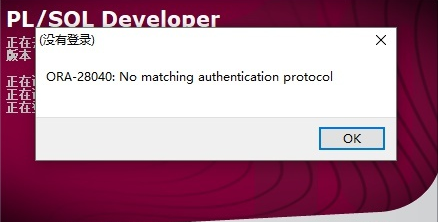
出现这个原因是因为你的Oracle连接客户端与服务端Oracle的版本不匹配造成的。
使用Oracle11g客户端连接12c数据库,就会出现此问题。
oerr ora 2804028040, 0000, "No matching authentication protocol" //没有匹配的验证协议// *Cause: There was no acceptable authentication protocol for// either client or server.// *Action: The administrator should set the values of the// SQLNET.ALLOWED_LOGON_VERSION_SERVER and// SQLNET.ALLOWED_LOGON_VERSION_CLIENT parameters, on both the// client and on the server, to values that match the minimum// version software supported in the system.// This error is also raised when the client is authenticating to// a user account which was created without a verifier suitable for// the client software version. In this situation, that account's// password must be reset, in order for the required verifier to// be generated and allow authentication to proceed successfully.
可以看出从12C开始 SQLNET.ALLOWED_LOGON_VERSION参数已被废弃
MOS文档中显示,在默认情况下Oracle12.2对客户端版本有限制的,我们客户端版本是11g的。
因此需要在$ORACLE_HOME/network/admin/sqlnet.ora文件中写以下两行
SQLNET.ALLOWED_LOGON_VERSION_SERVER=10SQLNET.ALLOWED_LOGON_VERSION_CLIENT=10
注:如果客户端存在8i和9i版本的,建议数字写成最低版本数字,否则依然后出现部分客户端无法连接的情况。
修改完sqlnet.ora,再次连接oracle,会报用户密码错误,此时必须要修改用户密码,password_versions字段才会出现10G的值。
ORA-01017: invalid username/password; logon denied
修改完成后再次登录正常。
再次查看下该用户信息:
select username, account_status, default_tablespace, created, password_versions from dba_users where username='CDPW';CDPW OPEN TICKET_DATA 2021/7/27 22:19:49 10G 11G 12C
文章转载自DBA小记,如果涉嫌侵权,请发送邮件至:contact@modb.pro进行举报,并提供相关证据,一经查实,墨天轮将立刻删除相关内容。
