



1、\gexec是什么?
它是pg 9.6的psql中引入的一个meta command。什么是meta command?我们常用\l、\d、\c等等都是psql的meta command, \gexec是其中之一。
2、\gexec的作用是什么?
将当前查询缓冲区发送到服务器,然后将查询输出(如果有的话)的每一行的每一列都要作为要执行的SQL语句处理。
3、举个例子。
a.首先,编写一个生成creaet table sql的sql。
SELECT format('CREATE TABLE gexec_test_%s (id integer,some_data text,primary key (id));', gs)FROM generate_series(1, 5) gs;
b. 执行一下看看,可以看到这个sql,含有5行,每行只有一列,是一条create table sql。如果我们想要执行它们,不需要一条条复制出来,分别去执行。只需要紧跟着执行\gexec即可。
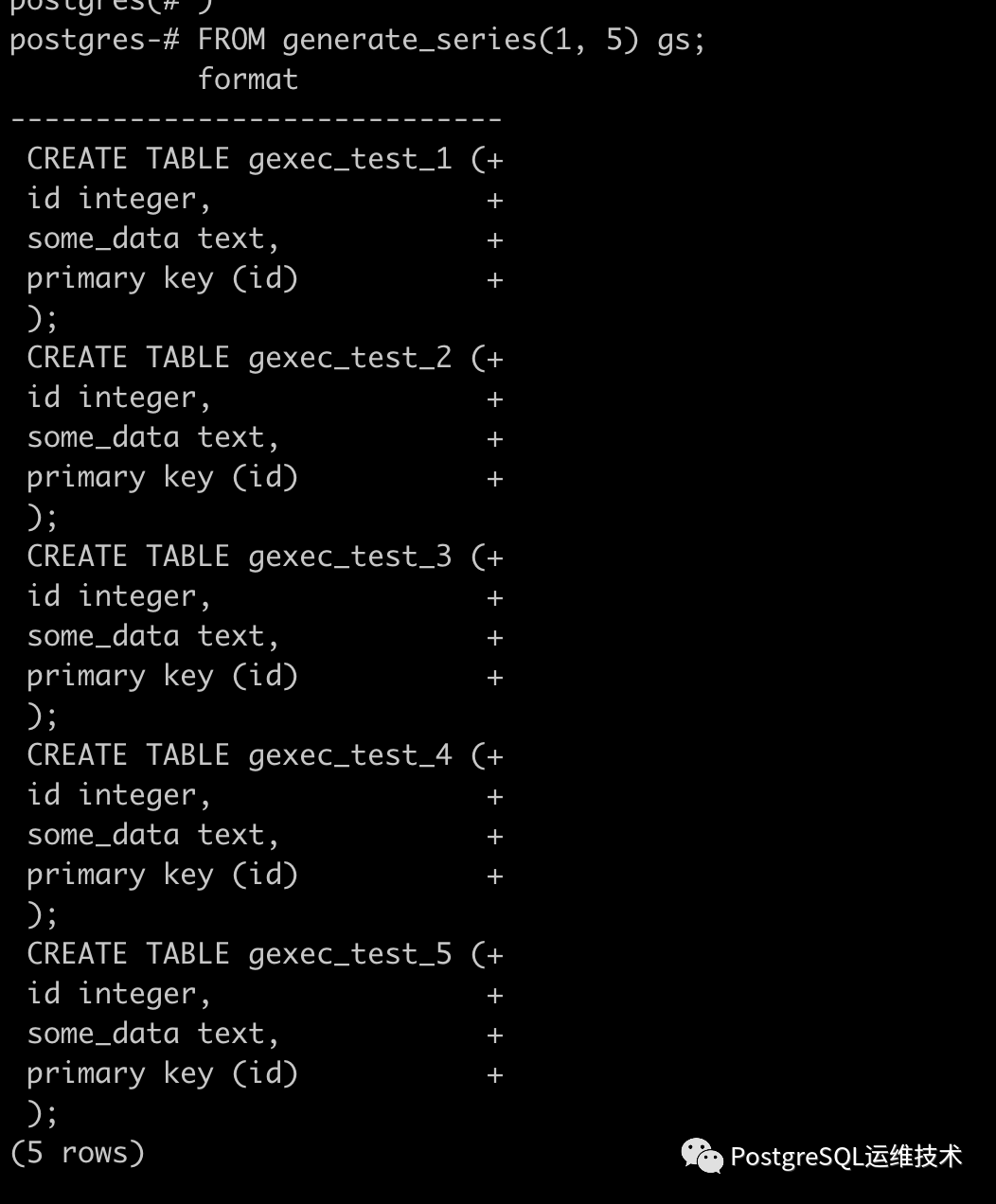
c、执行\gexec。
postgres=# \gexecCREATE TABLECREATE TABLECREATE TABLECREATE TABLECREATE TABLE
d、查看表有没有创建成功。
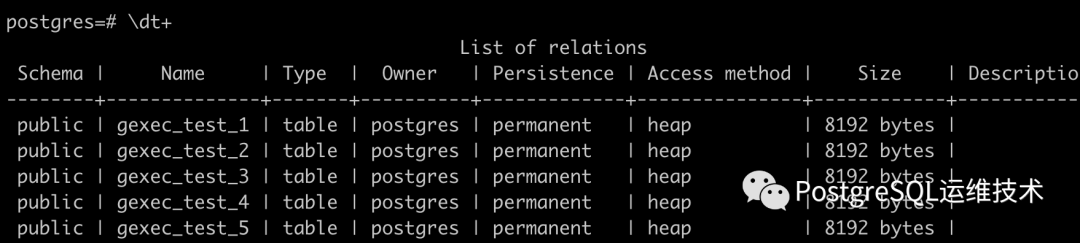
相应的,我们想删除这些表,要怎么做?
SELECT format('drop table public.%I;', tablename)FROM pg_tablesWHERE schemaname = 'public' AND tablename LIKE 'gexec_test_%';
执行下看看。
postgres=# SELECT format('drop table public.%I;', tablename)postgres-# FROM pg_tablespostgres-# WHERE schemaname = 'public' AND tablename LIKE 'gexec_test_%';format---------------------------------drop table public.gexec_test_3;drop table public.gexec_test_1;drop table public.gexec_test_2;drop table public.gexec_test_4;drop table public.gexec_test_5;(5 rows)postgres=# \gexecDROP TABLEDROP TABLEDROP TABLEDROP TABLEDROP TABLEpostgres=# \dt+List of relationsSchema | Name | Type | Owner | Persistence | Access method | Size | Description--------+------+-------+----------+-------------+---------------+---------+-------------public | t1 | table | postgres | permanent | heap | 12 MB |public | t2 | table | postgres | permanent | heap | 4176 kB |(2 rows)
4、使用\gexec的注意事项。
A. 生成的查询按照返回行的顺序执行,如果有多个列,则在每行中从左到右执行。
B.NULL字段被忽略。
C.生成的查询被逐字地发送到服务器进行处理,因此它们不能是psql元命令,也不能包含psql变量引用。
D.默认情况下,如果查询中出现错误,会被忽略继续执行。如果想避免这种情况,可以使用psql的ON_ERROR_STOP参数。
5、其他。
我之所有会用到这个命令,是因为遇到一个需求,需要导出数据库中的所有函数,没有找到很好的方案,不过在网上看到一种,算是一种方法。ps:大家有什么更好的方案的话,欢迎给我留言。
参考:
https://dba.stackexchange.com/questions/24452/how-do-i-save-functions-to-individual-files-in-postgresql
思路:使用copy+\gexec结合,将每个函数的定义保存到一个独立文件中。
步骤:
a. mkdir tmp/foo
b. chown postgres:postgres tmp/foo
c.
SELECT FORMAT('COPY (SELECT pg_get_functiondef(%s)) TO ''/tmp/foo/%s''',pp.oid,pp.proname)from pg_proc ppinner join pg_namespace pn on (pp.pronamespace = pn.oid)inner join pg_language pl on (pp.prolang = pl.oid)where pl.lanname NOT IN ('c','internal')and pn.nspname NOT LIKE 'pg_%'and pn.nspname <> 'information_schema';
d.执行一下。
postgres=# SELECT FORMAT(postgres(# 'COPY (SELECT pg_get_functiondef(%s)) TO ''/tmp/foo/%s''',postgres(# pp.oid,postgres(# pp.pronamepostgres(# )postgres-# from pg_proc pppostgres-# inner join pg_namespace pn on (pp.pronamespace = pn.oid)postgres-# inner join pg_language pl on (pp.prolang = pl.oid)postgres-# where pl.lanname NOT IN ('c','internal')postgres-# and pn.nspname NOT LIKE 'pg_%'postgres-# and pn.nspname <> 'information_schema';format------------------------------------------------------------COPY (SELECT pg_get_functiondef(18408)) TO '/tmp/foo/add'COPY (SELECT pg_get_functiondef(18409)) TO '/tmp/foo/add1'(2 rows)postgres=# \gexecCOPY 1COPY 1
e.查看文件。

6、题外话。
大家有时候在后台给我留言,我因为不经常看消息= =,可能有的时候回复不及时,甚至可能因为超时消息就直接不显示了…。所以大家有需要的话,可以加我的微信。放个二维码。

参考:
https://dbtut.com/index.php/2019/02/03/postgresql-psql-gexec/
https://www.postgresql.org/docs/11/app-psql.html
