
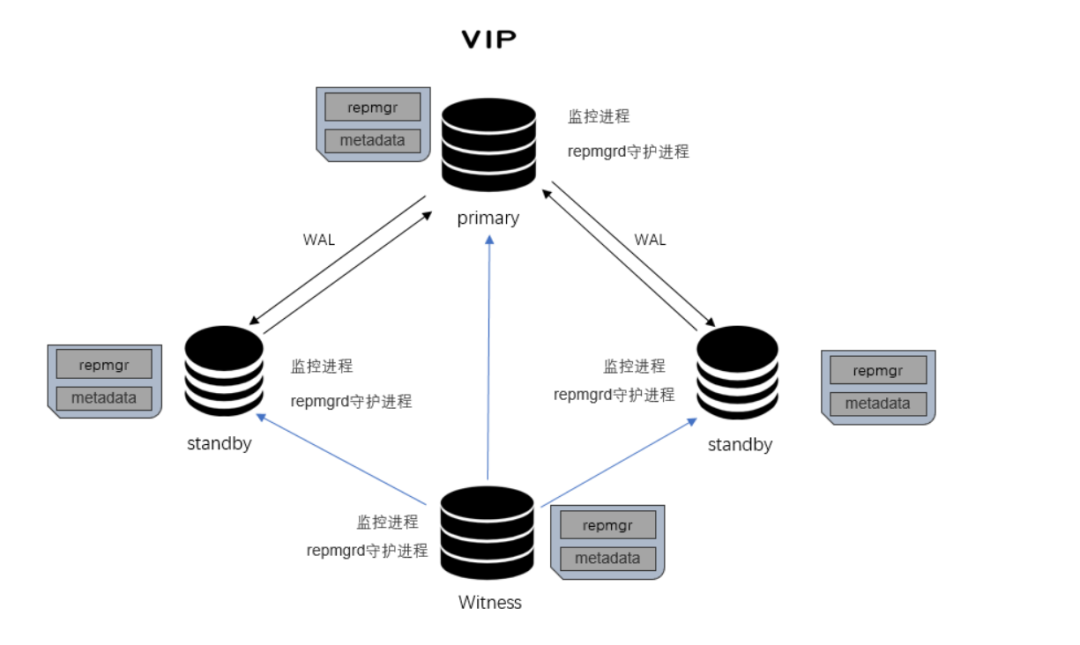
监控和记录集群复制性能
通过检测主服务器故障并提升最合适的备用服务器来执行故障转移
将有关群集中事件的通知提供给用户定义的脚本,该脚本可以执行诸如通过电子邮件发送警报等任务
repmgrd 根据本地数据库角色不同,其功能也不同:
主库:repmgrd仅监控本地数据库,负责自动恢复、同异步切换
备库:repmgrd监控本地数据库和主数据库,负责自动切换、复制槽删除
设置备用服务器
将备用服务器升级为主服务器
切换主服务器和备用服务器
显示复制群集中的服务器状态
192.168.127.135 lightdb1192.168.127.136 lightdb2192.168.127.137 lightdb3192.168.127.138 lightdb4 192.168.127.126 lightdb5192.168.127.127 lightdb6 [root@localhost ~]# hostnamectl set-hostname lightdb1[root@localhost ~]# hostnamelightdb1[root@localhost ~]# systemctl stop firewalld.service [root@localhost ~]# systemctl disable firewalld.service Removed /etc/systemd/system/multi-user.target.wants/firewalld.service.Removed /etc/systemd/system/dbus-org.fedoraproject.FirewallD1.service.[root@localhost ~]# cat >> /etc/hosts << EOF> 192.168.127.135 lightdb1> 192.168.127.136 lightdb2> 192.168.127.137 lightdb3> 192.168.127.138 lightdb4>192.168.127.126 lightdb5>192.168.127.127 lightdb6> EOF[root@localhost ~]# systemctl stop firewalld[root@localhost ~]# systemctl disable firewalld[root@localhost ~]# sed -i 's/enforcing/disabled/' /etc/selinux/config[root@localhost ~]# setenforce 0[root@localhost ~]# dnf install -y https://download.postgresql.org/pub/repos/yum/reporpms/EL-8-x86_64/pgdg-redhat-repo-latest.noarch.rpmCentOS Linux 8 - AppStream 688 kB/s | 8.1 MB 00:12 CentOS Linux 8 - BaseOS 674 kB/s | 3.6 MB 00:05 CentOS Linux 8 - Extras 16 kB/s | 9.8 kB 00:00 pgdg-redhat-repo-latest.noarch.rpm 3.0 kB/s | 12 kB 00:03 Dependencies resolved.=========================================================================================================================================================================== Package Architecture Version Repository Size===========================================================================================================================================================================Installing: pgdg-redhat-repo noarch 42.0-18 @commandline 12 kTransaction Summary===========================================================================================================================================================================Install 1 PackageTotal size: 12 kInstalled size: 12 kDownloading Packages:Running transaction checkTransaction check succeeded.Running transaction testTransaction test succeeded.Running transaction Preparing : 1/1 Installing : pgdg-redhat-repo-42.0-18.noarch 1/1 Verifying : pgdg-redhat-repo-42.0-18.noarch 1/1 Installed products updated.Installed: pgdg-redhat-repo-42.0-18.noarch Complete!
ssh-keygenssh-copy-id -i /home/postgres/.ssh/id_rsa.pub postgres@192.168.127.135ssh-copy-id -i /home/postgres/.ssh/id_rsa.pub postgres@192.168.127.136ssh-copy-id -i /home/postgres/.ssh/id_rsa.pub postgres@192.168.127.137ssh-copy-id -i /home/postgres/.ssh/id_rsa.pub postgres@192.168.127.138
sudo yum check-updatesudo yum groupinstall 'Development Tools'sudo yum install yum-utils openjade docbook-dtds docbook-style-dsssl docbook-style-xslsudo yum-builddep postgresql96
git clone https://github.com/2ndQuadrant/repmgr
tar -zxvf repmgr-5.2.1.tar.gzsudo mv repmgr-5.2.1 /home/postgres/postgresql-13.3/contrib/repmgrcd /home/postgres/postgresql-13.3/contrib/repmgr./configuresudo make && sudo make install
create user repmgr with password 'repmgr' superuser replication;create database repmgr owner repmgr;
listen_addresses = '*'shared_preload_libraries = 'repmgr'wal_log_hints = 'on'wal_level = replicahot_standby = on
# TYPE DATABASE USER ADDRESS METHOD# 'local' is for Unix domain socket connections onlylocal all all trustlocal repmgr repmgr trust# IPv4 local connections:host all all 127.0.0.1/32 trusthost all all 0.0.0.0/0 trusthost repmgr repmgr 192.168.127.135/0 trusthost repmgr repmgr 192.168.127.136/0 trusthost repmgr repmgr 192.168.127.137/0 trusthost repmgr repmgr 192.168.127.138/0 trust# IPv6 local connections:host all all ::1/128 trust# Allow replication connections from localhost, by a user with the# replication privilege.local replication all trusthost replication all 127.0.0.1/32 trusthost replication all ::1/128 trustlocal replication repmgr trusthost replication repmgr 192.168.127.135/0 trusthost replication repmgr 192.168.127.136/0 trusthost replication repmgr 192.168.127.137/0 trusthost replication repmgr 192.168.127.138/0 trust
sudo mkdir -pv /data/postgresql/etc/sudo chown -R postgres:postgres /data/postgresql/touch /data/postgresql/etc/repmgr.confcat >> /data/postgresql/etc/repmgr.conf << EOF/*repmgr基本配置*/node_id=1node_name='lightdb1'conninfo='host=192.168.127.135 port=5432 dbname=repmgr user=repmgr connect_timeout=2'data_directory ='/data/postgresql/data'pg_bindir='/data/postgresql/bin'config_directory='/data/postgresql/data'/*设置日志参数*/log_level=INFOlog_facility=STDERRlog_file='/data/postgresql/etc/repmgr.log'EOF
[postgres@lightdb1 etc]$ pg_config --sysconfdir/data/postgresql/etc
repmgr命令repmgr -f /etc/repmgr.conf node service --list-actions --action=stoprepmgr -f /etc/repmgr.conf node service --list-actions --action=startrepmgr -f /etc/repmgr.conf node service --list-actions --action=restartrepmgr -f /etc/repmgr.conf node service --list-actions --action=reload
[postgres@lightdb1 etc]$ pwd/data/postgresql/etc[postgres@lightdb1 etc]$ repmgr primary registerINFO: connecting to primary database...NOTICE: attempting to install extension 'repmgr'NOTICE: 'repmgr' extension successfully installedNOTICE: primary node record (ID: 1) registered[postgres@lightdb1 etc]$ repmgr service status ID | Name | Role | Status | Upstream | repmgrd | PID | Paused? | Upstream last seen----+----------+---------+-----------+----------+-------------+-----+---------+-------------------- 1 | lightdb1 | primary | * running | | not running | n/a | n/a | n/a psql -h 192.168.127.135 -U repmgr -d postgres -c 'select version()'psql -h 192.168.127.135 -U repmgr -d repmgr -c 'SELECT * FROM repmgr.nodes;'[postgres@lightdb1 ~]$ psql -h 192.168.127.135 -U repmgr -d repmgr -c 'SELECT * FROM repmgr.nodes;' node_id | upstream_node_id | active | node_name | type | location | priority | conninfo | repluser | slot_name | config_file ---------+------------------+--------+-----------+---------+----------+----------+----------------------------------------------------------------------------+----------+-----------+--------------- 1 | | t | lightdb1 | primary | default | 100 | host=192.168.127.135 port=5432 dbname=repmgr user=repmgr connect_timeout=2 | repmgr | | ./repmgr.conf(1 row)
[postgres@lightdb1 etc]$ repmgrd -d[2021-07-16 00:52:22] [NOTICE] redirecting logging output to '/data/postgresql/etc/repmgr.log'
克隆从库
由于repmgr是一个客户端/服务器端PostgreSQL管理套件,在真正使用它之前,我们至少需要两个或两个以上节点,备库不需要初始化数据库。如备库在搭建的过程中,需要停止数据库或者删除data目录下面的文件。通过复制主库,在备库创建克隆副本,并注册到repmgr中。此处为了演示,在实际生成环境中,部署多个节点,数据丢失或系统中断的几率会降低,提高整个框架的高可用性。
下面操作需要在所有的备库repmgr2、repmgr3执行。
sudo mkdir -pv /data/postgresql/etc/sudo chown -R postgres:postgres /data/postgresql/touch /data/postgresql/etc/repmgr.confcat >> /data/postgresql/etc/repmgr.conf << EOFnode_id=2node_name='lightdb2'conninfo='host=192.168.127.136 port=5432 dbname=repmgr user=repmgr connect_timeout=2'data_directory ='/data/postgresql/data'pg_bindir='/data/postgresql/bin'config_directory='/data/postgresql/data'log_level=INFOlog_facility=STDERRlog_file='/data/postgresql/etc/repmgr.log'EOF
[postgres@lightdb2 etc]$ repmgr -h 192.168.127.135 -U repmgr -d repmgr -f /data/postgresql/etc/repmgr.conf standby cloneWARNING: following problems with command line parameters detected: 'config_directory' set in repmgr.conf, but --copy-external-config-files not providedNOTICE: destination directory '/data/postgresql/data' providedINFO: connecting to source nodeDETAIL: connection string is: host=192.168.127.135 user=repmgr dbname=repmgrDETAIL: current installation size is 30 MBINFO: replication slot usage not requested; no replication slot will be set up for this standbyNOTICE: checking for available walsenders on the source node (2 required)NOTICE: checking replication connections can be made to the source server (2 required)INFO: creating directory '/data/postgresql/data'...NOTICE: starting backup (using pg_basebackup)...HINT: this may take some time; consider using the -c/--fast-checkpoint optionINFO: executing: /data/postgresql/bin/pg_basebackup -l 'repmgr base backup' -D /data/postgresql/data -h 192.168.127.135 -p 5432 -U repmgr -X stream NOTICE: standby clone (using pg_basebackup) completeNOTICE: you can now start your PostgreSQL serverHINT: for example: pg_ctl -D /data/postgresql/data startHINT: after starting the server, you need to register this standby with 'repmgr standby register'[postgres@lightdb2 etc]$ repmgr standby registerINFO: connecting to local node 'lightdb2' (ID: 2)INFO: connecting to primary databaseWARNING: --upstream-node-id not supplied, assuming upstream node is primary (node ID 1)INFO: standby registration completeNOTICE: standby node 'lightdb2' (ID: 2) successfully registered[postgres@lightdb2 etc]$
repmgr -h 192.168.127.135 -U repmgr -d repmgr -f /data/postgresql/etc/repmgr.conf standby clone
pg_ctl -D /data/postgresql/data -l logfile start
repmgr standby register
[postgres@lightdb2 ~]$ repmgrd -d[2021-07-18 19:23:18] [NOTICE] redirecting logging output to '/data/postgresql/etc/repmgr.log'
[postgres@lightdb2 ~]$ repmgr service status ID | Name | Role | Status | Upstream | repmgrd | PID | Paused? | Upstream last seen----+----------+---------+-----------+----------+---------+-------+---------+-------------------- 1 | lightdb1 | standby | running | lightdb3 | running | 40872 | no | 1 second(s) ago 2 | lightdb2 | standby | running | lightdb3 | running | 8665 | no | 1 second(s) ago 3 | lightdb3 | primary | * running | | running | 2324 | no | n/a 4 | witness | witness | * running | lightdb3 | running | 2387 | no | 0 second(s) ago
配置见证服务
见证节点主要的工作是帮助备用数据库达到法定的数量。简单来讲,备机连不上主机了,就会连接见证节点,如果也连接不上见证节点,那判断自己网络故障了,如果能连上见证节点,则认为主机故障,见证节点的作用类似于一个信任的网关。
所有见证节点安装在witness服务上,需要在此节点重新初始化数据。按照以下步骤生成一个功能齐全的repmgr证人:
shared_preload_libraries = 'repmgr'
pg_ctl -D /data/postgresql/data -l logfile start
create user repmgr with password 'repmgr' superuser replication;create database repmgr owner repmgr;
[root@lightdb4 ~]# more /data/postgresql/etc/repmgr.confnode_id=4node_name='witness'conninfo='host=192.168.127.138 port=5432 dbname=repmgr user=repmgr connect_timeout=2'data_directory ='/data/postgresql/data'pg_bindir='/data/postgresql/bin'config_directory='/data/postgresql/data'log_level=INFOlog_facility=STDERRlog_file='/data/postgresql/etc/repmgr.log'
[postgres@lightdb4 ~]$ repmgr witness register -h192.168.127.137 -drepmgr -UrepmgrINFO: connecting to witness node 'witness' (ID: 4)INFO: connecting to primary nodeNOTICE: attempting to install extension 'repmgr'NOTICE: 'repmgr' extension successfully installedINFO: witness registration completeNOTICE: witness node 'witness' (ID: 4) successfully registered
sudo systemctl enable repmgrdsudo systemctl restart repmgrd
[postgres@lightdb4 ~]$ repmgr cluster show ID | Name | Role | Status | Upstream | Location | Priority | Timeline | Connection string ----+----------+---------+-----------+----------+----------+----------+----------+---------------------------------------------------------------------------- 1 | lightdb1 | primary | * running | | default | 100 | 1 | host=192.168.127.135 port=5432 dbname=repmgr user=repmgr connect_timeout=2 2 | lightdb2 | standby | running | lightdb1 | default | 100 | 1 | host=192.168.127.136 port=5432 dbname=repmgr user=repmgr connect_timeout=2 3 | lightdb3 | standby | running | lightdb1 | default | 100 | 1 | host=192.168.127.137 port=5432 dbname=repmgr user=repmgr connect_timeout=2 4 | witness | witness | * running | lightdb1 | default | 0 | n/a | host=192.168.127.138 port=5432 dbname=repmgr user=repmgr connect_timeout=2
[postgres@lightdb4 ~]$ repmgr cluster show ID | Name | Role | Status | Upstream | Location | Priority | Timeline | Connection string ----+----------+---------+-----------+----------+----------+----------+----------+---------------------------------------------------------------------------- 1 | lightdb1 | primary | * running | | default | 100 | 1 | host=192.168.127.135 port=5432 dbname=repmgr user=repmgr connect_timeout=2 2 | lightdb2 | standby | running | lightdb1 | default | 100 | 1 | host=192.168.127.136 port=5432 dbname=repmgr user=repmgr connect_timeout=2 3 | lightdb3 | standby | running | lightdb1 | default | 100 | 1 | host=192.168.127.137 port=5432 dbname=repmgr user=repmgr connect_timeout=2 4 | witness | witness | * running | lightdb1 | default | 0 | n/a | host=192.168.127.138 port=5432 dbname=repmgr user=repmgr connect_timeout=2
[postgres@lightdb4 ~]$ repmgr cluster show ID | Name | Role | Status | Upstream | Location | Priority | Timeline | Connection string ----+----------+---------+-----------+------------+----------+----------+----------+---------------------------------------------------------------------------- 1 | lightdb1 | standby | running | lightdb3 | default | 100 | 21 | host=192.168.127.135 port=5432 dbname=repmgr user=repmgr connect_timeout=2 2 | lightdb2 | standby | - failed | ? lightdb3 | default | 100 | | host=192.168.127.136 port=5432 dbname=repmgr user=repmgr connect_timeout=2 3 | lightdb3 | primary | * running | | default | 100 | 21 | host=192.168.127.137 port=5432 dbname=repmgr user=repmgr connect_timeout=2 4 | witness | witness | * running | lightdb3 | default | 0 | n/a | host=192.168.127.138 port=5432 dbname=repmgr user=repmgr connect_timeout=2WARNING: following issues were detected - unable to connect to node 'lightdb2' (ID: 2)HINT: execute with --verbose option to see connection error messages[postgres@lightdb4 ~]$
[postgres@lightdb2 ~]$ repmgr standby promoteWARNING: 2 sibling nodes found, but option '--siblings-follow' not specifiedDETAIL: these nodes will remain attached to the current primary: lightdb3 (node ID: 3) witness (node ID: 4, witness server)NOTICE: promoting standby to primaryDETAIL: promoting server 'lightdb2' (ID: 2) using pg_promote()NOTICE: waiting up to 60 seconds (parameter 'promote_check_timeout') for promotion to completeNOTICE: STANDBY PROMOTE successfulDETAIL: server 'lightdb2' (ID: 2) was successfully promoted to primary
repmgr -f /etc/repmgr.conf cluster show
repmgr standby follow
repmgr node rejoin -h 192.168.127.135 -U repmgr -d repmgr --force-rewind
repmgr cluster show
failover='automatic'promote_command='/data/postgresql/bin/repmgr standby promote -f /data/postgresql/etc/repmgr.conf'follow_command='/data/postgresql/bin/repmgr standby follow -f /data/postgresql/etc/repmgr.conf --upstream-node-id=%n'monitoring_history=true (启用监控参数) monitor_interval_secs=2 (定义监视数据间隔写入时间参数)connection_check_type='ping'reconnect_attempts=3 (故障转移之前,尝试重新连接主库次数(默认为6)参数)reconnect_interval=5 reconnect_interval=5standby_disconnect_on_failover =true
promote_command、follow_command提升备库切换为主库monitoring_history-启动监控参数monitor_interval_secs-定义监视数据间隔写入时间参数reconnect_attempts-故障切换之前,设置10s内自动连接,超过10s超reconnect_interval-每间隔5s尝试重连一次
[postgres@node1 ~]$ repmgr node service --action=restart1. DETAIL: executing server command 'pg_ctl -w -D '/data/postgresql/data ' restart'
[postgres@lighdtdb1 ~]$ repmgrd –f /data/postgresql/etc/repmgr.conf --pid-file /tmp/repmgrd.pid
[postgres@lighdtdb2 ~]$ pg_ctl stop
waiting for server to shut down..... done
server stopped
[postgres@lightdb3 ~]$ repmgr service status
 ID | Name     | Role    | Status    | Upstream | repmgrd | PID   | Paused? | Upstream last seen
----+----------+---------+-----------+----------+---------+-------+---------+--------------------
 1  | lightdb1 | primary | * running |          | running | 7325  | no      | n/a
 2  | lightdb2 | standby |   running | lightdb1 | running | 23929 | no      | 2 second(s) ago
 3  | lightdb3 | standby |   running | lightdb1 | running | 31001 | no      | 1 second(s) ago
 4  | witness  | witness | * running | lightdb1 | running | 24790 | no      | 1 second(s) ago
repmgr primary register  安装pg的repmgr扩展并注册为主节点
repmgr primary unregister 注销不活动的主节点
repmgr standby clone 从其他节点复制数据到从节点
repmgr standby register 注册从节点(添加从的信息到repmgr元数据)
repmgr standby unregister repmgr  元数据中移除从的信息
repmgr standby promote 将从提升为主
repmgr standby follow  将从跟随新主
repmgr standby switchover 将从提升为主并将主降级为从
repmgr witness register  注册一个观察节点
repmgr witness unregister  移除一个观察节点
repmgr node status  显示节点的基本信息和复制状态
repmgr node check  从复制的角度对节点进行健康监测
repmgr node rejoin   重新加入一个失效节点到集群
repmgr cluster show  显示所有集群中注册的节点信息
repmgr cluster matrix 在所有节点运行show并汇总
repmgr cluster crosscheck  在节点间两两交叉监测连接
repmgr cluster event 输出时间记录
repmgr cluster cleanup   清理监控历史
repmgr service status  节点状态





新闻|Babelfish使PostgreSQL直接兼容SQL Server应用程序

更多新闻资讯,行业动态,技术热点,请关注中国PostgreSQL分会官方网站
https://www.postgresqlchina.com
中国PostgreSQL分会生态产品
https://www.pgfans.cn
中国PostgreSQL分会资源下载站
https://www.postgreshub.cn