


4


deepseek私有化部署.pdf
5墨值下载

Deepseek-R1 本地部署
资源需求(选配,测试版)
配置:8C16g、磁盘 100G
系统:Centos 7.9 2009
网络:192.168.1.120
主机名:aibox
安装过程:
1. 安装虚拟机
1.1. 最小安装,选择安装开发包;
1.2. 配置时区,asia shanghai;
1.3. 配置主机名,aibox;
1.4. 配置 IP 地址,192.168.1.120(或者自动获取)
1.5. 自动分区,或者删除 home 分区,保留/根分区
1.6. 等待安装进程……
2. 配置 ollama 组件
2.1. 安装完成后,进入操作系统验证互联网连通性(ping www.baidu.com)
2.2. 下载 ollama
执行命令,下载通常 10-20 分钟不等,依据硬件性能;
curl -fsSL https://ollama.com/install.sh | sh
>>> Installing ollama to /usr/local
>>> Downloading Linux amd64 bundle
#####################################################################
### 100.0%
>>> Creating ollama user...
>>> Adding ollama user to video group...
>>> Adding current user to ollama group...
>>> Creating ollama systemd service...
>>> Enabling and starting ollama service...
Created symlink from /etc/systemd/system/default.target.wants/ollama.service to
/etc/systemd/system/ollama.service.
>>> The Ollama API is now available at 127.0.0.1:11434.
>>> Install complete. Run "ollama" from the command line. 安装完成。
编辑 ollama 配置文件,修改监听端口
vim /etc/systemd/system/ollama.service
增加如下内容
[Service]
Environment="OLLAMA_HOST=0.0.0.0:11434"
重新加载 ollama 服务文件
sudo systemctl daemon-reload
sudo systemctl restart ollama
sudo systemctl status ollama
3. 配置 deepseek R1 模型
3.1. 调用模型地址:https://ollama.com/library/deepseek-r1
3.2. 根据自己需求选择需要的模型,此处选择了 7b,执行命令:
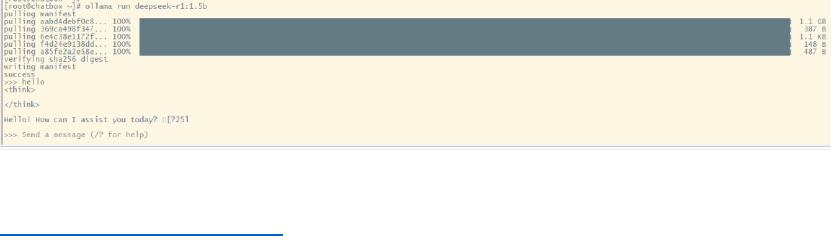
ollama run deepseek-r1:7b ,等待 n 分钟,pulling 并安装
安装成功后有输出显示【send a message】
4. 调用
https://www.chatboxai.app/zh
可以使用网页版或者下载,然后通过设置界面调用,【使用自己的 AIPkey 或本地
模型】,选择【ollama api】,模型提供方【ollama api】,api 域名
【http://192.168.1.120:11434】,更多可查看访问教程,模型选择你下载的模型,点
击【保存】,开始你的对话之旅。
--------完------------
20250206 sinahan
of 2
5墨值下载
【版权声明】本文为墨天轮用户原创内容,转载时必须标注文档的来源(墨天轮),文档链接,文档作者等基本信息,否则作者和墨天轮有权追究责任。如果您发现墨天轮中有涉嫌抄袭或者侵权的内容,欢迎发送邮件至:contact@modb.pro进行举报,并提供相关证据,一经查实,墨天轮将立刻删除相关内容。
下载排行榜

评论