



Centos7.6下有界面安装和静默无界面化安装Oracle 11g完美手册
免费下载

更多数据库资源请访问 美河学习在线 www.eimhe.com
Centos7.6 下有界面化安装
Linux 常用命令:
Find / -name ‘xxx’ #查找文件
Vi 编辑器里查找关键词: 按 / 键,小写 n 向下查找,N 向上查找;
1、下载 Oracle 安装包:
linux.x64_11gR2_database_1of2.zip 和 linux.x64_11gR2_database_2of2.zip ,可以下载到本地,
通过 ftp 服务上传到 Linux 系统(参考 CentOS7 FTP 服务器搭建),也可以使用 Linux 系统的
wget 命令,下载文件包;
或者到我个人百度网盘永久分享上下载:
链接:https://pan.baidu.com/s/1jiwk3gCqTODxQY06cMrwYQ
提取码:dmh4
2、创建运行 oracle 数据库的系统用户和用户组:
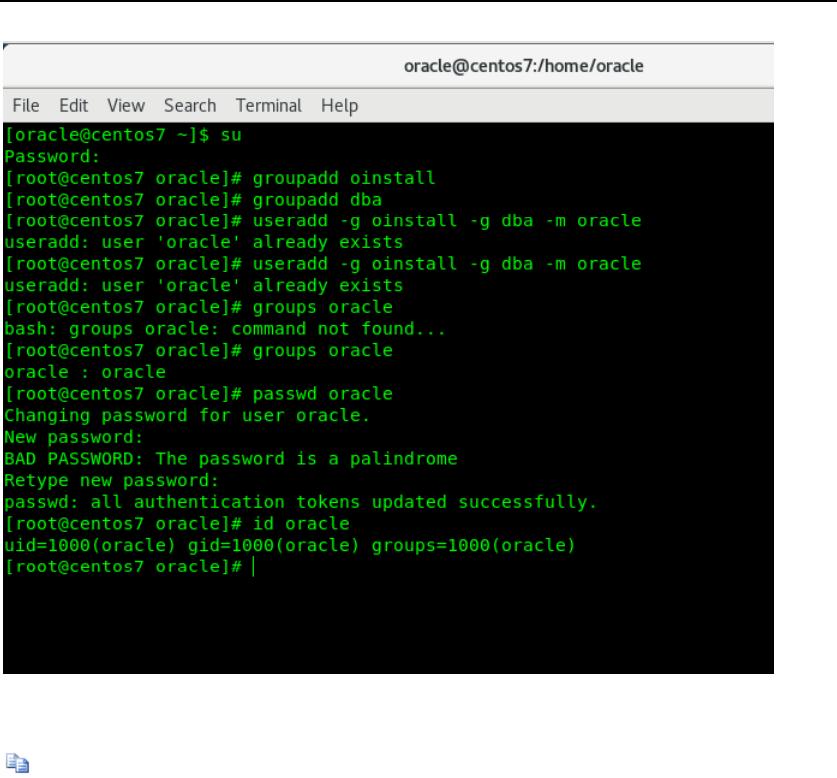
用 Root 账号登录,运行下面指令,创建所需要用户和用户组;
groupadd oinstall #创建用户组 oinstall
groupadd dba #创建用户组 dba
useradd -g oinstall -g dba -m oracle #创建 oracle 用户,并加入到 oinstall 和 dba 用户组
groups oracle #查询用户组是否授权成功
passwd oracle #设置用户 oracle 的登陆密码,不设置密码,
在 CentOS 的图形登陆界面没法登陆
id oracle #查看新建的 oracle 用户
[oracle@centos7 ~]$ su
Password:
[root@centos7 oracle]# groupadd oinstall
[root@centos7 oracle]# groupadd dba
[root@centos7 oracle]# groups oracle
oracle : oracle
[root@centos7 oracle]# passwd oracle
Changing password for user oracle.
New password:
Retype new password:
passwd: all authentication tokens updated successfully.
[root@centos7 oracle]# id oracle
uid=1000(oracle) gid=1000(oracle) groups=1000(oracle)
[root@centos7 oracle]#
更多数据库资源请访问 美河学习在线 www.eimhe.com
3、创建 oracle 数据库安装目录(运行下面指令,创建账号和分配权限)
mkdir -p /data/oracle #oracle 数据库安装目录
mkdir -p /data/oraInventory #oracle 数据库配置文件目录
mkdir -p /data/database #oracle 数据库软件包解压目录
cd /data
ls #创建完毕检查一下
chown -R oracle:oinstall /data/oracle #设置目录所有者为 oinstall 用户组的 oracle 用户
chown -R oracle:oinstall /data/oraInventory
chown -R oracle:oinstall /data/database
of 41
免费下载
【版权声明】本文为墨天轮用户原创内容,转载时必须标注文档的来源(墨天轮),文档链接,文档作者等基本信息,否则作者和墨天轮有权追究责任。如果您发现墨天轮中有涉嫌抄袭或者侵权的内容,欢迎发送邮件至:contact@modb.pro进行举报,并提供相关证据,一经查实,墨天轮将立刻删除相关内容。
下载排行榜

评论