



Greenplum Database 4.3 Connectivity Tools for Windows.pdf
免费下载

Connectivity Tools
1
Greenplum Database 4.3 Connectivity Tools for
Windows
Rev: A07
Updated: February, 2017
Overview
Greenplum provides database drivers and a C API for connecting to Greenplum Database. In this version
4.3 distribution, the following connectivity tools are provided for Windows. See the Greenplum Database
Release Notes for the list of currently supported platforms for the Connectivity Tools.
• psqlODBC
• PostgreSQL JDBC Interface
• libpq
Note: If your Java application connects to Greenplum Database with Kerberos authentication, see
Configuring a Client System for Kerberos Authentication.
psqlODBC
psqlODBC is the official PostgreSQL ODBC Driver. The driver is currently maintained by a number of
contributors to the PostgreSQL project at http://pgfoundry.org/projects/psqlodbc. It is developed and
supported through the pgsql-odbc@postgresql.org mailing list. psqlODBC is released under the Library
General Public Licence, or LGPL.
PostgreSQL JDBC Interface
The PostgreSQL JDB interface is the official PostgreSQL JDBC driver. The driver is currently maintained
by a number of contributors to the PostgreSQL project at http://jdbc.postgresql.org. JDBC is a core API
of Java 1.1 and later. It provides a standard set of interfaces to SQL-compliant databases. PostgreSQL
provides a type 4 JDBC driver. Type 4 indicates that the driver is written in Pure Java, and communicates
in the database system's own network protocol. Because of this, the driver is platform independent; once
compiled, the driver can be used on any system. The PostgreSQL JDBC Interface has not been modified
from the original PostgreSQL distribution.
libpq
libpq is the C application programmer's interface (API) to PostgreSQL (and Greenplum Database).
libpq is a set of library functions that allow client programs to pass queries to the PostgreSQL backend
server and to receive the results of these queries.
For more information on using libpq, see libpq - C Library in the PostgreSQL documentation.
Running the Connectivity Tools Installer
You can choose to install all connectivity tools or a subset. After installing, some connectivity tools require
additional installation or configuration steps.
Greenplum Database 4.3 Connectivity Tools for Windows Pivotal Software
2
To install the Greenplum Database Connectivity Tools
1. Download the greenplum-connectivity-4.3.x.x-WinXP-x86_32.msi package from Pivotal
Network.
2. Double-click on the greenplum-connectivity-4.3.x.x-WinXP-x86_32.msi package to launch
the installer.
3. Click Next on the Welcome screen.
4. Click I Agree on the License Agreement screen.
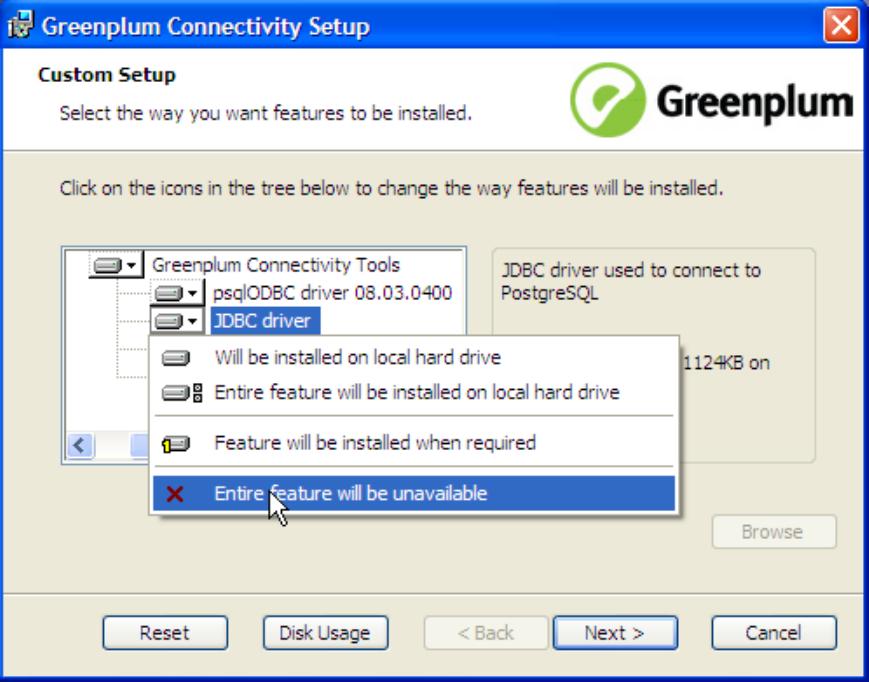
5. On the Custom Setup screen, deselect the components you do not want to install. By default, all
components will be installed.
6. By default, the Greenplum Database connectivity tools will be installed into C:\Program Files
\Greenplum\greenplum-drivers-4.3.x.x. Click Browse to choose another location.
7. Click Next when you have chosen the components and install path you want.
8. Click Install to begin the installation.
9. Click Finish to exit the installer.
About Your Installation
Your Greenplum Database connectivity tools installation contains the following files and directories:
• GP_ConnectWin.pdf — the documentation file for connectivity tools
• greenplum_connectivity_path.bat— script to set environment variables. This script is run
automatically as part of the installation.
• drivers — PostgreSQL ODBC and JDBC database drivers
• include — libpq C header files
of 8
免费下载
【版权声明】本文为墨天轮用户原创内容,转载时必须标注文档的来源(墨天轮),文档链接,文档作者等基本信息,否则作者和墨天轮有权追究责任。如果您发现墨天轮中有涉嫌抄袭或者侵权的内容,欢迎发送邮件至:contact@modb.pro进行举报,并提供相关证据,一经查实,墨天轮将立刻删除相关内容。
下载排行榜

评论