



Ansible中文手册.pdf
5墨值下载
Ansible 中文手册 -By Geekwolf http://www.simlinux.com
1
一.
Ansible
介绍
常用的自动化运维工具
Puppet
—基于 Ruby 开发,采用 C/S 架构,扩展性强,基于 SSL,远程命令执行相对较弱
SaltStack
—基于 Python 开发,采用 C/S 架构,相对 puppet 更轻量级,配置语法使用 YMAL,使得配置
脚本更简单
Ansible
—基于 Python paramiko 开发,分布式,无需客户端,轻量级,配置语法使用 YMAL 及 Jinja2
模板语言,更强的远程命令执行操作
其他 DevOps 请参看:https://github.com/geekwolf/sa-scripts/blob/master/devops.md
Ansible 是一个简单的自动化运维管理工具,可以用来自动化部署应用、配置、编排 task(持续
交付、无宕机更新等),采用 paramiko 协议库(fabric 也使用这个),通过 SSH 或者 ZeroMQ 等连
接主机,大概每 2 个月发布一个主版本
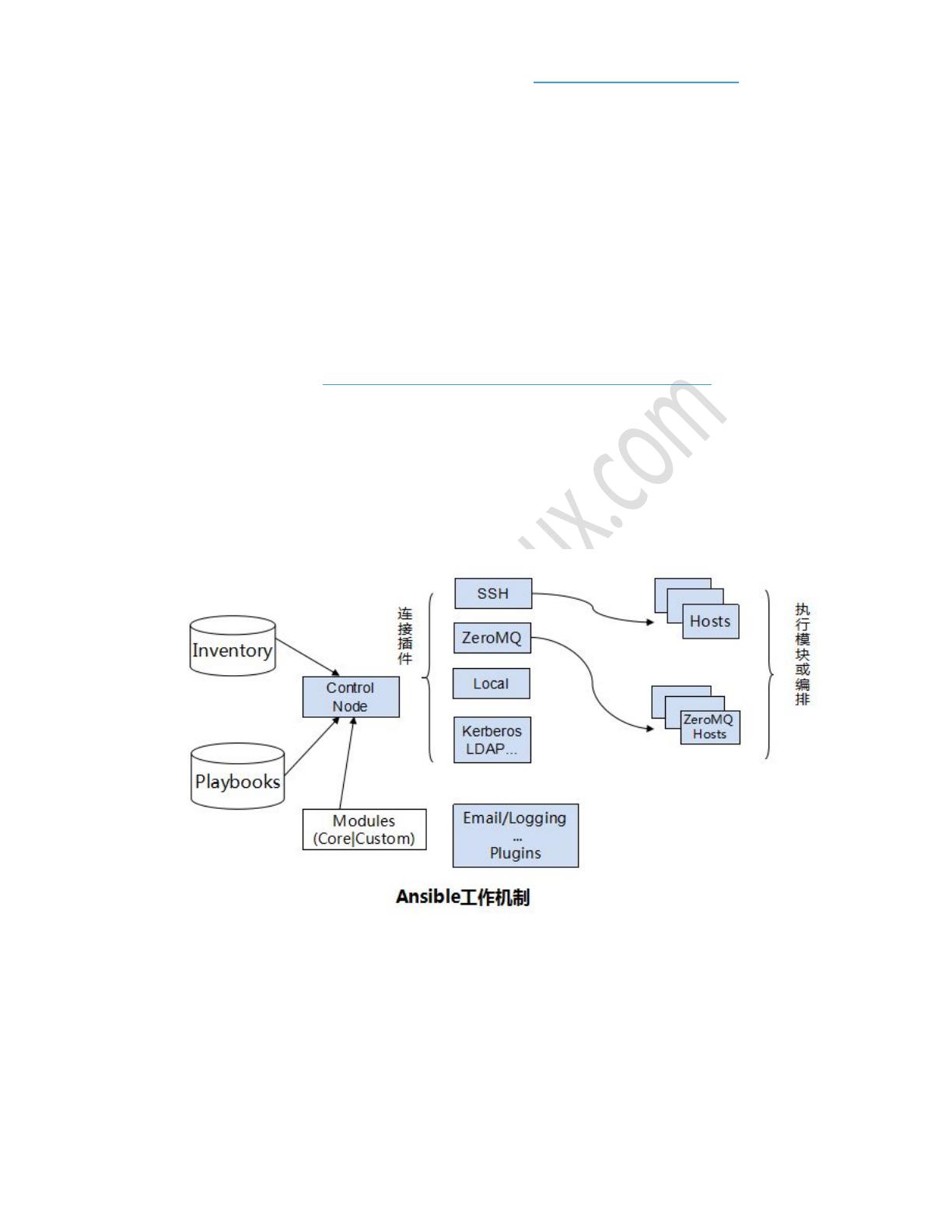
Ansible 工作机制
Ansible 在管理节点将 Ansible 模块通过 SSH 协议(或者 Kerberos、LDAP)推送到被管理端执
行,执行完之后自动删除,可以使用 SVN 等来管理自定义模块及编排
由上面的图可以看到 Ansible 的组成由 5 个部分组成:
Ansible:核心
Modules:包括 Ansible 自带的核心模块及自定义模块
Plugins:完成模块功能的补充,包括连接插件、邮件插件等
Playbooks:网上很多翻译为剧本,个人觉得理解为编排更为合理;定义 Ansible 多任务配置文
件,有 Ansible 自动执行
Inventory:定义 Ansible 管理主机的清单

Ansible 中文手册 -By Geekwolf http://www.simlinux.com
2
二.
Ansible
安装
使用环境 Ubuntu 14.04.1 LTS
Control Machine: 192.168.0.4
Managed Nodes0: 192.168.0.5
192.168.0.6
注意:Ansible 默认使用 SSH 协议管理节点
安装要求:
控制服务器:需要安装 Python2.6/2.7
被管理服务器:需要安装 Python2.4 以上版本,若低于 Python2.5 需要安装 python-
simplejson; 若启用了 selinux,则需要安装 libselinux-python
方式一:源码安装
git clone git://github.com/ansible/ansible.git --recursive
cd ./ansible
source ./hacking/env-setup
sudo easy_install pip
sudo pip install paramiko PyYAML Jinja2 httplib2
Ansible 升级操作:
git pull --rebase
git submodule update --init --recursive
Git 知识请参考:
http://blog.csdn.net/huangyabin001/article/details/30100287
http://git-scm.com/docs/git-submodule
执行脚本 evn-setup 时会读取默认的主机清单文件/etc/ansible/hosts,主机清单文件路径可以通过环境
变量 ANSIBLE_HOSTS 设置或者执行 ansible 时-i 参数指定
最后可以执行 sudo make install 将 ansible 安装到 control server
问题 1:
x86_64-linux-gnu-gcc -pthread -fno-strict-aliasing -fwrapv -Wall -Wstrict-prototypes -fPIC -std=c99 -O3 -
fomit-frame-pointer -Isrc/ -I/usr/include/python2.7 -c src/MD2.c -o build/temp.linux-x86_64-
2.7/src/MD2.o
src/MD2.c:31:20: fatal error: Python.h: No such file or directory
#include "Python.h"
^
compilation terminated.
error: command 'x86_64-linux-gnu-gcc' failed with exit status 1
解决办法:
of 45
5墨值下载
【版权声明】本文为墨天轮用户原创内容,转载时必须标注文档的来源(墨天轮),文档链接,文档作者等基本信息,否则作者和墨天轮有权追究责任。如果您发现墨天轮中有涉嫌抄袭或者侵权的内容,欢迎发送邮件至:contact@modb.pro进行举报,并提供相关证据,一经查实,墨天轮将立刻删除相关内容。
下载排行榜

评论