



彻底搞明白find命令mtime含义和用法
5墨值下载

【引言】
大家知道,在写
shell
脚本时,经常会
crontab
定时删除一些文件,会经常用到
nd
命令
的
-mtime
参数,之前只是在用,没具体理解,今天集中时间学习下。
Linux
里 面 一 切 皆 文 件 , 想 了 解 文 件 状 态 时 间 , 就 得 熟 悉
nd
命 令 中 的
-atime,
-ctime
,
-mtime
这三个参数,其中
-mtime
用的更多。
使用命令
stat
先看下文件或者目录的信息:
!"# $
%&'())"*+)((,* !
-.)//01212134.35.3
6*1**7*89:8*98
-((22++;!(!+<!
='$((22+();+)/(<!
6*>((22+();+)/(<!
2
可以看到,关于时间信息有三个:最近访问时间
access time
(
2?@
)、最近更改时间
@'$?@
(
2@?@
)和 最近状态改动时间
*>?@
(
2?@
);但也看到了
创建
时间一项为空,说明
,*1
系统下是无法查看文件的创建时间的。
先看下
man nd
中的解释,大家直接看英文,这里不过多解释
-atime n
File was last accessed n*24 hours ago. When nd gures out how many 24-
hour periods ago the le was last accessed, any fractional part is ignored, so
to match -atime +1, a le has to have been accessed at least two days ago.
-ctime n
File's status was last changed n*24 hours ago. See the comments for -atime
to understand how rounding a&ects the interpretation of le status change
times.
-mtime n
File’
0 @7 *A( >; @@* ' 2?@ **
0
rounding a&ects the interpretation of le modication times.
解释
-atime, -ctime
和
-mtime
参数含义:
atime:
代表最近一次访问文件的时间,显示一个文件的内容或者运行一个
shell
脚本会
更新文件的
?@
。可用
2
命令查看。在
*(;;+
之前,文件系统默认会及时的更新
?@
;此后版本,只有发生以下三种情况之一才会更新
?@
。
;
将分区
mount
的挂载的时候指定采用非
?@
方式
(;
atime
小于
?@
或者小于
@?@
的时候
+;
本次的
access time
和上次的
?@
超过
(
个小时
mtime:
代表最近一次文件内容被修改的时间。可用
ls -l
命令查看。
ctime:
代表最近一次文件状态的改变时间,是
status change me
,在写入文件、更改所
有者、权限或链接设置时随
Inode
的内容更改而更改,文件状态最后一次被改变的时间。
可用
2
命令查看。
在
unix
或
*1
环境中经常会用到
7*2@?@
来找某时间点之前的文件,并在此基础上进
行处理(如定期删除过期文件);
如何更好的理解
nd -mtime +N/-N/N
,这里小结下:
-mtime n : n
为数字,意思为在
*
天之前的“一天之内”被更改过内容的文件
-mtime +n :
列出在
*
天之前(不含
*
天本身)被更改过内容的文件名
-mtime -n :
列出在
*
天之内(含
*
天本身)被更改过内容的文件名
举个栗子:
nd $HOME -mtime 0
Search for les in your home directory which have been modied in the last
twenty-four hours. This command works this way because the time since
each le was last modied is divided by 24 hours and any remainder is
discarded. That means that to match -mtime 0, a le will have to have a
modication in the past which is less than 24 hours ago.
将根目录下
24
小时内更改过内容的文件列出:
nd / -mtime 0
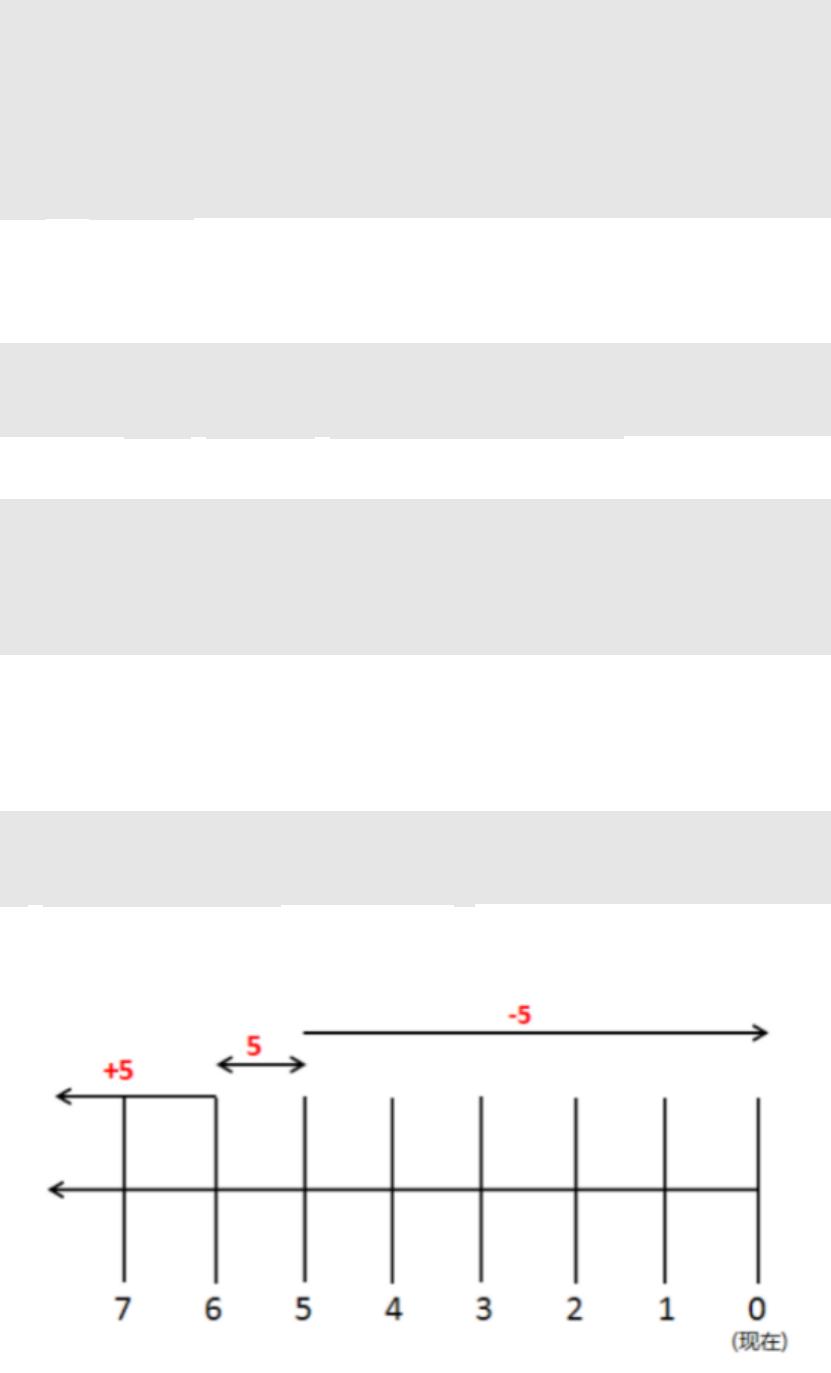
场景举例:
找“
/
天之内被更改过的档案名”
nd / -mtime -5
;
找“
/
天前的那一天被更改过的档案名”
nd / -mtime 5
;
找“
/
天之前被更改过的档案名”
nd / -mtime +5
。
下图来表现更直观,以便理解记忆。
of 3
5墨值下载
【版权声明】本文为墨天轮用户原创内容,转载时必须标注文档的来源(墨天轮),文档链接,文档作者等基本信息,否则作者和墨天轮有权追究责任。如果您发现墨天轮中有涉嫌抄袭或者侵权的内容,欢迎发送邮件至:contact@modb.pro进行举报,并提供相关证据,一经查实,墨天轮将立刻删除相关内容。
下载排行榜

评论