



Neo4j中文使用手册(卷二)
免费下载

186
Aggregate functions take multiple input values and calculate an aggregated value from them.
Examples are AVG that calculate the average of multiple numeric values, or MIN that finds the
smallest numeric value in a set of values.
Aggregation can be done over all the matching sub graphs, or it can be further divided by
introducing key values. These are non-aggregate expressions, that are used to group the values going
into the aggregate functions.
So, if the return statement looks something like this:
1
RETURN n,
count(*)
We have two return expressions — n, and count(*). The first, n, is no aggregate function,
and so it will be the grouping key. The latter, count(*) is an aggregate expression. So the matching
subgraphs will be divided into different buckets, depending on the grouping key. The aggregate
function will then run on these buckets, calculating the aggregate values.
The last piece of the puzzle is the DISTINCT keyword. It is used to make all values unique
before running them through an aggregate function.
An example might be helpful:
Query
1
2
3
START me=node(1)
MATCH me-->friend-->friend_of_friend
RETURN count(distinct friend_of_friend),
count(friend_of_friend)
In this example we are trying to find all our friends of friends, and count them. The first
aggregate function, count(distinct friend_of_friend), will only see a
friend_of_friend once — DISTINCT removes the duplicates. The latter aggregate function,
count(friend_of_friend), might very well see the same friend_of_friend multiple times.
Since there is no real data in this case, an empty result is returned. See the sections below for real
data.
表
. --docbook
count(distinct
friend_of_friend)
count(friend_of_fri
end)
1 row
0 ms
0
0
187
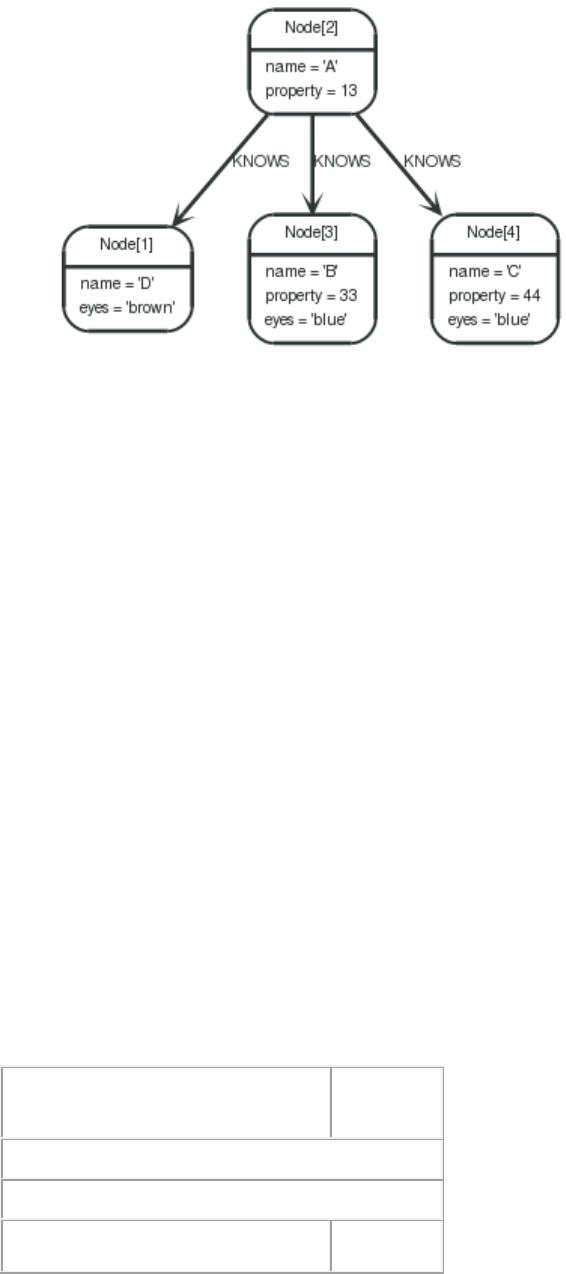
The following examples are assuming the example graph structure below.
Graph
COUNT
COUNT is used to count the number of rows. COUNT can be used in two forms — COUNT(*)
which just counts the number of matching rows, and COUNT(<identifier>), which counts the
number of non-null values in <identifier>.
Count nodes
To count the number of nodes, for example the number of nodes connected to one node, you can
use count(*).
Query
1
2
3
START
n=node(2)
MATCH
(n)-->(x)
RETURN n,
count(*)
This returns the start node and the count of related nodes.
表
. --docbook
n
cou
nt(*)
1 row
0 ms
Node[2]{name:"A",property
3
of 185
免费下载
【版权声明】本文为墨天轮用户原创内容,转载时必须标注文档的来源(墨天轮),文档链接,文档作者等基本信息,否则作者和墨天轮有权追究责任。如果您发现墨天轮中有涉嫌抄袭或者侵权的内容,欢迎发送邮件至:contact@modb.pro进行举报,并提供相关证据,一经查实,墨天轮将立刻删除相关内容。
下载排行榜


评论