



Mycat+HaProxy+keepalived实现MYSQL高可用
25墨值下载
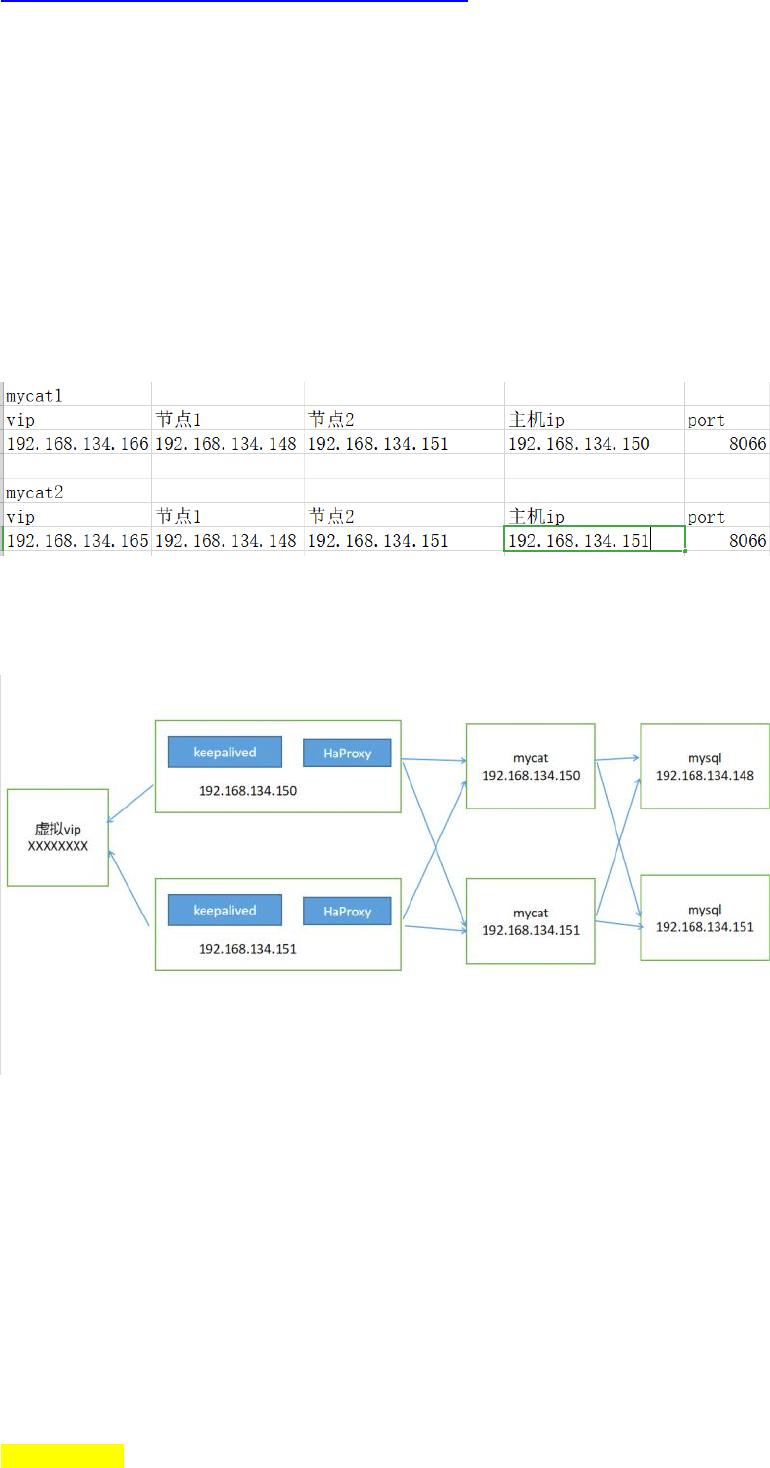
1.
准备工作
准备了三台
Centos
服务器,
IP
地址分别为
192.168.134.150
,
192.168.134.151
,
192.168.134.148
192.168.134.151
,
192.168.134.148
安装好了
mysql
192.168.134.150
,
192.168.134.151
安装
mycat
192.168.134.150
上安装的
mycat
配置
VIP 192.168.134.166
192.168.134.151
上安装的
mycat
配置
VIP 192.168.134.165
mycat
机器
ip
以及对应的
mysql
节点
ip
HaProxy
和
keepalived
装在
192.168.134.150
和
192.168.134.151
上。
架构图如下:
2.
安装
HaProxy
这里通过
yum
安装。
查找
haproxy
的安装文件
[root@mgr1 conf]# yum search haproxy
Loaded plugins: fastestmirror, langpacks
Loading mirror speeds from cached hostfile
* base: mirrors.njupt.edu.cn
* epel: mirror.earthlink.iq
* extras: mirrors.njupt.edu.cn
* updates: mirrors.ustc.edu.cn
================================================= N/S matched: haproxy
=================================================
pcp-pmda-haproxy.x86_64 : Performance Co-Pilot (PCP) metrics for HAProxy
haproxy.x86_64 : TCP/HTTP proxy and load balancer for high availability environments
Name and summary matches only, use "search all" for everything.
Mycat+HaProxy+keepalived
实现高可用
2020年12月3日
11:28
分区 Mycat+HaProxy+keepalived实现高可用 的第 1 页

Name and summary matches only, use "search all" for everything.
安装
haproxy
[root@mgr1 ~]# yum -y install haproxy.x86_64
Loaded plugins: fastestmirror, langpacks
base | 3.6 kB
00:00:00
extras | 2.9 kB
00:00:00
updates | 2.9 kB
00:00:00
updates/7/x86_64/primary_db | 3.7 MB
00:00:04
Running transaction
Installing : haproxy-1.5.18-9.el7.x86_64
1/1
Verifying : haproxy-1.5.18-9.el7.x86_64
1/1
Installed:
haproxy.x86_64 0:1.5.18-9.el7
Complete!
修改
haproxy
配置:
[root@mgr1 ~]# cd /etc/haproxy/
[root@mgr1 haproxy]# ls
haproxy.cfg
[root@mgr1 haproxy]# vim haproxy.cfg
先将
defaults
下的
mode
改成
tcp
,因为
Haproxy
只能通过
tcp
协议来连接
mycat
接下来配置
backend app,
这里配置的是
mycat
的
ip
和端口号。
启动
Haproxy:
[root@mgr1 haproxy]# haproxy -f /etc/haproxy/haproxy.cfg
[WARNING] 337/011232 (5938) : parsing [/etc/haproxy/haproxy.cfg:45] : 'option httplog' not usable with frontend 'main' (needs 'mode
http'). Falling back to 'option tcplog'.
[WARNING] 337/011232 (5938) : config : 'option forwardfor' ignored for frontend 'main' as it requires HTTP mode.
[WARNING] 337/011232 (5938) : config : 'option forwardfor' ignored for backend 'static' as it requires HTTP mode.
[WARNING] 337/011232 (5938) : config : 'option forwardfor' ignored for backend 'app' as it requires HTTP mode.
[root@mgr1 haproxy]# ps -ef|grep haproxy
haproxy 5939 1 0 01:12 ? 00:00:00 haproxy -f /etc/haproxy/haproxy.cfg
分区 Mycat+HaProxy+keepalived实现高可用 的第 2 页
of 10
25墨值下载
【版权声明】本文为墨天轮用户原创内容,转载时必须标注文档的来源(墨天轮),文档链接,文档作者等基本信息,否则作者和墨天轮有权追究责任。如果您发现墨天轮中有涉嫌抄袭或者侵权的内容,欢迎发送邮件至:contact@modb.pro进行举报,并提供相关证据,一经查实,墨天轮将立刻删除相关内容。
下载排行榜

文档被以下合辑收录
评论