



H3C 交换机 BOOT MENU升级.pdf
10墨值下载
H3C 交换机 BOOT MENU升级方法
(可以挽救格式化Flash的交换机)
1、准备工作
1.1、准备一条串口线连接到 Console 口
1.2、准备一条网线从 PC 机网卡连到交换机 VLAN1 端口
(记住这个网卡的 IP 地址)
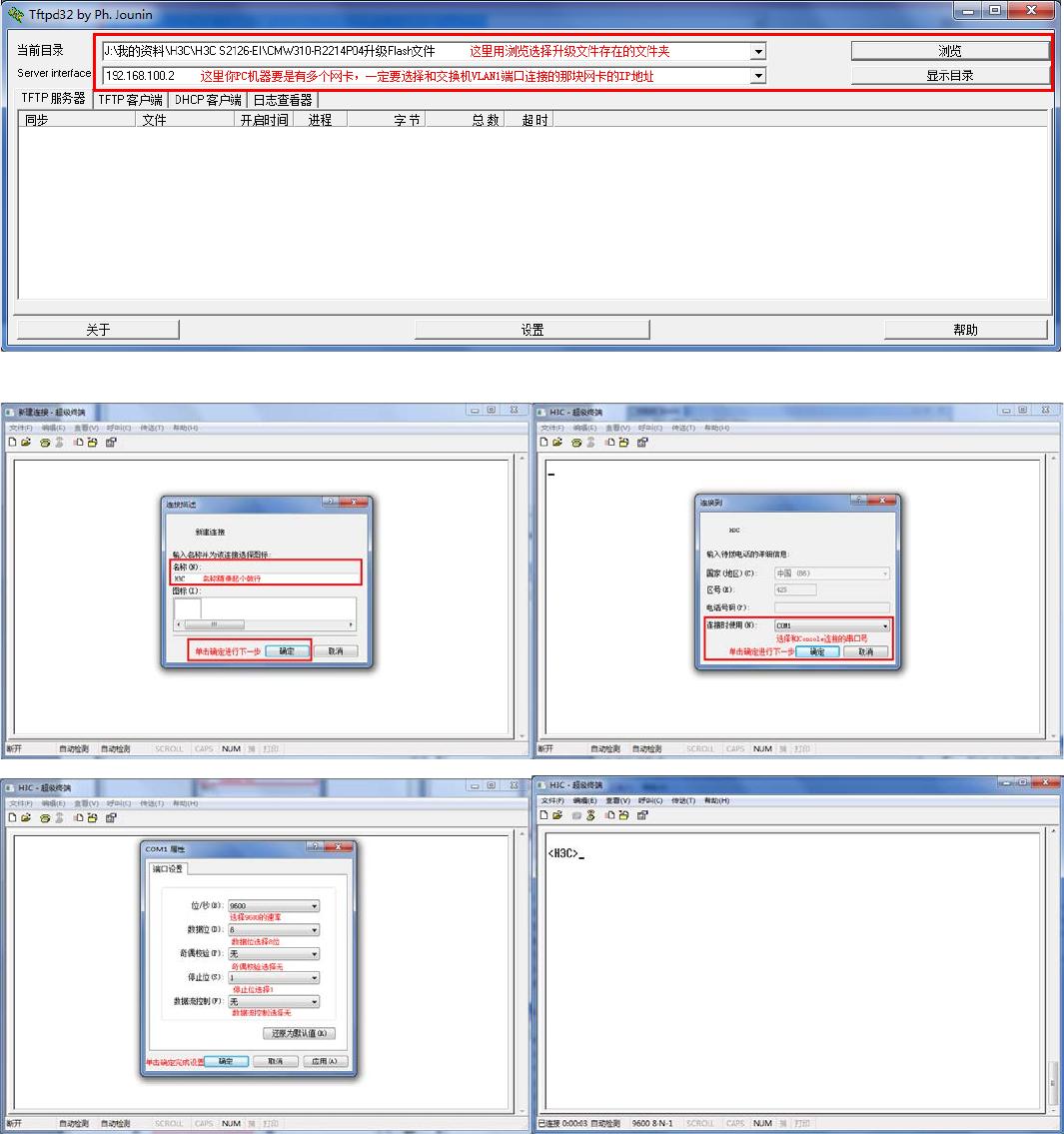
1.3、准备 Tftpd32 软件(没有的百度一搜有的是下载)
1.4、准备把要升级的文件都复制到 Tftpd32 软件目录,并运行 Tftpd32 软件。
(如果你的机器有多网卡要选择连到交换机 VLAN1 端口的那块网卡的 IP 地址)
如图:
2、配置超级终端连接交换机
确定---登陆交换机
(下面不复制图片了复制超级终端内的文字内容)
3、下面重启交换机,按 Ctrl-B 进入 Boot Menu:
<H3C>reboot
Start to check configuration with next startup configuration file,
please wait......
This command will reboot the device. Current configuration may be lost in next
startup if you continue. Continue? [Y/N] y
This will reboot device. Continue? [Y/N] y
#Apr 1 23:55:5 8:151 2000 H3C COM MONSY /5/R EB O O T:- 1 -
Reboot Fabric by command.
<H3C>
%Apr 17 01:28:27:958 2000 H3C DEV/5/DEV_LOG:- 1 -
Switch is rebooting ...
Starting......
***********************************************************
* *
* H3C S2126-EI BOOTROM, Version 510 *
* *
***********************************************************
Copyright(c) 2004-2007 Hangzhou H3C Technologies Co., Ltd.
Creation date : May 29 2007, 19:16:0 0
CPU Clock Speed : 200MHz
BUS Clock Speed : 33MHz
Memory Size : 64MB
Mac Address : 000fe2733ea2
Press Ctrl-B to enter Boot Menu... 1
password:
(缺省密码为空)
BOOT MENU
1. Download application file to flash
2. Select application file to boot
3. Display all files in flash
4. Delete file from flash
5. Modify bootrom pas sword
6. Enter bootrom upgrade menu
7. Skip current configuration file
8. Set bootrom password recovery
9. Set switch startup mode
0. Reboot
Enter your choice(0-9):
of 7
10墨值下载
【版权声明】本文为墨天轮用户原创内容,转载时必须标注文档的来源(墨天轮),文档链接,文档作者等基本信息,否则作者和墨天轮有权追究责任。如果您发现墨天轮中有涉嫌抄袭或者侵权的内容,欢迎发送邮件至:contact@modb.pro进行举报,并提供相关证据,一经查实,墨天轮将立刻删除相关内容。
下载排行榜

评论