


装好了db和gi软件,但还未创建实例,准备打补丁
1)应用补丁日志
[root@1ge153 ~]# opatchauto apply /oraru/31326369/31305339/
OPatchauto session is initiated at Thu Oct 14 14:02:05 2021
System initialization log file is /u01/app/19.0.0/grid/cfgtoollogs/opatchautodb/systemconfig2021-10-14_02-02-08PM.log.
会话日志文件是/u01/app/19.0.0/grid/cfgtoollogs/opatchauto/opatchauto2021-10-14_02-02-11PM.log
此会话的 ID 为 71ZJ
Executing OPatch prereq operations to verify patch applicability on home /u01/app/19.0.0/grid
Patch applicability verified successfully on home /u01/app/19.0.0/grid
Executing patch validation checks on home /u01/app/19.0.0/grid
Patch validation checks successfully completed on home /u01/app/19.0.0/grid
Performing prepatch operations on CRS - bringing down CRS service on home /u01/app/19.0.0/grid
Prepatch operation log file location: /u01/app/grid/crsdata/1ge153/crsconfig/hapatch_2021-10-14_02-02-41PM.log
CRS service brought down successfully on home /u01/app/19.0.0/grid
Start applying binary patch on home /u01/app/19.0.0/grid
Binary patch applied successfully on home /u01/app/19.0.0/grid
Performing postpatch operations on CRS - starting CRS service on home /u01/app/19.0.0/grid
Postpatch operation log file location: /u01/app/grid/crsdata/1ge153/crsconfig/hapatch_2021-10-14_02-08-28PM.log
CRS service started successfully on home /u01/app/19.0.0/grid
OPatchAuto 成功。
--------------------------------Summary--------------------------------
Patching is completed successfully. Please find the summary as follows:
Host:1ge153
SIHA Home:/u01/app/19.0.0/grid
Version:19.0.0.0.0
Summary:
==Following patches were SUCCESSFULLY applied:
Patch: /oraru/31326369/31305339/31281355
Log: /u01/app/19.0.0/grid/cfgtoollogs/opatchauto/core/opatch/opatch2021-10-14_14-03-07下午_1.log
Patch: /oraru/31326369/31305339/31304218
Log: /u01/app/19.0.0/grid/cfgtoollogs/opatchauto/core/opatch/opatch2021-10-14_14-03-07下午_1.log
Patch: /oraru/31326369/31305339/31305087
Log: /u01/app/19.0.0/grid/cfgtoollogs/opatchauto/core/opatch/opatch2021-10-14_14-03-07下午_1.log
Patch: /oraru/31326369/31305339/31335188
Log: /u01/app/19.0.0/grid/cfgtoollogs/opatchauto/core/opatch/opatch2021-10-14_14-03-07下午_1.log
OPatchauto session completed at Thu Oct 14 14:09:06 2021
Time taken to complete the session 7 minutes, 1 second
[root@1ge153 ~]#
2)应用OJVM日志
[oracle@1ge153 31219897]$ opatch apply
Oracle Interim Patch Installer version 12.2.0.1.27
Copyright (c) 2021, Oracle Corporation. All rights reserved.
Oracle Home : /u01/app/oracle/product/19.0.0/dbhome_1
Central Inventory : /u01/app/oraInventory
from : /u01/app/oracle/product/19.0.0/dbhome_1/oraInst.loc
OPatch version : 12.2.0.1.27
OUI version : 12.2.0.7.0
Log file location : /u01/app/oracle/product/19.0.0/dbhome_1/cfgtoollogs/opatch/opatch2021-10-14_14-45-09PM_1.log
Verifying environment and performing prerequisite checks...
OPatch continues with these patches: 31219897
Do you want to proceed? [y|n]
y
User Responded with: Y
All checks passed.
Please shutdown Oracle instances running out of this ORACLE_HOME on the local system.
(Oracle Home = '/u01/app/oracle/product/19.0.0/dbhome_1')
Is the local system ready for patching? [y|n]
y
User Responded with: Y
Backing up files...
Applying interim patch '31219897' to OH '/u01/app/oracle/product/19.0.0/dbhome_1'
Patching component oracle.javavm.server, 19.0.0.0.0...
Patching component oracle.javavm.server.core, 19.0.0.0.0...
Patching component oracle.rdbms.dbscripts, 19.0.0.0.0...
Patching component oracle.rdbms, 19.0.0.0.0...
Patch 31219897 successfully applied.
Log file location: /u01/app/oracle/product/19.0.0/dbhome_1/cfgtoollogs/opatch/opatch2021-10-14_14-45-09PM_1.log
OPatch succeeded.
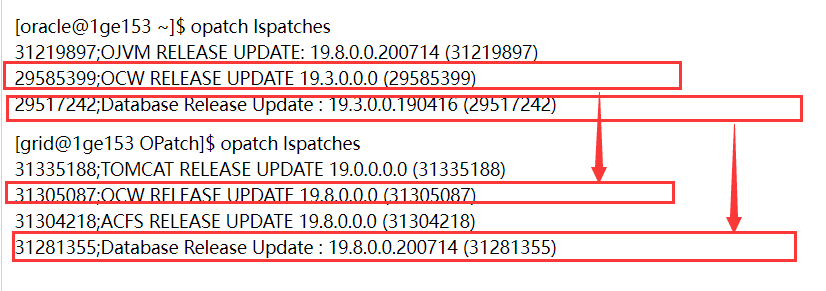
3)检查补丁情况
[oracle@1ge153 ~]$ opatch lspatches
31219897;OJVM RELEASE UPDATE: 19.8.0.0.200714 (31219897)
29585399;OCW RELEASE UPDATE 19.3.0.0.0 (29585399)
29517242;Database Release Update : 19.3.0.0.190416 (29517242)
[grid@1ge153 OPatch]$ opatch lspatches
31335188;TOMCAT RELEASE UPDATE 19.0.0.0.0 (31335188)
31305087;OCW RELEASE UPDATE 19.8.0.0.0 (31305087)
31304218;ACFS RELEASE UPDATE 19.8.0.0.0 (31304218)
31281355;Database Release Update : 19.8.0.0.200714 (31281355)
OPatch succeeded.
4)我的问题是版本怎么不一致呢
 评论
评论

 墨值悬赏
墨值悬赏