


安装进度到38%时报INS-32123的错
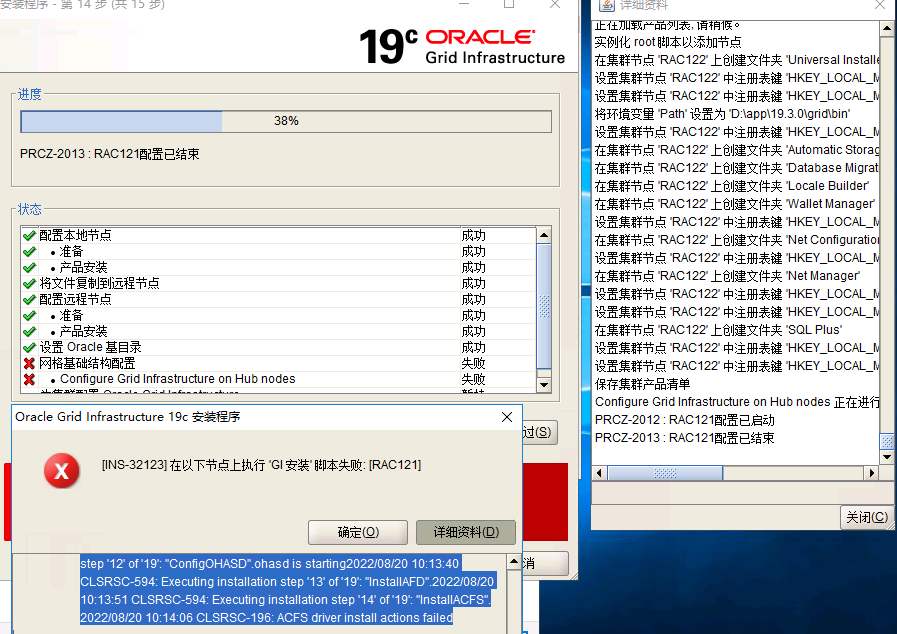
报错的详细资料:
原因 - 安装程序无法在一个或多个节点上执行指定的脚本。这可能是由于在节点上执行脚本时出现异常错误。 操作 - 有关详细信息, 请查看日志文件 ‘C:\Program Files\Oracle\Inventory\logs\GridSetupActions2022-08-20_10-00-44AM\gridSetupActions2022-08-20_10-00-44AM.log’ 和 ‘
未能在节点上执行GI 安装脚本: [RAC121] 异常错误详细信息 - PRCZ-2014 : 无法在节点 “RAC121” 上执行命令 “D:\app\19.3.0\grid\crs\config\gridconfig.bat”
- PRCZ-2014 : 无法在节点 “RAC121” 上执行命令 “D:\app\19.3.0\grid\crs\config\gridconfig.bat”
失败节点的执行状态:RAC121
错误
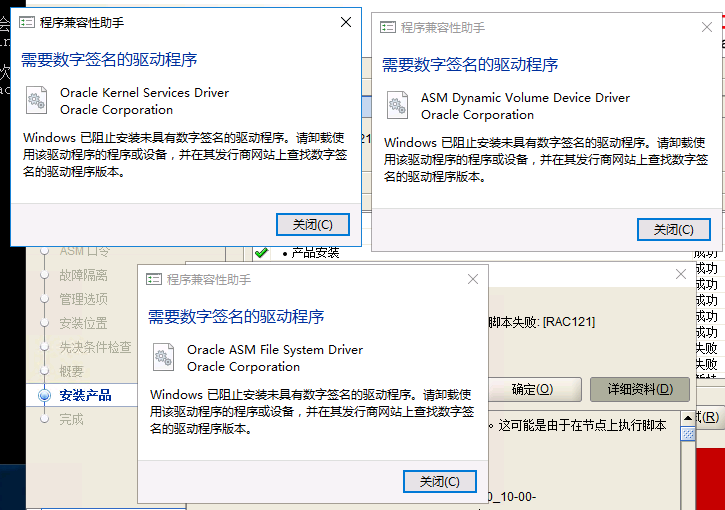
: Using configuration parameter file: D:\app\19.3.0\grid\crs\install\crsconfig_params|The log of current session can be found at:| D:\app\19.3.0\grid_base\crsdata\rac121\crsconfig\rootcrs_rac121_2022-08-20_10-11-02AM.log|2022/08/20 10:11:12 CLSRSC-594: Executing installation step ‘1’ of ‘19’: ‘‘SetupTFA’’.|2022/08/20 10:11:12 CLSRSC-594: Executing installation step ‘2’ of ‘19’: ‘‘ValidateEnv’’.|2022/08/20 10:11:40 CLSRSC-4002: Successfully installed Oracle Trace File Analyzer (TFA) Collector.|2022/08/20 10:11:40 CLSRSC-363: User ignored prerequisites during installation|2022/08/20 10:11:40 CLSRSC-594: Executing installation step ‘3’ of ‘19’: ‘‘CheckFirstNode’’.|2022/08/20 10:11:42 CLSRSC-594: Executing installation step ‘4’ of ‘19’: ‘‘GenSiteGUIDs’’.|2022/08/20 10:11:42 CLSRSC-594: Executing installation step ‘5’ of ‘19’: ‘‘SetupOSD’’.|<10:11:42> Started|<10:11:42> arguements 2|<10:11:42> D:\app\19.3.0\grid\bin\crssetup.exe|<10:11:42> installFence|<10:11:42> returning 0x0|2022/08/20 10:11:42 CLSRSC-594: Executing installation step ‘6’ of ‘19’: ‘‘CheckCRSConfig’’.|2022/08/20 10:11:42 CLSRSC-594: Executing installation step ‘7’ of ‘19’: ‘‘SetupLocalGPNP’’.|2022/08/20 10:12:05 CLSRSC-594: Executing installation step ‘8’ of ‘19’: ‘‘CreateRootCert’’.|2022/08/20 10:12:10 CLSRSC-594: Executing installation step ‘9’ of ‘19’: ‘‘ConfigOLR’’.|2022/08/20 10:12:50 CLSRSC-594: Executing installation step ‘10’ of ‘19’: ‘‘ConfigCHMOS’’.|2022/08/20 10:12:50 CLSRSC-594: Executing installation step ‘11’ of ‘19’: ‘‘CreateOHASD’’.|OhasdConfigureRegistry: started|OhasdConfigureRegistry: completed with 0|2022/08/20 10:13:02 CLSRSC-594: Executing installation step ‘12’ of ‘19’: ‘‘ConfigOHASD’’.|ohasd is starting|2022/08/20 10:13:40 CLSRSC-594: Executing installation step ‘13’ of ‘19’: ‘‘InstallAFD’’.|2022/08/20 10:13:51 CLSRSC-594: Executing installation step ‘14’ of ‘19’: ‘‘InstallACFS’’.|2022/08/20 10:14:06 CLSRSC-196: ACFS driver install actions failed
标准输出
: Using configuration parameter file: D:\app\19.3.0\grid\crs\install\crsconfig_paramsThe log of current session can be found at: D:\app\19.3.0\grid_base\crsdata\rac121\crsconfig\rootcrs_rac121_2022-08-20_10-11-02AM.log2022/08/20 10:11:12 CLSRSC-594: Executing installation step ‘1’ of ‘19’: ‘‘SetupTFA’’.2022/08/20 10:11:12 CLSRSC-594: Executing installation step ‘2’ of ‘19’: ‘‘ValidateEnv’’.2022/08/20 10:11:40 CLSRSC-4002: Successfully installed Oracle Trace File Analyzer (TFA) Collector.2022/08/20 10:11:40 CLSRSC-363: User ignored prerequisites during installation2022/08/20 10:11:40 CLSRSC-594: Executing installation step ‘3’ of ‘19’: ‘‘CheckFirstNode’’.2022/08/20 10:11:42 CLSRSC-594: Executing installation step ‘4’ of ‘19’: ‘‘GenSiteGUIDs’’.2022/08/20 10:11:42 CLSRSC-594: Executing installation step ‘5’ of ‘19’: ‘‘SetupOSD’’.<10:11:42> Started<10:11:42> arguements 2<10:11:42> D:\app\19.3.0\grid\bin\crssetup.exe<10:11:42> installFence<10:11:42> returning 0x02022/08/20 10:11:42 CLSRSC-594: Executing installation step ‘6’ of ‘19’: ‘‘CheckCRSConfig’’.2022/08/20 10:11:42 CLSRSC-594: Executing installation step ‘7’ of ‘19’: ‘‘SetupLocalGPNP’’.2022/08/20 10:12:05 CLSRSC-594: Executing installation step ‘8’ of ‘19’: ‘‘CreateRootCert’’.2022/08/20 10:12:10 CLSRSC-594: Executing installation step ‘9’ of ‘19’: ‘‘ConfigOLR’’.2022/08/20 10:12:50 CLSRSC-594: Executing installation step ‘10’ of ‘19’: ‘‘ConfigCHMOS’’.2022/08/20 10:12:50 CLSRSC-594: Executing installation step ‘11’ of ‘19’: ‘‘CreateOHASD’’.OhasdConfigureRegistry: startedOhasdConfigureRegistry: completed with 02022/08/20 10:13:02 CLSRSC-594: Executing installation step ‘12’ of ‘19’: ‘‘ConfigOHASD’’.ohasd is starting2022/08/20 10:13:40 CLSRSC-594: Executing installation step ‘13’ of ‘19’: ‘‘InstallAFD’’.2022/08/20 10:13:51 CLSRSC-594: Executing installation step ‘14’ of ‘19’: ‘‘InstallACFS’’.2022/08/20 10:14:06 CLSRSC-196: ACFS driver install actions failed
 评论
评论

 墨值悬赏
墨值悬赏