

openGauss预安装环境报错(报错信息在评论区),求大佬解答
openGauss预安装环境报错(报错信息在评论区),求大佬解答
我来答
添加附件
收藏
复制链接
微信扫码分享

在小程序上查看
分享
添加附件
问题补充
9条回答
默认
最新
[GAUSS-51400] : Failed to execute the command: python3 '/soft/openGauss/script/local/PreInstallUtility.py' -t create_cluster_paths -u omm -g dbgrp -X '/soft/openGauss/clusterconfig.xml' -l '/gaussdb/log/omm/om/gs_local.log'.Error:
[GAUSS-50202] : The /gaussdb must be empty. Or user [omm] has write permission to directory /gaussdb. Because it will create symbolic link [/gaussdb/app] to install path [/gaussdb/app_78689da9] in gs_install process with this user.
 评论
评论 有用 0
有用 0在omm用户下,执行vi ~/.bashrc,将环境变量清空,重新执行初始化脚本试试
评论 有用 0[2022-08-22 14:08:51.676989][19381][gs_preinstall][LOG][Step1]:Parsing the configuration file.
[2022-08-22 14:08:51.696733][19381][gs_preinstall][DEBUG]:Instance information of cluster:
ClusterName=dbCluster,AppPath=/gaussdb/app,LogPath=/gaussdb/log,ClusterType=single-inst
HostName=node1,backIps=['10.168.3.107']
InstanceId=10001,MirrorId=-3,Host=node1,Port=0,DataDir=cm_agent,XlogDir=,SsdDir=,InstanceType=-1,Role=5,ListenIps=['10.168.3.107'],HaIps=[]
InstanceId=6001,MirrorId=1,Host=node1,Port=26000,DataDir=/gaussdb/data/db1,XlogDir=,SsdDir=,InstanceType=0,Role=4,ListenIps=['10.168.3.107'],HaIps=['10.168.3.107'],azName=AZ1.
[2022-08-22 14:08:51.712561][19381][gs_preinstall][LOG][Step1]:Successfully parsed the configuration file.
[2022-08-22 14:08:51.712828][19381][gs_preinstall][DEBUG]:gs_preinstall execution takes 14 steps in total
[2022-08-22 14:08:51.712906][19381][gs_preinstall][DEBUG]:There is no environment file, skip check repeat.
[2022-08-22 14:08:51.712973][19381][gs_preinstall][LOG][Step2]:Installing the tools on the local node.
[2022-08-22 14:08:52.253653][19381][gs_preinstall][DEBUG]:Modifying logPath owner
[2022-08-22 14:08:52.253738][19381][gs_preinstall][DEBUG]:Successfully modified logPath owner
[2022-08-22 14:09:07.642472][19381][gs_preinstall][LOG][Step2]:Successfully installed the tools on the local node.
[2022-08-22 14:09:07.642571][19381][gs_preinstall][LOG][Step3]:Setting pssh path
[2022-08-22 14:09:07.646326][19381][gs_preinstall][LOG][Step3]:Successfully set core path.
[2022-08-22 14:09:07.646399][19381][gs_preinstall][DEBUG]:Creating OS user and create trust for user
[2022-08-22 14:09:11.903170][19381][gs_preinstall][DEBUG]:Setting the flag for creating user's trust.
[2022-08-22 14:09:12.171376][19381][gs_preinstall][LOG][Step3]:Please enter password for cluster user.
[2022-08-22 14:09:18.080262][19381][gs_preinstall][LOG][Step3]:Please enter password for cluster user again.
[2022-08-22 14:09:22.155599][19381][gs_preinstall][DEBUG]:Successfully created [omm] user on all nodes.
[2022-08-22 14:09:22.491438][19381][gs_preinstall][LOG]:Successfully created [omm] user on all nodes.
[2022-08-22 14:09:22.491535][19381][gs_preinstall][LOG][Step4]:Preparing SSH service.
[2022-08-22 14:09:23.126763][19381][gs_preinstall][LOG][Step4]:Successfully prepared SSH service.
[2022-08-22 14:09:24.050025][19381][gs_preinstall][LOG][Step5]:Checking OS software.
[2022-08-22 14:09:24.050458][19381][gs_preinstall][DEBUG]:Checking OS software: python3 '/soft/openGauss/script/local/PreInstallUtility.py' -t check_os_software -u omm -l /gaussdb/log/omm/om/gs_local.log
[2022-08-22 14:09:24.356985][19381][gs_preinstall][LOG][Step5]:Successfully check os software.
[2022-08-22 14:09:24.357077][19381][gs_preinstall][LOG][Step6]:Checking OS version.
[2022-08-22 14:09:24.636418][19381][gs_preinstall][LOG][Step6]:Successfully checked OS version.
[2022-08-22 14:09:24.636514][19381][gs_preinstall][LOG][Step7]:Creating cluster's path.
[2022-08-22 14:09:24.636568][19381][gs_preinstall][DEBUG]:Paths need to be fixed owner:['/gaussdb/om'].
[2022-08-22 14:09:26.308742][19381][gs_preinstall][ERROR]:[GAUSS-51400] : Failed to execute the command: python3 '/soft/openGauss/script/local/PreInstallUtility.py' -t create_cluster_paths -u omm -g dbgrp -X '/soft/openGauss/clusterconfig.xml' -l '/gaussdb/log/omm/om/gs_local.log'.Error:
[GAUSS-50202] : The /gaussdb must be empty. Or user [omm] has write permission to directory /gaussdb. Because it will create symbolic link [/gaussdb/app] to install path [/gaussdb/app_78689da9] in gs_install process with this user.
确认一下python3已安装并且可以直接用python3命令启动
评论 有用 0这不找罪受呢么,官网都写了要求了,重装个3.6版本的吧
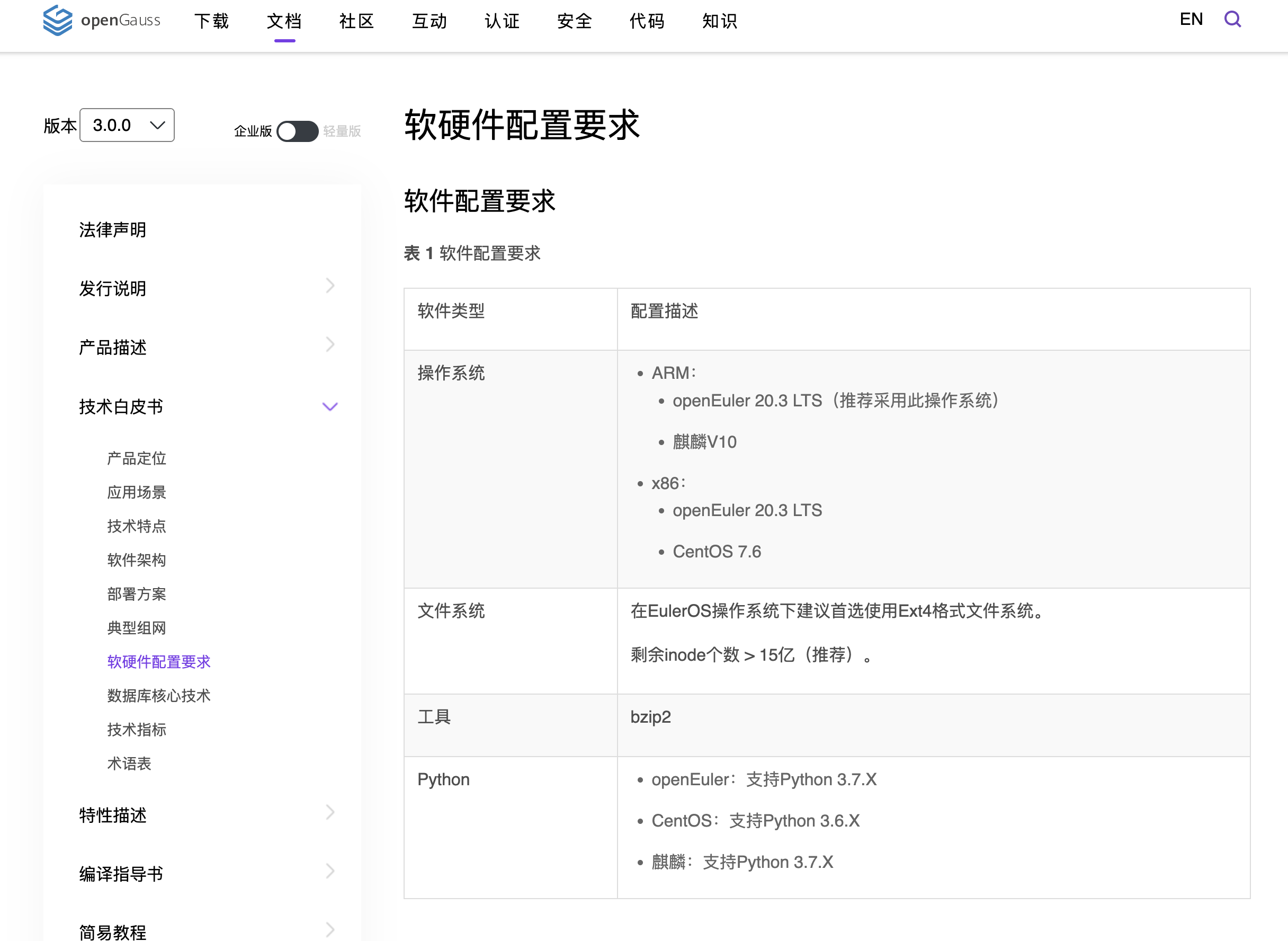
评论 有用 0The /gaussdb must be empty ==》这个目录是空的么
评论 有用 0回答交流
提交
问题信息
请登录之后查看
邀请回答
暂无人订阅该标签,敬请期待~~
 墨值悬赏
墨值悬赏