暂无图片
AIX7.1 Oracle 19c grid安装报[INS-30508] [INS-30515]错误
我来答
手
手机用户6990
2022-11-10
AIX7.1 Oracle 19c grid安装报[INS-30508] [INS-30515]错误

grid@dbsrv1:/home/grid> oslevel -s
7100-05-02-1810
grid@dbsrv1:/home/grid> lspv
hdisk0 00cac8e55637ef24 rootvg active
hdisk1 none None
hdisk2 none None
hdisk3 none None
grid@dbsrv1:/home/grid> ls -l /dev/rhdisk*
crw------- 2 root system 15, 0 Nov 03 16:15 /dev/rhdisk0
crw-rw---- 1 grid asmadmin 15, 1 Nov 03 16:29 /dev/rhdisk1
crw-rw---- 1 grid asmadmin 15, 3 Nov 03 16:29 /dev/rhdisk2
crw-rw---- 1 grid asmadmin 15, 2 Nov 03 16:29 /dev/rhdisk3

grid@dbsrv1:/home/grid>$ORACLE_HOME/gridSetup.sh -silent -responseFile /home/grid/grid.rsp

********************************************************************************

Your platform requires the root user to perform certain pre-installation
OS preparation. The root user should run the shell script 'rootpre.sh' before
you proceed with Oracle installation. The rootpre.sh script can be found at:
/u01/app/19.3.0/grid/clone/rootpre.sh

Answer 'y' if root has run 'rootpre.sh' so you can proceed with Oracle
installation.
Answer 'n' to abort installation and then ask root to run 'rootpre.sh'.

********************************************************************************

Has 'rootpre.sh' been run by root in this machine? [y/n] (n)
y
Launching Oracle Grid Infrastructure Setup Wizard...

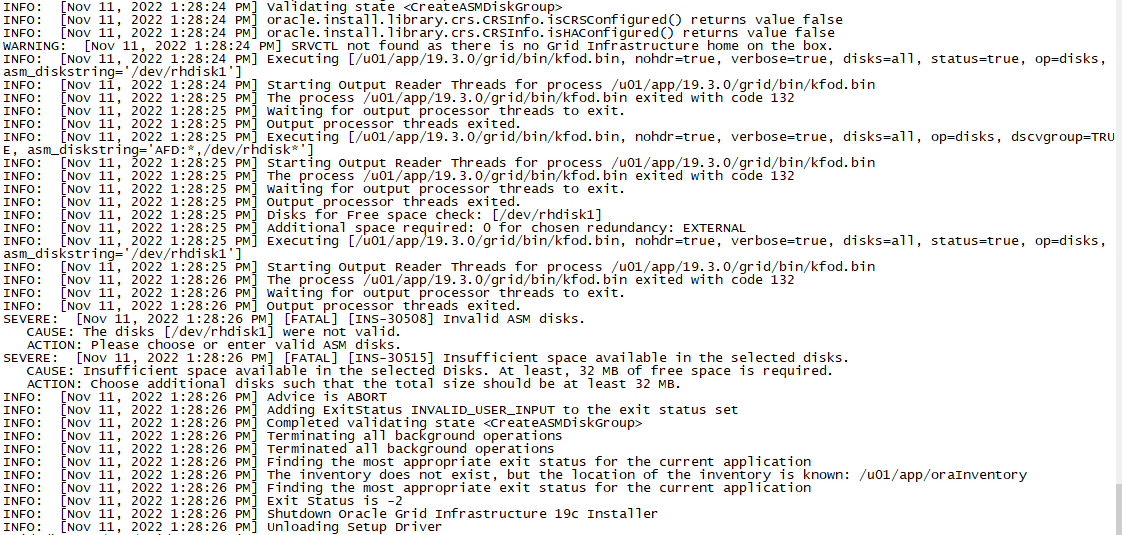
[FATAL] [INS-30508] Invalid ASM disks.
CAUSE: The disks [/dev/rhdisk1, /dev/rhdisk2, /dev/rhdisk3] were not valid.
ACTION: Please choose or enter valid ASM disks.
[FATAL] [INS-30515] Insufficient space available in the selected disks.
CAUSE: Insufficient space available in the selected Disks. At least, 32 MB of free space is required.
ACTION: Choose additional disks such that the total size should be at least 32 MB.

我来答
添加附件
收藏
问题补充
11条回答
默认
最新
农夫三拳
暂无图片 评论
暂无图片 有用 0
手
手机用户6990

iocp开了的

grid@dbsrv1:/home/grid> lsdev | grep iocp
iocp0 Available I/O Completion Ports

暂无图片 评论
暂无图片 有用 0
农夫三拳

/tmp下找最近的OraInstallxxxxxxxx目录里面的日志看看

暂无图片 评论
暂无图片 有用 0
愤怒的蜗牛
2022-11-11
手
手机用户6990


测试了一下,同样的环境安装12c grid能正常找到ASM硬盘,18c/19c grid死活找不到硬盘

暂无图片 评论
暂无图片 有用 0
农夫三拳
2022-11-11
手
手机用户6990

root@dbsrv1:/# /u01/app/19.3.0/grid/bin/kfod nohdr=true verbose=true disks=all status=true op=disks asm_diskstring='/dev/rhdisk*'
/u01/app/19.3.0/grid/bin/kfod[22]: /scratch/app/user/product/19.0.0/grid/bin/kfod.bin: not found.

暂无图片 评论
暂无图片 有用 0
农夫三拳
2022-11-11
手
手机用户6990

就是执行了那命令后的输出信息

暂无图片 评论
暂无图片 有用 0
农夫三拳

进去gridhome/bin/下运行kfod.bin nohdr=true verbose=true disks=all status=true op=disks asm_diskstring='/dev/rhdisk*'

暂无图片 评论
暂无图片 有用 0
农夫三拳
答主
2022-11-11
手
手机用户6990

严格按照上面的建议重建了目录,结果还是一样的找不到盘,出错提示一模一样

暂无图片 评论
暂无图片 有用 0
手
手机用户6990

root@dbsrv1:/u01/app/19.0.0/grid/bin# ./kfod.bin nohdr=true verbose=true disks=all status=true op=disks asm_diskstring='/dev/rhdisk*'
exec(): 0509-036 Cannot load program ./kfod.bin because of the following errors:
0509-150 Dependent module libasmclntsh19.so could not be loaded.
0509-022 Cannot load module libasmclntsh19.so.
0509-026 System error: A file or directory in the path name does not exist.

暂无图片 评论
暂无图片 有用 0
手
手机用户6990

root@dbsrv1:/u01/app/19.0.0/grid/bin# find / -name libasmclntsh19.so
find: 0652-019 The status on /proc/5636322/fd/6 is not valid.
find: 0652-019 The status on /proc/5636322/fd/7 is not valid.
find: 0652-019 The status on /proc/5636322/fd/8 is not valid.
/u01/app/19.0.0/grid/lib/libasmclntsh19.so

这库文件能找着的

暂无图片 评论
暂无图片 有用 0
猫瞳映月

可能是权限问题

暂无图片 评论
暂无图片 有用 0
回答交流
提交
问题信息
请登录之后查看
邀请回答
暂无人订阅该标签,敬请期待~~
暂无图片墨值悬赏