暂无图片
openggauss创建自定义函数报错。
我来答
分享
Renduy
2023-03-29
openggauss创建自定义函数报错。

我在3.0.0企业版本上创建自定义函数时,报如下错误。

Begin  
return i + 1;  
END;  
$$ LANGUAGE plpgsql;  
ERROR: autonomous transaction failed to create autonomous session  
DETAIL: could not connect to server: Operation now in progress  
Is the server running on host "localhost" (::1) and accepting  
TCP/IP connections on port 5432?  
could not connect to server: Operation now in progress  
Is the server running on host "localhost" (127.0.0.1) and accepting  
TCP/IP connections on port 5432?

我来答
添加附件
收藏
分享
问题补充
7条回答
默认
最新
DarkAthena

给一下pull和启动这个docker的命令

暂无图片 评论
暂无图片 有用 0
暂无图片
Renduy
题主
2023-03-29
我是在k8s集群上通过yaml文件启动的opengauss服务,镜像用的是官网下载的openGauss_3.0.0 分布式镜像中的的镜像。
Renduy
题主
2023-03-29
我查看了postgresql.conf文件,发现监听的地址没有 localhost 。不知道是不是和这个有关系 listen_addresses = '192.168.2.196' # what IP address(es) to listen on; # comma-separated list of addresses; # defaults to 'localhost'; use '*' for all # (change requires restart)
DarkAthena
答主
2023-03-30
改成 星号 吧
Renduy

少粘贴了几行,完整的函数定义如下(官网的例子):

omm=# CREATE OR REPLACE FUNCTION func_increment_plsql(i integer) RETURNS integer AS $$
omm$# begin
omm$#  return i + 1;
omm$# end;
omm$# $$ LANGUAGE plpgsql;
暂无图片 评论
暂无图片 有用 1
DarkAthena

这个问题是在3.0版本中,增加了dbe_pldeveloper功能导致的。
在开启了plsql_show_all_error这个参数后,只要创建pl对象,就会走一个自治事务,将这个对象的代码插入到dbe_pldeveloper这个schema下面的表中。但这个自治事务,是又走了一次连接数据库的流程,而且写的是通过localhost进行连接,那么操作系统上的hosts里,也必须要维护localhost(操作系统默认一般是有localhost的,除非改过)

所以,避免这个报错的方式有两种,

  1. 关闭plsql_show_all_error,但这样就没有dbe_pldeveloper的功能了
  2. 操作系统里设置一下localhost
暂无图片 评论
暂无图片 有用 1
Renduy
题主
2023-03-29
感谢大佬指导。 我查了一下参数,这个参数目前设置的是off postgres=> select name, setting from pg_settings where name = 'plsql_show_all_error'; name | setting ----------------------+--------- plsql_show_all_error | off (1 row)
Renduy
题主
2023-03-29
尝试了方式1 无论把这个参数改为 on 或者 off 问题依然存在。 对于第二种方式,我是在容器中运行的数据库,不知道如何验证一下,还请大佬再指导下。
Renduy

我是在容器中启动的opengauss

# Kubernetes-managed hosts file.
127.0.0.1       localhost
::1     localhost ip6-localhost ip6-loopback
fe00::0 ip6-localnet
fe00::0 ip6-mcastprefix
fe00::1 ip6-allnodes
fe00::2 ip6-allrouters
192.168.1.90    db1-deployment-df949654d-c24mj

暂无图片 评论
暂无图片 有用 0
Renduy

发现这个markdown有点问题 代码块第一行总被忽略 需要手动敲个换行

bash-4.2$ cat /etc/hosts
# Kubernetes-managed hosts file.
127.0.0.1       localhost
::1     localhost ip6-localhost ip6-loopback
fe00::0 ip6-localnet
fe00::0 ip6-mcastprefix
fe00::1 ip6-allnodes
fe00::2 ip6-allrouters
192.168.1.90    db1-deployment-df949654d-c24mj


暂无图片 评论
暂无图片 有用 0

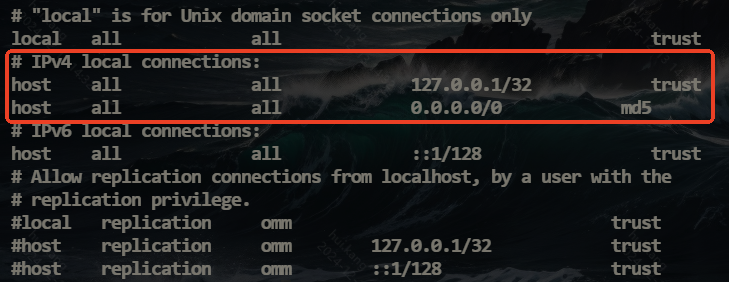
opengauss创建函数,存储过程等,需要修改pg_hba.conf,增加

host all all 127.0.0.1/32 trust

暂无图片 评论
暂无图片 有用 0

listen_addresses = '*'

然后重启生效

暂无图片 评论
暂无图片 有用 0
回答交流
提交
问题信息
请登录之后查看
邀请回答
暂无人订阅该标签,敬请期待~~
暂无图片墨值悬赏