

 5M
5M如果配置vsftpd的三个用户一个:
a.upload用户,bai可以上传下载,可以新建文件夹,但不能删除文件和文件夹,不能重命名原有文件和文件夹;
b.download用户,只能下载;
c.admin用户,管理员,可以上传,可以下载,可以新建文件夹,可以删除和更改文件和文件夹名。

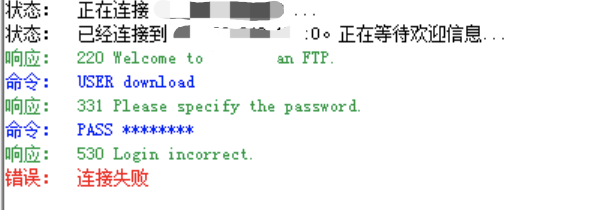
我用到虚拟用户方式,本地到方式也是做了。但是本地用户登录似乎不能够单独控制每个用户的权限
 评论
评论 有用 0
有用 0vsftpd.conf配置如下:
创建了本地用户:uploaduser、gyd、downloadusers
三个虚拟用户:admin、upload、download
Example config file /etc/vsftpd/vsftpd.conf
The default compiled in settings are fairly paranoid. This sample file
loosens things up a bit, to make the ftp daemon more usable.
Please see vsftpd.conf.5 for all compiled in defaults.
READ THIS: This example file is NOT an exhaustive list of vsftpd options.
Please read the vsftpd.conf.5 manual page to get a full idea of vsftpd’s
capabilities.
Allow anonymous FTP? (Beware - allowed by default if you comment this out).
使用当地时间
use_localtime=YES
被动/主动端口,不写默认是被动端口,开启主动端口需要服务器开启20/21端口
pasv_enable=YES
anonymous_enable=NO
anon_upload_enable=NO
anon_mkdir_write_enable=NO
async_abor_enable=YES
ascii_upload_enable=YES
ascii_download_enable=YES
chown_uploads=NO
#allow_writeable_root=YES
nopriv_user=ftpuserpub
#建立传输可使用最小端口范围
pasv_min_port=3000
#建立传输可使用最大端口范围
pasv_max_port=3999
#设置本地用户最大传输效率
local_max_rate=500000
Uncomment this to allow local users to log in.
When SELinux is enforcing check for SE bool ftp_home_dir
#允许本地用户登录ftp
local_enable=YES
#本地用户单独配置文件路径
user_config_dir=/etc/vsftpd/conf
Uncomment this to enable any form of FTP write command.
write_enable=YES
Default umask for local users is 077. You may wish to change this to 022,
if your users expect that (022 is used by most other ftpd’s)
local_umask=022
#本地用户上传档案后的档案权限,与chmod所使用的数值相同。默认值为0666.
file_open_mode=0755
Uncomment this to allow the anonymous FTP user to upload files. This only
has an effect if the above global write enable is activated. Also, you will
obviously need to create a directory writable by the FTP user.
When SELinux is enforcing check for SE bool allow_ftpd_anon_write, allow_ftpd_full_access
#anon_upload_enable=YES
Uncomment this if you want the anonymous FTP user to be able to create
new directories.
#anon_mkdir_write_enable=YES
Activate directory messages - messages given to remote users when they
go into a certain directory.
dirmessage_enable=YES
Activate logging of uploads/downloads.
xferlog_enable=YES
#设置日志文件路径
xferlog_file=/var/log/vsftpd.log
Make sure PORT transfer connections originate from port 20 (ftp-data).
connect_from_port_20=YES
If you want, you can arrange for uploaded anonymous files to be owned by
a different user. Note! Using “root” for uploaded files is not
recommended!
#chown_uploads=YES
#chown_username=whoever
You may override where the log file goes if you like. The default is shown
below.
#xferlog_file=/var/log/xferlog
If you want, you can have your log file in standard ftpd xferlog format.
Note that the default log file location is /var/log/xferlog in this case.
xferlog_std_format=YES
You may change the default value for timing out an idle session.
#默认不活动断开时间
idle_session_timeout=900
#设置默认传输超时时间
data_connection_timeout=120
#设置最多客户端连接,0为不限制
#max_clients=200
#一个ip最大连接数,0为不限制
#max_per_ip=5
You may change the default value for timing out a data connection.
#data_connection_timeout=120
It is recommended that you define on your system a unique user which the
ftp server can use as a totally isolated and unprivileged user.
#nopriv_user=ftpsecure
Enable this and the server will recognise asynchronous ABOR requests. Not
recommended for security (the code is non-trivial). Not enabling it,
however, may confuse older FTP clients.
#async_abor_enable=YES
By default the server will pretend to allow ASCII mode but in fact ignore
the request. Turn on the below options to have the server actually do ASCII
mangling on files when in ASCII mode. The vsftpd.conf(5) man page explains
the behaviour when these options are disabled.
Beware that on some FTP servers, ASCII support allows a denial of service
attack (DoS) via the command “SIZE /big/file” in ASCII mode. vsftpd
predicted this attack and has always been safe, reporting the size of the
raw file.
ASCII mangling is a horrible feature of the protocol.
#ascii_upload_enable=YES
#ascii_download_enable=YES
You may fully customise the login banner string:
#登录后欢迎语
ftpd_banner=Welcome to ZhongLian FTP.
You may specify a file of disallowed anonymous e-mail addresses. Apparently
useful for combatting certain DoS attacks.
#deny_email_enable=YES
(default follows)
#banned_email_file=/etc/vsftpd/banned_emails
You may specify an explicit list of local users to chroot() to their home
directory. If chroot_local_user is YES, then this list becomes a list of
users to NOT chroot().
(Warning! chroot’ing can be very dangerous. If using chroot, make sure that
the user does not have write access to the top level directory within the
chroot)
#锁定所有用户在自己的主目录
chroot_local_user=YES
chroot_list_enable=YES
(default follows)
#用户白名单,默认有一个目录us的这个是自己建立的。
chroot_list_file=/etc/vsftpd/chroot_list
To fixed 500 OOPS: vsftpd: refusing to run with writable root inside chroot ()
local_root=/var/ftp
guest_enable=YES
guest_username=ftpuserpub
virtual_use_local_privs=YES
You may activate the “-R” option to the builtin ls. This is disabled by
default to avoid remote users being able to cause excessive I/O on large
sites. However, some broken FTP clients such as “ncftp” and “mirror” assume
the presence of the “-R” option, so there is a strong case for enabling it.
#ls_recurse_enable=YES
When “listen” directive is enabled, vsftpd runs in standalone mode and
listens on IPv4 sockets. This directive cannot be used in conjunction
with the listen_ipv6 directive.
#监听IPv4 sockets
listen=YES
ls_recurse_enable=NO
This directive enables listening on IPv6 sockets. By default, listening
on the IPv6 “any” address (:😃 will accept connections from both IPv6
and IPv4 clients. It is not necessary to listen on both IPv4 and IPv6
sockets. If you want that (perhaps because you want to listen on specific
addresses) then you must run two copies of vsftpd with two configuration
files.
Make sure, that one of the listen options is commented !!
listen_ipv6=NO
pam_service_name=vsftpd
userlist_enable=YES
userlist_deny=NO
tcp_wrappers=YES
评论 有用 0墨值悬赏