


各位大佬,执行第三步总是报错?请教大家是什么问题?
1.使用普通用户登录到openGauss包安装的主机,解压openGauss压缩包到安装目录。
tar -jxf openGauss-x.x.x-openEuler-64bit.tar.bz2 -C /opt/software/openGauss
2.假定解压包的路径为/opt/software/openGauss,进入解压后目录下的simpleInstall。
cd /opt/software/openGauss/simpleInstall
3.执行install.sh脚本安装openGauss。
sh install.sh -w “xxxx” &&source ~/.bashrc
执行第三步总是报错?请教大家是什么问题?
[omm@master1 simpleInstall]$ sh install.sh -w “Kunpeng@0715” &&source ~/.bashrc
[step 1]: check parameter
[step 2]: check install env and os setting
[step 3]: change_gausshome_owner
[step 4]: set environment variables
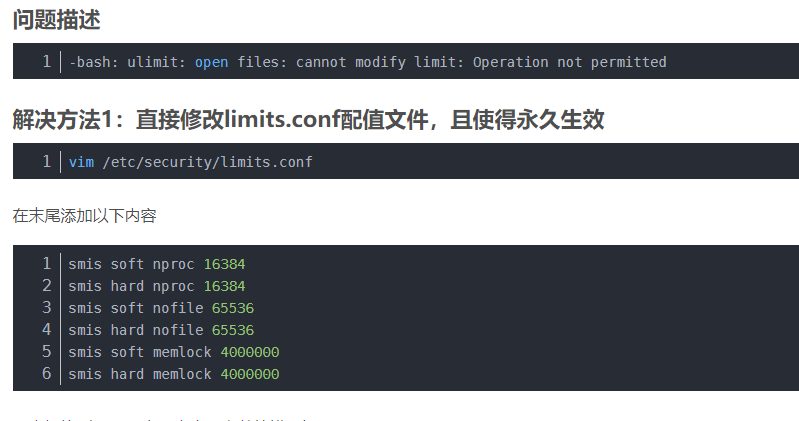
/home/omm/.bashrc: line 16: ulimit: open files: cannot modify limit: Operation not permitted
[step 6]: init datanode
install.sh: line 223: /opt/software/openGauss/bin/gs_initdb: cannot execute binary file
[step 7]: start datanode
install.sh: line 229: /opt/software/openGauss/bin/gs_ctl: cannot execute binary file
import sql file
Would you like to create a demo database (yes/no)? yes
Load demoDB [school,finance] success.
[complete successfully]: You can start or stop the database server using:
gs_ctl start|stop|restart -D $GAUSSHOME/data/single_node -Z single_node
-bash: ulimit: open files: cannot modify limit: Operation not permitted
[omm@master1 simpleInstall]$
用这个方法不太行
 评论
评论
 墨值悬赏
墨值悬赏