

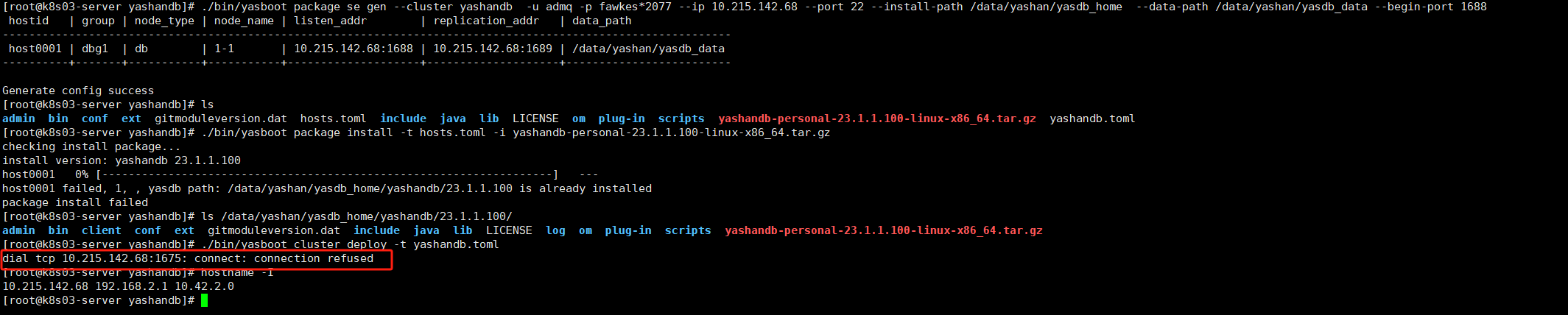

1.检查防火墙是否关闭
systemctl status firewalld
service iptables status
2.检查用户密码是否能正常访问主机
ssh ip -p port
--输入密码验证
3.查看yasom和yasagent是否在package install时正常拉起
ps -ef|grep yas
- 如果方便,请提供yasom.log,yasagent.log,yasboot.log
#日志目录
yashandb/yasdb_home/23.1.1.100/om/yashandb/log/yasom.log
yashandb/yasdb_home/23.1.1.100/om/yashandb/log/yasagent.log
install/om/yasboot.log
5.安装部署的过程建议严格按照官方手册操作-http://doc.yashandb.com/yashandb/23.1/zh/%E5%BF%AB%E9%80%9F%E4%B8%8A%E6%89%8B/%E5%AE%89%E8%A3%85%E9%83%A8%E7%BD%B2/YashanDB%E4%BA%A7%E5%93%81%E5%AE%89%E8%A3%85/YashanDB%E6%9C%8D%E5%8A%A1%E7%AB%AF%E5%AE%89%E8%A3%85.html
为了更快解决问题,可将操作的前后文以及和手册动作不一致的地方标明进行说明。
 评论
评论 有用 0
有用 0从截图来看,1675端口对应的om服务没有成功启动,建议按照文档对环境进行调整:https://doc.yashandb.com/yashandb/23.1/zh/%E5%AE%89%E8%A3%85%E5%92%8C%E5%8D%87%E7%BA%A7/%E5%AE%89%E8%A3%85%E9%83%A8%E7%BD%B2/%E5%AE%89%E8%A3%85%E5%89%8D%E5%87%86%E5%A4%87/%E5%AE%89%E8%A3%85%E5%88%9D%E5%A7%8B%E7%8E%AF%E5%A2%83%E8%B0%83%E6%95%B4.html
可以通过yasboot命令检查yasom和yasagent状态:https://doc.yashandb.com/yashandb/23.1/zh/%E5%B7%A5%E5%85%B7%E6%89%8B%E5%86%8C/yasboot/yasboot%E5%91%BD%E4%BB%A4%E4%BB%8B%E7%BB%8D/yasboot%20process.html#process-yasom-status
评论 有用 0 墨值悬赏
墨值悬赏