


/var/log/message
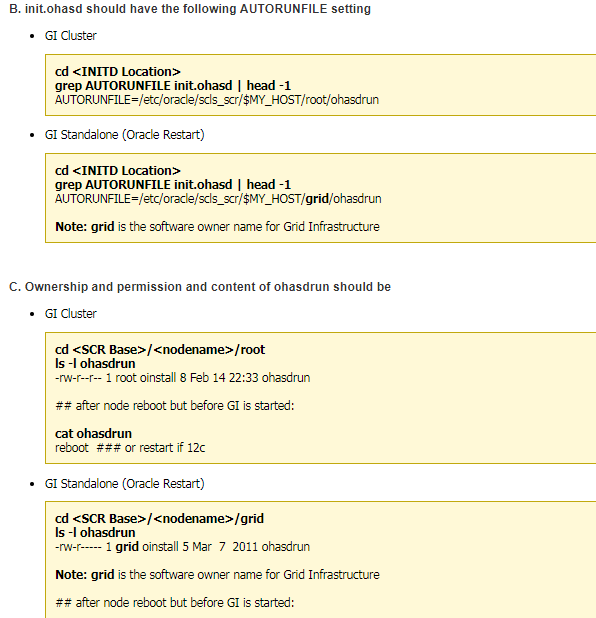
Apr 16 14:14:51 cwglrac12 logger: autorun file for ohasd is missing
/u01/app/11.2.0/grid/log/cwglrac12/ohasd
tail -30000f ohasd.log
2021-04-16 14:16:10.707: [ default][1283712800] Created alert : (:OHAS00117:) : TIMED OUT WAITING FOR OHASD MONITOR
/u01/app/11.2.0/grid/log/cwglrac12/cssd
tail -3000f ocssd.log
关键点Apr 16 14:14:51 以后没任何信息
/u01/app/11.2.0/grid/log/cwglrac12/crsd
tail -3000f ocssd.log
关键点Apr 16 14:14:51 以后没任何信息
/u01/app/11.2.0/grid/log/cwglrac12/
tail -3000f alertcwglrac12.log
2021-04-16 14:16:10.706:
[ohasd(14343)]CRS-0715:Oracle High Availability Service has timed out waiting for init.ohasd to be started.
检查进程
[root@cwglrac12 ~]# ps -ef|grep d.bin
root 14343 1 0 14:06 ? 00:00:00 /u01/app/11.2.0/grid/bin/ohasd.bin reboot
root 34104 33560 0 14:45 pts/0 00:00:00 grep d.bin
[root@cwglrac12 ~]# ps -ef|grep ohasd.bin
root 14343 1 0 14:06 ? 00:00:00 /u01/app/11.2.0/grid/bin/ohasd.bin reboot
root 34172 33560 0 14:45 pts/0 00:00:00 grep ohasd.bin
[root@cwglrac12 ~]# /u01/app/11.2.0/grid/bin/crsctl check crs
CRS-4639: Could not contact Oracle High Availability Services
[root@cwglrac12 ~]# /u01/app/11.2.0/grid/bin/crsctl status res -t
CRS-4535: Cannot communicate with Cluster Ready Services
CRS-4000: Command Status failed, or completed with errors.
解决办法
[root@cwglrac12 ~]# ps -ef| grep ohasd
root 6920 1 0 14:05 ? 00:00:00 /bin/sh /etc/init.d/init.ohasd run
root 14343 1 0 14:06 ? 00:00:00 /u01/app/11.2.0/grid/bin/ohasd.bin reboot
root 35353 33560 0 14:47 pts/0 00:00:00 grep ohasd
kill -9 6920
即可解决
请问,有什么办法可以彻底解决吗?

 评论
评论

 墨值悬赏
墨值悬赏