

MQ的整体架构
Exchange 交换机接收消息,根据路由键(RoutingKey)转发消息到绑定的队列
4.1、交换机属性:
- name:交换机名称
- Type:交换机类型direct、topic、fanout、headers
- Durability:是否需要持久化,true为持久化
- Auto Delete:当最后一个绑定到exchange上的队列删除后,自动删除该exchange
- Internal:当前exchange是否用于Rabbitmq内部使用,默认false
- Arguments:扩展参数,用于扩展AMQP协议自制定化使用
4.2、交换机类型
4.2.1、direct Exchange
- 所有发送到direct exchange的消息被转发到RouteKey中指定的Queue。
注意:direct 模式可以使用rabbitmq自带的exchange:default exchange,所以不需要将exchange进行任何绑定操作,消息传递时,RouteKey必须完全匹配才会被队列接收,否则将会被消息抛弃。
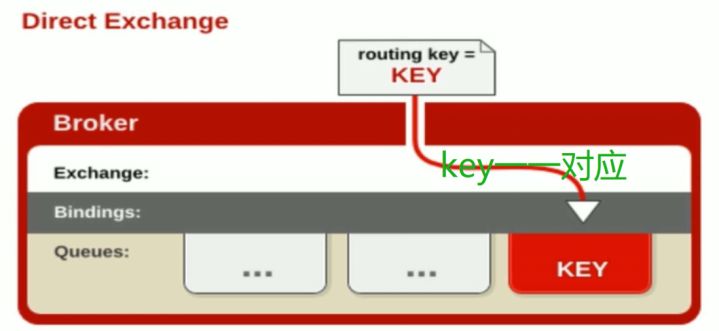
4.2.1 代码
生产者:
public class send {
public static void main(String[] args) throws java.io.IOException {
/**
* 创建连接连接到MabbitMQ
*/
ConnectionFactory factory = new ConnectionFactory();
// 设置MabbitMQ所在主机ip或者主机名
factory.setHost("192.168.60.129");
factory.setPort(5672);
factory.setUsername("guest");
factory.setPassword("guest");
// 创建一个连接
Connection connection = factory.newConnection();
// 创建一个管道
Channel channel = connection.createChannel();
//声明
String exchangeName = "test_direct_exchange" ;
String routeKey = "test.direct";
// 发送的消息
String message = "hello world!";
// 往队列中发出一条消息
channel.basicPublish(exchangeName, routeKey, null, message.getBytes());
System.out.println(" [x] Sent '" + message + "'");
// 关闭频道和连接
channel.close();
connection.close();
}
} 消费者 public class Recv { public static void main(String[] args) throws java.io.IOException, java.lang.InterruptedException {
     ConnectionFactory factory = new ConnectionFactory();
     factory.setHost("192.168.60.129");
     factory.setPort(5672);
     factory.setUsername("guest");
     factory.setPassword("guest");
        // 打开连接和创建频道,与发送端一样
        Connection connection = factory.newConnection();

        Channel channel = connection.createChannel();

        // 声明
