




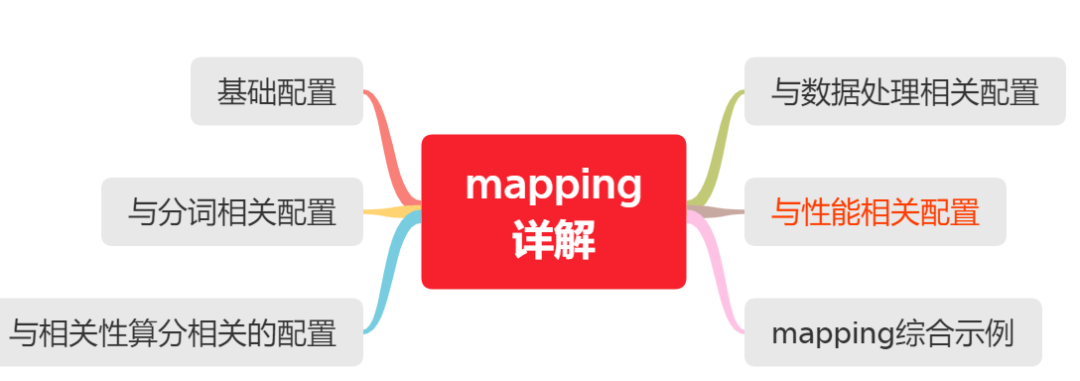
本文导航
什么是 Mapping?
Mapping 类似于数据库中的表结构定义 schema,它有以下几个作用:
1、定义索引中字段的名称; 2、定义字段的数据类型,比如 text、keyword、date;
3、倒排索引的相关配置,比如设置某个字段为不被索引;
PUT my_index
{
  "mappings": {
    "properties": {
      "manager": {
        "properties": {
          "age":  { "type": "integer" },
          "name": { "type": "text"  }
        }
      },
      "employees": {
        "type": "nested",
        "properties": {
          "age":  { "type": "integer" },
          "name": { "type": "text"  }
        }
      }
    }
  }
}
PUT my_index
{
  "mappings": {
    "properties": {
      "name": {
       # 针对 name 字段,使用 standard 分词器建立索引
        "type": "text",
        "fields": {
       # 针对 name.sub_name 字段,使用 english 分词器建立索引
          "sub_name": {
            "type":     "text",
            "analyzer": "english"
          }
        }
      }
    }
  }
}
PUT my_index
{
  "mappings": {
    "properties": {
      "title": {
        "type": "text",
        "analyzer": "whitespace"
      }
    }
  }
}
# 指定字段 title 建立倒排索引时的 analyzer 为 whitespace
PUT my_index
{
  "settings": {
    "analysis": {
      "analyzer": {
        "default": {
          "type": "english"
        }
      }
    }
  }
}
GET my_index/_search
{
  "query": {
    "match": {
      "message": {
        "query": "Quick foxes",
        "analyzer": "stop"
      }
    }
  }
}
PUT my_index
{
  "mappings": {
    "properties": {
      "title": {
        "type": "text",
        "analyzer": "whitespace",
        "search_analyzer": "simple"
      }
    }
  }
}
PUT my_index
{
  "settings": {
    "analysis": {
      "analyzer": {
        "default": {
          "type": "simple"
        },
        "default_search": {
          "type": "whitespace"
        }
      }
    }
  }
}
PUT index
{
  "settings": {
    "analysis": {
      "normalizer": {
        "my_normalizer": {
          "type": "custom",
          "char_filter": [],
          "filter": ["lowercase", "asciifolding"]
        }
      }
    }
  },
  "mappings": {
    "properties": {
      "foo": {
        "type": "keyword",
        "normalizer": "my_normalizer"
      }
    }
  }
}
# 存入文本【BÀR a】,该配置得到的倒排索引是【bar a】
PUT index/_doc/1
{
  "foo": "BÀR a"
}
# 可以检索到结果
GET index/_search
{
  "query": {
    "term": {
      "foo": "BAR"
    }
  }
}
PUT my_index
{
  "mappings": {
    "properties": {
      "title": {
        "type": "text",
        "boost": 2
      },
      "content": {
        "type": "text"
      }
    }
  }
}
1)true 动态添加新的字段--缺省;
2)false 忽略新的字段,【不会被索引】不会添加字段映射,但是会存在于_source中;
3)strict 如果遇到新字段抛出异常【推荐配置参数】。
PUT my_index { "mappings": { "my_type": { "dynamic": "strict", "properties": { "title": { "type": "string" }, "stash": { "type": "object", "dynamic": "strict" } } } } }
ES的date类型允许我们规定格式,可以使用的格式有3种:
yyyy-MM-dd HH:mm:ss
yyyy-MM-dd
epoch_millis(毫秒值)

# 规定格式如下:|| 表示或者

PUT my_index
{
  "mappings": {
    "_doc": {
      "properties": {
        "date": {
          "type":   "date",
          "format": "yyyy-MM-dd HH:mm:ss||yyyy-MM-dd||epoch_millis"
        }
      }
    }
  }
}
注意:一旦我们规定了格式,如果新增数据不符合这个格式,ES将会报错mapper_parsing_exception。
PUT my_index
{
  "mappings": {
    "properties": {
      "user_id": {
        "type":  "keyword"
      },
      "last_updated": {
        "type": "date"
      },
      "session_data": {
        "type": "object",
        "enabled": false
      }
    }
  }
}
# 任何任意数据都可以传递到该session_data字段,因为它将被完全忽略。
PUT my_index/_doc/session_1
{
  "user_id": "kimchy",
  "session_data": {
    "arbitrary_object": {
      "some_array": [ "foo", "bar", { "baz": 2 } ]
    }
  },
  "last_updated": "2015-12-06T18:20:22"
}

PUT my_index/_doc/session_2
{
  "user_id": "jpountz",
  "session_data": "none",
  "last_updated": "2015-12-06T18:22:13"
}
PUT my_index
{
  "mappings": {
    "properties": {
      "status_code": {
        "type": "keyword"
      },
      "session_id": {
        "type": "keyword",
        "doc_values": false
      }
    }
  }
}
PUT my_index/_doc/1
{
  "session_id":"关注我"
}
# 可以检索到
GET my_index/_search
{
  "query": {
    "term": {
      "session_id": {
        "value": "关注我"
      }
    }
  }
}
# 直接报错 illegal_argument_exception
GET my_index/_search
{
 "aggs": {
   "test_agg": {
     "terms": {
       "field": "session_id",
       "size": 10
     }
   }
 }
}
PUT my_index
{
  "mappings": {
    "properties": {
      "test_field": {
        "type": "keyword",
         "index": false
      }
    }
  }
}
PUT my_index/_doc/1
{
  "test_field":"关注我"
}
# 直接报错
GET my_index/_search
{
  "query": {
    "term": {
      "test_field": {
        "value": "关注我"
      }
    }
  }
}
# 可以聚合
GET my_index/_search
{
 "aggs": {
   "test_agg": {
     "terms": {
       "field": "test_field",
       "size": 10
     }
   }
 }
}
PUT my_index
{
  "mappings": {
    "properties": {
      "test_field": {
        "type": "text",
        "fielddata": true
      },
      "test_field2":{
        "type": "text"
      }
    }
  }
}
PUT my_index/_doc/1
{
  "test_field":"点个在看",
  "test_field2":"可好"
}

# 可以聚合
GET my_index/_search
{
  "size": 0,
 "aggs": {
   "test_agg": {
     "terms": {
       "field": "test_field",
       "size": 10
     }
   }
 }
}
# 聚合报错
GET my_index/_search
{
  "size": 0,
 "aggs": {
   "test_agg": {
     "terms": {
       "field": "test_field2",
       "size": 10
     }
   }
 }
}
Doc Values 是在索引时与倒排索引同时生成。也就是说 Doc Values 和 倒排索引 一样,基于 Segement 生成并且是不可变的。同时 Doc Values 和 倒排索引 一样序列化到磁盘,这样对性能和扩展性有很大帮助。Doc Values 通过序列化把数据结构持久化到磁盘,我们可以充分利用操作系统的内存,而不是 JVM 的 Heap 。 当 working set 远小于系统的可用内存,系统会自动将 Doc Values 驻留在内存中,使得其读写十分快速;不过,当其远大于可用内存时,系统会根据需要从磁盘读取 Doc Values,然后选择性放到分页缓存中。很显然,这样性能会比在内存中差很多,但是它的大小就不再局限于服务器的内存了。
PUT my_index
{
  "mappings": {
    "properties": {
      "my_field": {
        "type": "text",
        "fields": {
         # 该字段只用于聚合、排序等,所以关闭了index
          "keyword": {
            "type": "keyword",
            "index":false
          }
        }
      }
    }
  }
}
PUT my_index/_doc/1
{
  "my_field":"点个在看,可好"
}

# 可以聚合
GET my_index/_search
{
  "size": 0,
 "aggs": {
   "test_agg": {
     "terms": {
       "field": "my_field.keyword",
       "size": 10
     }
   }
 }
}
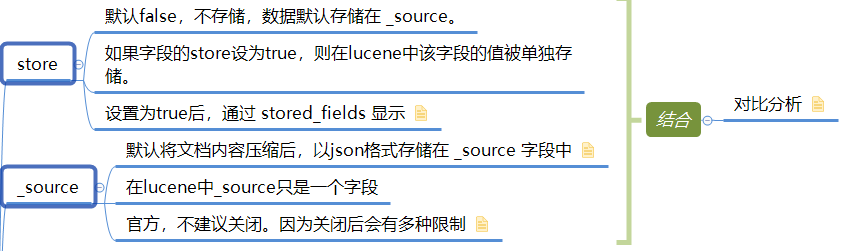
如果你的文档长度很长,存储 _source 或者从 _source 中获取 field 的代价很大,你可以显式的将某些 field 的 store 属性设置为 yes。此时只查询这一个字段的值的,效率高。
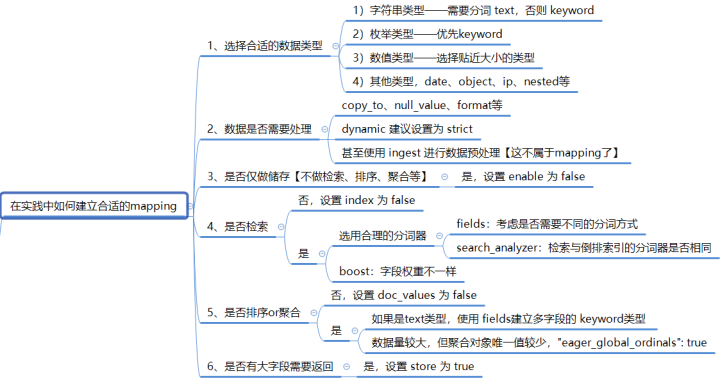
PUT blogs_index/
{
  "settings": {
    "index": {
      "number_of_shards": 1,
      "number_of_replicas": 1
    },
    "analysis": {
      "analyzer": {
        "pinyin_analyzer": {
          "tokenizer": "standard",
          "filter": [
            "my_pinyin"
          ]
        }
      },
      "filter": {
        "my_pinyin": {
          "type": "pinyin",
          "keep_first_letter": true,
          "keep_separate_first_letter": true,
          "keep_full_pinyin": true,
          "keep_original": true,
          "limit_first_letter_length": 16,
          "lowercase": true
        }
      }
    }
  },
  "mappings": {
    # 禁止新增字段
    "dynamic": "strict",
    "properties": {
      "id": {
        "type": "integer"
      },
      "author": {
        "type": "text",
        # 对作者使用拼音分词
        "analyzer": "pinyin_analyzer",
        "fields": {
          # 建立多字段,用于聚合
          "keyword": {
            "type": "keyword",
            "index":false
          }
        }
      },
      # 博客的分类,支持 term 查询
      "blog_sort": {
        "type": "keyword",
        # 需要聚合,且数据量较大,但唯一值较少
        "eager_global_ordinals": true,
        # 提升该字段的权重
        "boost": 3
      },
      "title": {
        "type": "text",
        "analyzer": "ik_max_word",
        # 检索的分词没必要细粒度,提升效率
        "search_analyzer": "ik_smart",
        # 对 标题 不需要聚合、排序
        "doc_values": false,
        # 提升该字段的权重
        "boost": 5
      },
      "content": {
        "type": "text",
        "analyzer": "ik_max_word",
        "search_analyzer": "ik_smart",
        # 博客内容为大字段,单独存储,用于查询返回
        "store": true,
        # 不需要聚合、排序
        "doc_values": false
      },
      "update_time":{
        "type": "date",
        # 规定格式,提高可读性
        "format": ["yyyy-MM-dd HH:mm:ss"],
        # 该字段仅用于显示,不用检索、聚合、排序【非object类型,不能使用 enabled 参数】
        "index":false,
        "doc_values": false
      },
      "create_time":{
        "type": "date",
        "format": ["yyyy-MM-dd HH:mm:ss"]
      }
    }
  }
}
完整版《Mapping参数详解》,公号后台回复【ES】即可获取。
待续

留言区
文章转载自方才编程,如果涉嫌侵权,请发送邮件至:contact@modb.pro进行举报,并提供相关证据,一经查实,墨天轮将立刻删除相关内容。
