



目录
- 前言
- 一、基础环境
- 二、环境准备
- 1、配置hosts
- 2、创建用户和组
- 3、配置环境变量
- 4、 创建目录
- 5、修改内核参数
- 6、修改用户资源限制
- 7、配置登陆验证模块
- 8、安装依赖软件
- 9、配置SSH互信
- 10、安装配置oracle asmlib
- 10、创建共享磁盘
- 三、grid软件安装
- 四、oracle软件安装
- 五、Oracle数据库安装
前言
目前生产上有用oracle 12.1.0.2,之前的测试环境也删除了,正好这次机会,把文档写一写,也在自己笔记本电脑上搭建一套RAC。
一、基础环境
为了和生产环境一直,选用以下基础环境
操作系统:oracle Linux 6.8

存储使用vmware配置的共享存储,吐槽下,vmware配置共享存储还的需要修改配置文件,不人性化啊。
具体配置详见
VMware Workstation 17 Pro 添加共享存储
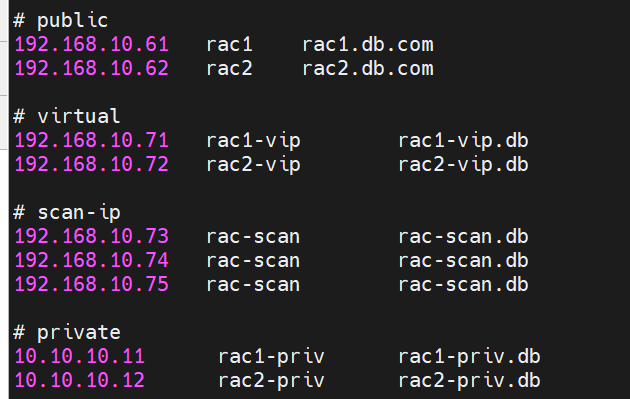
IP地址分配
| 节点 | Public IP | Virtual IP | Private IP | Scan IP |
|---|---|---|---|---|
| rac1 | 192.168.10.61 | 192.168.10.71 | 10.10.10.11 | 192.168.10.73 |
| rac2 | 192.168.10.62 | 192.168.10.72 | 10.10.10.12 | 192.168.10.74 192.168.10.74 |
二、环境准备
1、配置hosts
2个节点的/etc/hosts添加以下内容
# public
192.168.10.61   rac1    rac1.db.com
192.168.10.62   rac2    rac2.db.com

# virtual
192.168.10.71   rac1-vip        rac1-vip.db
192.168.10.72   rac2-vip        rac2-vip.db

# scan-ip
192.168.10.73   rac-scan        rac-scan.db
192.168.10.74   rac-scan        rac-scan.db
192.168.10.75   rac-scan        rac-scan.db

# private
10.10.10.11      rac1-priv      rac1-priv.db
10.10.10.12      rac2-priv      rac2-priv.db
2、创建用户和组
- 创建组
groupadd -g 1001 oinstall
groupadd -g 1002 dba
groupadd -g 1003 oper
groupadd -g 1004 asmadmin
groupadd -g 1005 asmdba
groupadd -g 1006 asmoper
- 创建用户
useradd -u 501 -g oinstall -G asmadmin,asmdba,asmoper,dba grid
useradd -u 502 -g oinstall -G dba,oper,asmdba oracle
- 修改密码
echo '123456' |passwd --stdin oracle
echo '123456' |passwd --stdin grid
3、配置环境变量
- 配置grid用户
2个节点都要添加
cat >> /home/grid/.bash_profile << EOF
export ORACLE_BASE=/u01/app/grid
export ORACLE_HOME=/u01/app/12.1.0/grid
export ORACLE_SID=ASM1
export PATH=$ORACLE_HOME/bin:/usr/sbin:\$PATH
export LC_ALL="en_US.UTF-8"
export LANG="en_US.UTF-8"
export NLS_LANG="AMERICAN_AMERICA.AL32UTF8"
set -o vi
EOF
- 配置oracle用户
cat >> /home/oracle/.bash_profile << EOF
export ORACLE_HOME=$ORACLE_BASE/product/12.1.0/dbhome_1
export ORACLE_SID=RACDB1
export PATH=$ORACLE_HOME/bin:/usr/sbin:$PATH
export LD_LIBRARY_PATH=$ORACLE_HOME/lib:/lib:/usr/lib
export CLASSPATH=$ORACLE_HOME/JRE:$ORACLE_HOME/jlib:$ORACLE_HOME/rdbms/jlib
export LC_ALL="en_US.UTF-8"
export LANG="en_US.UTF-8"
export NLS_LANG="AMERICAN_AMERICA.AL32UTF8"
set -o vi
E0F
4、 创建目录
mkdir -p /u01/app/oraInventory
mkdir -p /u01/app/oracle
修改目录权限
chown -R grid. /u01
chown -R oracle. /u01/app/oracle
5、修改内核参数
cat >> /etc/sysctl.conf <<EOF
# For Oracle 12c RAC
#vm.nr_hugepages = 26000
fs.aio-max-nr = 1048576
fs.file-max = 6815744
kernel.shmall = 8589934592
kernel.shmmax = 21474836480
kernel.shmmni = 4096
kernel.sem = 250 32000 100 128
net.ipv4.ip_local_port_range = 1024 65500
net.core.rmem_default = 262144
net.core.rmem_max = 4194304
net.core.wmem_default = 262144
net.core.wmem_max = 1048576
EOF
使修改的参数生效
sysctl -p
6、修改用户资源限制
cat >> /etc/security/limits.conf <<EOF
# For Oracle 12c
oracle soft nproc 16384
oracle hard nproc 16384
oracle soft nofile 65536
oracle hard nofile 65536
oracle soft memlock 475482060
oracle hard memlock 475482060
grid soft nproc 16384
grid hard nproc 16384
grid soft nofile 65536
grid hard nofile 65536
grid soft memlock 475482060
grid hard memlock 475482060
EOF
7、配置登陆验证模块
cat >> /etc/pam.d/login <<EOF
# For oracle 12c
session    required    pam_limits.so
EOF
8、安装依赖软件
yum -y install binutils compat-libcap1 compat-libstdc++-33* gcc gcc-c++ glibc* glibc-devel* ksh libgcc* libstdc++* libstdc++-devel* libaio* libaio-devel-* make sysstat unixODBC-* unixODBC-devel-* elfutils-libelf-devel elfutils-libelf
9、配置SSH互信
节点1和节点2中、oracle和grid用户下分别执行
ssh-keygen
ssh-copy-id rac1
ssh-copy-id rac2
10、安装配置oracle asmlib
- 下载安装
yum -y install kmod-oracleasm
yum install -y oracleasm-support
下载oracleasmlib-2.0.12-1.el6.x86_64.rpm并上传后使用rpm进行安装
[root@rac2 ~]# rpm -ivh oracleasmlib-2.0.12-1.el6.x86_64.rpm

2. 配置
/usr/sbin/oracleasm configure -i
Configuring the Oracle ASM library driver.

This will configure the on-boot properties of the Oracle ASM library
driver.  The following questions will determine whether the driver is
loaded on boot and what permissions it will have.  The current values
will be shown in brackets ('[]').  Hitting <ENTER> without typing an
answer will keep that current value.  Ctrl-C will abort.

Default user to own the driver interface []: grid
Default group to own the driver interface []: asmadmin
Start Oracle ASM library driver on boot (y/n) [n]: y
Scan for Oracle ASM disks on boot (y/n) [y]: y
Writing Oracle ASM library driver configuration: done
初始化
/usr/sbin/oracleasm init
Creating /dev/oracleasm mount point: /dev/oracleasm
Loading module "oracleasm": oracleasm
Configuring "oracleasm" to use device physical block size
Mounting ASMlib driver filesystem: /dev/oracleasm
10、创建共享磁盘
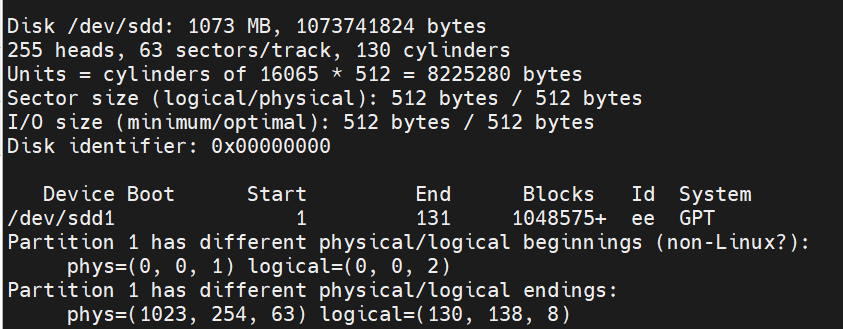
- 分区
parted /dev/sdd mklabel gpt
parted /dev/sdd mkpart primary 0% 100%
2. 创建共享磁盘
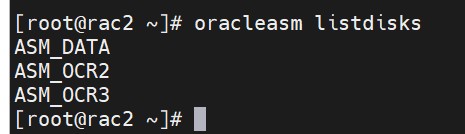
oracleasm createdisk asm_data /dev/sdd1
查看共享磁盘
oracleasm listdisks
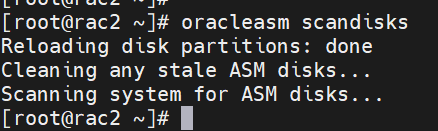
节点2进行扫描共享磁盘
oracleasm scandisks
三、grid软件安装
1、使用grid用户进行环境检查
[grid@rac1 grid]$ ./runcluvfy.sh stage -pre crsinst -n rac1,rac2 -verbose -fixup
Performing pre-checks for cluster services setup
Checking node reachability...
Check: Node reachability from node "rac1"
Destination Node Reachable?
------------------------------------ ------------------------
rac1 yes
rac2 yes
Result: Node reachability check passed from node "rac1"
Checking user equivalence...
Check: User equivalence for user "grid"
Node Name Status
------------------------------------ ------------------------
rac2 passed
rac1 passed
Result: User equivalence check passed for user "grid"
Checking node connectivity...
Checking hosts config file...
Node Name Status
------------------------------------ ------------------------
rac1 passed
rac2 passed
Verification of the hosts config file successful
Interface information for node "rac1"
Name IP Address Subnet Gateway Def. Gateway HW Address MTU
------ --------------- --------------- --------------- --------------- ----------------- ------
eth1 192.168.10.61 192.168.10.0 0.0.0.0 192.168.10.2 00:0C:29:F5:02:DD 1500
eth2 10.10.10.11 10.10.10.0 0.0.0.0 192.168.10.2 00:0C:29:F5:02:E7 1500
Interface information for node "rac2"
Name IP Address Subnet Gateway Def. Gateway HW Address MTU
------ --------------- --------------- --------------- --------------- ----------------- ------
eth1 192.168.10.62 192.168.10.0 0.0.0.0 192.168.10.2 00:0C:29:8F:7E:9F 1500
eth2 10.10.10.12 10.10.10.0 0.0.0.0 192.168.10.2 00:0C:29:8F:7E:A9 1500
Check: Node connectivity of subnet "192.168.10.0"
Source Destination Connected?
------------------------------ ------------------------------ ----------------
rac1[192.168.10.61] rac2[192.168.10.62] yes
Result: Node connectivity passed for subnet "192.168.10.0" with node(s) rac1,rac2
Check: TCP connectivity of subnet "192.168.10.0"
Source Destination Connected?
------------------------------ ------------------------------ ----------------
rac1 : 192.168.10.61 rac1 : 192.168.10.61 passed
rac2 : 192.168.10.62 rac1 : 192.168.10.61 failed
ERROR:
PRVG-11850 : The system call "connect" failed with error "113" while executing exectask on node "rac2"
No route to host
rac1 : 192.168.10.61 rac2 : 192.168.10.62 failed
ERROR:
PRVG-11850 : The system call "connect" failed with error "113" while executing exectask on node "rac1"
No route to host
rac2 : 192.168.10.62 rac2 : 192.168.10.62 passed
Result: TCP connectivity check failed for subnet "192.168.10.0"
Check: Node connectivity of subnet "10.10.10.0"
Source Destination Connected?
------------------------------ ------------------------------ ----------------
rac1[10.10.10.11] rac2[10.10.10.12] yes
Result: Node connectivity passed for subnet "10.10.10.0" with node(s) rac1,rac2
Check: TCP connectivity of subnet "10.10.10.0"
Source Destination Connected?
------------------------------ ------------------------------ ----------------
rac1 : 10.10.10.11 rac1 : 10.10.10.11 passed
rac2 : 10.10.10.12 rac1 : 10.10.10.11 failed
ERROR:
PRVG-11850 : The system call "connect" failed with error "113" while executing exectask on node "rac2"
No route to host
rac1 : 10.10.10.11 rac2 : 10.10.10.12 failed
ERROR:
PRVG-11850 : The system call "connect" failed with error "113" while executing exectask on node "rac1"
No route to host
rac2 : 10.10.10.12 rac2 : 10.10.10.12 passed
Result: TCP connectivity check failed for subnet "10.10.10.0"
Interfaces found on subnet "192.168.10.0" that are likely candidates for VIP are:
rac1 eth1:192.168.10.61
rac2 eth1:192.168.10.62
WARNING:
Could not find a suitable set of interfaces for the private interconnect
Checking subnet mask consistency...
Subnet mask consistency check passed for subnet "192.168.10.0".
Subnet mask consistency check passed for subnet "10.10.10.0".
Subnet mask consistency check passed.
Result: Node connectivity check failed
Checking multicast communication...
Checking subnet "192.168.10.0" for multicast communication with multicast group "224.0.0.251"...
PRVG-11138 : Interface "192.168.10.61" on node "rac1" is not able to communicate with interface "192.168.10.61" on node "rac1" over multicast group "224.0.0.251"
PRVG-11138 : Interface "192.168.10.61" on node "rac1" is not able to communicate with interface "192.168.10.62" on node "rac2" over multicast group "224.0.0.251"
PRVG-11138 : Interface "192.168.10.62" on node "rac2" is not able to communicate with interface "192.168.10.61" on node "rac1" over multicast group "224.0.0.251"
PRVG-11138 : Interface "192.168.10.62" on node "rac2" is not able to communicate with interface "192.168.10.62" on node "rac2" over multicast group "224.0.0.251"
Checking subnet "10.10.10.0" for multicast communication with multicast group "224.0.0.251"...
PRVG-11138 : Interface "10.10.10.11" on node "rac1" is not able to communicate with interface "10.10.10.11" on node "rac1" over multicast group "224.0.0.251"
PRVG-11138 : Interface "10.10.10.11" on node "rac1" is not able to communicate with interface "10.10.10.12" on node "rac2" over multicast group "224.0.0.251"
PRVG-11138 : Interface "10.10.10.12" on node "rac2" is not able to communicate with interface "10.10.10.11" on node "rac1" over multicast group "224.0.0.251"
PRVG-11138 : Interface "10.10.10.12" on node "rac2" is not able to communicate with interface "10.10.10.12" on node "rac2" over multicast group "224.0.0.251"
Checking ASMLib configuration.
Node Name Status
------------------------------------ ------------------------
rac1 passed
rac2 passed
Result: Check for ASMLib configuration passed.
Check: Total memory
Node Name Available Required Status
------------ ------------------------ ------------------------ ----------
rac2 7.7961GB (8174804.0KB) 4GB (4194304.0KB) passed
rac1 7.7961GB (8174804.0KB) 4GB (4194304.0KB) passed
Result: Total memory check passed
Check: Available memory
Node Name Available Required Status
------------ ------------------------ ------------------------ ----------
rac2 7.5224GB (7887840.0KB) 50MB (51200.0KB) passed
rac1 7.0555GB (7398204.0KB) 50MB (51200.0KB) passed
Result: Available memory check passed
Check: Swap space
Node Name Available Required Status
------------ ------------------------ ------------------------ ----------
rac2 6GB (6291452.0KB) 7.7961GB (8174804.0KB) failed
rac1 6GB (6291452.0KB) 7.7961GB (8174804.0KB) failed
Result: Swap space check failed
Check: Free disk space for "rac2:/usr,rac2:/var,rac2:/etc,rac2:/sbin,rac2:/tmp"
Path Node Name Mount point Available Required Status
---------------- ------------ ------------ ------------ ------------ ------------
/usr rac2 / 46.5928GB 1.0635GB passed
/var rac2 / 46.5928GB 1.0635GB passed
/etc rac2 / 46.5928GB 1.0635GB passed
/sbin rac2 / 46.5928GB 1.0635GB passed
/tmp rac2 / 46.5928GB 1.0635GB passed
Result: Free disk space check passed for "rac2:/usr,rac2:/var,rac2:/etc,rac2:/sbin,rac2:/tmp"
Check: Free disk space for "rac1:/usr,rac1:/var,rac1:/etc,rac1:/sbin,rac1:/tmp"
Path Node Name Mount point Available Required Status
---------------- ------------ ------------ ------------ ------------ ------------
/usr rac1 / 38.0964GB 1.0635GB passed
/var rac1 / 38.0964GB 1.0635GB passed
/etc rac1 / 38.0964GB 1.0635GB passed
/sbin rac1 / 38.0964GB 1.0635GB passed
/tmp rac1 / 38.0964GB 1.0635GB passed
Result: Free disk space check passed for "rac1:/usr,rac1:/var,rac1:/etc,rac1:/sbin,rac1:/tmp"
Check: User existence for "grid"
Node Name Status Comment
------------ ------------------------ ------------------------
rac2 passed exists(501)
rac1 passed exists(501)
Checking for multiple users with UID value 501
Result: Check for multiple users with UID value 501 passed
Result: User existence check passed for "grid"
Check: Group existence for "oinstall"
Node Name Status Comment
------------ ------------------------ ------------------------
rac2 passed exists
rac1 passed exists
Result: Group existence check passed for "oinstall"
Check: Group existence for "dba"
Node Name Status Comment
------------ ------------------------ ------------------------
rac2 passed exists
rac1 passed exists
Result: Group existence check passed for "dba"
Check: Membership of user "grid" in group "oinstall" [as Primary]
Node Name User Exists Group Exists User in Group Primary Status
---------------- ------------ ------------ ------------ ------------ ------------
rac2 yes yes yes yes passed
rac1 yes yes yes yes passed
Result: Membership check for user "grid" in group "oinstall" [as Primary] passed
Check: Membership of user "grid" in group "dba"
Node Name User Exists Group Exists User in Group Status
---------------- ------------ ------------ ------------ ----------------
rac2 yes yes yes passed
rac1 yes yes yes passed
Result: Membership check for user "grid" in group "dba" passed
Check: Run level
Node Name run level Required Status
------------ ------------------------ ------------------------ ----------
rac2 5 3,5 passed
rac1 5 3,5 passed
Result: Run level check passed
Check: Hard limits for "maximum open file descriptors"
Node Name Type Available Required Status
---------------- ------------ ------------ ------------ ----------------
rac2 hard 65536 65536 passed
rac1 hard 65536 65536 passed
Result: Hard limits check passed for "maximum open file descriptors"
Check: Soft limits for "maximum open file descriptors"
Node Name Type Available Required Status
---------------- ------------ ------------ ------------ ----------------
rac2 soft 65536 1024 passed
rac1 soft 65536 1024 passed
Result: Soft limits check passed for "maximum open file descriptors"
Check: Hard limits for "maximum user processes"
Node Name Type Available Required Status
---------------- ------------ ------------ ------------ ----------------
rac2 hard 16384 16384 passed
rac1 hard 16384 16384 passed
Result: Hard limits check passed for "maximum user processes"
Check: Soft limits for "maximum user processes"
Node Name Type Available Required Status
---------------- ------------ ------------ ------------ ----------------
rac2 soft 16384 2047 passed
rac1 soft 16384 2047 passed
Result: Soft limits check passed for "maximum user processes"
Check: System architecture
Node Name Available Required Status
------------ ------------------------ ------------------------ ----------
rac2 x86_64 x86_64 passed
rac1 x86_64 x86_64 passed
Result: System architecture check passed
Check: Kernel version
Node Name Available Required Status
------------ ------------------------ ------------------------ ----------
rac2 4.1.12-37.4.1.el6uek.x86_64 2.6.39 passed
rac1 4.1.12-37.4.1.el6uek.x86_64 2.6.39 passed
Result: Kernel version check passed
Check: Kernel parameter for "semmsl"
Node Name Current Configured Required Status Comment
---------------- ------------ ------------ ------------ ------------ ------------
rac1 250 250 250 passed
rac2 250 250 250 passed
Result: Kernel parameter check passed for "semmsl"
Check: Kernel parameter for "semmns"
Node Name Current Configured Required Status Comment
---------------- ------------ ------------ ------------ ------------ ------------
rac1 32000 32000 32000 passed
rac2 32000 32000 32000 passed
Result: Kernel parameter check passed for "semmns"
Check: Kernel parameter for "semopm"
Node Name Current Configured Required Status Comment
---------------- ------------ ------------ ------------ ------------ ------------
rac1 100 100 100 passed
rac2 100 100 100 passed
Result: Kernel parameter check passed for "semopm"
Check: Kernel parameter for "semmni"
Node Name Current Configured Required Status Comment
---------------- ------------ ------------ ------------ ------------ ------------
rac1 128 128 128 passed
rac2 128 128 128 passed
Result: Kernel parameter check passed for "semmni"
Check: Kernel parameter for "shmmax"
Node Name Current Configured Required Status Comment
---------------- ------------ ------------ ------------ ------------ ------------
rac1 21474836480 21474836480 4185499648 passed
rac2 21474836480 21474836480 4185499648 passed
Result: Kernel parameter check passed for "shmmax"
Check: Kernel parameter for "shmmni"
Node Name Current Configured Required Status Comment
---------------- ------------ ------------ ------------ ------------ ------------
rac1 4096 4096 4096 passed
rac2 4096 4096 4096 passed
Result: Kernel parameter check passed for "shmmni"
Check: Kernel parameter for "shmall"
Node Name Current Configured Required Status Comment
---------------- ------------ ------------ ------------ ------------ ------------
rac1 8589934592 8589934592 817480 passed
rac2 8589934592 8589934592 817480 passed
Result: Kernel parameter check passed for "shmall"
Check: Kernel parameter for "file-max"
Node Name Current Configured Required Status Comment
---------------- ------------ ------------ ------------ ------------ ------------
rac1 6815744 6815744 6815744 passed
rac2 6815744 6815744 6815744 passed
Result: Kernel parameter check passed for "file-max"
Check: Kernel parameter for "ip_local_port_range"
Node Name Current Configured Required Status Comment
---------------- ------------ ------------ ------------ ------------ ------------
rac1 between 9000 & 65535 between 9000 & 65535 between 9000 & 65535 passed
rac2 between 9000 & 65535 between 9000 & 65535 between 9000 & 65535 passed
Result: Kernel parameter check passed for "ip_local_port_range"
Check: Kernel parameter for "rmem_default"
Node Name Current Configured Required Status Comment
---------------- ------------ ------------ ------------ ------------ ------------
rac1 262144 262144 262144 passed
rac2 262144 262144 262144 passed
Result: Kernel parameter check passed for "rmem_default"
Check: Kernel parameter for "rmem_max"
Node Name Current Configured Required Status Comment
---------------- ------------ ------------ ------------ ------------ ------------
rac1 4194304 4194304 4194304 passed
rac2 4194304 4194304 4194304 passed
Result: Kernel parameter check passed for "rmem_max"
Check: Kernel parameter for "wmem_default"
Node Name Current Configured Required Status Comment
---------------- ------------ ------------ ------------ ------------ ------------
rac1 262144 262144 262144 passed
rac2 262144 262144 262144 passed
Result: Kernel parameter check passed for "wmem_default"
Check: Kernel parameter for "wmem_max"
Node Name Current Configured Required Status Comment
---------------- ------------ ------------ ------------ ------------ ------------
rac1 1048576 1048576 1048576 passed
rac2 1048576 1048576 1048576 passed
Result: Kernel parameter check passed for "wmem_max"
Check: Kernel parameter for "aio-max-nr"
Node Name Current Configured Required Status Comment
---------------- ------------ ------------ ------------ ------------ ------------
rac1 1048576 1048576 1048576 passed
rac2 1048576 1048576 1048576 passed
Result: Kernel parameter check passed for "aio-max-nr"
Check: Kernel parameter for "panic_on_oops"
Node Name Current Configured Required Status Comment
---------------- ------------ ------------ ------------ ------------ ------------
rac1 1 1 1 passed
rac2 1 1 1 passed
Result: Kernel parameter check passed for "panic_on_oops"
Check: Package existence for "binutils"
Node Name Available Required Status
------------ ------------------------ ------------------------ ----------
rac2 binutils-2.20.51.0.2-5.48.0.3.el6_10.1 binutils-2.20.51.0.2 passed
rac1 binutils-2.20.51.0.2-5.48.0.3.el6_10.1 binutils-2.20.51.0.2 passed
Result: Package existence check passed for "binutils"
Check: Package existence for "compat-libcap1"
Node Name Available Required Status
------------ ------------------------ ------------------------ ----------
rac2 compat-libcap1-1.10-1 compat-libcap1-1.10 passed
rac1 compat-libcap1-1.10-1 compat-libcap1-1.10 passed
Result: Package existence check passed for "compat-libcap1"
Check: Package existence for "compat-libstdc++-33(x86_64)"
Node Name Available Required Status
------------ ------------------------ ------------------------ ----------
rac2 compat-libstdc++-33(x86_64)-3.2.3-69.el6 compat-libstdc++-33(x86_64)-3.2.3 passed
rac1 compat-libstdc++-33(x86_64)-3.2.3-69.el6 compat-libstdc++-33(x86_64)-3.2.3 passed
Result: Package existence check passed for "compat-libstdc++-33(x86_64)"
Check: Package existence for "libgcc(x86_64)"
Node Name Available Required Status
------------ ------------------------ ------------------------ ----------
rac2 libgcc(x86_64)-4.4.7-23.0.1.el6 libgcc(x86_64)-4.4.4 passed
rac1 libgcc(x86_64)-4.4.7-23.0.1.el6 libgcc(x86_64)-4.4.4 passed
Result: Package existence check passed for "libgcc(x86_64)"
Check: Package existence for "libstdc++(x86_64)"
Node Name Available Required Status
------------ ------------------------ ------------------------ ----------
rac2 libstdc++(x86_64)-4.4.7-23.0.1.el6 libstdc++(x86_64)-4.4.4 passed
rac1 libstdc++(x86_64)-4.4.7-23.0.1.el6 libstdc++(x86_64)-4.4.4 passed
Result: Package existence check passed for "libstdc++(x86_64)"
Check: Package existence for "libstdc++-devel(x86_64)"
Node Name Available Required Status
------------ ------------------------ ------------------------ ----------
rac2 libstdc++-devel(x86_64)-4.4.7-23.0.1.el6 libstdc++-devel(x86_64)-4.4.4 passed
rac1 libstdc++-devel(x86_64)-4.4.7-23.0.1.el6 libstdc++-devel(x86_64)-4.4.4 passed
Result: Package existence check passed for "libstdc++-devel(x86_64)"
Check: Package existence for "sysstat"
Node Name Available Required Status
------------ ------------------------ ------------------------ ----------
rac2 sysstat-9.0.4-33.0.1.el6_9.1 sysstat-9.0.4 passed
rac1 sysstat-9.0.4-33.0.1.el6_9.1 sysstat-9.0.4 passed
Result: Package existence check passed for "sysstat"
Check: Package existence for "gcc"
Node Name Available Required Status
------------ ------------------------ ------------------------ ----------
rac2 gcc-4.4.7-23.0.1.el6 gcc-4.4.4 passed
rac1 gcc-4.4.7-23.0.1.el6 gcc-4.4.4 passed
Result: Package existence check passed for "gcc"
Check: Package existence for "gcc-c++"
Node Name Available Required Status
------------ ------------------------ ------------------------ ----------
rac2 gcc-c++-4.4.7-23.0.1.el6 gcc-c++-4.4.4 passed
rac1 gcc-c++-4.4.7-23.0.1.el6 gcc-c++-4.4.4 passed
Result: Package existence check passed for "gcc-c++"
Check: Package existence for "ksh"
Node Name Available Required Status
------------ ------------------------ ------------------------ ----------
rac2 ksh ksh passed
rac1 ksh ksh passed
Result: Package existence check passed for "ksh"
Check: Package existence for "make"
Node Name Available Required Status
------------ ------------------------ ------------------------ ----------
rac2 make-3.81-23.el6 make-3.81 passed
rac1 make-3.81-23.el6 make-3.81 passed
Result: Package existence check passed for "make"
Check: Package existence for "glibc(x86_64)"
Node Name Available Required Status
------------ ------------------------ ------------------------ ----------
rac2 glibc(x86_64)-2.12-1.212.0.3.el6_10.3 glibc(x86_64)-2.12 passed
rac1 glibc(x86_64)-2.12-1.212.0.3.el6_10.3 glibc(x86_64)-2.12 passed
Result: Package existence check passed for "glibc(x86_64)"
Check: Package existence for "glibc-devel(x86_64)"
Node Name Available Required Status
------------ ------------------------ ------------------------ ----------
rac2 glibc-devel(x86_64)-2.12-1.212.0.3.el6_10.3 glibc-devel(x86_64)-2.12 passed
rac1 glibc-devel(x86_64)-2.12-1.212.0.3.el6_10.3 glibc-devel(x86_64)-2.12 passed
Result: Package existence check passed for "glibc-devel(x86_64)"
Check: Package existence for "libaio(x86_64)"
Node Name Available Required Status
------------ ------------------------ ------------------------ ----------
rac2 libaio(x86_64)-0.3.107-10.el6 libaio(x86_64)-0.3.107 passed
rac1 libaio(x86_64)-0.3.107-10.el6 libaio(x86_64)-0.3.107 passed
Result: Package existence check passed for "libaio(x86_64)"
Check: Package existence for "libaio-devel(x86_64)"
Node Name Available Required Status
------------ ------------------------ ------------------------ ----------
rac2 libaio-devel(x86_64)-0.3.107-10.el6 libaio-devel(x86_64)-0.3.107 passed
rac1 libaio-devel(x86_64)-0.3.107-10.el6 libaio-devel(x86_64)-0.3.107 passed
Result: Package existence check passed for "libaio-devel(x86_64)"
Check: Package existence for "nfs-utils"
Node Name Available Required Status
------------ ------------------------ ------------------------ ----------
rac2 nfs-utils-1.2.3-70.0.1.el6 nfs-utils-1.2.3-15 passed
rac1 nfs-utils-1.2.3-70.0.1.el6 nfs-utils-1.2.3-15 passed
Result: Package existence check passed for "nfs-utils"
Checking availability of ports "6200,6100" required for component "Oracle Notification Service (ONS)"
Node Name Port Number Protocol Available Status
---------------- ------------ ------------ ------------ ----------------
rac2 6200 TCP yes successful
rac1 6200 TCP yes successful
rac2 6100 TCP yes successful
rac1 6100 TCP yes successful
Result: Port availability check passed for ports "6200,6100"
Checking availability of ports "42424" required for component "Oracle Cluster Synchronization Services (CSSD)"
Node Name Port Number Protocol Available Status
---------------- ------------ ------------ ------------ ----------------
rac2 42424 TCP yes successful
rac1 42424 TCP yes successful
Result: Port availability check passed for ports "42424"
Checking for multiple users with UID value 0
Result: Check for multiple users with UID value 0 passed
Check: Current group ID
Result: Current group ID check passed
Starting check for consistency of primary group of root user
Node Name Status
------------------------------------ ------------------------
rac2 passed
rac1 passed
Check for consistency of root user's primary group passed
Starting Clock synchronization checks using Network Time Protocol(NTP)...
Checking existence of NTP configuration file "/etc/ntp.conf" across nodes
Node Name File exists?
------------------------------------ ------------------------
rac2 yes
rac1 yes
The NTP configuration file "/etc/ntp.conf" is available on all nodes
NTP configuration file "/etc/ntp.conf" existence check passed
No NTP Daemons or Services were found to be running
PRVF-5507 : NTP daemon or service is not running on any node but NTP configuration file exists on the following node(s):
rac2,rac1
Result: Clock synchronization check using Network Time Protocol(NTP) failed
Checking Core file name pattern consistency...
Core file name pattern consistency check passed.
Checking to make sure user "grid" is not in "root" group
Node Name Status Comment
------------ ------------------------ ------------------------
rac2 passed does not exist
rac1 passed does not exist
Result: User "grid" is not part of "root" group. Check passed
Check default user file creation mask
Node Name Available Required Comment
------------ ------------------------ ------------------------ ----------
rac2 0022 0022 passed
rac1 0022 0022 passed
Result: Default user file creation mask check passed
Checking integrity of file "/etc/resolv.conf" across nodes
Checking the file "/etc/resolv.conf" to make sure only one of 'domain' and 'search' entries is defined
"domain" and "search" entries do not coexist in any "/etc/resolv.conf" file
Checking if 'domain' entry in file "/etc/resolv.conf" is consistent across the nodes...
"domain" entry does not exist in any "/etc/resolv.conf" file
Checking if 'search' entry in file "/etc/resolv.conf" is consistent across the nodes...
Checking file "/etc/resolv.conf" to make sure that only one 'search' entry is defined
More than one "search" entry does not exist in any "/etc/resolv.conf" file
All nodes have same "search" order defined in file "/etc/resolv.conf"
Checking DNS response time for an unreachable node
Node Name Status
------------------------------------ ------------------------
rac1 passed
rac2 passed
The DNS response time for an unreachable node is within acceptable limit on all nodes
checking DNS response from all servers in "/etc/resolv.conf"
checking response for name "rac2" from each of the name servers specified in "/etc/resolv.conf"
Node Name Source Comment Status
------------ ------------------------ ------------------------ ----------
rac2 192.168.10.60 IPv4 passed
checking response for name "rac1" from each of the name servers specified in "/etc/resolv.conf"
Node Name Source Comment Status
------------ ------------------------ ------------------------ ----------
rac1 192.168.10.60 IPv4 passed
Check for integrity of file "/etc/resolv.conf" passed
Check: Time zone consistency
Result: Time zone consistency check passed
Checking integrity of name service switch configuration file "/etc/nsswitch.conf" ...
Checking if "hosts" entry in file "/etc/nsswitch.conf" is consistent across nodes...
Checking file "/etc/nsswitch.conf" to make sure that only one "hosts" entry is defined
More than one "hosts" entry does not exist in any "/etc/nsswitch.conf" file
All nodes have same "hosts" entry defined in file "/etc/nsswitch.conf"
Check for integrity of name service switch configuration file "/etc/nsswitch.conf" passed
Checking daemon "avahi-daemon" is not configured and running
Check: Daemon "avahi-daemon" not configured
Node Name Configured Status
------------ ------------------------ ------------------------
rac2 no passed
rac1 no passed
Daemon not configured check passed for process "avahi-daemon"
Check: Daemon "avahi-daemon" not running
Node Name Running? Status
------------ ------------------------ ------------------------
rac2 no passed
rac1 no passed
Daemon not running check passed for process "avahi-daemon"
Starting check for /dev/shm mounted as temporary file system ...
Check for /dev/shm mounted as temporary file system passed
Starting check for /boot mount ...
Check for /boot mount passed
Starting check for zeroconf check ...
Check for zeroconf check passed
Pre-check for cluster services setup was unsuccessful on all the nodes.
NOTE:
No fixable verification failures to fix
2、使用grid用户进行安装
unzip  V46096-01_1of2(grid-12.1.0.2).zip
unzip  V46096-01_2of2(grid-12.1.0.2).zip
chown -R grid:oinstall grid
su - grid
cd /software/grid
./runInstaller
-
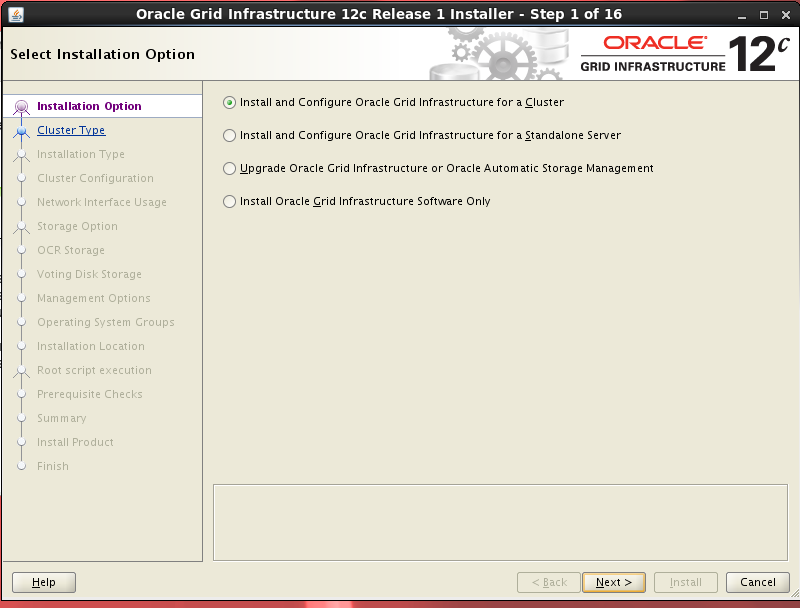
选择安装
-
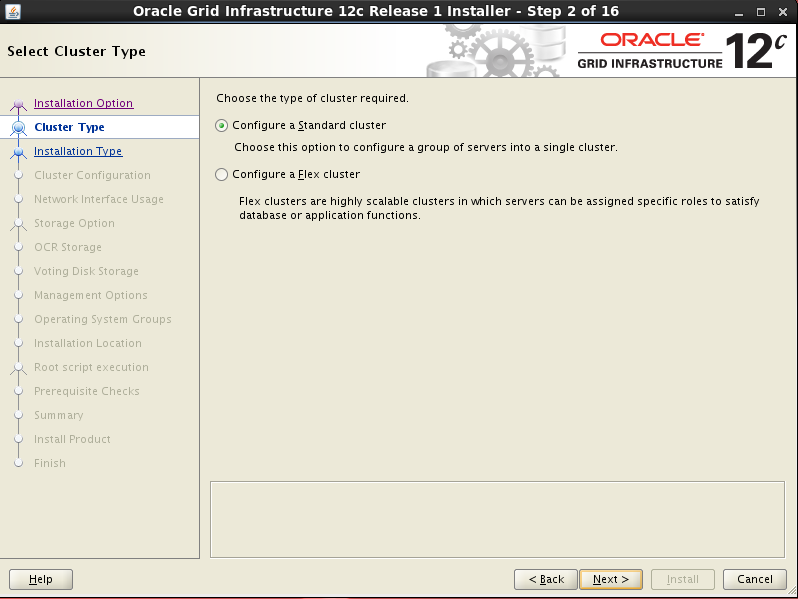
选择集群类型
-
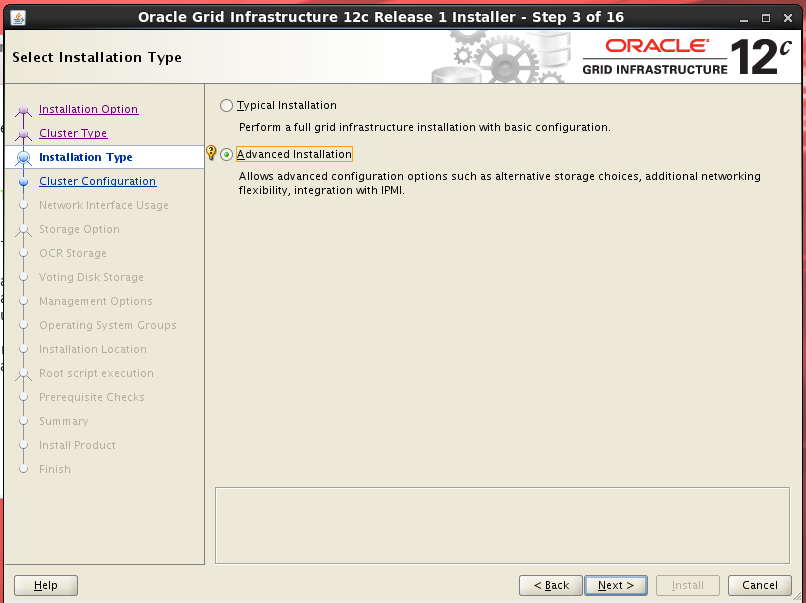
选择安装类型
-
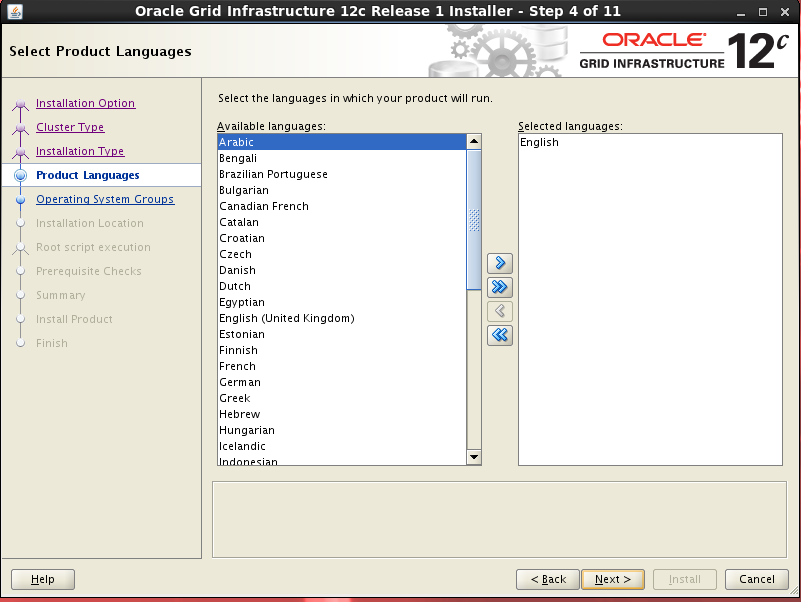
选择语言
-
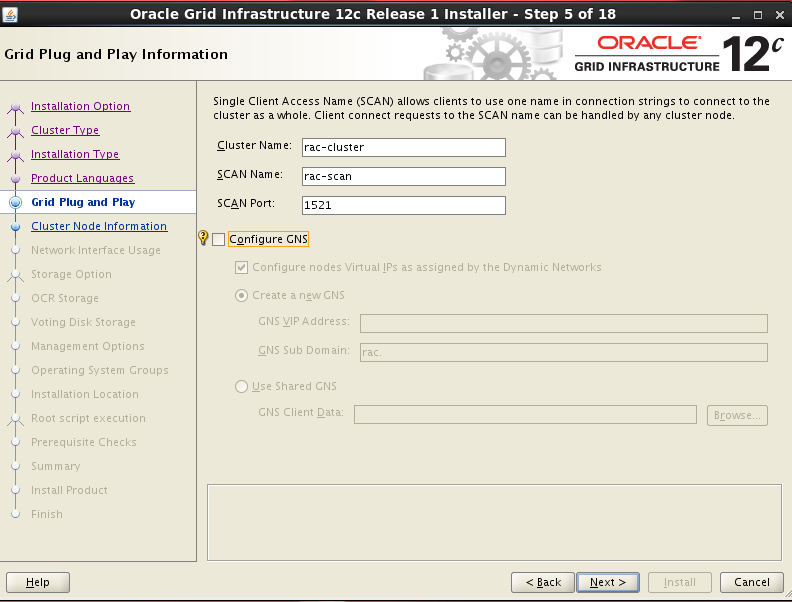
填写集群信息、scan名称和端口号
-
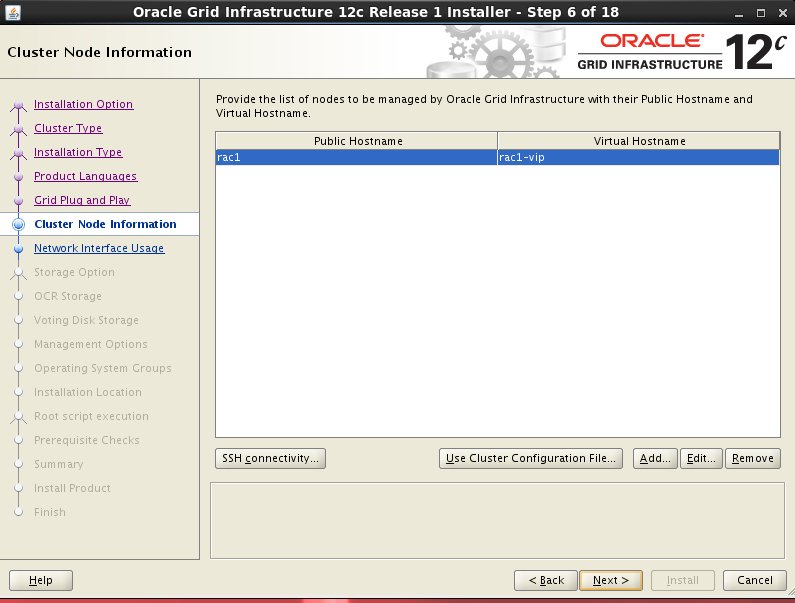
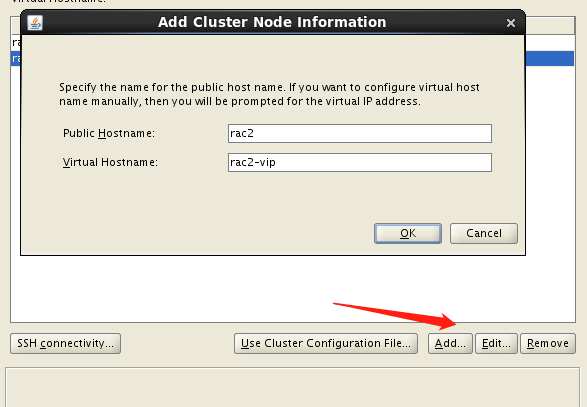
添加集群节点
-
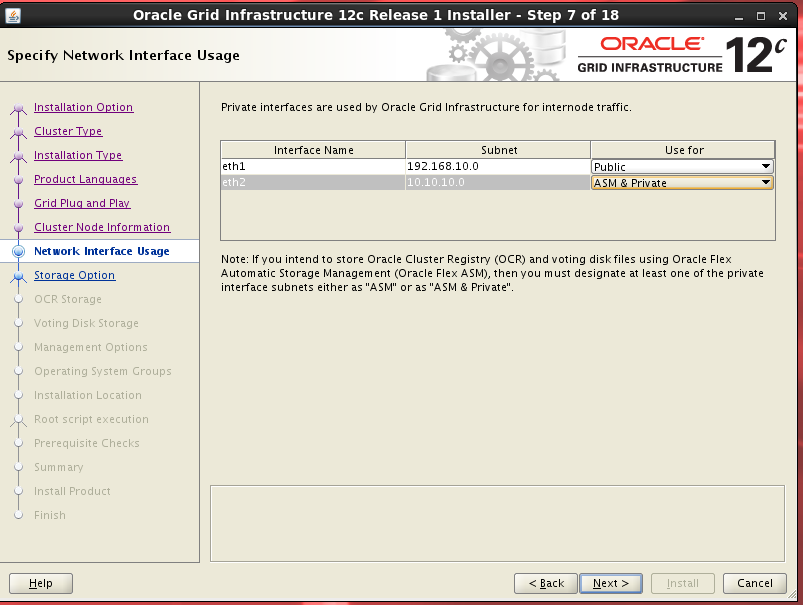
选择网络
-
选择ASM存储
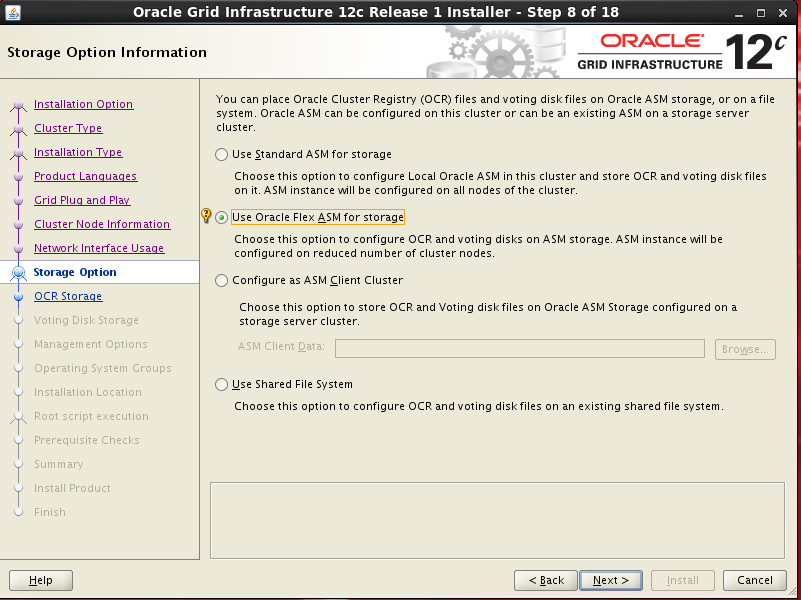
-
创建asm
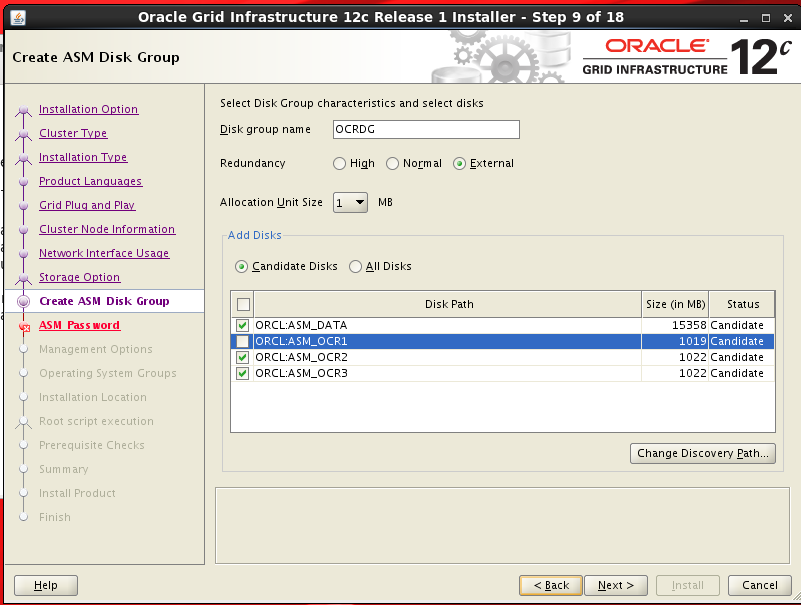
-
设置密码
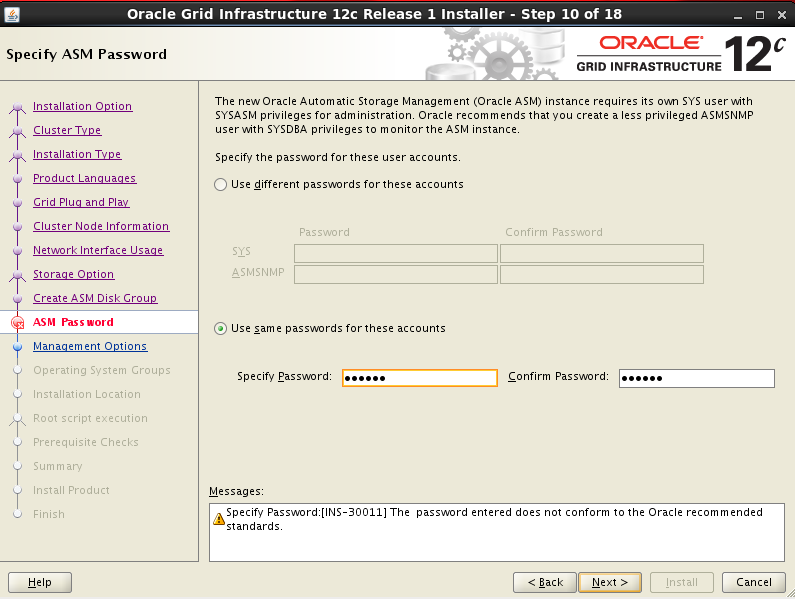
-
选择
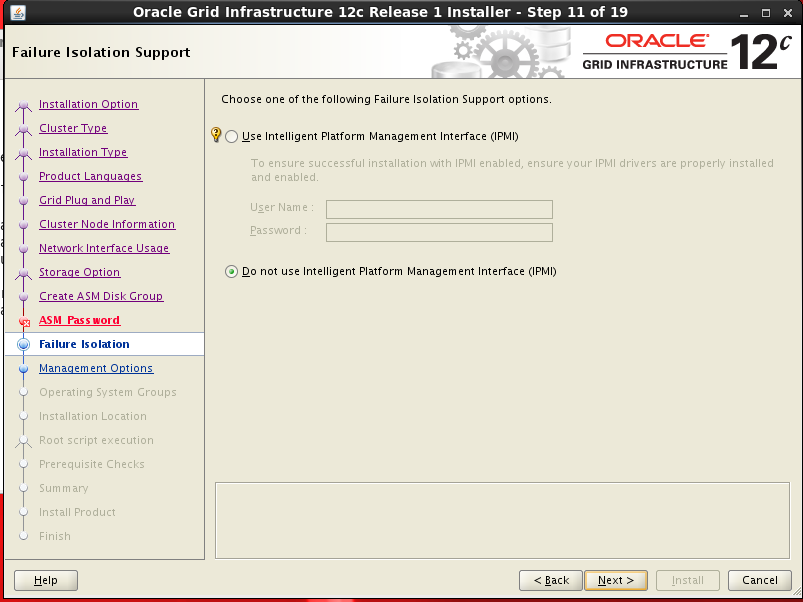
-
选择
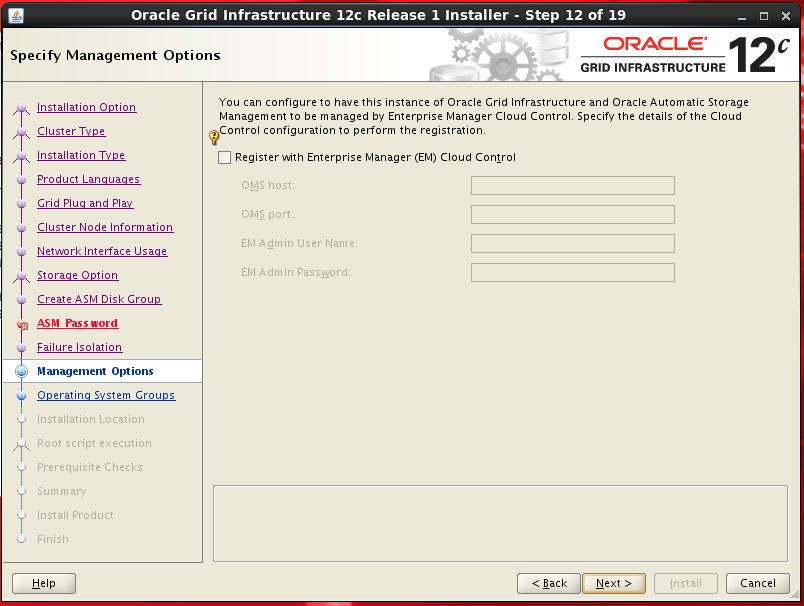
-
选择
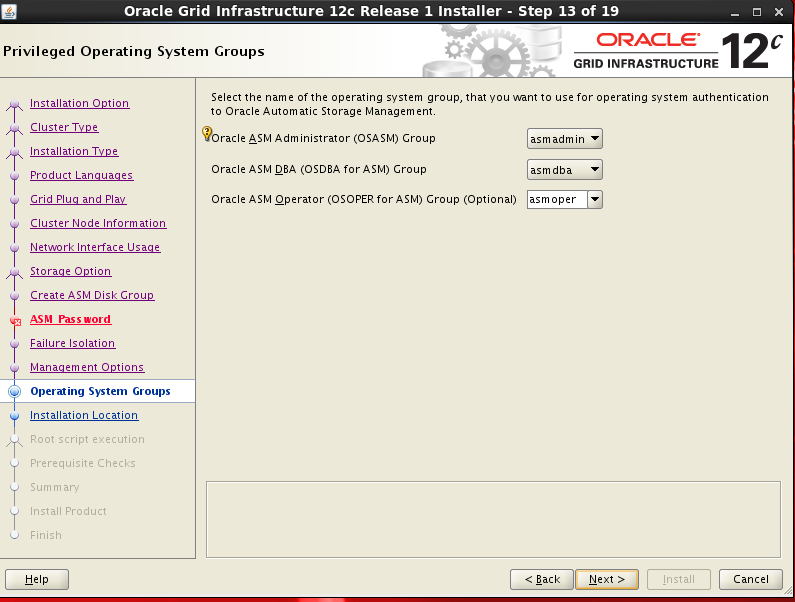
-
选择
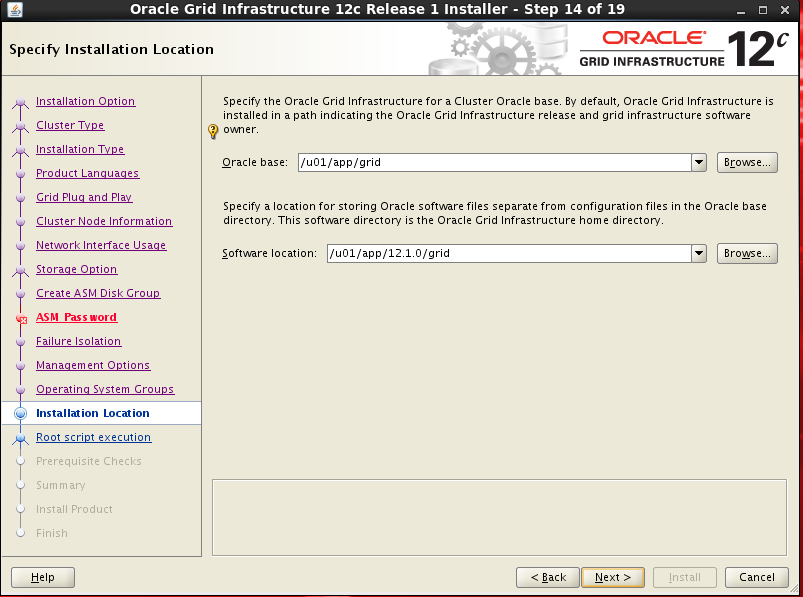
-
选择
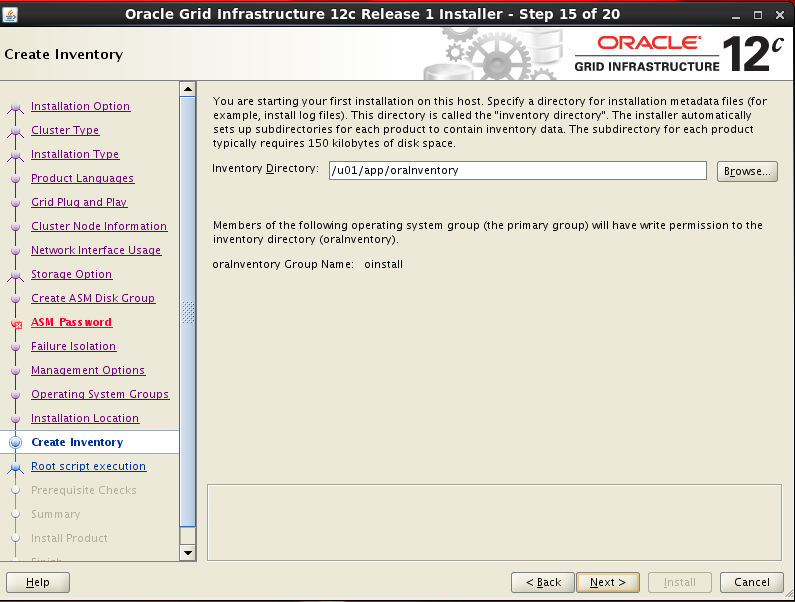
-
选择
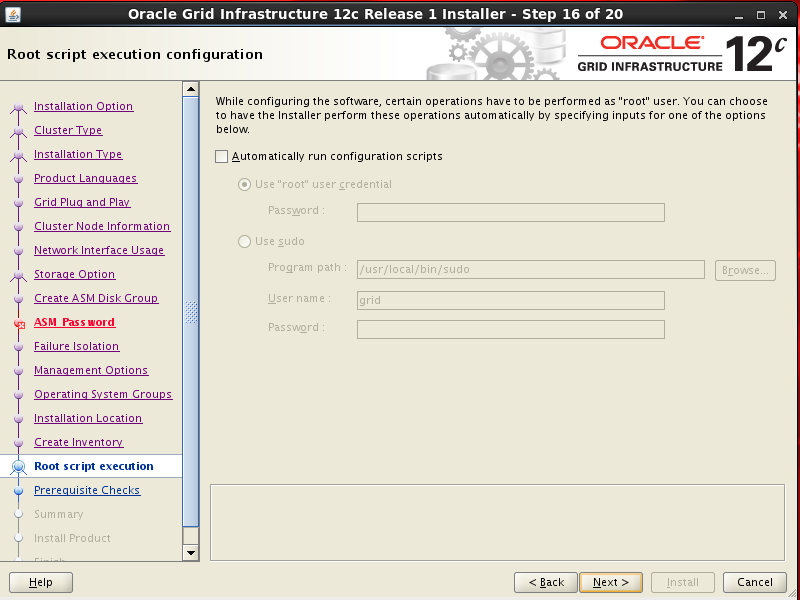
-
使用root用户执行脚本
2个节点都要执行
[root@rac1 software]# /u01/app/oraInventory/orainstRoot.sh
Changing permissions of /u01/app/oraInventory.
Adding read,write permissions for group.
Removing read,write,execute permissions for world.

Changing groupname of /u01/app/oraInventory to oinstall.
The execution of the script is complete.
- 节点1执行完成后,然后再执行节点2
[root@rac1 software]# /u01/app/12.1.0/grid/root.sh
Performing root user operation.

The following environment variables are set as:
    ORACLE_OWNER= grid
    ORACLE_HOME=  /u01/app/12.1.0/grid

Enter the full pathname of the local bin directory: [/usr/local/bin]:
   Copying dbhome to /usr/local/bin ...
   Copying oraenv to /usr/local/bin ...
   Copying coraenv to /usr/local/bin ...


Creating /etc/oratab file...
Entries will be added to the /etc/oratab file as needed by
Database Configuration Assistant when a database is created
Finished running generic part of root script.
Now product-specific root actions will be performed.
Using configuration parameter file: /u01/app/12.1.0/grid/crs/install/crsconfig_params
2023/08/15 12:33:21 CLSRSC-4001: Installing Oracle Trace File Analyzer (TFA) Collector.

2023/08/15 12:33:58 CLSRSC-4002: Successfully installed Oracle Trace File Analyzer (TFA) Collector.

2023/08/15 12:34:00 CLSRSC-363: User ignored prerequisites during installation

OLR initialization - successful
  root wallet
  root wallet cert
  root cert export
  peer wallet
  profile reader wallet
  pa wallet
  peer wallet keys
  pa wallet keys
  peer cert request
  pa cert request
  peer cert
  pa cert
  peer root cert TP
  profile reader root cert TP
  pa root cert TP
  peer pa cert TP
  pa peer cert TP
  profile reader pa cert TP
  profile reader peer cert TP
  peer user cert
  pa user cert
2023/08/15 12:35:21 CLSRSC-330: Adding Clusterware entries to file 'oracle-ohasd.conf'

CRS-4133: Oracle High Availability Services has been stopped.
CRS-4123: Oracle High Availability Services has been started.
CRS-4133: Oracle High Availability Services has been stopped.
CRS-4123: Oracle High Availability Services has been started.
CRS-2672: Attempting to start 'ora.evmd' on 'rac1'
CRS-2672: Attempting to start 'ora.mdnsd' on 'rac1'
CRS-2676: Start of 'ora.mdnsd' on 'rac1' succeeded
CRS-2676: Start of 'ora.evmd' on 'rac1' succeeded
CRS-2672: Attempting to start 'ora.gpnpd' on 'rac1'
CRS-2676: Start of 'ora.gpnpd' on 'rac1' succeeded
CRS-2672: Attempting to start 'ora.cssdmonitor' on 'rac1'
CRS-2672: Attempting to start 'ora.gipcd' on 'rac1'
CRS-2676: Start of 'ora.cssdmonitor' on 'rac1' succeeded
CRS-2676: Start of 'ora.gipcd' on 'rac1' succeeded
CRS-2672: Attempting to start 'ora.cssd' on 'rac1'
CRS-2672: Attempting to start 'ora.diskmon' on 'rac1'
CRS-2676: Start of 'ora.diskmon' on 'rac1' succeeded
CRS-2676: Start of 'ora.cssd' on 'rac1' succeeded

ASM created and started successfully.

Disk Group OCRDG created successfully.

CRS-2672: Attempting to start 'ora.crf' on 'rac1'
CRS-2672: Attempting to start 'ora.storage' on 'rac1'
CRS-2676: Start of 'ora.storage' on 'rac1' succeeded
CRS-2676: Start of 'ora.crf' on 'rac1' succeeded
CRS-2672: Attempting to start 'ora.crsd' on 'rac1'
CRS-2676: Start of 'ora.crsd' on 'rac1' succeeded
CRS-4256: Updating the profile
Successful addition of voting disk 4feea83f7d734fd9bf94032cc34a8871.
Successfully replaced voting disk group with +OCRDG.
CRS-4256: Updating the profile
CRS-4266: Voting file(s) successfully replaced
##  STATE    File Universal Id                File Name Disk group
--  -----    -----------------                --------- ---------
 1. ONLINE   4feea83f7d734fd9bf94032cc34a8871 (ORCL:ASM_OCR3) [OCRDG]
Located 1 voting disk(s).
CRS-2791: Starting shutdown of Oracle High Availability Services-managed resources on 'rac1'
CRS-2673: Attempting to stop 'ora.crsd' on 'rac1'
CRS-2677: Stop of 'ora.crsd' on 'rac1' succeeded
CRS-2673: Attempting to stop 'ora.storage' on 'rac1'
CRS-2673: Attempting to stop 'ora.mdnsd' on 'rac1'
CRS-2673: Attempting to stop 'ora.gpnpd' on 'rac1'
CRS-2677: Stop of 'ora.storage' on 'rac1' succeeded
CRS-2673: Attempting to stop 'ora.ctssd' on 'rac1'
CRS-2673: Attempting to stop 'ora.evmd' on 'rac1'
CRS-2673: Attempting to stop 'ora.asm' on 'rac1'
CRS-2677: Stop of 'ora.mdnsd' on 'rac1' succeeded
CRS-2677: Stop of 'ora.gpnpd' on 'rac1' succeeded
CRS-2677: Stop of 'ora.ctssd' on 'rac1' succeeded
CRS-2677: Stop of 'ora.evmd' on 'rac1' succeeded
CRS-2677: Stop of 'ora.asm' on 'rac1' succeeded
CRS-2673: Attempting to stop 'ora.cluster_interconnect.haip' on 'rac1'
CRS-2677: Stop of 'ora.cluster_interconnect.haip' on 'rac1' succeeded
CRS-2673: Attempting to stop 'ora.cssd' on 'rac1'
CRS-2677: Stop of 'ora.cssd' on 'rac1' succeeded
CRS-2673: Attempting to stop 'ora.crf' on 'rac1'
CRS-2677: Stop of 'ora.crf' on 'rac1' succeeded
CRS-2673: Attempting to stop 'ora.gipcd' on 'rac1'
CRS-2677: Stop of 'ora.gipcd' on 'rac1' succeeded
CRS-2793: Shutdown of Oracle High Availability Services-managed resources on 'rac1' has completed
CRS-4133: Oracle High Availability Services has been stopped.
CRS-4123: Starting Oracle High Availability Services-managed resources
CRS-2672: Attempting to start 'ora.mdnsd' on 'rac1'
CRS-2672: Attempting to start 'ora.evmd' on 'rac1'
CRS-2676: Start of 'ora.mdnsd' on 'rac1' succeeded
CRS-2676: Start of 'ora.evmd' on 'rac1' succeeded
CRS-2672: Attempting to start 'ora.gpnpd' on 'rac1'
CRS-2676: Start of 'ora.gpnpd' on 'rac1' succeeded
CRS-2672: Attempting to start 'ora.gipcd' on 'rac1'
CRS-2676: Start of 'ora.gipcd' on 'rac1' succeeded
CRS-2672: Attempting to start 'ora.cssdmonitor' on 'rac1'
CRS-2676: Start of 'ora.cssdmonitor' on 'rac1' succeeded
CRS-2672: Attempting to start 'ora.cssd' on 'rac1'
CRS-2672: Attempting to start 'ora.diskmon' on 'rac1'
CRS-2676: Start of 'ora.diskmon' on 'rac1' succeeded
CRS-2676: Start of 'ora.cssd' on 'rac1' succeeded
CRS-2672: Attempting to start 'ora.cluster_interconnect.haip' on 'rac1'
CRS-2672: Attempting to start 'ora.ctssd' on 'rac1'
CRS-2676: Start of 'ora.ctssd' on 'rac1' succeeded
CRS-2676: Start of 'ora.cluster_interconnect.haip' on 'rac1' succeeded
CRS-2672: Attempting to start 'ora.asm' on 'rac1'
CRS-2676: Start of 'ora.asm' on 'rac1' succeeded
CRS-2672: Attempting to start 'ora.storage' on 'rac1'
CRS-2676: Start of 'ora.storage' on 'rac1' succeeded
CRS-2672: Attempting to start 'ora.crf' on 'rac1'
CRS-2676: Start of 'ora.crf' on 'rac1' succeeded
CRS-2672: Attempting to start 'ora.crsd' on 'rac1'
CRS-2676: Start of 'ora.crsd' on 'rac1' succeeded
CRS-6023: Starting Oracle Cluster Ready Services-managed resources
CRS-6017: Processing resource auto-start for servers: rac1
CRS-6016: Resource auto-start has completed for server rac1
CRS-6024: Completed start of Oracle Cluster Ready Services-managed resources
CRS-4123: Oracle High Availability Services has been started.
2023/08/15 12:40:46 CLSRSC-343: Successfully started Oracle Clusterware stack

CRS-2672: Attempting to start 'ora.ASMNET1LSNR_ASM.lsnr' on 'rac1'
CRS-2676: Start of 'ora.ASMNET1LSNR_ASM.lsnr' on 'rac1' succeeded
CRS-2672: Attempting to start 'ora.asm' on 'rac1'
CRS-2676: Start of 'ora.asm' on 'rac1' succeeded
CRS-2672: Attempting to start 'ora.OCRDG.dg' on 'rac1'
CRS-2676: Start of 'ora.OCRDG.dg' on 'rac1' succeeded
CRS-2791: Starting shutdown of Oracle High Availability Services-managed resources on 'rac1'
CRS-2673: Attempting to stop 'ora.crsd' on 'rac1'
CRS-2790: Starting shutdown of Cluster Ready Services-managed resources on 'rac1'
CRS-2673: Attempting to stop 'ora.cvu' on 'rac1'
CRS-2673: Attempting to stop 'ora.OCRDG.dg' on 'rac1'
CRS-2673: Attempting to stop 'ora.LISTENER_SCAN3.lsnr' on 'rac1'
CRS-2673: Attempting to stop 'ora.LISTENER_SCAN1.lsnr' on 'rac1'
CRS-2673: Attempting to stop 'ora.rac1.vip' on 'rac1'
CRS-2673: Attempting to stop 'ora.LISTENER_SCAN2.lsnr' on 'rac1'
CRS-2673: Attempting to stop 'ora.oc4j' on 'rac1'
CRS-2677: Stop of 'ora.cvu' on 'rac1' succeeded
CRS-2677: Stop of 'ora.OCRDG.dg' on 'rac1' succeeded
CRS-2673: Attempting to stop 'ora.asm' on 'rac1'
CRS-2677: Stop of 'ora.LISTENER_SCAN2.lsnr' on 'rac1' succeeded
CRS-2673: Attempting to stop 'ora.scan2.vip' on 'rac1'
CRS-2677: Stop of 'ora.asm' on 'rac1' succeeded
CRS-2673: Attempting to stop 'ora.ASMNET1LSNR_ASM.lsnr' on 'rac1'
CRS-2677: Stop of 'ora.LISTENER_SCAN3.lsnr' on 'rac1' succeeded
CRS-2677: Stop of 'ora.LISTENER_SCAN1.lsnr' on 'rac1' succeeded
CRS-2673: Attempting to stop 'ora.scan1.vip' on 'rac1'
CRS-2673: Attempting to stop 'ora.scan3.vip' on 'rac1'
CRS-2677: Stop of 'ora.ASMNET1LSNR_ASM.lsnr' on 'rac1' succeeded
CRS-2677: Stop of 'ora.rac1.vip' on 'rac1' succeeded
CRS-2677: Stop of 'ora.scan2.vip' on 'rac1' succeeded
CRS-2677: Stop of 'ora.scan3.vip' on 'rac1' succeeded
CRS-2677: Stop of 'ora.scan1.vip' on 'rac1' succeeded
CRS-2677: Stop of 'ora.oc4j' on 'rac1' succeeded
CRS-2673: Attempting to stop 'ora.ons' on 'rac1'
CRS-2677: Stop of 'ora.ons' on 'rac1' succeeded
CRS-2673: Attempting to stop 'ora.net1.network' on 'rac1'
CRS-2677: Stop of 'ora.net1.network' on 'rac1' succeeded
CRS-2792: Shutdown of Cluster Ready Services-managed resources on 'rac1' has completed
CRS-2677: Stop of 'ora.crsd' on 'rac1' succeeded
CRS-2673: Attempting to stop 'ora.ctssd' on 'rac1'
CRS-2673: Attempting to stop 'ora.evmd' on 'rac1'
CRS-2673: Attempting to stop 'ora.storage' on 'rac1'
CRS-2673: Attempting to stop 'ora.mdnsd' on 'rac1'
CRS-2673: Attempting to stop 'ora.gpnpd' on 'rac1'
CRS-2677: Stop of 'ora.storage' on 'rac1' succeeded
CRS-2673: Attempting to stop 'ora.asm' on 'rac1'
CRS-2677: Stop of 'ora.ctssd' on 'rac1' succeeded
CRS-2677: Stop of 'ora.mdnsd' on 'rac1' succeeded
CRS-2677: Stop of 'ora.gpnpd' on 'rac1' succeeded
CRS-2677: Stop of 'ora.evmd' on 'rac1' succeeded
CRS-2677: Stop of 'ora.asm' on 'rac1' succeeded
CRS-2673: Attempting to stop 'ora.cluster_interconnect.haip' on 'rac1'
CRS-2677: Stop of 'ora.cluster_interconnect.haip' on 'rac1' succeeded
CRS-2673: Attempting to stop 'ora.cssd' on 'rac1'
CRS-2677: Stop of 'ora.cssd' on 'rac1' succeeded
CRS-2673: Attempting to stop 'ora.crf' on 'rac1'
CRS-2677: Stop of 'ora.crf' on 'rac1' succeeded
CRS-2673: Attempting to stop 'ora.gipcd' on 'rac1'
CRS-2677: Stop of 'ora.gipcd' on 'rac1' succeeded
CRS-2793: Shutdown of Oracle High Availability Services-managed resources on 'rac1' has completed
CRS-4133: Oracle High Availability Services has been stopped.
CRS-4123: Starting Oracle High Availability Services-managed resources
CRS-2672: Attempting to start 'ora.mdnsd' on 'rac1'
CRS-2672: Attempting to start 'ora.evmd' on 'rac1'
CRS-2676: Start of 'ora.mdnsd' on 'rac1' succeeded
CRS-2676: Start of 'ora.evmd' on 'rac1' succeeded
CRS-2672: Attempting to start 'ora.gpnpd' on 'rac1'
CRS-2676: Start of 'ora.gpnpd' on 'rac1' succeeded
CRS-2672: Attempting to start 'ora.gipcd' on 'rac1'
CRS-2676: Start of 'ora.gipcd' on 'rac1' succeeded
CRS-2672: Attempting to start 'ora.cssdmonitor' on 'rac1'
CRS-2676: Start of 'ora.cssdmonitor' on 'rac1' succeeded
CRS-2672: Attempting to start 'ora.cssd' on 'rac1'
CRS-2672: Attempting to start 'ora.diskmon' on 'rac1'
CRS-2676: Start of 'ora.diskmon' on 'rac1' succeeded
CRS-2676: Start of 'ora.cssd' on 'rac1' succeeded
CRS-2672: Attempting to start 'ora.cluster_interconnect.haip' on 'rac1'
CRS-2672: Attempting to start 'ora.ctssd' on 'rac1'
CRS-2676: Start of 'ora.ctssd' on 'rac1' succeeded
CRS-2676: Start of 'ora.cluster_interconnect.haip' on 'rac1' succeeded
CRS-2672: Attempting to start 'ora.asm' on 'rac1'
CRS-2676: Start of 'ora.asm' on 'rac1' succeeded
CRS-2672: Attempting to start 'ora.storage' on 'rac1'
CRS-2676: Start of 'ora.storage' on 'rac1' succeeded
CRS-2672: Attempting to start 'ora.crf' on 'rac1'
CRS-2676: Start of 'ora.crf' on 'rac1' succeeded
CRS-2672: Attempting to start 'ora.crsd' on 'rac1'
CRS-2676: Start of 'ora.crsd' on 'rac1' succeeded
CRS-6023: Starting Oracle Cluster Ready Services-managed resources
CRS-2664: Resource 'ora.OCRDG.dg' is already running on 'rac1'
CRS-6017: Processing resource auto-start for servers: rac1
CRS-2672: Attempting to start 'ora.net1.network' on 'rac1'
CRS-2672: Attempting to start 'ora.oc4j' on 'rac1'
CRS-2676: Start of 'ora.net1.network' on 'rac1' succeeded
CRS-2672: Attempting to start 'ora.cvu' on 'rac1'
CRS-2672: Attempting to start 'ora.ons' on 'rac1'
CRS-2672: Attempting to start 'ora.rac1.vip' on 'rac1'
CRS-2672: Attempting to start 'ora.scan1.vip' on 'rac1'
CRS-2672: Attempting to start 'ora.scan2.vip' on 'rac1'
CRS-2672: Attempting to start 'ora.scan3.vip' on 'rac1'
CRS-2676: Start of 'ora.cvu' on 'rac1' succeeded
CRS-2676: Start of 'ora.rac1.vip' on 'rac1' succeeded
CRS-2676: Start of 'ora.scan1.vip' on 'rac1' succeeded
CRS-2672: Attempting to start 'ora.LISTENER_SCAN1.lsnr' on 'rac1'
CRS-2676: Start of 'ora.scan2.vip' on 'rac1' succeeded
CRS-2672: Attempting to start 'ora.LISTENER_SCAN2.lsnr' on 'rac1'
CRS-2676: Start of 'ora.scan3.vip' on 'rac1' succeeded
CRS-2672: Attempting to start 'ora.LISTENER_SCAN3.lsnr' on 'rac1'
CRS-2676: Start of 'ora.ons' on 'rac1' succeeded
CRS-2676: Start of 'ora.LISTENER_SCAN1.lsnr' on 'rac1' succeeded
CRS-2676: Start of 'ora.LISTENER_SCAN2.lsnr' on 'rac1' succeeded
CRS-2676: Start of 'ora.LISTENER_SCAN3.lsnr' on 'rac1' succeeded
CRS-2676: Start of 'ora.oc4j' on 'rac1' succeeded
CRS-6016: Resource auto-start has completed for server rac1
CRS-6024: Completed start of Oracle Cluster Ready Services-managed resources
CRS-4123: Oracle High Availability Services has been started.
Preparing packages for installation...
cvuqdisk-1.0.9-1
2023/08/15 12:45:23 CLSRSC-325: Configure Oracle Grid Infrastructure for a Cluster ... succeeded

[root@rac1 software]#
- 安装完成

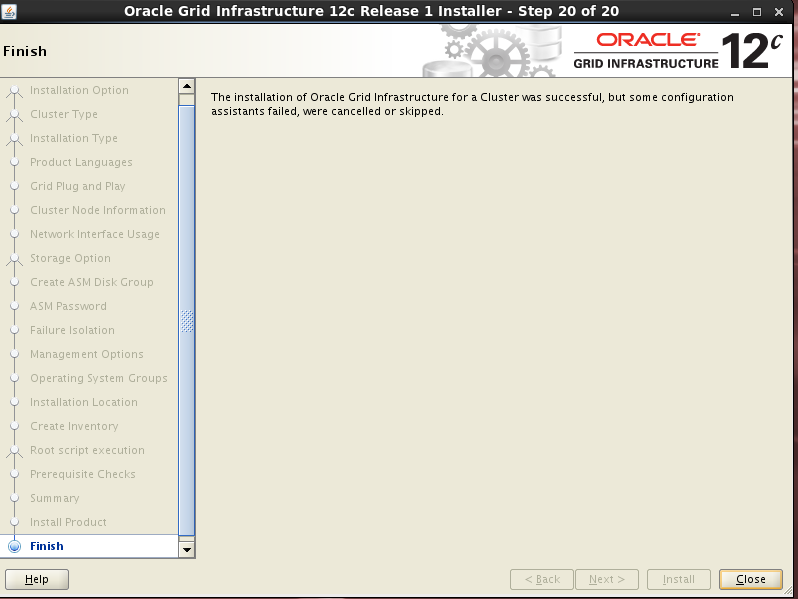
四、oracle软件安装
- 解压安装包
unzip V46095-01_1of2 (oracle-12.1.0.2).zip
unzip V46095-01_2of2 (oracle-12.1.0.2).zip
chown -R oracle:oinstall database
su - oracle
cd /software
./runInstaller
-
开始安装
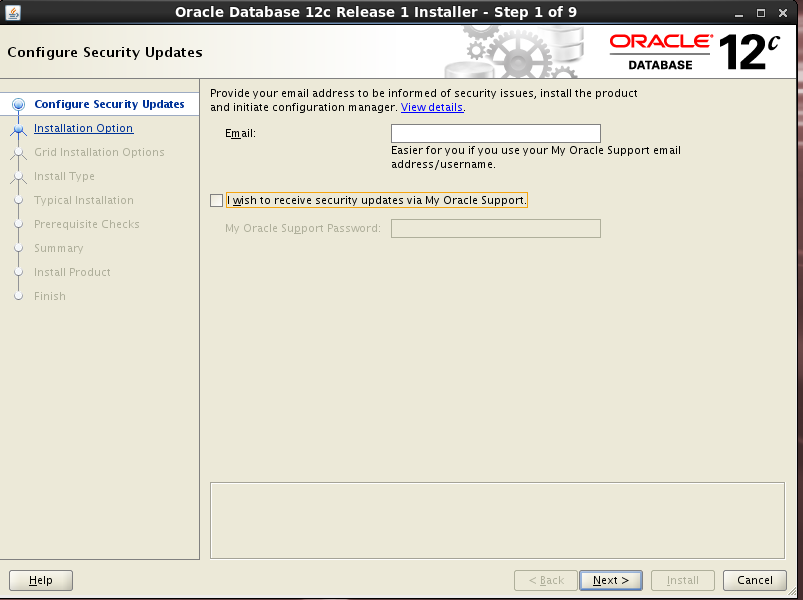
-
仅安装软件
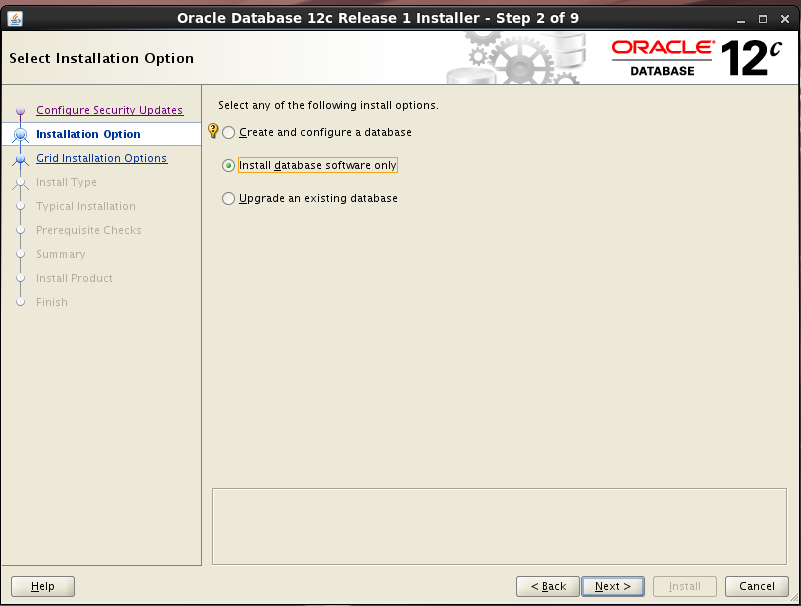
-
安装rac集群
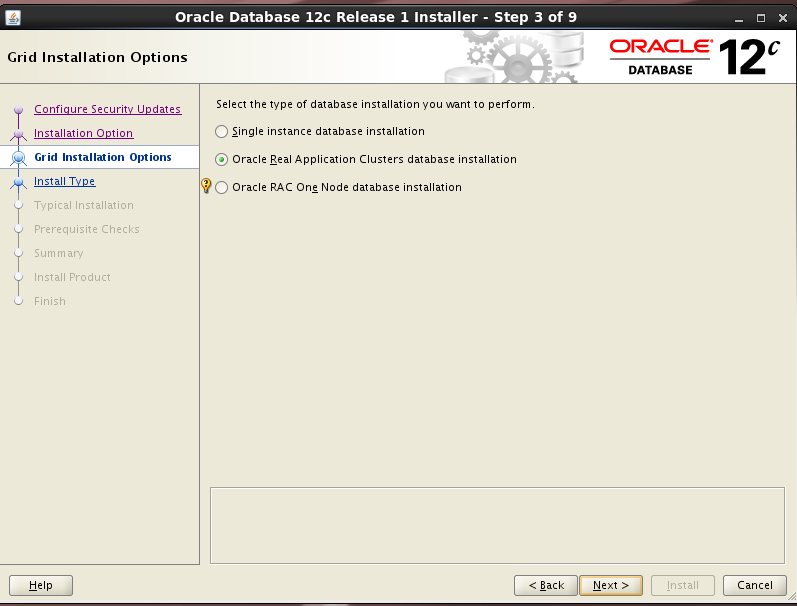
-
选择节点

-
选择语言
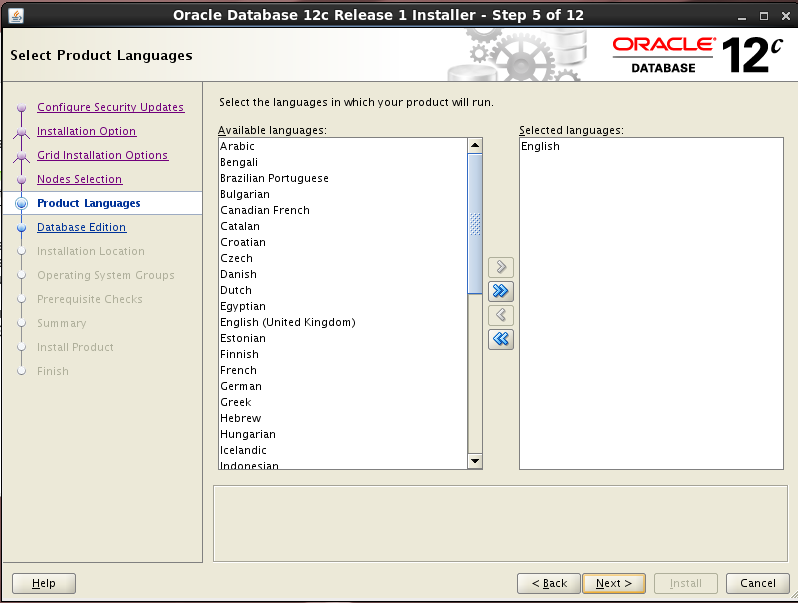
-
选择企业版
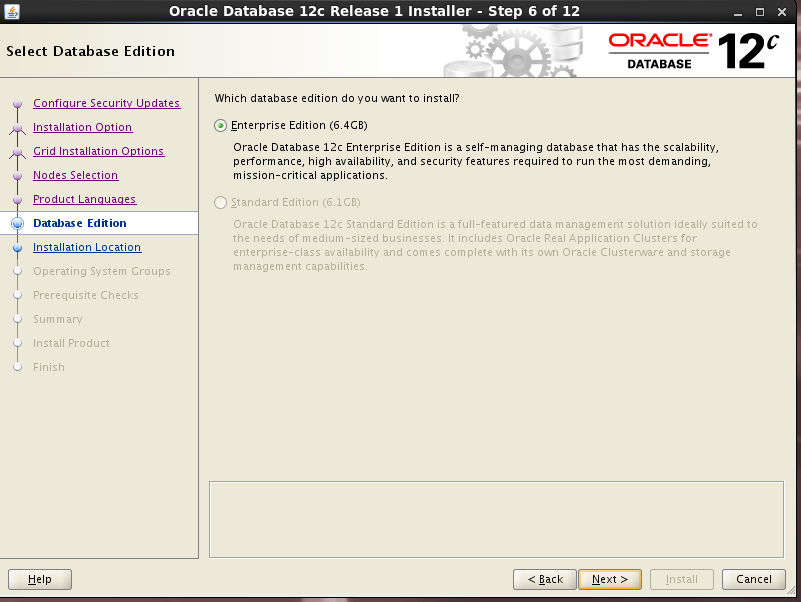
-
安装路径
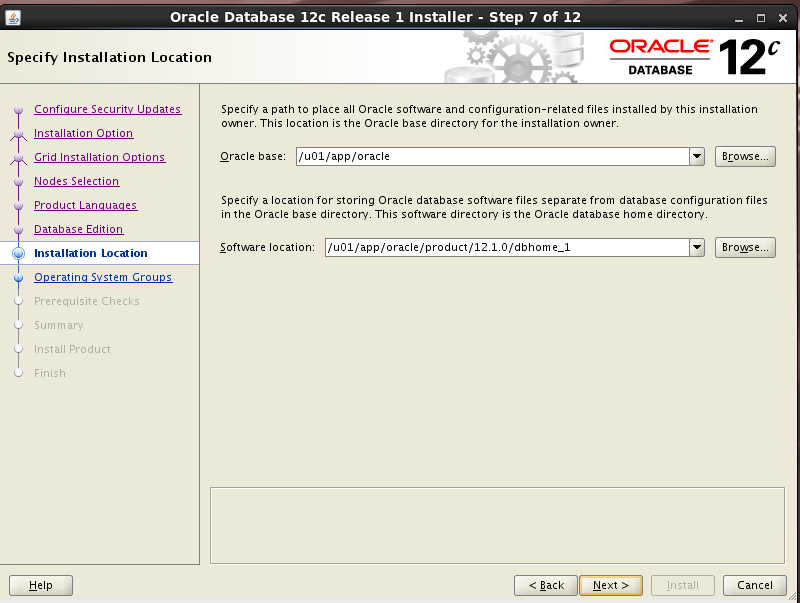
-
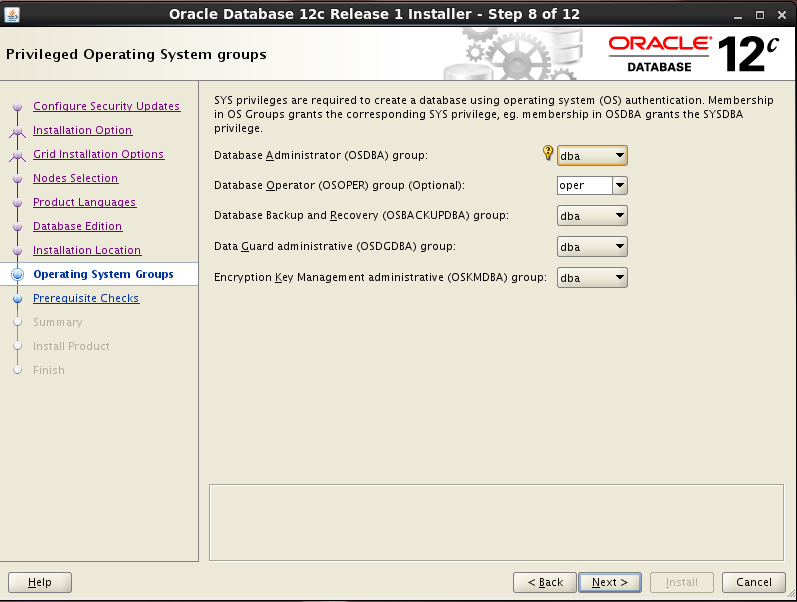
选择组
-
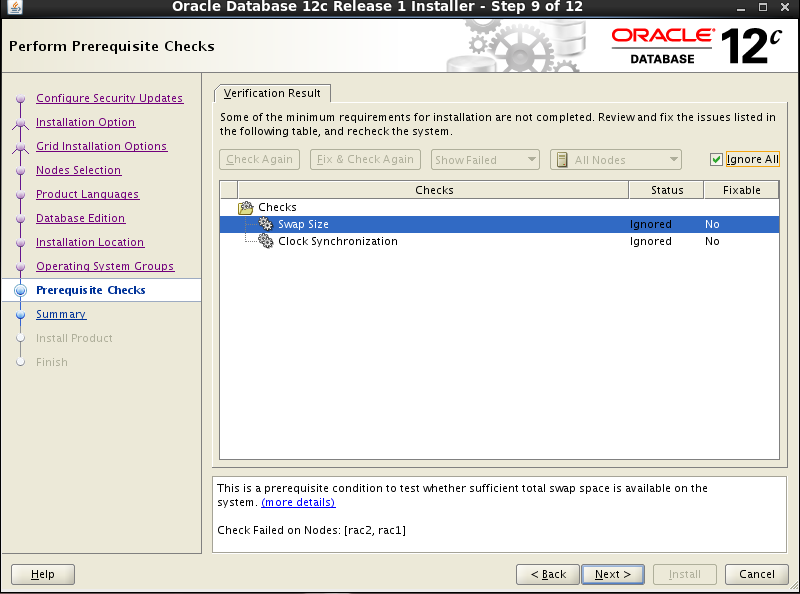
环境检查
-
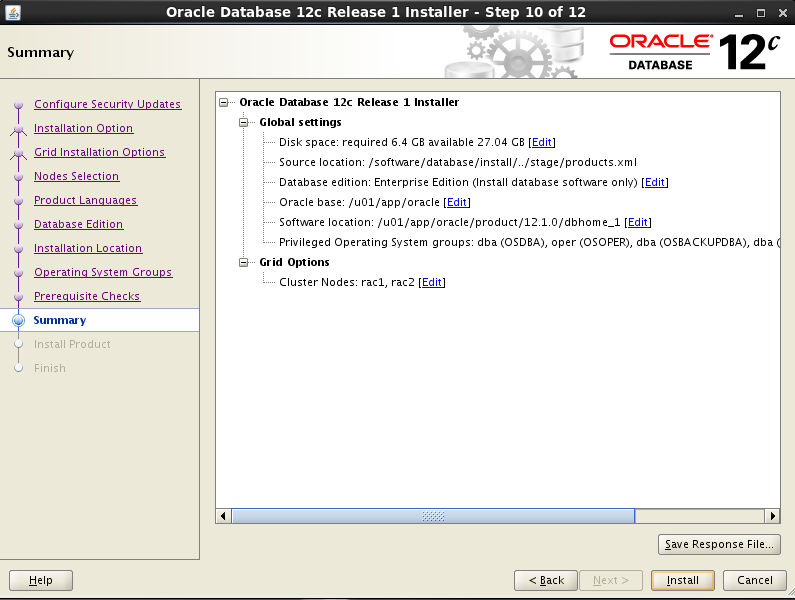
确认信息,开始安装
-
2个节点使用root执行脚本
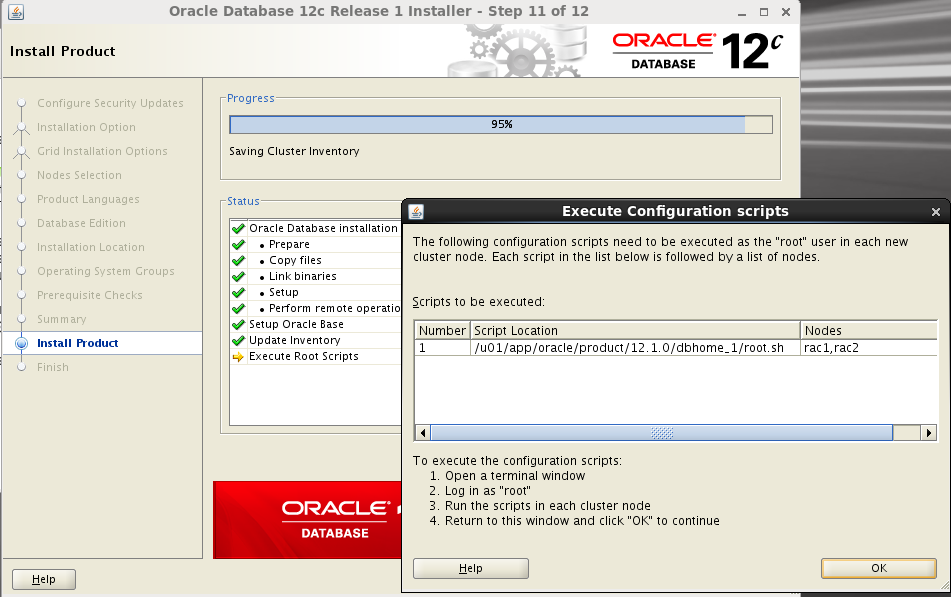
节点1和节点2都需要执行
[root@rac1 software]# /u01/app/oracle/product/12.1.0/dbhome_1/root.sh
Performing root user operation.

The following environment variables are set as:
    ORACLE_OWNER= oracle
    ORACLE_HOME=  /u01/app/oracle/product/12.1.0/dbhome_1

Enter the full pathname of the local bin directory: [/usr/local/bin]:
The contents of "dbhome" have not changed. No need to overwrite.
The contents of "oraenv" have not changed. No need to overwrite.
The contents of "coraenv" have not changed. No need to overwrite.

Entries will be added to the /etc/oratab file as needed by
Database Configuration Assistant when a database is created
Finished running generic part of root script.
Now product-specific root actions will be performed.
[root@rac1 software]#
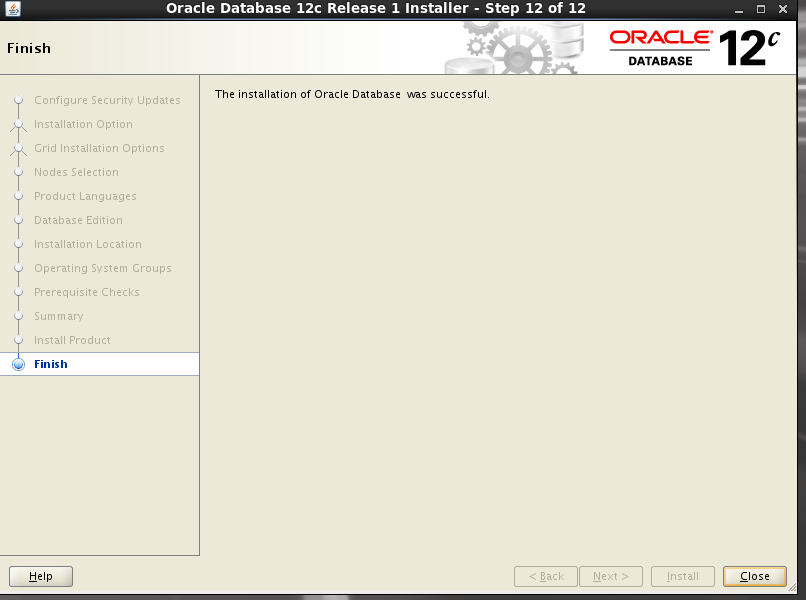
- 安装完成
五、Oracle数据库安装
su - oracle
dbca
-
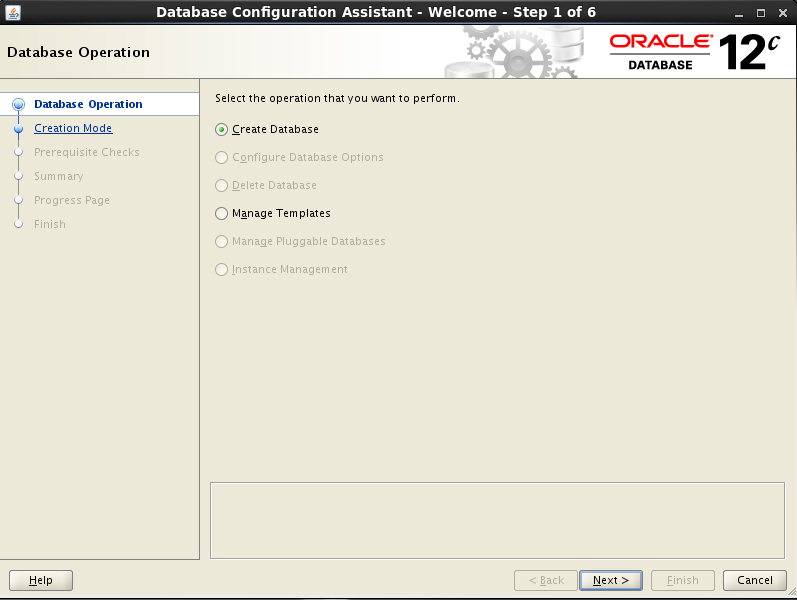
选择创建数据库
-
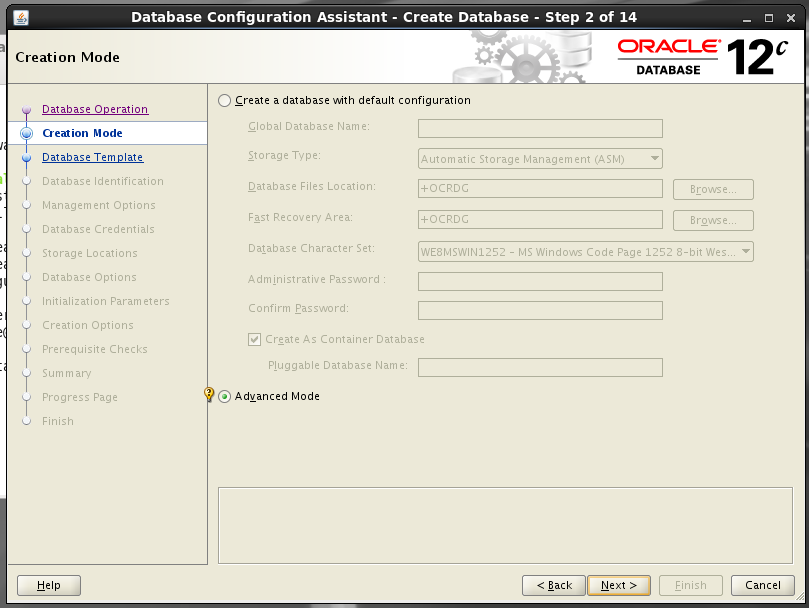
选择创建模式
-
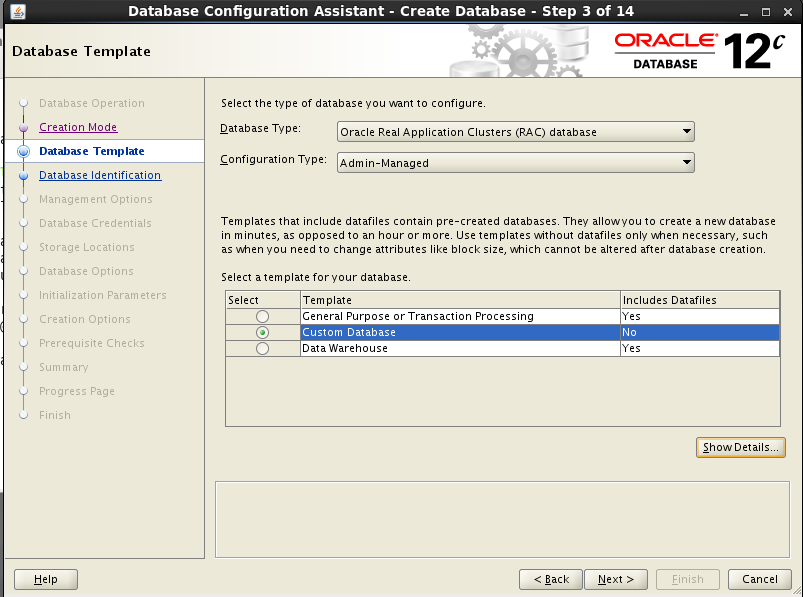
选择自定义数据库
-
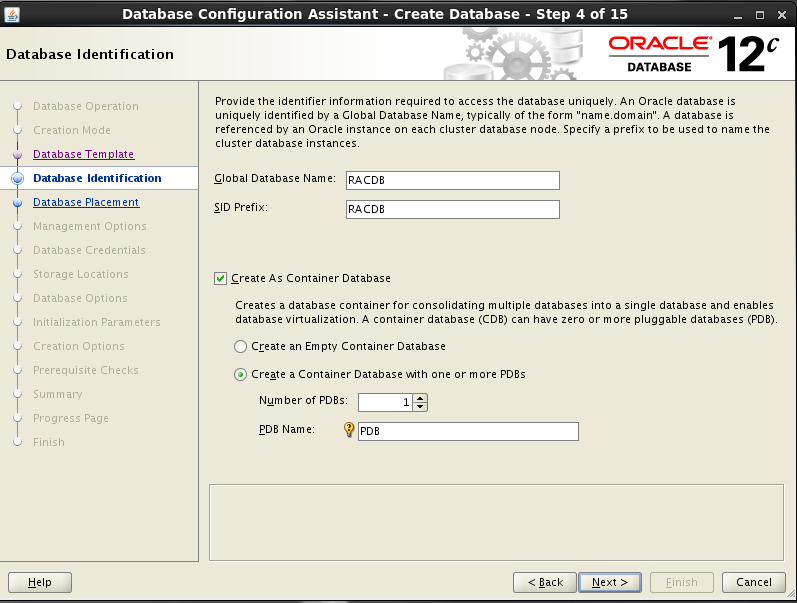
填写数据库名称
-
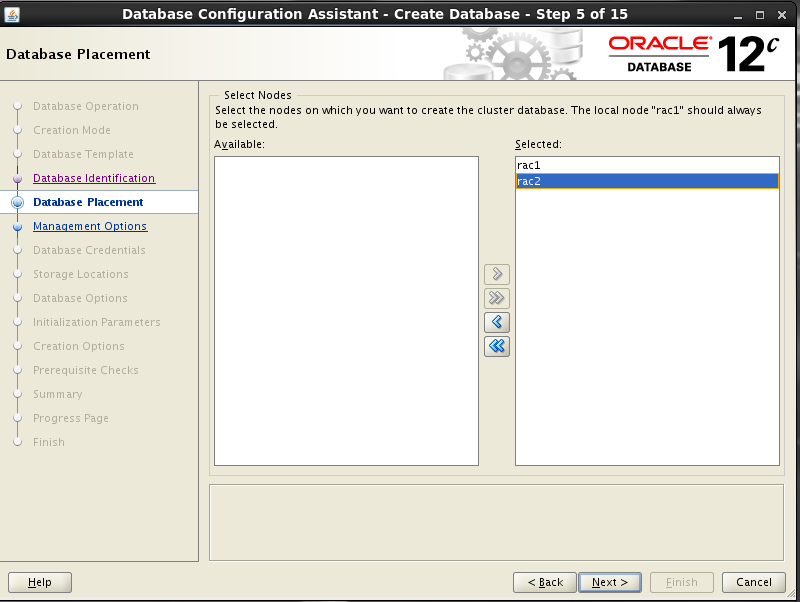
选择数据库节点
-
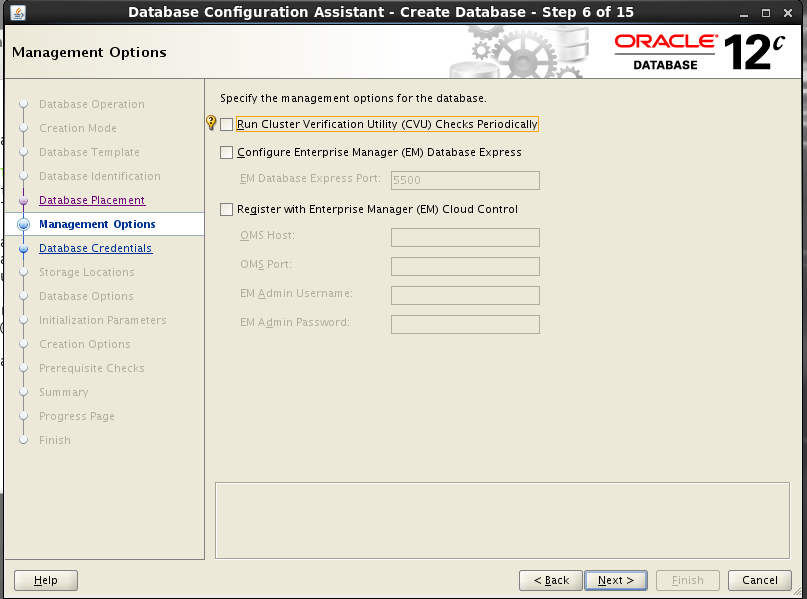
不配置EM
-
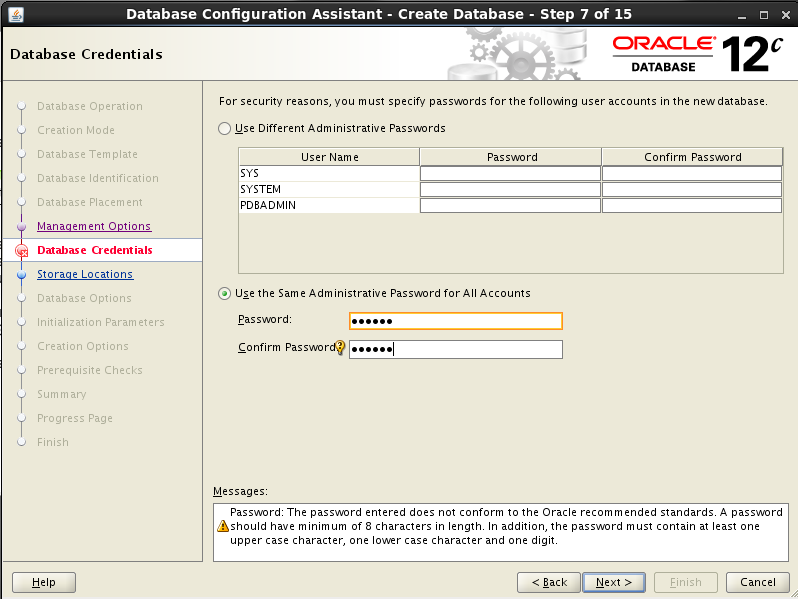
设置密码
-
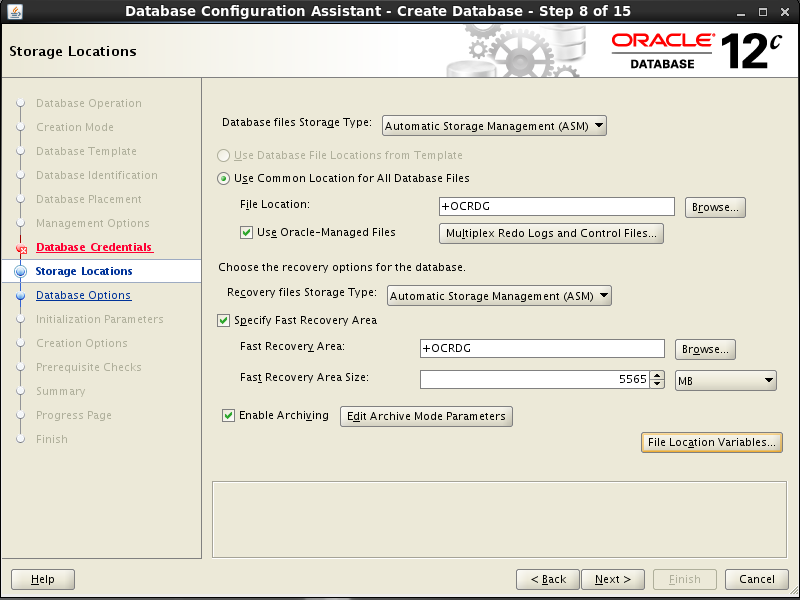
配置存储
-
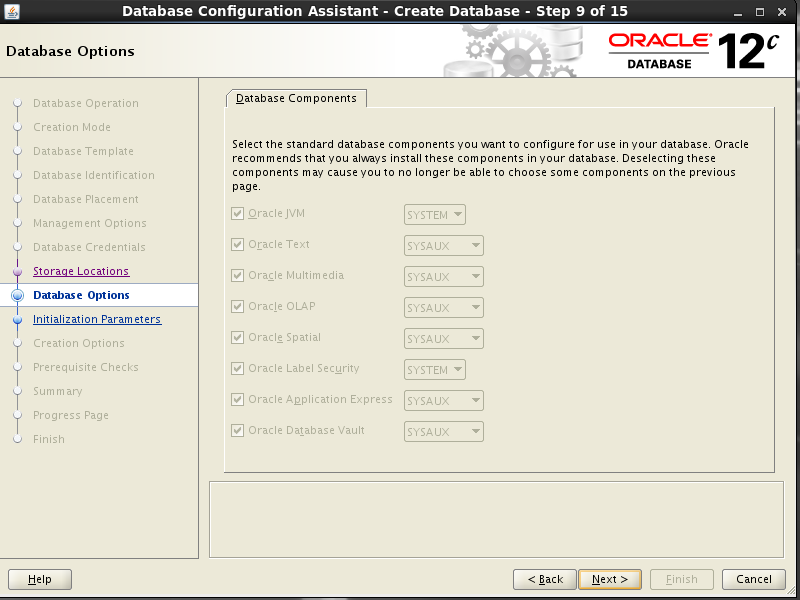
选择
-
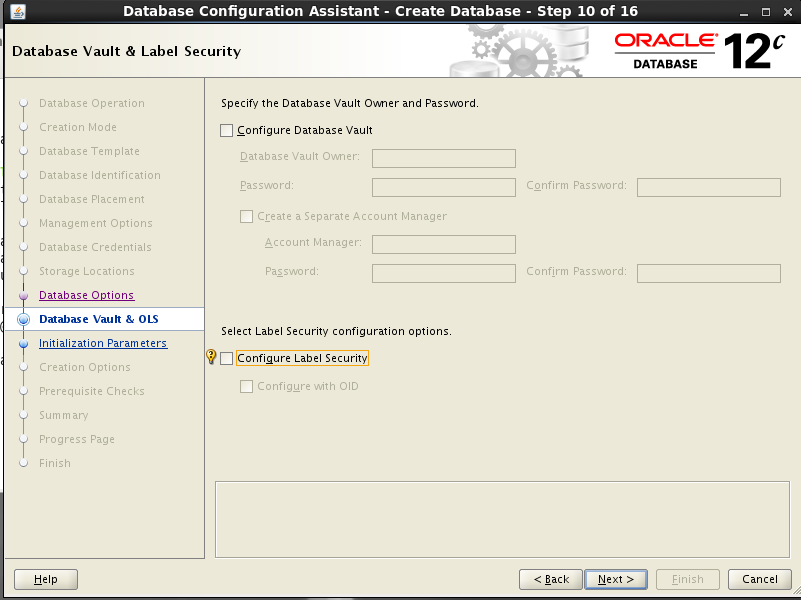
不选安全配置
-
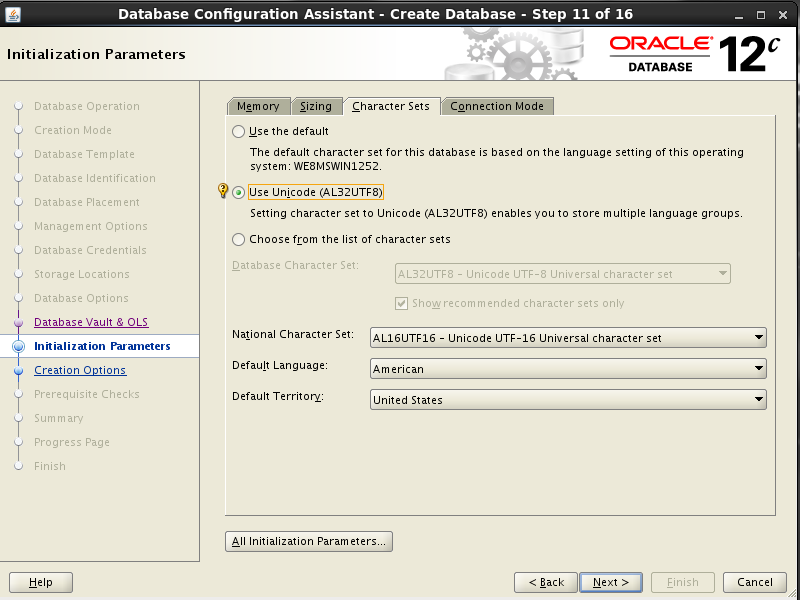
选择字符集
-
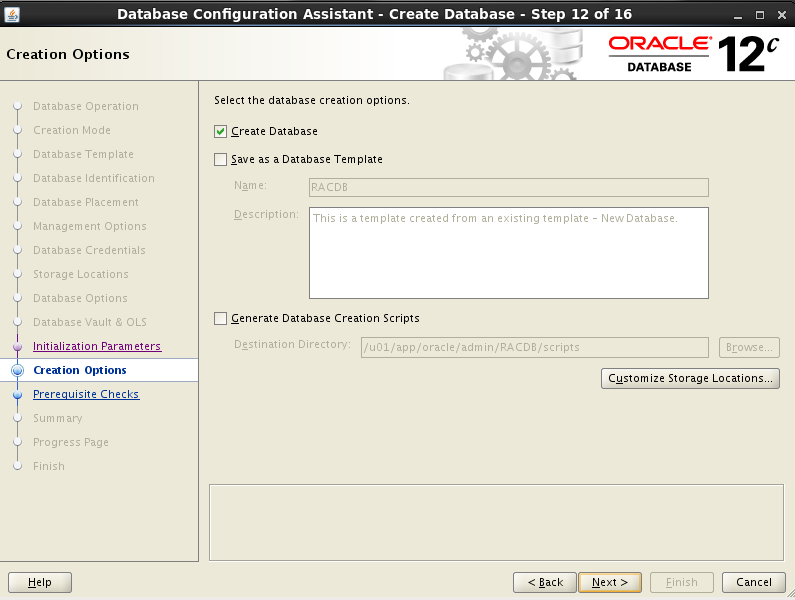
开始创建数据库
-
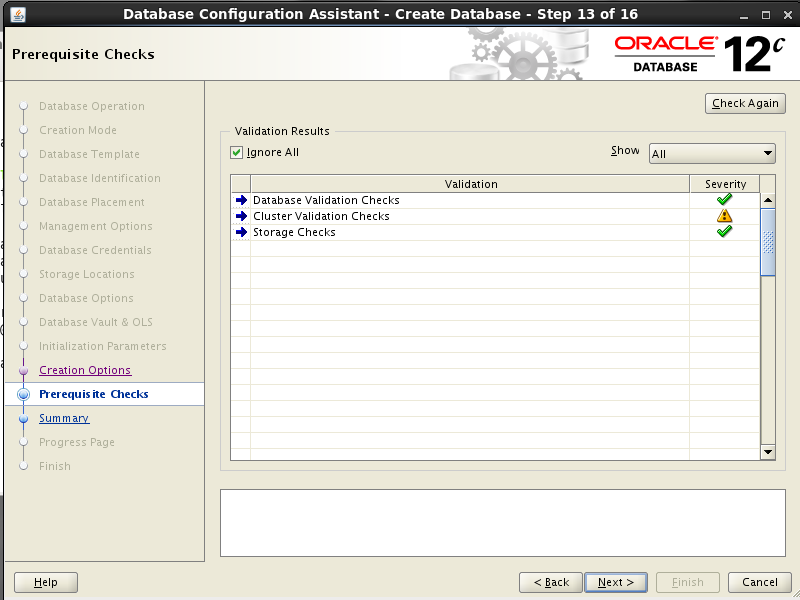
检查
-
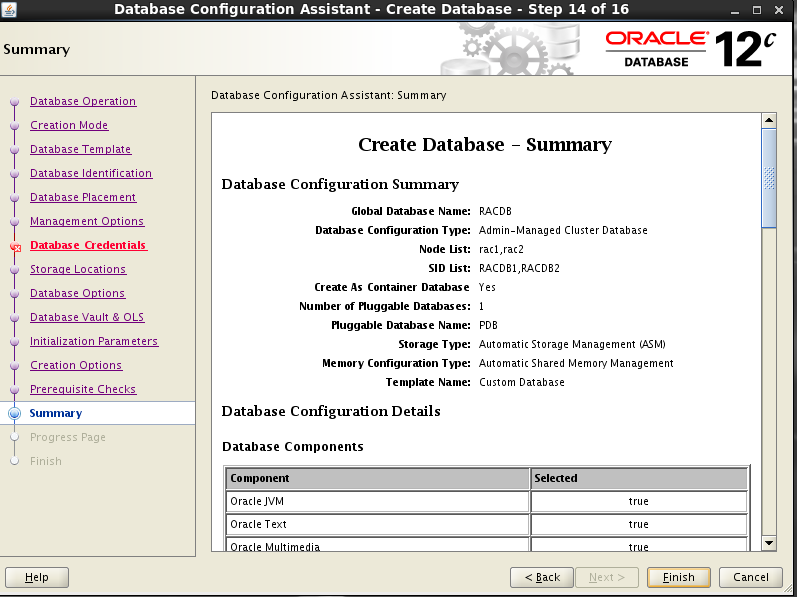
开始安装
-
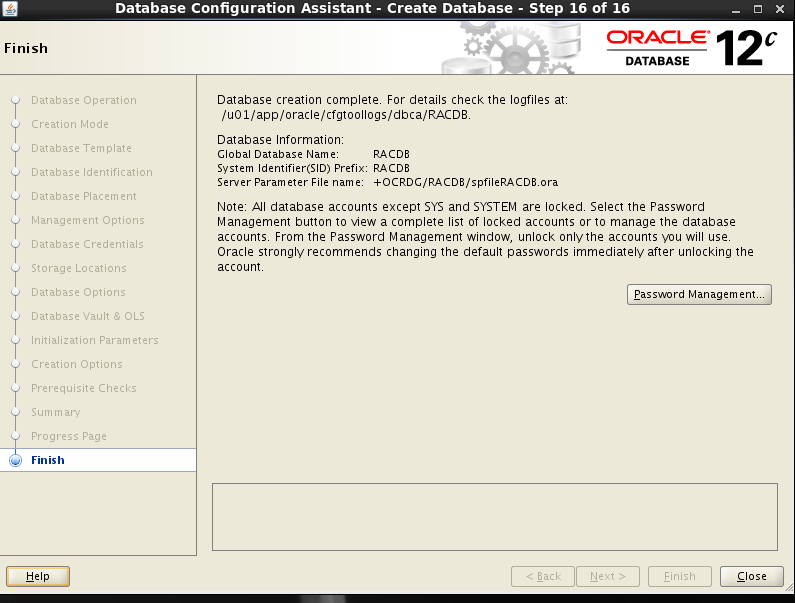
安装完成
最后修改时间:2023-08-16 11:31:54
「喜欢这篇文章,您的关注和赞赏是给作者最好的鼓励」
关注作者
【版权声明】本文为墨天轮用户原创内容,转载时必须标注文章的来源(墨天轮),文章链接,文章作者等基本信息,否则作者和墨天轮有权追究责任。如果您发现墨天轮中有涉嫌抄袭或者侵权的内容,欢迎发送邮件至:contact@modb.pro进行举报,并提供相关证据,一经查实,墨天轮将立刻删除相关内容。
