



深入解锁 Elasticsearch:如何用索引模板简化数据管理?
Template 介绍
在大数据环境下,手动配置索引过于繁琐?通过 Elasticsearch 的索引模板功能,轻松实现自动化索引管理!本文将详细介绍如何创建和应用索引模板及组件模板,帮助你简化数据管理流程,提升工作效率。
Index template[1] 定义在创建新 index 时可以自动应用的 settings[2] 和 mappings[3]。 Elasticsearch 根据与 index 名称匹配的 index 模式将模板应用于新索引。这个对于我们想创建的一系列的 Index 具有同样的 settings 及 mappings。
比如我们希望每一天/月的日志的index都具有同样的设置。
Index template 仅在 index 创建期间应用。 对 index template 的更改不会影响现有索引。 create index API[4]请求中指定的设置和映射会覆盖索引模板中指定的任何设置或映射。
索引模板Index Template
参数说明
| 参数 | 说明 |
| template | 匹配的索引,匹配多个规则: "index_patterns": ["te*", "bar*"] |
| order | 排序,多个索引模板命中,合并所有配置,如参数重复取order最大的为准。这里的 “order” 的意思是:如果索引与多个模板匹配,则 Elasticsearch 应用此模板的顺序。该值为1,如果有更高 order 的 template,这个 settings 或 mappings 有可能被其它的 template 所覆盖。 |
| aliases | 索引别名 |
创建一个索引模板 Index Template
PUT _template/my_logs
{
  "template": "test-*",
  "order":    1,
  "settings": {
    "number_of_shards": 1
  },
  "mappings": {
    "properties":{
        "account_holder_name":{
          "type":"text",
          "fields":{
            "keyword":{
              "type":"keyword",
              "ignore_above":256
            }
          }
        },
        "certificate_type":{
          "type":"text",
          "fields":{
            "keyword":{
              "type":"keyword",
              "ignore_above":256
            }
          }
        }
        }
  },
  "aliases": {
    "{index}-alias": {}
  }
}
• 创建一个名为 my_logs 的模板。
• 将这个模板应用于所有以 logstash- 为起始的索引。
• 这个模板将会覆盖默认的 logstash 模板,因为默认模板的 order 更低。
• 限制主分片数量为 1 。
• 添加这个索引至 last_3_months 别名中。
• {index}-alias 中 {index} 是索引名称
• 创建
certificate_type
,account_holder_name
两个字段,类型为text
这个模板指定了所有名字以 logstash-
为起始的索引的默认设置,不论它是手动还是自动创建的。 如果我们认为明天的索引需要比今天更大的容量,我们可以更新这个索引以使用更多的分片。
这个模板还将新建索引添加至了{index}-alias
别名中,然而从那个别名中删除旧的索引则需要手动执行。
测试
不存在的索引直接添加数据
直接向索引添加数据,此时未创建这个索引
PUT test-123/_doc/123
{
  "i12d":123
}
查看索引结构,发现我们模板创建的字段已经存在,说明模板创建成功
GET test-123
{
  "test-123" : {
    "aliases" : {
      "test-123-alias" : { }
    },
    "mappings" : {
      "properties" : {
        "account_holder_name" : {
          "type" : "text",
          "fields" : {
            "keyword" : {
              "type" : "keyword",
              "ignore_above" : 256
            }
          }
        },
        "certificate_type" : {
          "type" : "text",
          "fields" : {
            "keyword" : {
              "type" : "keyword",
              "ignore_above" : 256
            }
          }
        },
        "i12d" : {
          "type" : "long"
        }
      }
    },
    "settings" : {
      "index" : {
        "routing" : {
          "allocation" : {
            "include" : {
              "_tier_preference" : "data_content"
            }
          }
        },
        "number_of_shards" : "1",
        "provided_name" : "test-123",
        "creation_date" : "1673858087923",
        "number_of_replicas" : "1",
        "uuid" : "FAkaooiET62QohAYn3Sjrw",
        "version" : {
          "created" : "7140299"
        }
      }
    }
  }
}
创建索引
PUT test-test3
{
  "settings":{
    "number_of_shards":6,
    "number_of_replicas":0
  },
  "mappings":{
      "properties":{
        "region":{
          "type":"integer"
        },
        "account_holder_name":{
          "type": "integer"
        }
      }
  }
}
做了一些验证项
• 分片和副本数与模板不相同
• 新增一个字段
•
account_holder_name
字段类型与模板不相同
查看索引信息
GET test-test3
{
  "test-test3" : {
    "aliases" : {
      "test-test3-alias" : { }
    },
    "mappings" : {
      "properties" : {
        "account_holder_name" : {
          "type" : "integer",
          "fields" : {
            "keyword" : {
              "type" : "keyword",
              "ignore_above" : 256
            }
          }
        },
        "certificate_type" : {
          "type" : "text",
          "fields" : {
            "keyword" : {
              "type" : "keyword",
              "ignore_above" : 256
            }
          }
        },
        "region" : {
          "type" : "integer"
        }
      }
    },
    "settings" : {
      "index" : {
        "routing" : {
          "allocation" : {
            "include" : {
              "_tier_preference" : "data_content"
            }
          }
        },
        "number_of_shards" : "6",
        "provided_name" : "test-test3",
        "creation_date" : "1673858131778",
        "number_of_replicas" : "0",
        "uuid" : "MGE8mZ46ReSisIVhDBeTQw",
        "version" : {
          "created" : "7140299"
        }
      }
    }
  }
}
总结
• 模板已存在,我们手动未指定的,模板的生效
• 模板已存在,我们手动执行了,按照我们指定的为准
组合索引模板 Index Template 7.8版本之后引入
模板有两种类型:索引模板和组件模板[5]。 组件模板是可重用的构建块,用于配置映射,设置和别名。 你使用组件模板来构造索引模板,但它们不会直接应用于一组索引。 索引模板可以包含组件模板的集合,也可以直接指定设置,映射和别名。
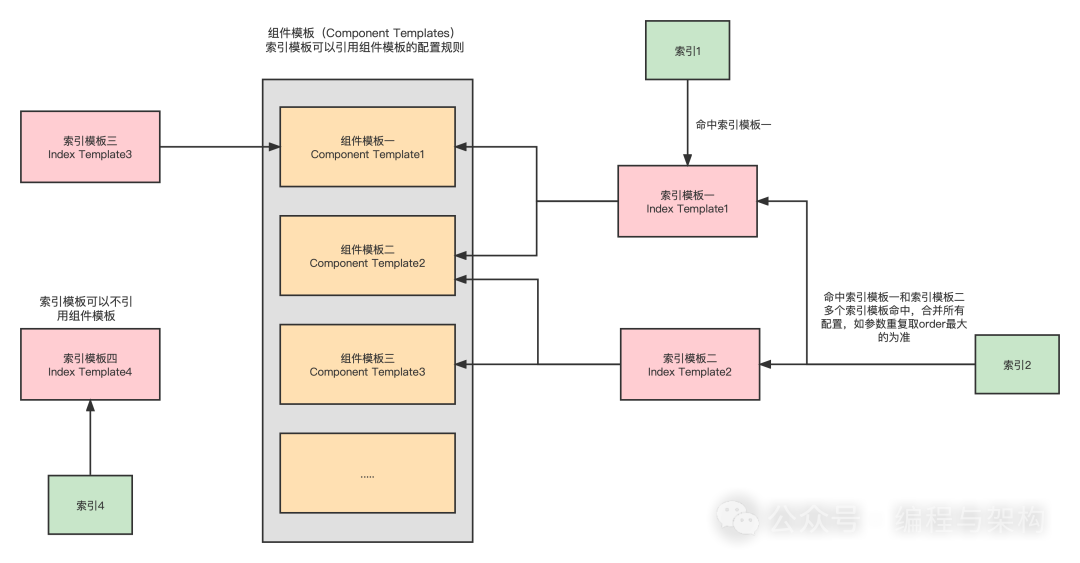
•
索引1
使用索引模板一
,索引模板一
使用组件模板一
、组件模板二•
索引2
使用索引模板二
与索引模板一
,索引模板又分别引用不同组件模板,这里会合并索引模板二
与索引模板一
的配置,重复的内容根据索引模板配置的order
字段取相对大的值•
索引4
使用了索引模板四
,索引模板可以不使用组件模板
创建基于组件模板的索引模板 Index Template
创建组件模板
组件模板1:
PUT _component_template/component_template1
{
  "template": {
    "mappings": {
      "properties": {
        "@timestamp": {
          "type": "date"
        }
      }
    }
  }
}
组件模板2:
PUT _component_template/component_template2
{
  "template": {
    "mappings": {
      "properties": {
        "ip_address": {
          "type": "ip"
        }
      }
    }
  }
}
在上面,我们定义了组件模板 component_template1 以及组件模板 component_template2 两个组件模板。
我们运用上面的两个组件模板 component template 来组合一个索引模板 index tempate。
创建索引模板 index tempate:
PUT _index_template/template_1
{
  "index_patterns": ["te*", "bar*"],
  "template": {
    "settings": {
      "number_of_shards": 1
    },
    "mappings": {
      "_source": {
        "enabled": false
      },
      "properties": {
        "host_name": {
          "type": "keyword"
        },
        "created_at": {
          "type": "date",
          "format": "EEE MMM dd HH:mm:ss Z yyyy"
        }
      }
    },
    "aliases": {
      "mydata": { }
    }
  },
  "priority": 200,
  "composed_of": ["component_template1", "component_template2"],
  "version": 3,
  "_meta": {
    "description": "my custom"
  }
}
注意这个部分
"composed_of": ["component_template1", "component_template2"]
这里是创建的索引模板引用了component_template1
,component_template1
组件模板
我们指定了index_patterns
参数,以 te 和 bar 开头的索引都会应用这个索引模板。
在Kibana中创建索引进行测试
创建索引:
PUT test
查看索引信息:
GET test
{
  "test" : {
    "aliases" : {
      "mydata" : { }
    },
    "mappings" : {
      "_source" : {
        "enabled" : false
      },
      "properties" : {
        "@timestamp" : {
          "type" : "date"
        },
        "created_at" : {
          "type" : "date",
          "format" : "EEE MMM dd HH:mm:ss Z yyyy"
        },
        "host_name" : {
          "type" : "keyword"
        },
        "ip_address" : {
          "type" : "ip"
        }
      }
    },
    "settings" : {
      "index" : {
        "routing" : {
          "allocation" : {
            "include" : {
              "_tier_preference" : "data_content"
            }
          }
        },
        "number_of_shards" : "1",
        "provided_name" : "test",
        "creation_date" : "1673862378764",
        "number_of_replicas" : "1",
        "uuid" : "8lePbT1bSmWanCKSkp8LPg",
        "version" : {
          "created" : "7140299"
        }
      }
    }
  }
}
对比一下,发现索引模板的字段和索引模板配置的组件模板字段都生效了。
模拟测试多组件模板
由于模板不仅可以由多个组件模板组成,还可以由索引模板本身组成。比较复杂,因此有两个模拟API(不生成实际索引,只用来查看验证)可以确定最终的索引设置是什么
指定索引名测试生成的索引信息
格式:
POST _index_template/_simulate_index/${索引名称}
样例:
POST /_index_template/_simulate_index/test
{
  "template" : {
    "settings" : {
      "index" : {
        "number_of_shards" : "1"
      }
    },
    "mappings" : {
      "_source" : {
        "enabled" : false
      },
      "properties" : {
        "@timestamp" : {
          "type" : "date"
        },
        "created_at" : {
          "type" : "date",
          "format" : "EEE MMM dd HH:mm:ss Z yyyy"
        },
        "host_name" : {
          "type" : "keyword"
        },
        "ip_address" : {
          "type" : "ip"
        }
      }
    },
    "aliases" : {
      "mydata" : { }
    }
  },
  "overlapping" : [
    {
      "name" : "my_logs",
      "index_patterns" : [
        "test-*"
      ]
    }
  ]
}
指定索引模板测试生成的索引信息
格式:
POST _index_template/_simulate/${索引模板名称}
样例:
# 上面我们已经创建了索引模板(Index Template)template_1
POST /_index_template/_simulate/template_1
{
  "template" : {
    "settings" : {
      "index" : {
        "number_of_shards" : "1"
      }
    },
    "mappings" : {
      "_source" : {
        "enabled" : false
      },
      "properties" : {
        "@timestamp" : {
          "type" : "date"
        },
        "created_at" : {
          "type" : "date",
          "format" : "EEE MMM dd HH:mm:ss Z yyyy"
        },
        "host_name" : {
          "type" : "keyword"
        },
        "ip_address" : {
          "type" : "ip"
        }
      }
    },
    "aliases" : {
      "mydata" : { }
    }
  },
  "overlapping" : [
    {
      "name" : "my_logs",
      "index_patterns" : [
        "test-*"
      ]
    }
  ]
}
验证同时使用多组件模板、索引模板优先级
定义两个组件模板(component template)
PUT /_component_template/ct1
{
  "template": {
    "settings": {
      "index.number_of_shards": 2
    }
  }
}

PUT /_component_template/ct2
{
  "template": {
    "settings": {
      "index.number_of_replicas": 0
    },
    "mappings": {
      "properties": {
        "@timestamp": {
          "type": "date"
        }
      }
    }
  }
}
模拟索引模板查看生成索引信息
POST /_index_template/_simulate
{
  "index_patterns": ["my*"],
  "template": {
    "settings" : {
        "index.number_of_shards" : 3
    }
  },
  "composed_of": ["ct1", "ct2"]
}
返回结果
{
  "template" : {
    "settings" : {
      "index" : {
        "number_of_shards" : "3",
        "number_of_replicas" : "0"
      }
    },
    "mappings" : {
      "properties" : {
        "@timestamp" : {
          "type" : "date"
        }
      }
    },
    "aliases" : { }
  },
  "overlapping" : [ ]
}
得出结论:
• 索引模板如果设置与组件模板冲突,则以索引模板为主
• 索引模板没有设置,则组件模板配置的内容生效
使用Kibana创建组合索引模板 Index Template
进入Kibana
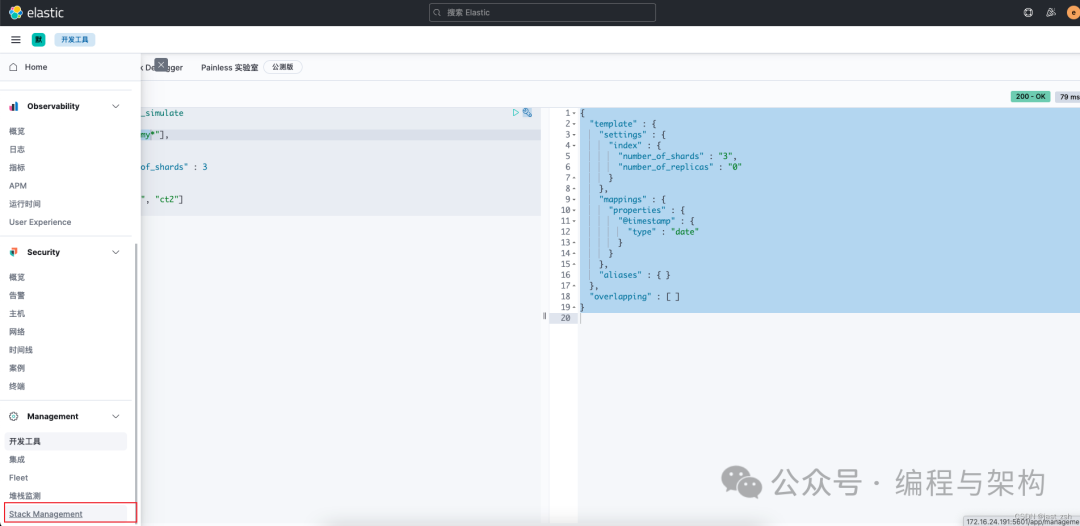
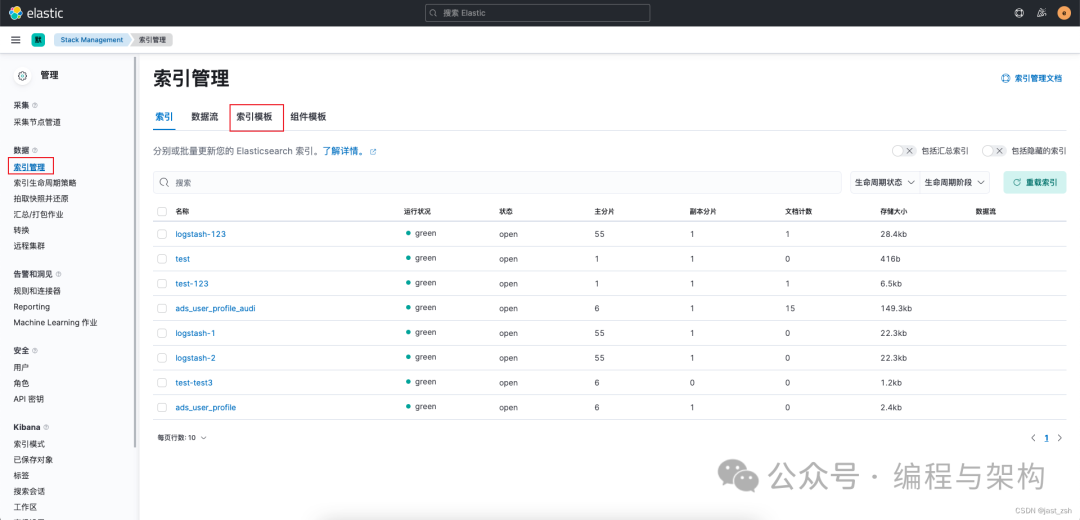
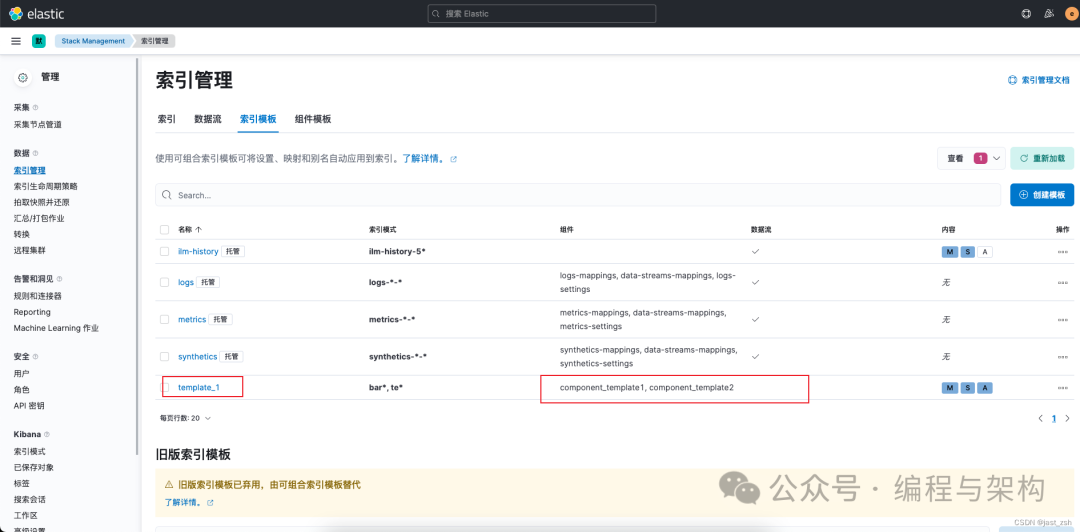
在索引模板中,可以看到,template_1 索引模板由component_template1, component_template2组成
创建组件模板
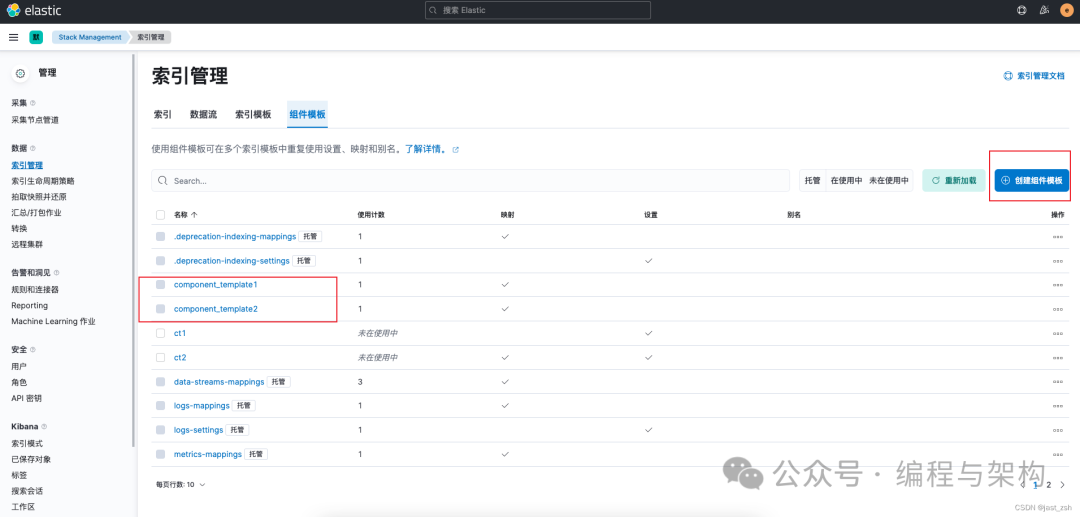
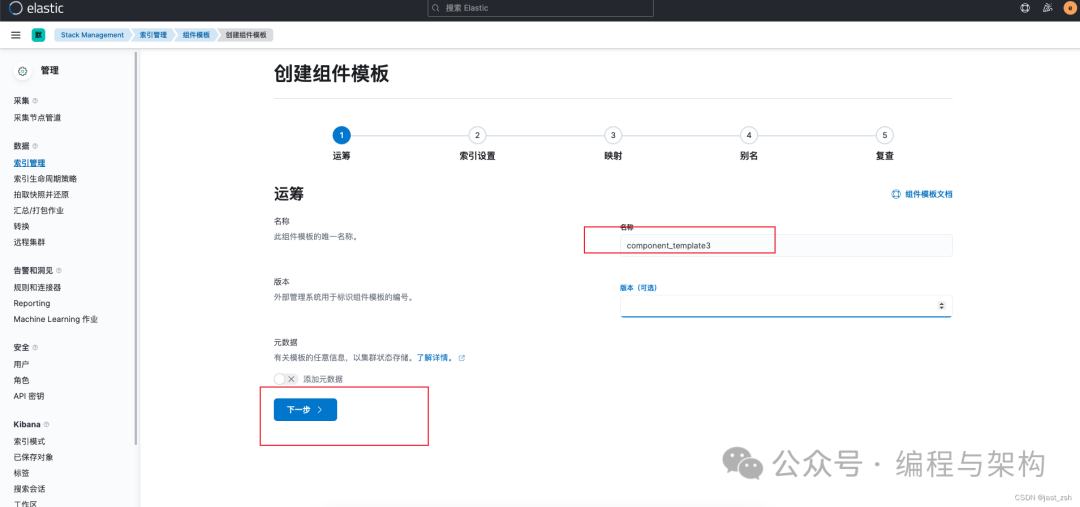
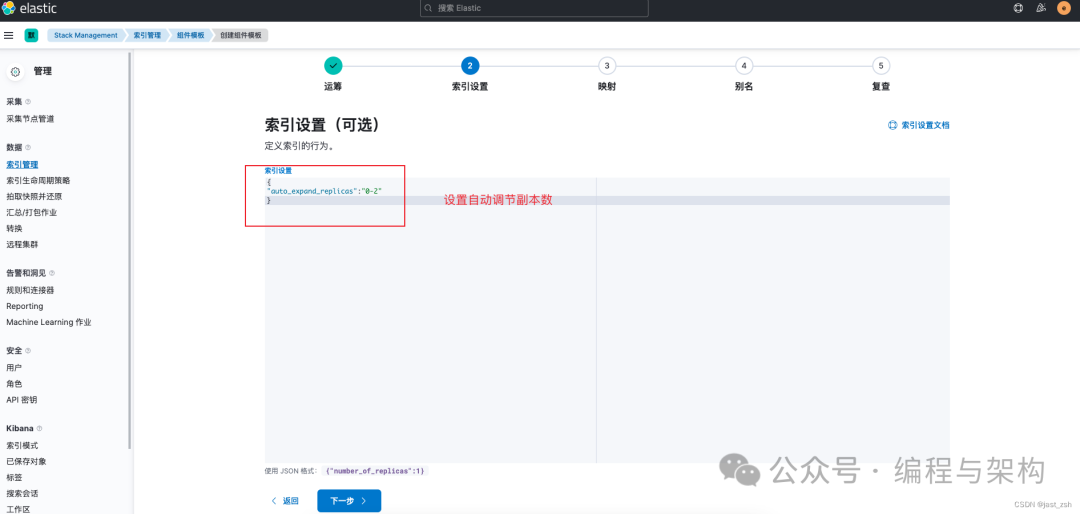
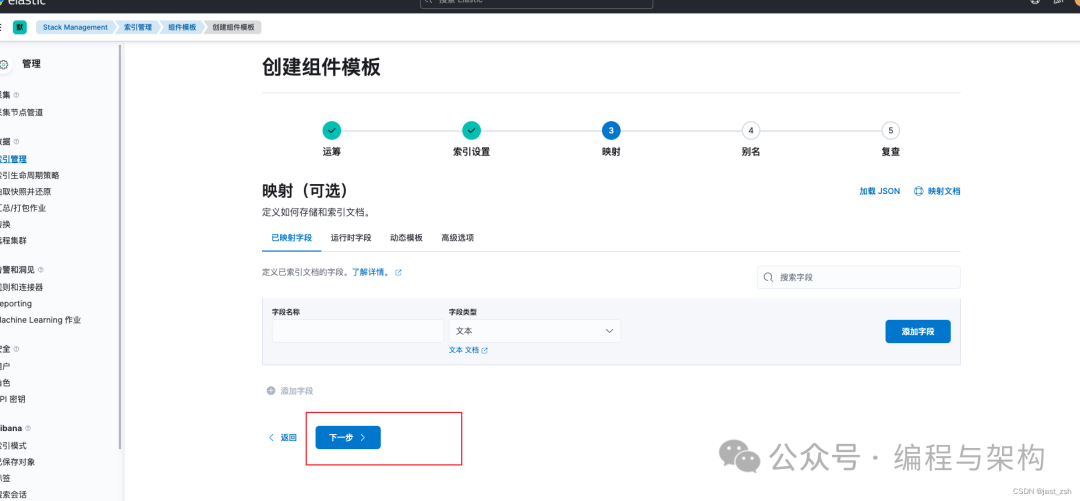
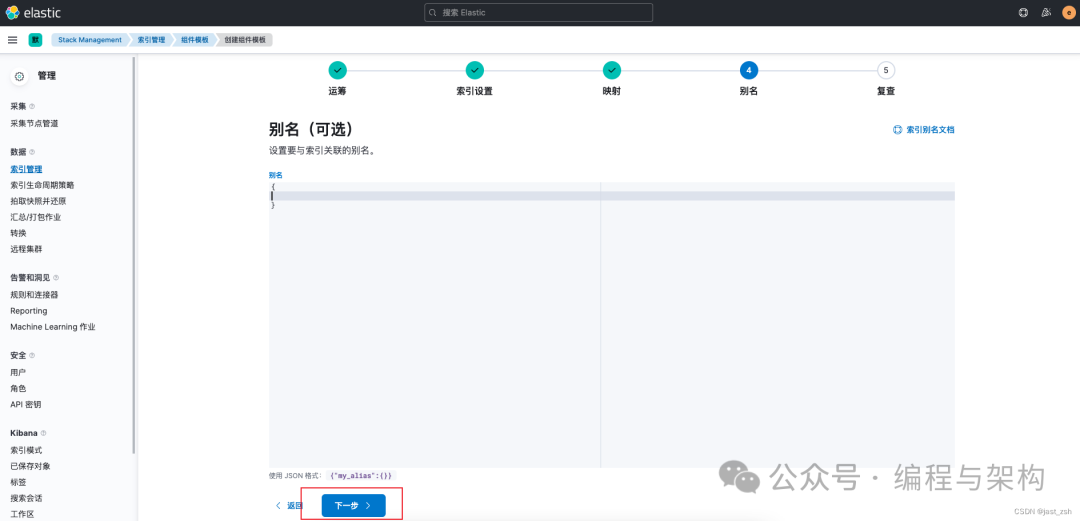
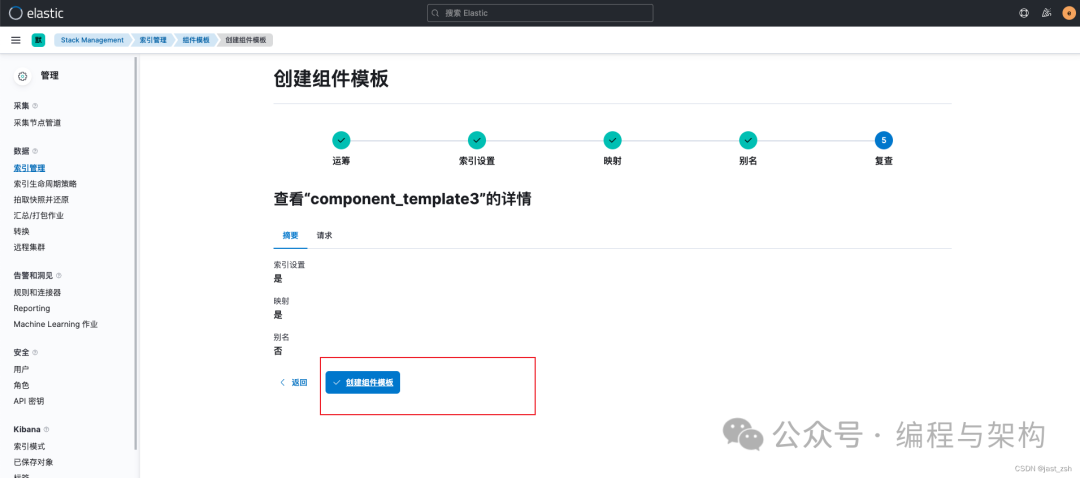
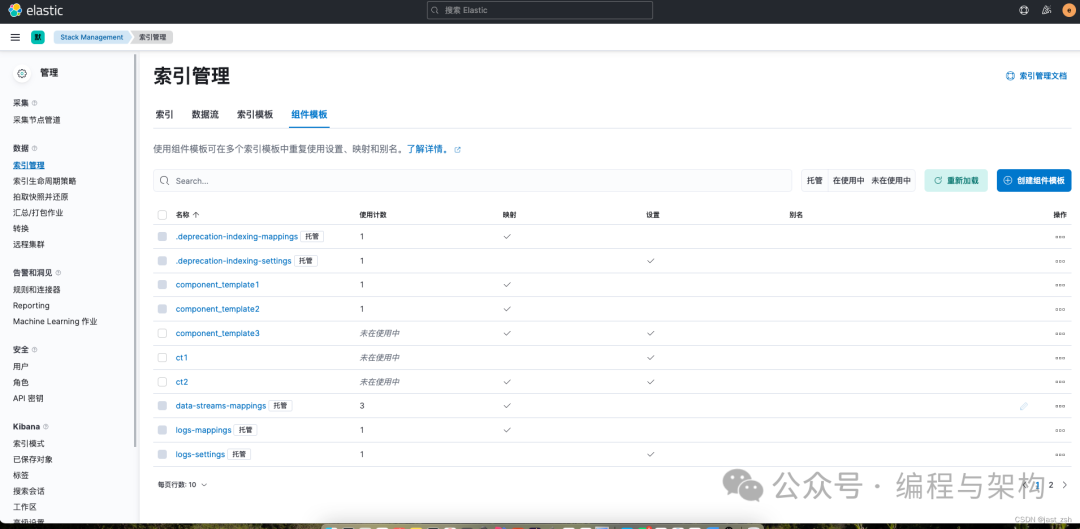
创建完成后可以在管理页面看到
未引用的组件模板可以删除,已经被索引模板引用的组件模板不可以删除
欢迎关注我的公众号“编程与架构”,原创技术文章第一时间推送。
引用链接
[1]
Index template: https://www.elastic.co/guide/en/elasticsearch/reference/7.6/indices-templates.html[2]
settings: https://www.elastic.co/guide/en/elasticsearch/reference/7.4/index-modules.html#index-modules-settings[3]
mappings: https://www.elastic.co/guide/en/elasticsearch/reference/7.4/mapping.html[4]
create index API: https://www.elastic.co/guide/en/elasticsearch/reference/current/indices-create-index.html[5]
组件模板: https://www.elastic.co/guide/en/elasticsearch/reference/master/indices-component-template.html
