



大家好,这里是公众号 DBA学习之路,分享一些学习国产数据库路上的知识和经验。
目录
前言
记得在金仓公众号看到过一篇文章:重生之我在甲方做DBA,从单机到集群,易如反掌~,写的比较有意思。
这篇文章介绍的是金仓数据库单机转集群的一些策略以及大致步骤,单机数据库在线扩展成集群,从单打独斗到同舟共“集”。告别单机瓶颈,轻松拥抱高可用!
为了避免绩效评定为 D,我打算学习一下!
介绍
KingbaseES 提供数据库扩缩容工具进行数据库集群的在线扩缩容。对于不支持图形化(GUI)的服务器,KingbaseES 提供基于命令行操作的集群扩缩容方式,本文主要用于在不支持 GUI 的服务器上的 KingbaseES 版本集群扩缩容工作。
金仓数据库为我们提供了 3 种单机扩集群的方式:
- 数据迁移
- 离线扩展
- 在线扩展
我们可以根据业务需求、资源可用性、成本预算和技术支持等因素进行综合考虑。
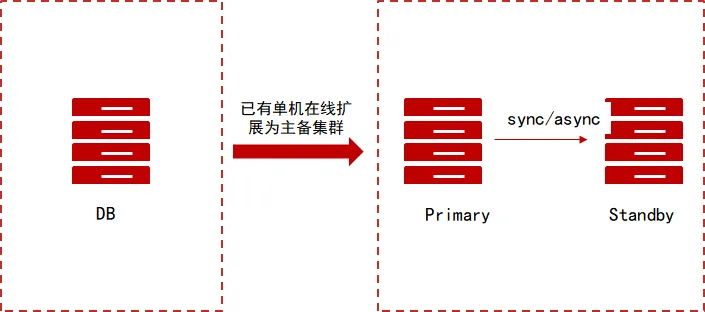
我这里演示的是金仓主备集群使用命令行静默一键扩容的方式。
前置准备
环境信息:
| 角色 | 主机名 | IP | 版本 | CPU | 内存 | 硬盘 |
|---|---|---|---|---|---|---|
| 主 | kesrwc01 | 192.168.6.87 | 银河麒麟 Kylin V10 | x86 | 8G | 100G |
| 备 | kesrwc02 | 192.168.6.88 | 银河麒麟 Kylin V10 | x86 | 8G | 100G |
| 待扩节点 | kesv9 | 192.168.6.98 | 银河麒麟 Kylin V10 | x86 | 8G | 100G |
在正式开始集群扩容之前,需要做好以下几个准备:
1、已部署好一主一备集群,可参考文章:金仓 KES RWC(读写分离集群)静默安装部署指南
2、已准备好进行扩容操作的节点,配置好系统即可,不需要安装软件,可参考文章:金仓数据库 KingbaseES V9 单机安装指南
3、待扩容或缩容节点需要从集群主节点上获取如下文件:
- 集群安装目录
/KingbaseES/V9/ClientTools/guitools/DeployTools/zip/中的db.zip - 集群安装目录
/install下的一键部署脚本cluster_install.sh、install.conf、trust_cluster.sh - 如果有
license.dat授权文件也需要
从主备集群中收集以上文件存放到 /soft 目录中:
[root@kesrwc01 ~]# mkdir /soft
[root@kesrwc01 ~]# cp /KingbaseES/V9/ClientTools/guitools/DeployTools/zip/db.zip /soft/
[root@kesrwc01 ~]# cp /install/cluster_install.sh /soft/
[root@kesrwc01 ~]# cp /install/install.conf /soft/
[root@kesrwc01 ~]# cp /install/trust_cluster.sh /soft/
[root@kesrwc01 ~]# ll /soft/
总用量 319872
-rwxr-xr-x 1 root root    252402  2月 26 16:26 cluster_install.sh
-rw-r--r-- 1 root root 327258132  2月 26 16:23 db.zip
-rw-r--r-- 1 root root     19430  2月 26 16:26 install.conf
-rwxr-xr-x 1 root root      9677  2月 26 16:26 trust_cluster.sh
然后拷贝到需要扩容的单机主机上:
[root@kesrwc01 ~]# scp /soft/* 192.168.6.98:/soft

使用集群安装用户在待扩容节点,将上面从主备集群中获取到的文件拷贝至单机目录 /install 下:
[root@kesv9 soft]# ll
总用量 319872
-rwxr-xr-x 1 root root    252402  2月 26 16:29 cluster_install.sh
-rw-r--r-- 1 root root 327258132  2月 26 16:29 db.zip
-rw-r--r-- 1 root root     19430  2月 26 16:29 install.conf
-rwxr-xr-x 1 root root      9677  2月 26 16:29 trust_cluster.sh
[root@kesv9 soft]# cp * /install/
[root@kesv9 soft]# chown -R kingbase:kingbase /install/

确保文件权限属主需为集群安装用户即可。
集群扩容
配置 install.conf(单机)
待扩容节点配置 install.conf 文件,首先需要修改 all_ip 选项:
## 互信需要所有节点 IP,包括扩容的节点
all_ip=(192.168.6.87 192.168.6.88 192.168.6.98)
然后填写 expand 标签下各参数信息**:
## config of create a standby/witness node.
## when the cluster is in quorum or sync mode and expand sync standby node,
## it may automatically adjust synchronous_node and synchronous_standby_count parameters.
[expand]
expand_type="0"                   # The node type of standby/witness node, which would be add to cluster. 0:standby  1:witness
primary_ip="192.168.6.87"                    # The ip addr of cluster primary node, which need to expand a standby/witness node.
expand_ip="192.168.6.98"                     # The ip addr of standby/witness node, which would be add to cluster.
node_id="3"                       # The node_id of standby/witness node, which would be add to cluster. It does not the same with any one in  cluster node
                                 # for example: node_id="3"
sync_type=""                     # the sync_type parameter is used to specify the sync type for expand node. 0:sync 1:potential 2:async
                                 # this parameter is only valid when expand_type="0" and the synchronous parameter of the cluster is set to custom mode.

## Specific instructions ,see it under [install]
install_dir="/KingbaseES/V9/cluster"                   # the last layer of directory could not add '/'
zip_package="/install/db.zip"
net_device=(ens33)                    # if virtual_ip set,it must be set
net_device_ip=(192.168.6.98)                 # if virtual_ip set,it must be set
license_file=()
deploy_by_sshd="1"
ssh_port="22"
scmd_port="8890"
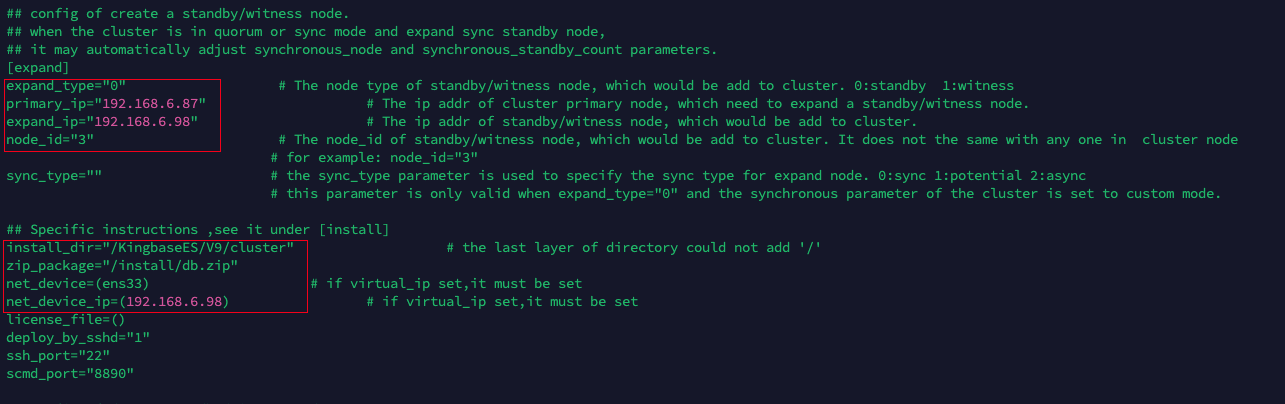
这里需要修改的信息可以参考下图,修改要求可以参考注释即可:
SSH 免密配置(单机)
静默安装需要配置免密,使用 root 用户执行 trust_cluster.sh 脚本即可:
[root@kesv9 ~]# cd /install/
[root@kesv9 install]# sh trust_cluster.sh
[INFO] set password-free between root and kingbase
Generating public/private rsa key pair.
...
...
...

## 过程中根据提示输入密码即可
root@192.168.6.87's password:
id_rsa                                                                                                                                                                                                                                                                                     100% 2590     1.3MB/s   00:00
id_rsa.pub                                                                                                                                                                                                                                                                                 100%  564   486.4KB/s   00:00
authorized_keys                                                                                                                                                                                                                                                                            100%  564   590.3KB/s   00:00
known_hosts

...
...
...
connect to "192.168.6.87" from current node by 'ssh' kingbase:0..... OK
connect to "192.168.6.87" from current node by 'ssh' root:0..... OK
connect to "192.168.6.88" from "192.168.6.87" by 'ssh' kingbase->kingbase:0 .... OK
connect to "192.168.6.88" from "192.168.6.87" by 'ssh' root->root:0 root->kingbase:0 kingbase->root:0.... OK
connect to "192.168.6.88" from current node by 'ssh' kingbase:0..... OK
connect to "192.168.6.88" from current node by 'ssh' root:0..... OK
connect to "192.168.6.98" from "192.168.6.88" by 'ssh' kingbase->kingbase:0 .... OK
connect to "192.168.6.98" from "192.168.6.88" by 'ssh' root->root:0 root->kingbase:0 kingbase->root:0.... OK
connect to "192.168.6.98" from current node by 'ssh' kingbase:0..... OK
connect to "192.168.6.98" from current node by 'ssh' root:0..... OK
connect to "192.168.6.87" from "192.168.6.98" by 'ssh' kingbase->kingbase:0 .... OK
connect to "192.168.6.87" from "192.168.6.98" by 'ssh' root->root:0 root->kingbase:0 kingbase->root:0.... OK
check ssh connection success!
互信成功即可。
扩容前准备
📢 注意:待扩容节点不需要建库,否则在扩容过程中会提示关闭数据库,而且加入集群后使用的也是集群库的数据,所以待扩容节点建库是多此一举:
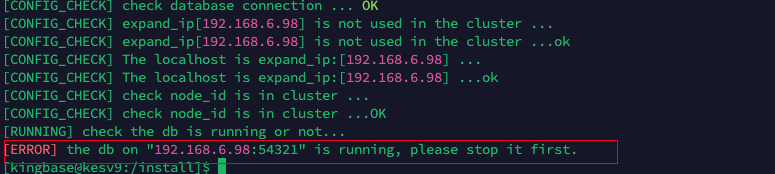
如果待扩容节点已经建库,那就要手动关闭数据库:
[kingbase@kesv9:/install]$ sys_ctl stop
等待服务器进程关闭 .... 完成
服务器进程已经关闭
如果已经建库并且数据存放目录与集群目录一样,需要先将待扩容节点的数据存放目录备份改名:
[root@kesv9 ~]# mv /data/ /databak
[root@kesv9 ~]# mkdir /data
[root@kesv9 ~]# chown kingbase:kingbase /data
防止扩容过程中提示冲突:

有一些集群的参数与单机配置有区别,所以需要提前修改操作系统参数,否则扩容过程中会有一些告警和报错:
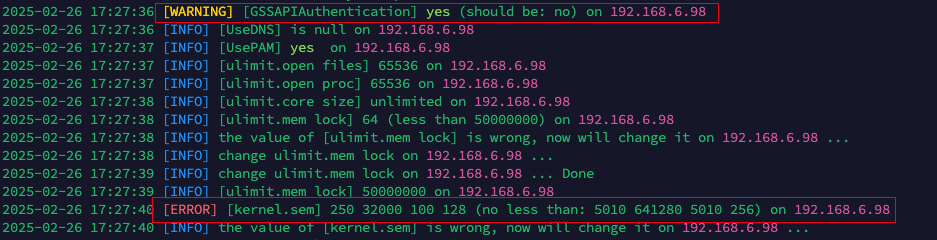
修改参数:
[root@kesv9 ~]# vi /etc/sysctl.conf

## 修改为如下配置
kernel.sem= 5010 641280 5010 256

## 然后执行生效
[root@kesv9 ~]# sysctl -p
确保准备都好了之后就可以开始扩容了。
执行扩容(单机)
2、待扩容节点执行扩容 standby 节点操作:
[kingbase@kesv9:/install]$ sh cluster_install.sh expand
[CONFIG_CHECK] will deploy the cluster of
[RUNNING] success connect to the target "192.168.6.98" ..... OK
[RUNNING] success connect to "192.168.6.98" from current node by 'ssh' ..... OK
[RUNNING] success connect to the target "192.168.6.87" ..... OK
[RUNNING] success connect to "192.168.6.87" from current node by 'ssh' ..... OK
[RUNNING] Primary node ip is 192.168.6.87 ...
[RUNNING] Primary node ip is 192.168.6.87 ... OK
[CONFIG_CHECK] set install_with_root=1
[RUNNING] success connect to the target "192.168.6.98" ..... OK
[RUNNING] success connect to "192.168.6.98" from current node by 'ssh' ..... OK
[RUNNING] success connect to the target "192.168.6.87" ..... OK
[RUNNING] success connect to "192.168.6.87" from current node by 'ssh' ..... OK
[INSTALL] load config from cluster.....
 [INFO] db_user=system
 [INFO] db_port=54321
 [INFO] use_scmd=1
 [INFO] data_directory=/data
 [INFO] scmd_port=8890
 [INFO] recovery=standby
 [INFO] use_check_disk=off
 [INFO] trusted_servers=192.168.6.254
 [INFO] reconnect_attempts=10
 [INFO] reconnect_interval=6
 [INFO] auto_cluster_recovery_level=1
 [INFO] synchronous=quorum
[INSTALL] load config from cluster.....OK
[CONFIG_CHECK] file format is correct ... OK
[CONFIG_CHECK] check database connection ...
[CONFIG_CHECK] check database connection ... OK
[CONFIG_CHECK] expand_ip[192.168.6.98] is not used in the cluster ...
[CONFIG_CHECK] expand_ip[192.168.6.98] is not used in the cluster ...ok
[CONFIG_CHECK] The localhost is expand_ip:[192.168.6.98] ...
[CONFIG_CHECK] The localhost is expand_ip:[192.168.6.98] ...ok
[CONFIG_CHECK] check node_id is in cluster ...
[CONFIG_CHECK] check node_id is in cluster ...OK
[RUNNING] check the db is running or not...
[RUNNING] the db is not running on "192.168.6.98:54321" ..... OK
[RUNNING] the install dir is not exist on "192.168.6.98" ..... OK
[RUNNING] check the sys_securecmdd is running or not...
[RUNNING] the sys_securecmdd is not running on "192.168.6.98:8890" ..... OK
 [INFO] use_ssl=0
2025-02-26 17:27:36 [INFO] start to check system parameters on 192.168.6.98 ...
2025-02-26 17:27:36 [WARNING] [GSSAPIAuthentication] yes (should be: no) on 192.168.6.98
2025-02-26 17:27:36 [INFO] [UseDNS] is null on 192.168.6.98
2025-02-26 17:27:37 [INFO] [UsePAM] yes  on 192.168.6.98
2025-02-26 17:27:37 [INFO] [ulimit.open files] 65536 on 192.168.6.98
2025-02-26 17:27:37 [INFO] [ulimit.open proc] 65536 on 192.168.6.98
2025-02-26 17:27:38 [INFO] [ulimit.core size] unlimited on 192.168.6.98
2025-02-26 17:27:38 [INFO] [ulimit.mem lock] 64 (less than 50000000) on 192.168.6.98
2025-02-26 17:27:38 [INFO] the value of [ulimit.mem lock] is wrong, now will change it on 192.168.6.98 ...
2025-02-26 17:27:38 [INFO] change ulimit.mem lock on 192.168.6.98 ...
2025-02-26 17:27:39 [INFO] change ulimit.mem lock on 192.168.6.98 ... Done
2025-02-26 17:27:39 [INFO] [ulimit.mem lock] 50000000 on 192.168.6.98
2025-02-26 17:27:40 [ERROR] [kernel.sem] 250 32000 100 128 (no less than: 5010 641280 5010 256) on 192.168.6.98
2025-02-26 17:27:40 [INFO] the value of [kernel.sem] is wrong, now will change it on 192.168.6.98 ...
2025-02-26 17:27:40 [INFO] change kernel.sem on 192.168.6.98 ...
2025-02-26 17:27:41 [INFO] change kernel.sem on 192.168.6.98 ... Done
2025-02-26 17:27:42 [INFO] [kernel.sem] 5010 641280 5010 256 on 192.168.6.98
2025-02-26 17:27:43 [INFO] [RemoveIPC] no on 192.168.6.98
2025-02-26 17:27:43 [INFO] [DefaultTasksAccounting] is null on 192.168.6.98
2025-02-26 17:27:43 [INFO] write file "/etc/udev/rules.d/kingbase.rules" on 192.168.6.98
2025-02-26 17:27:45 [INFO] [crontab] chmod /usr/bin/crontab ...
2025-02-26 17:27:45 [INFO] [crontab] chmod /usr/bin/crontab ... Done
2025-02-26 17:27:45 [INFO] [crontab access] OK
2025-02-26 17:27:46 [INFO] [cron.allow] add kingbase to cron.allow ...
2025-02-26 17:27:46 [INFO] [cron.allow] add kingbase to cron.allow ... Done
2025-02-26 17:27:47 [INFO] [crontab auth] crontab is accessible by kingbase now on 192.168.6.98
2025-02-26 17:27:47 [INFO] [SELINUX] disabled on 192.168.6.98
2025-02-26 17:27:48 [INFO] [firewall] down on 192.168.6.98
2025-02-26 17:27:48 [INFO] [The memory] OK on 192.168.6.98
2025-02-26 17:27:49 [INFO] [The hard disk] OK on 192.168.6.98
2025-02-26 17:27:49 [INFO] [ping] chmod /bin/ping ...
2025-02-26 17:27:49 [INFO] [ping] chmod /bin/ping ... Done
2025-02-26 17:27:50 [INFO] [ping access] OK
2025-02-26 17:27:50 [INFO] [/bin/cp --version] on 192.168.6.98 OK
2025-02-26 17:27:50 [INFO] [Virtual IP] Not configured on 192.168.6.98
[INSTALL] create the install dir "/KingbaseES/V9/cluster/kingbase" on 192.168.6.98 ...
[INSTALL] success to create the install dir "/KingbaseES/V9/cluster/kingbase" on "192.168.6.98" ..... OK
[INSTALL] try to copy the zip package "/install/db.zip" to /KingbaseES/V9/cluster/kingbase of "192.168.6.98" .....
[INSTALL] success to scp the zip package "/install/db.zip" /KingbaseES/V9/cluster/kingbase of to "192.168.6.98" ..... OK
[INSTALL] decompress the "/KingbaseES/V9/cluster/kingbase" to "/KingbaseES/V9/cluster/kingbase" on 192.168.6.98
[INSTALL] success to decompress the "/KingbaseES/V9/cluster/kingbase/db.zip" to "/KingbaseES/V9/cluster/kingbase" on "192.168.6.98"..... OK
[INSTALL] check license_file "default"
[INSTALL] success to access license_file on 192.168.6.98: /KingbaseES/V9/cluster/kingbase/bin/license.dat
[RUNNING] config sys_securecmdd and start it ...
[RUNNING] config the sys_securecmdd port to 8890 ...
[RUNNING] success to config the sys_securecmdd port on 192.168.6.98 ... OK
successfully initialized the sys_securecmdd, please use "/KingbaseES/V9/cluster/kingbase/bin/sys_HAscmdd.sh start" to start the sys_securecmdd
[RUNNING] success to config sys_securecmdd on 192.168.6.98 ... OK
Created symlink /etc/systemd/system/multi-user.target.wants/securecmdd.service → /etc/systemd/system/securecmdd.service.
[RUNNING] success to start sys_securecmdd on 192.168.6.98 ... OK
[INSTALL] success to access file: /KingbaseES/V9/cluster/kingbase/etc/all_nodes_tools.conf
[INSTALL] success to scp the /KingbaseES/V9/cluster/kingbase/etc/repmgr.conf from 192.168.6.87 to "192.168.6.98"..... ok
[INSTALL] success to scp the ~/.encpwd from 192.168.6.87 to "192.168.6.98"..... ok
[INSTALL] success to scp /KingbaseES/V9/cluster/kingbase/etc/all_nodes_tools.conf from "192.168.6.87" to "192.168.6.98" ...ok
[INSTALL] success to chmod 600 the ~/.encpwd on 192.168.6.98..... ok
 [INFO] parameter_name=node_id
 [INFO] parameter_values='3'
 [INFO] [parameter_name] para_exist=1
 [INFO] sed -i "/[#]*node_id[ ]*=/cnode_id='3'" /KingbaseES/V9/cluster/kingbase/etc/repmgr.conf
 [INFO] parameter_name=node_name
 [INFO] parameter_values='node3'
 [INFO] [parameter_name] para_exist=1
 [INFO] sed -i "/[#]*node_name[ ]*=/cnode_name='node3'" /KingbaseES/V9/cluster/kingbase/etc/repmgr.conf
 [INFO] parameter_name=conninfo
 [INFO] parameter_values='host
 [INFO] [parameter_name] para_exist=1
 [INFO] sed -i "/[#]*conninfo[ ]*=/cconninfo='host=192.168.6.98 user=esrep dbname=esrep port=54321 connect_timeout=10 keepalives=1 keepalives_idle=2 keepalives_interval=2 keepalives_count=3 tcp_user_timeout=9000'" /KingbaseES/V9/cluster/kingbase/etc/repmgr.conf
 [INFO] parameter_name=ping_path
 [INFO] parameter_values='/bin'
 [INFO] [parameter_name] para_exist=1
 [INFO] sed -i "/[#]*ping_path[ ]*=/cping_path='/bin'" /KingbaseES/V9/cluster/kingbase/etc/repmgr.conf
[RUNNING] standby clone ...
[WARNING] following problems with command line parameters detected:
  -D/--sysdata will be ignored if a repmgr configuration file is provided
[NOTICE] destination directory "/data" provided
[INFO] connecting to source node
[DETAIL] connection string is: host=192.168.6.87 user=esrep port=54321 dbname=esrep
[DETAIL] current installation size is 102 MB
[NOTICE] checking for available walsenders on the source node (2 required)
[NOTICE] checking replication connections can be made to the source server (2 required)
[INFO] checking and correcting permissions on existing directory "/data"
[INFO] creating replication slot as user "esrep"
[NOTICE] starting backup (using sys_basebackup)...
[INFO] executing:
  /KingbaseES/V9/cluster/kingbase/bin/sys_basebackup -l "repmgr base backup"  -D /data -h 192.168.6.87 -p 54321 -U esrep -c fast -X stream -S repmgr_slot_3
[NOTICE] standby clone (using sys_basebackup) complete
[NOTICE] you can now start your Kingbase server
[HINT] for example: sys_ctl -D /data start
[HINT] after starting the server, you need to register this standby with "repmgr standby register"
[RUNNING] standby clone ...OK
[RUNNING] db start ...
waiting for server to start.... done
server started
[RUNNING] db start ...OK
[INFO] connecting to local node "node3" (ID: 3)
[INFO] connecting to primary database
[WARNING] --upstream-node-id not supplied, assuming upstream node is primary (node ID: 1)
[INFO] standby registration complete
[NOTICE] standby node "node3" (ID: 3) successfully registered
2025-02-26 17:28:24 begin to start DB on "[localhost]".
2025-02-26 17:28:25 DB on "[localhost]" already started, connect to check it.
2025-02-26 17:28:26 DB on "[localhost]" start success.
2025-02-26 17:28:26 Ready to start local kbha daemon and repmgrd daemon ...
2025-02-26 17:28:26 begin to start repmgrd on "[localhost]".
[2025-02-26 17:28:27] [NOTICE] using provided configuration file "/KingbaseES/V9/cluster/kingbase/bin/../etc/repmgr.conf"
[2025-02-26 17:28:27] [INFO] creating directory "/KingbaseES/V9/cluster/kingbase/log"...
[2025-02-26 17:28:27] [NOTICE] redirecting logging output to "/KingbaseES/V9/cluster/kingbase/log/hamgr.log"

2025-02-26 17:28:29 repmgrd on "[localhost]" start success.
[2025-02-26 17:28:32] [NOTICE] redirecting logging output to "/KingbaseES/V9/cluster/kingbase/log/kbha.log"

2025-02-26 17:28:34 Done.
 ID | Name  | Role    | Status    | Upstream | Location | Priority | Timeline | LSN_Lag | Connection string
----+-------+---------+-----------+----------+----------+----------+----------+---------+-----------------------------------------------------------------------------------------------------------------------------------------------------------------------
 1  | node1 | primary | * running |          | default  | 100      | 1        |         | host=192.168.6.87 user=esrep dbname=esrep port=54321 connect_timeout=10 keepalives=1 keepalives_idle=2 keepalives_interval=2 keepalives_count=3 tcp_user_timeout=9000
 2  | node2 | standby |   running | node1    | default  | 100      | 1        | 0 bytes | host=192.168.6.88 user=esrep dbname=esrep port=54321 connect_timeout=10 keepalives=1 keepalives_idle=2 keepalives_interval=2 keepalives_count=3 tcp_user_timeout=9000
 3  | node3 | standby |   running | node1    | default  | 100      | 1        | 0 bytes | host=192.168.6.98 user=esrep dbname=esrep port=54321 connect_timeout=10 keepalives=1 keepalives_idle=2 keepalives_interval=2 keepalives_count=3 tcp_user_timeout=9000
[RUNNING] query archive command at 192.168.6.87 ...
[RUNNING] current cluster not config sys_rman,return.
这样就代表已经扩容成功。
检查集群
在集群主节点执行检查:
[kingbase@kesrwc01:/home/kingbase]$ repmgr cluster show
 ID | Name  | Role    | Status    | Upstream | Location | Priority | Timeline | LSN_Lag | Connection string
----+-------+---------+-----------+----------+----------+----------+----------+---------+-----------------------------------------------------------------------------------------------------------------------------------------------------------------------
 1  | node1 | primary | * running |          | default  | 100      | 1        |         | host=192.168.6.87 user=esrep dbname=esrep port=54321 connect_timeout=10 keepalives=1 keepalives_idle=2 keepalives_interval=2 keepalives_count=3 tcp_user_timeout=9000
 2  | node2 | standby |   running | node1    | default  | 100      | 1        | 0 bytes | host=192.168.6.88 user=esrep dbname=esrep port=54321 connect_timeout=10 keepalives=1 keepalives_idle=2 keepalives_interval=2 keepalives_count=3 tcp_user_timeout=9000
 3  | node3 | standby |   running | node1    | default  | 100      | 1        | 0 bytes | host=192.168.6.98 user=esrep dbname=esrep port=54321 connect_timeout=10 keepalives=1 keepalives_idle=2 keepalives_interval=2 keepalives_count=3 tcp_user_timeout=9000
[kingbase@kesrwc01:/home/kingbase]$ repmgr service status
 ID | Name  | Role    | Status    | Upstream | repmgrd | PID   | Paused? | Upstream last seen
----+-------+---------+-----------+----------+---------+-------+---------+--------------------
 1  | node1 | primary | * running |          | running | 4639  | no      | n/a
 2  | node2 | standby |   running | node1    | running | 5049  | no      | 0 second(s) ago
 3  | node3 | standby |   running | node1    | running | 36501 | no      | 1 second(s) ago
确认新扩容节点已正确加入集群,集群状态正常。
