



Es 中的聚合分析我们主要从三个方面来学习:
指标聚合 桶聚合 管道聚合
今天我们先来看相对简单的指标聚合。
以下是视频笔记:
注意,笔记只是视频内容的一个简要记录,因此笔记内容比较简单,完整的内容可以查看视频。
22.1 Max Aggregation
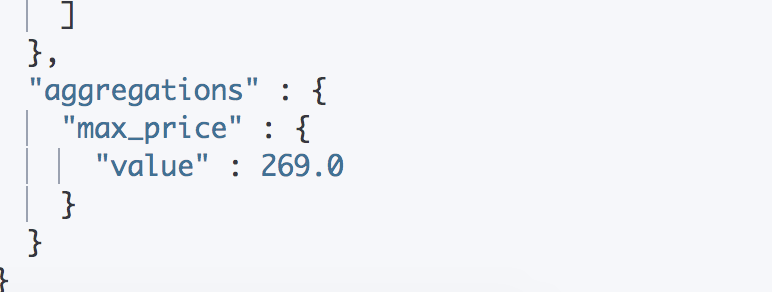
统计最大值。例如查询价格最高的书:
GET books/_search
{
  "aggs": {
    "max_price": {
      "max": {
        "field": "price"
      }
    }
  }
}
查询结果如下:
GET books/_search
{
  "aggs": {
    "max_price": {
      "max": {
        "field": "price",
        "missing": 1000
      }
    }
  }
}
如果某个文档中缺少 price 字段,则设置该字段的值为 1000。
也可以通过脚本来查询最大值:
GET books/_search
{
  "aggs": {
    "max_price": {
      "max": {
        "script": {
          "source": "if(doc['price'].size()!=0){doc.price.value}"
        }
      }
    }
  }
}
使用脚本时,可以先通过 doc['price'].size()!=0
去判断文档是否有对应的属性。
22.2 Min Aggregation
统计最小值,用法和 Max Aggregation 基本一致:
GET books/_search
{
  "aggs": {
    "min_price": {
      "min": {
        "field": "price",
        "missing": 1000
      }
    }
  }
}
脚本:
GET books/_search
{
  "aggs": {
    "min_price": {
      "min": {
        "script": {
          "source": "if(doc['price'].size()!=0){doc.price.value}"
        }
      }
    }
  }
}
22.3 Avg Aggregation
统计平均值:
GET books/_search
{
  "aggs": {
    "avg_price": {
      "avg": {
        "field": "price"
      }
    }
  }
}

GET books/_search
{
  "aggs": {
    "avg_price": {
      "avg": {
        "script": {
          "source": "if(doc['price'].size()!=0){doc.price.value}"
        }
      }
    }
  }
}
22.4 Sum Aggregation
求和:
GET books/_search
{
  "aggs": {
    "sum_price": {
      "sum": {
        "field": "price"
      }
    }
  }
}

GET books/_search
{
  "aggs": {
    "sum_price": {
      "sum": {
        "script": {
          "source": "if(doc['price'].size()!=0){doc.price.value}"
        }
      }
    }
  }
}
22.5 Cardinality Aggregation
cardinality aggregation 用于基数统计。类似于 SQL 中的 distinct count(0):
text 类型是分析型类型,默认是不允许进行聚合操作的,如果相对 text 类型进行聚合操作,需要设置其 fielddata 属性为 true,这种方式虽然可以使 text 类型进行聚合操作,但是无法满足精准聚合,如果需要精准聚合,可以设置字段的子域为 keyword。
方式一:
重新定义 books 索引:
PUT books
{
  "mappings": {
    "properties": {
      "name":{
        "type": "text",
        "analyzer": "ik_max_word"
      },
      "publish":{
        "type": "text",
        "analyzer": "ik_max_word",
        "fielddata": true
      },
      "type":{
        "type": "text",
        "analyzer": "ik_max_word"
      },
      "author":{
        "type": "keyword"
      },
      "info":{
        "type": "text",
        "analyzer": "ik_max_word"
      },
      "price":{
        "type": "double"
      }
    }
  }
}
定义完成后,重新插入数据(参考之前的视频)。
接下来就可以查询出版社的总数量:
GET books/_search
{
  "aggs": {
    "publish_count": {
      "cardinality": {
        "field": "publish"
      }
    }
  }
}
查询结果如下:
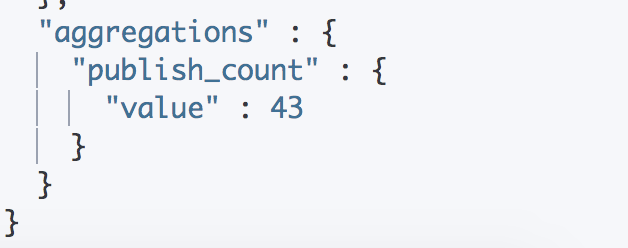 这种聚合方式可能会不准确。可以将 publish 设置为 keyword 类型或者设置子域为 keyword。
PUT books
{
  "mappings": {
    "properties": {
      "name":{
        "type": "text",
        "analyzer": "ik_max_word"
      },
      "publish":{
        "type": "keyword"
      },
      "type":{
        "type": "text",
        "analyzer": "ik_max_word"
      },
      "author":{
        "type": "keyword"
      },
      "info":{
        "type": "text",
        "analyzer": "ik_max_word"
      },
      "price":{
        "type": "double"
      }
    }
  }
}
查询结果如下:
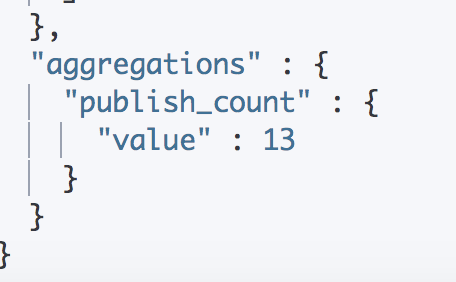 对比查询结果可知,使用 fileddata 的方式,查询结果不准确。
22.6 Stats Aggregation
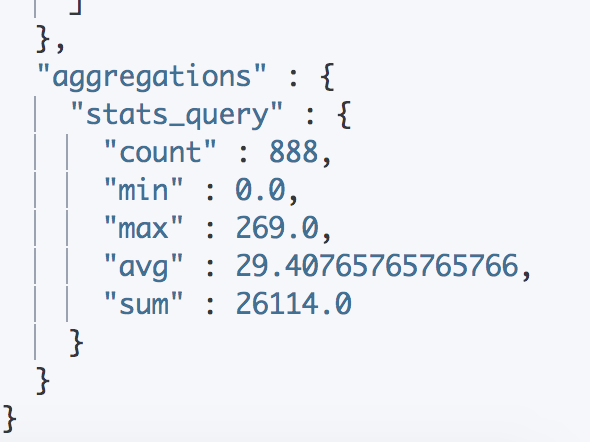
基本统计,一次性返回 count、max、min、avg、sum:
GET books/_search
{
  "aggs": {
    "stats_query": {
      "stats": {
        "field": "price"
      }
    }
  }
}
22.7 Extends Stats Aggregation
高级统计,比 stats 多出来:平方和、方差、标准差、平均值加减两个标准差的区间:
GET books/_search
{
  "aggs": {
    "es": {
      "extended_stats": {
        "field": "price"
      }
    }
  }
}
22.8 Percentiles Aggregation
百分位统计。
GET books/_search
{
  "aggs": {
    "p": {
      "percentiles": {
        "field": "price",
        "percents": [
          1,
          5,
          10,
          15,
          25,
          50,
          75,
          95,
          99
        ]
      }
    }
  }
}
22.9 Value Count Aggregation
可以按照字段统计文档数量(包含指定字段的文档数量):
GET books/_search
{
  "aggs": {
    "count": {
      "value_count": {
        "field": "price"
      }
    }
  }
}

文章转载自北漂码农有话说,如果涉嫌侵权,请发送邮件至:contact@modb.pro进行举报,并提供相关证据,一经查实,墨天轮将立刻删除相关内容。
