



一、大云海山数据库介绍
1、产品介绍
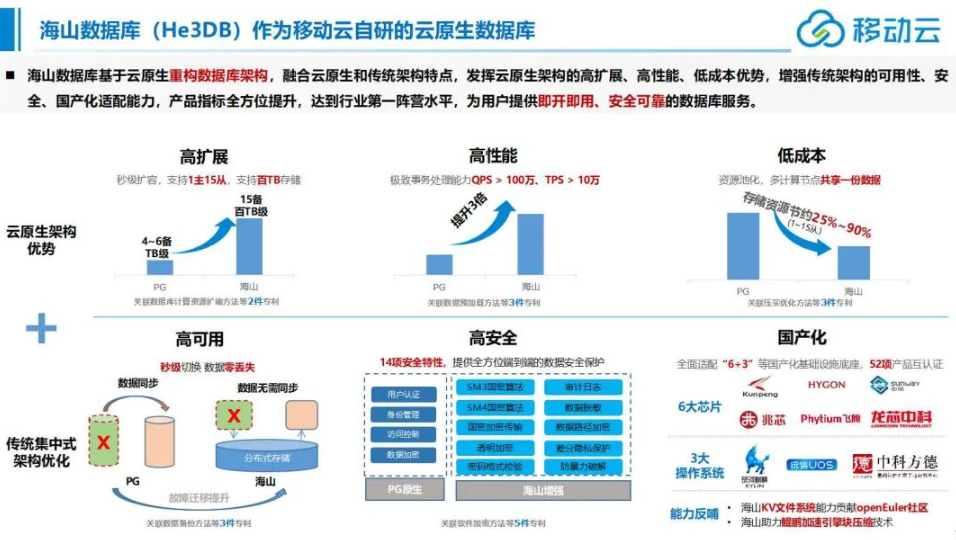
大云海山数据库(He3DB)是一款由移动云自主研发的新一代云原生关系型数据库产品,采用通过“安全可靠测评”的大云海山数据库(He3DB for PostgreSQL)内核。本产品以Shared-Storage与存储计算分离架构为基础,具备极致弹性、高可靠、高可用、弹性扩展等企业级数据库特性,并100%兼容PostgreSQL数据库。
2、产品技术特点
- 海山数据库能够百分百兼容 PostgreSQL 的语法,能够全面对接丰富的 PostgreSQL 生态,包括各类工具、框架以及第三方扩展等。基于 PostgreSQL 开发的应用程序可以无缝迁移到大云海山数据库上,极大地降低了用户的迁移成本和学习成本。
- 高度兼容Oracle :兼容绝大多数 Oracle 语法及函数,及Oracle常见功能如在线DDL,统计信息锁定,及导入导出,全局唯一索引,虚拟列,数据闪回等能力。
- 安全特性:通过三权分立、安全标记、安全审计、入侵防范、国密算法等系列改造增强原生PostgreSQL数据库安全能力。
- 多种形态部署方案:可以基于移动云基础底座实现云原生数据库架构形态的部署,也可基于物理机的方式进行部署交付。
- 数据库管理工具:配套数据库管理服务,提供统一管理、元数据可视化管理,支持界面化SQL查询,辅助提升数据库产品使用,方便用户对数据库的管理、开发与维护工作。
3、通过了国测
2025年8月入围中国信息安全测评中心与国家保密科技测评中心联合发布安全可靠测评结果名单中,获得安全可靠等级“I”级,成为国内电信运营商首款通过“安全可靠测评”的数据库产品。
二、大云海山数据库部署
本文主要介绍海山数据库单机版的部署过程。
1、目录规划
| 序号 | 文件系统 | 用途 |
|---|---|---|
| 1 | /database/he3db/app | 数据库软件存放目录 |
| 2 | /database/he3db/data | 数据存放目录 |
2、安装所需依赖包
yum install -y protobuf-devel readline-devel bison flex perl zlib-devel check libtool libffi-devel openssl-devel wget tar gzip curl bzip2-devel brotli-devel
3、创建用户
groupadd -g 1000 he3db
useradd -u 1000 -g he3db he3db
passwd he3db
4、设置用户he3db免密sudo权限
visudo
添加下面内容:
he3db       ALL=(ALL)       NOPASSWD: ALL
5、创建软件安装目录和数据目录
mkdir -p /database/he3db/app
mkdir -p /database/he3db/data
chown -R he3db:he3db /database/
6、上传安装包并解压
假设软件安装包已经上传到/home/he3db目录。解压到/database/he3db/app目录:
su - he3db
tar -zxf he3db_v2.0.6_x86_64.tar.gz -C /database/he3db/app
7、配置he3db用户环境变量
vim ~/.bashrc
追加:
export PATH=/database/he3db/app/he3sql/bin:$PATH
export LD_LIBRARY_PATH=/database/he3db/app/he3sql/lib:$LD_LIBRARY_PATH
export PGDATA=/database/he3db/data
export PGUSER=he3db
export PGDATABASE=postgres

保存退出,并执行如下命令生效:
source ~/.bashrc
8、初始化数据库
initdb -D /database/he3db/data
执行回显如下:
[he3db@euler1 ~]$ initdb -D /database/he3db/data
The files belonging to this database system will be owned by user "he3db".
This user must also own the server process.

The database cluster will be initialized with locale "en_US.UTF-8".
The default database encoding has accordingly been set to "UTF8".
The default text search configuration will be set to "english".

Data page checksums are disabled.

fixing permissions on existing directory /database/he3db/data ... ok
creating subdirectories ... ok
selecting dynamic shared memory implementation ... posix
selecting default max_connections ... 100
selecting default shared_buffers ... 128MB
selecting default time zone ... Asia/Shanghai
creating configuration files ... ok
running bootstrap script ... ok
performing post-bootstrap initialization ... ok
syncing data to disk ... ok

initdb: warning: enabling "trust" authentication for local connections
initdb: hint: You can change this by editing pg_hba.conf or using the option -A, or --auth-local and --auth-host, the next time you run initdb.

Success. You can now start the database server using:

    pg_ctl -D /database/he3db/data -l logfile start

[he3db@euler1 ~]$
9、配置数据库参数
vi /database/he3db/data/postgresql.conf
调整以下参数:
listen_addresses = '*'
wal_level = logical
checkpoint_timeout = 60min
checkpoint_completion_target = 0.9
max_wal_size = 8GB
min_wal_size = 1GB
wal_keep_size = 1GB
max_connections = 1024
shared_buffers = 1GB  ##shared_buffers大小推荐设置为系统内存的25%
logging_collector = on
log_directory = 'pg_log'
log_filename = 'postgresql-%Y-%m-%d-%H-%M-%S.log'
log_rotation_age = 1d
log_connections = on
log_disconnections = on
#license_info = '/database/he3db/data/he3_license.lic'
enable_probation = true
注:
(1)正式模式:要将enable_probation设置为false,并且要配置参数license_info为许可文件的绝对路径
(2)试用模式:将enable_probation设置为true,license_info可不配置,免费试用时长为3个月
10、按需配置数据库白名单(可配置为您要访问的客户端地址网段)
vi /database/he3db/data/pg_hba.conf
host all all 192.*.*.0/24 md5    ##注意:这些要根据实际情况替换掉*.*
11、配置数据库license(正式模式配置,试用模式请跳过此步骤)
拷贝he3_license.lic文件到license_info参数指定的位置:
cp he3_license.lic /database/he3db/data/he3_license.lic
12、启动数据库实例
pg_ctl -D /database/he3db/data start
执行回显如下:
[he3db@euler1 data]$  pg_ctl -D /database/he3db/data start
waiting for server to start....2026-03-06 00:37:44.460 CST [2719] LOG:  试用期生效中
2026-03-06 00:37:44.532 CST [2719] LOG:  redirecting log output to logging collector process
2026-03-06 00:37:44.532 CST [2719] HINT:  Future log output will appear in directory "pg_log".
 done
server started
[he3db@euler1 data]$
三、安装后使用
1、查看版本信息
[he3db@euler1 data]$ psql -U he3db -d postgres
psql (15.5)
Type "help" for help.

postgres=# select version();
                                   version
-----------------------------------------------------------------------------
 PostgreSQL 15.5 on x86_64-pc-linux-gnu, compiled by gcc (GCC) 7.3.0, 64-bit
(1 row)

postgres=# \echo :VERSION
PostgreSQL 15.5 on x86_64-pc-linux-gnu, compiled by gcc (GCC) 7.3.0, 64-bit
2、创建数据库、用户
postgres=# \l
                                              List of databases
   Name    | Owner | Encoding |   Collate   |    Ctype    | ICU Locale | Locale Provider | Access privileges
-----------+-------+----------+-------------+-------------+------------+-----------------+-------------------
 he3mysql  | he3db | UTF8     | en_US.UTF-8 | en_US.UTF-8 |            | libc            |
 postgres  | he3db | UTF8     | en_US.UTF-8 | en_US.UTF-8 |            | libc            |
 template0 | he3db | UTF8     | en_US.UTF-8 | en_US.UTF-8 |            | libc            | =c/he3db         +
           |       |          |             |             |            |                 | he3db=CTc/he3db
 template1 | he3db | UTF8     | en_US.UTF-8 | en_US.UTF-8 |            | libc            | =c/he3db         +
           |       |          |             |             |            |                 | he3db=CTc/he3db
(4 rows)

postgres=# create database testdb;
CREATE DATABASE
postgres=# create user tuser with password '******';
CREATE ROLE
3、创建插件
postgres=# create extension pg_stat_statements;
CREATE EXTENSION
postgres=# create extension pgsentinel;
CREATE EXTENSION
postgres=#
4、通过普通用户连接数据库
[he3db@euler1 data]$ psql -U tuser -d testdb -h 192.*.*.101 -p 5432
Password for user tuser:
psql (15.5)
Type "help" for help.

postgres=>
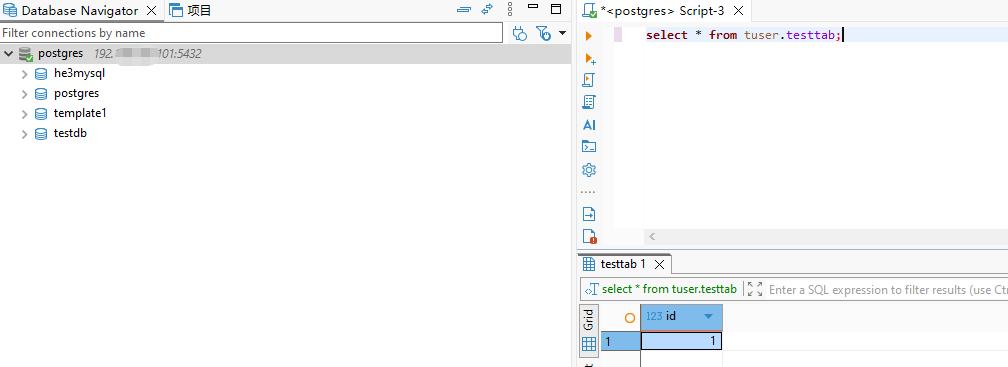
5、通过DBeaver查询表数据
驱动下载:https://jdbc.postgresql.org/download/
总结
部署海山数据库单机版的过程还是非常容易的!
大云海山数据库(He3DB)主备版部署
关于作者
网名:飞天,墨天轮2024年度、2025年度优秀原创作者,拥有 Oracle 10g OCM 认证、PGCE认证、MySQL 8.0 OCP认证以及OBCA、KCP、KCSM、ACP、YCP、HCIP-openGauss、磐维等众多国产数据库认证证书,目前从事Oracle、Mysql、PostgreSQL、磐维数据库管理运维工作,喜欢结交更多志同道合的朋友,热衷于研究、分享数据库技术。
微信公众号:飞天online
墨天轮:https://www.modb.pro/u/15197
如有任何疑问,欢迎大家留言,共同探讨~~~
最后修改时间:2026-03-08 14:12:45
「喜欢这篇文章,您的关注和赞赏是给作者最好的鼓励」
关注作者
【版权声明】本文为墨天轮用户原创内容,转载时必须标注文章的来源(墨天轮),文章链接,文章作者等基本信息,否则作者和墨天轮有权追究责任。如果您发现墨天轮中有涉嫌抄袭或者侵权的内容,欢迎发送邮件至:contact@modb.pro进行举报,并提供相关证据,一经查实,墨天轮将立刻删除相关内容。
