




点击蓝字关注我们
使用 Elasticsearch Serverless 、 Jina Embeddings v5 、 Elastic Open Web Crawler 和 Elastic Agent Builder ,不到一小时即可构建“与您的网站聊天”体验。
到最后,您将拥有一个可以搜索您抓取的页面、引用相关段落并回答基于您的内容的问题的代理,无需自定义分块或嵌入管道。
本指南将指导您:
启动一个 Elasticsearch Serverless 项目。
使用 Jina Embeddings v5 支持的新的 semantic_text 字段创建索引。
使用 Elastic Crawler Control(又名 Crawly) ( Elastic Open Web Crawler 的 开源 UI + API 封装器)抓取任何网站。
使用 Kibana 中的 Elastic Agent Builder 与该数据进行交互。
你将收获:
一个可重复使用的模式,您可以将其指向 任何 网站/文档来源。
以内容为核心的聊天。
先决条件
一个 Elasticsearch 无服务器(搜索) 项目 + 一个具有写入权限的 API 密钥 。
Docker + Docker Compose (用于运行爬虫 UI)。
git (用于克隆仓库)。
1. 启动一个 Elasticsearch 无服务器项目
首先,我们需要一个无服务器项目来托管我们的数据。
登录到您的 Elastic Cloud 控制台 。
点击 创建项目 。
选择 “搜索” 作为项目类型。(此类型针对 矢量搜索 和检索进行了优化。)
给它起个名字(例如, es-labs-jina-guide ),然后点击 “创建” 。
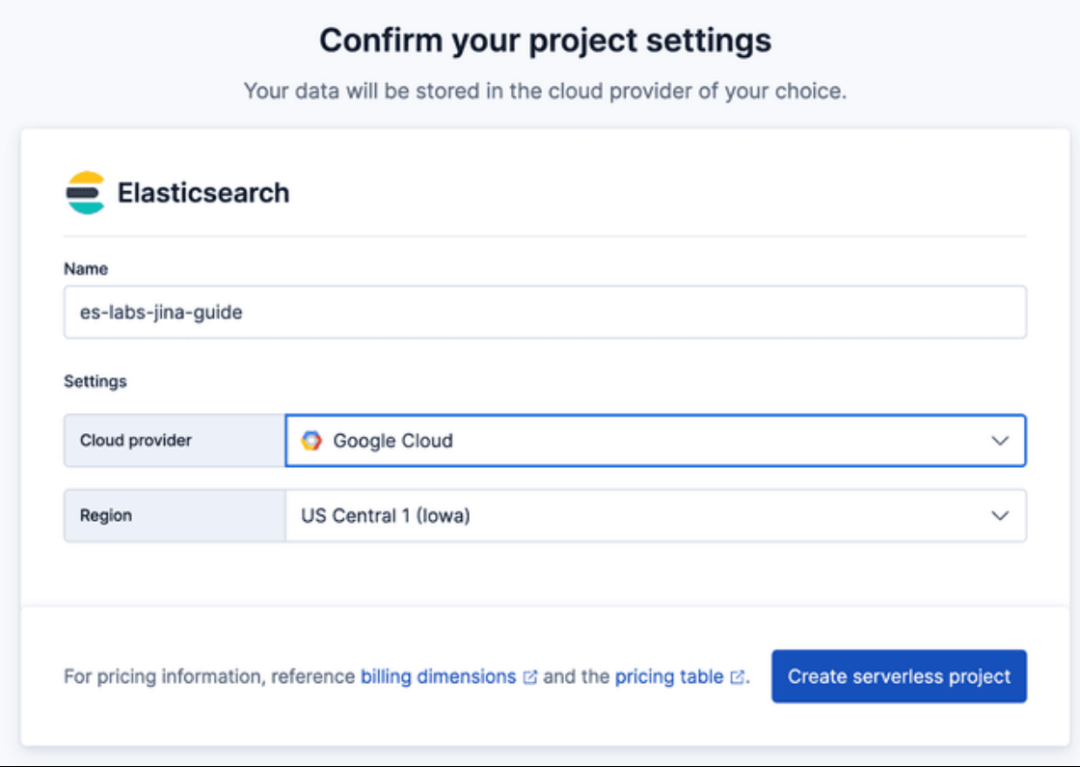
重要提示: 请保存创建项目时提供的 Elasticsearch 端点 和 API 密钥 。爬虫程序需要用到这些信息。

2. 创建索引
Elasticsearch Serverless 支持 semantic_text ,它可以自动处理分块和嵌入生成。我们将使用托管在 Elastic Inference Service 的 GPU 上的 jina-embeddings-v5-text-small 模型。
创建包含 semantic_text 字段的索引。这将指示 Elastic 使用我们刚刚创建的 推理 端点自动对放入该 field 属性中的内容进行向量化。
在 Kibana 开发工具 中运行:
PUT furnirem-website{"mappings": {"_meta": {"description": "Each document represents a web page with the following schema: 'title' and 'meta_description' provide high-level summaries; 'body' contains the full text content; 'headings' preserves the page hierarchy for semantic weighting. URL metadata is decomposed into 'url_host', 'url_path', and 'url_path_dir1/2/3' to allow for granular filtering by site section (e.g., 'blog' or 'tutorials'). 'links' contains extracted outbound URLs for discovery. Crawl timestamp: 2026-01-26T12:54:16.347907."},"properties": {"body_content": {"type": "text","fields": {"keyword": {"type": "keyword","ignore_above": 256},"semantic_multilingual": {"type": "semantic_text","inference_id": ".jina-embeddings-v5-text-small"}}},"headings": {"type": "text","fields": {"keyword": {"type": "keyword","ignore_above": 256},"semantic_multilingual": {"type": "semantic_text","inference_id": ".jina-embeddings-v5-text-small"}}},"title": {"type": "text","fields": {"keyword": {"type": "keyword","ignore_above": 256},"semantic_multilingual": {"type": "semantic_text","inference_id": ".jina-embeddings-v5-text-small"}}}}}}
3. 运行 Elastic OpenCrawler
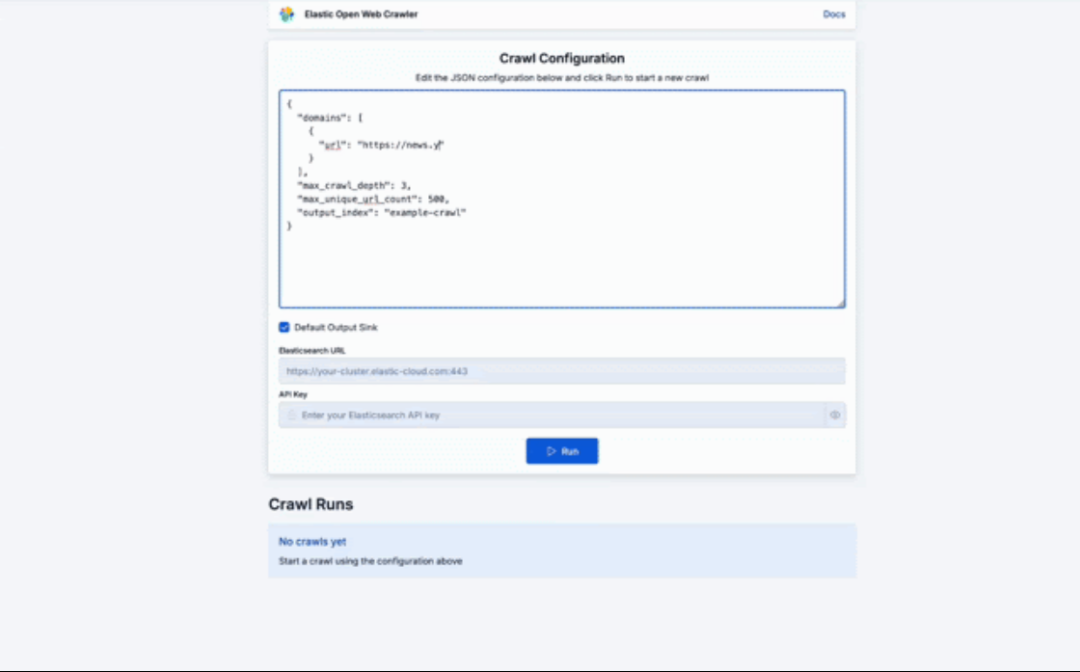
Run the Elastic Open Crawler
Crawly 就是一个例子,它展示了如何围绕 Open Web Crawler 提供的功能构建应用程序。
该应用程序将 Elastic Open Crawler 封装在一个 FastAPI 服务中,用于管理爬虫进程并持久化执行数据。React 前端提供了用于配置和监控爬虫的界面。
其底层工作原理是,爬虫服务(参见 crawler.py )通过 subprocess.Popen 生成 JRuby 进程,从而允许多个并发爬虫。每次执行的配置、状态和日志(目前)都会持久化到磁盘。
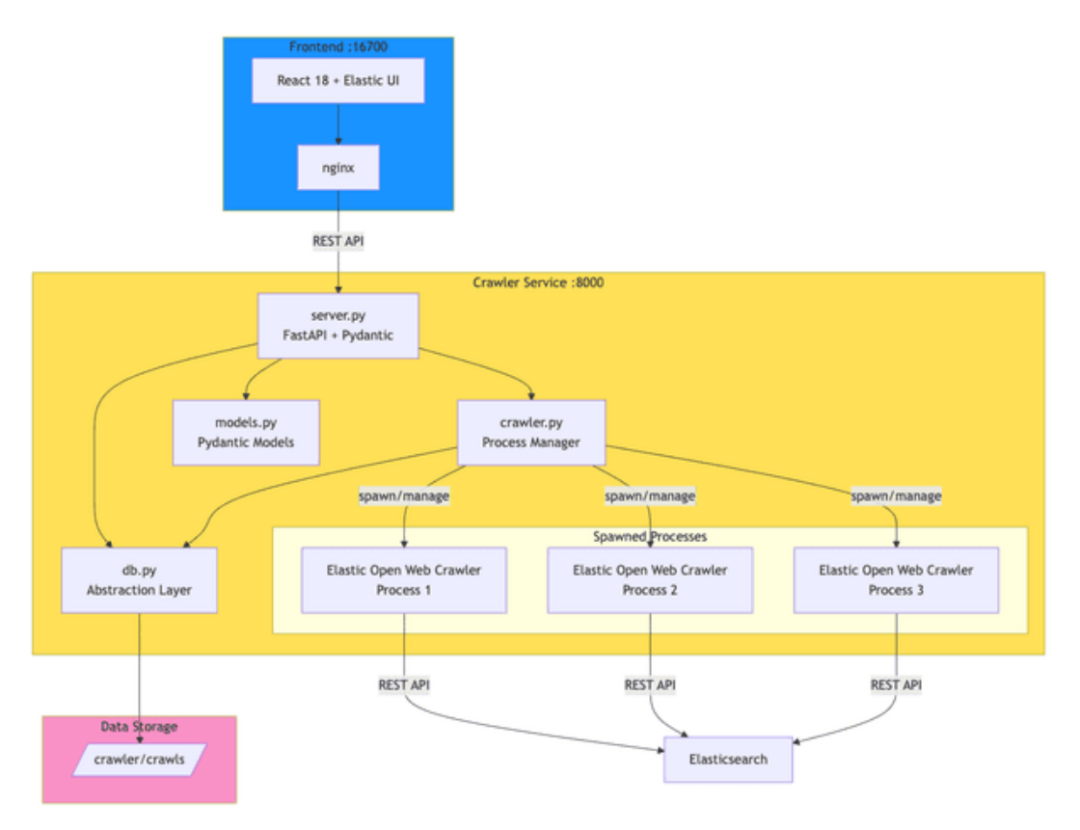
under the hood flow
克隆仓库:
git clone https://github.com/ugosan/elastic-crawler-control
创建一个名为 env.local 的 文件,并添加你的 Elasticsearch 凭据:
ES_URL=https://your-elasticsearch-endpoint.es.cloudES_API_KEY=your_api_key_here
启动服务:
docker-compose up
访问用户界面: http://localhost:16700
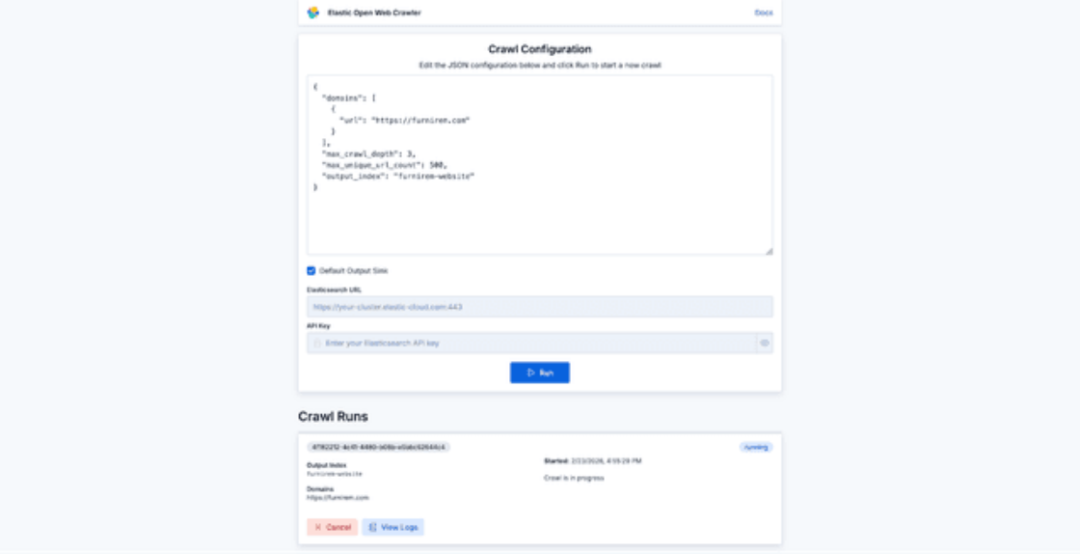
crawl configuration
除非你想指定具体的种子 URL,否则不一定需要 seed_urls ,所以你的配置可以像下面这样简单:
{"domains": [{"url": "https://furnirem.com"}],"max_crawl_depth": 3,"max_unique_url_count": 500,"output_index": "furnirem-website"}
从那里,您可以开始抓取任何网站并查看其进度:
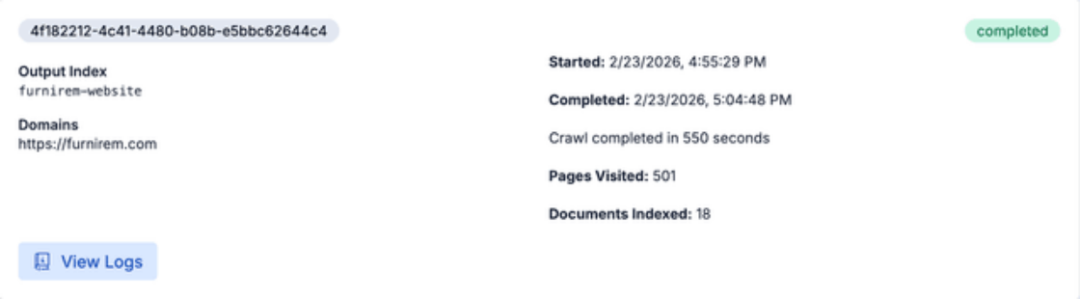
website crawling progress
完成后,我们就可以直接在 Elasticsearch 中查询内容,或者使用刚刚抓取的页面在 Agent Builder 上与网站进行聊天。
4. 在 Kibana 中与数据进行聊天
现在数据已经建立索引并向量化,我们可以开始使用 Elastic Agent Builder 与数据进行交互了。
打开 Kibana ,然后导航到 “代理” (在“搜索”部分下)。
测试代理 :
在聊天窗口中提出一个问题,例如: “稀疏向量和稠密向量有什么区别?”
代理将搜索您 Jina 中嵌入的数据,从 Search Labs 博客文章中检索相关片段,并生成答案。
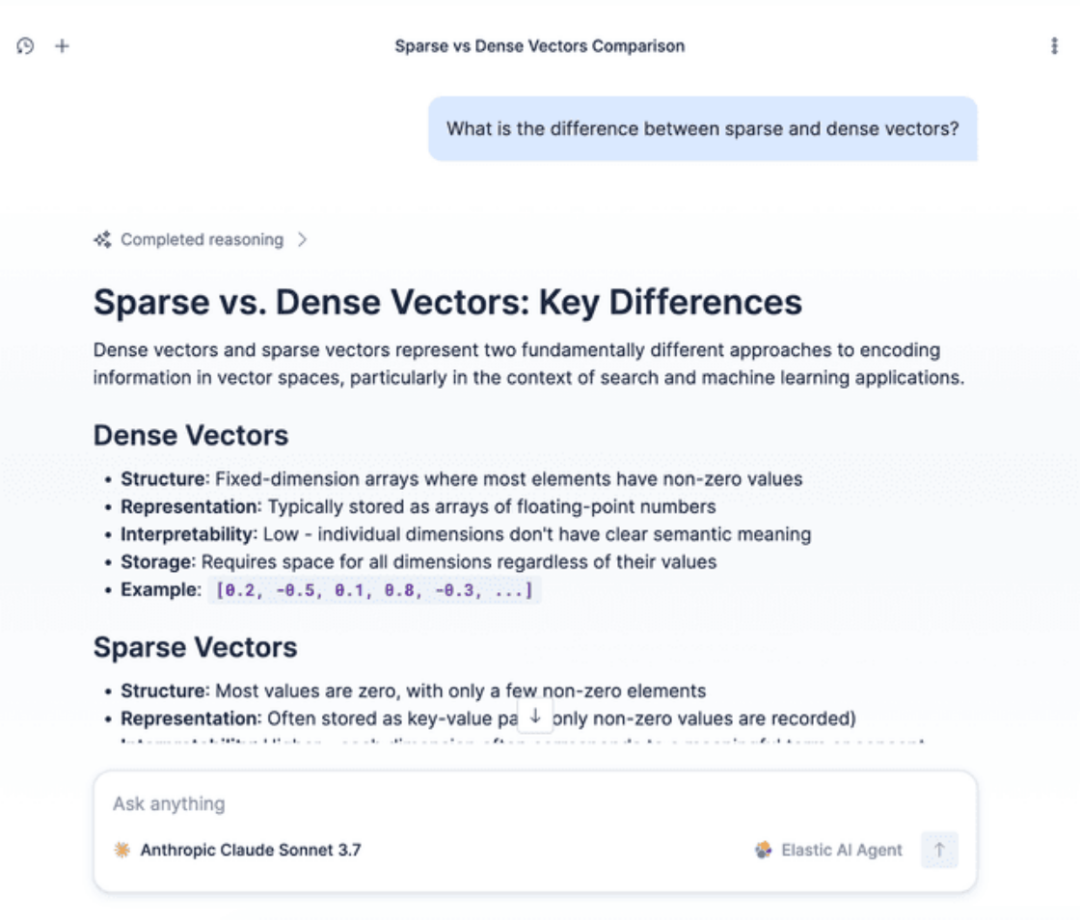
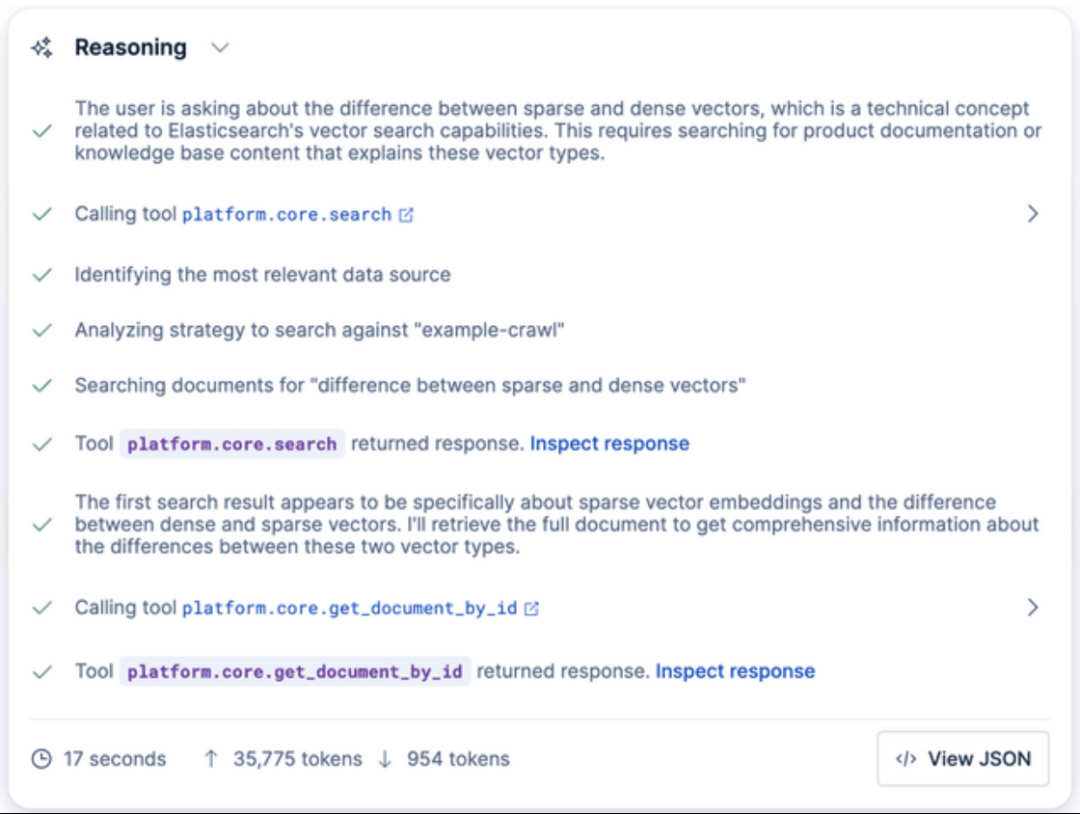
您还可以通过 Kibana API 直接与数据进行交互:
POST kbn://api/agent_builder/converse/async{"input": "What is the difference between sparse and dense vectors?","agent_id": "elastic-ai-agent","conversation_id": "<CONVERSATION_ID>"}
在 Elastic Agent Builder 中,使用 conversation_id 可以恢复与客服人员的现有对话。如果在初始请求中未提供此参数,API 将启动一个新对话,并在流式响应中返回新生成的 ID。
概括
您现在拥有一个可用的“ 与您的网站聊天 ”堆栈:您的网站会被抓取、索引,使用 semantic_text + Jina v5 自动嵌入,并通过 Kibana 中的代理显示出来,该代理会回答基于您页面的问题。
从这里开始,您可以将相同的设置指向文档、支持内容或内部维基,并在几分钟内迭代相关性。
关于公司
感谢您关注新智锦绣科技(北京)有限公司!作为 Elastic 的 Elite 合作伙伴及 EnterpriseDB 在国内的唯一代理和服务合作伙伴,我们始终致力于技术创新和优质服务,帮助企业客户实现数据平台的高效构建与智能化管理。无论您是关注 Elastic 生态系统,还是需要 EnterpriseDB 的支持,我们都将为您提供专业的技术支持和量身定制的解决方案。
易捷问数(NewmindExAI)
易捷问数(NewmindExAI)平台是新智锦绣科技(北京)有限公司自主研发的一款开箱即用的企业级一体化智能数据分析平台,基于 Apple Mac Studio 硬件,以 Elastic 为数据底座,扩展支持其它数据源,依托本地LLM/在线LLM、集成 NewRAG 智能知识库、NewFlow智能中枢工作流和 NewChat 智能聊天三大功能为一体,实现 LLM 驱动的一体化解决方案。
欢迎关注我们,获取更多技术资讯和数字化转型方案,共创美好未来!
 |  |
Elastic 微信群 | EDB 微信群 |
发现“分享”和“赞”了吗,戳我看看吧
