



一、选择JDBC连接类型“Open Distro Elasticsearch”
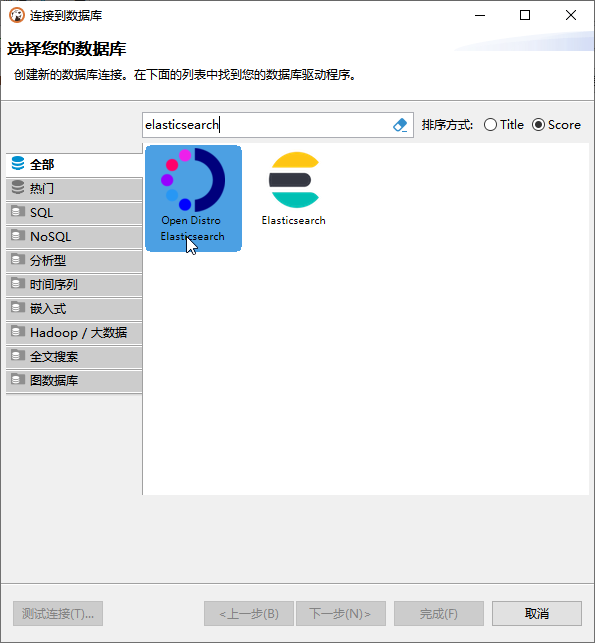
二、配置和安装驱动

三、配置连接:
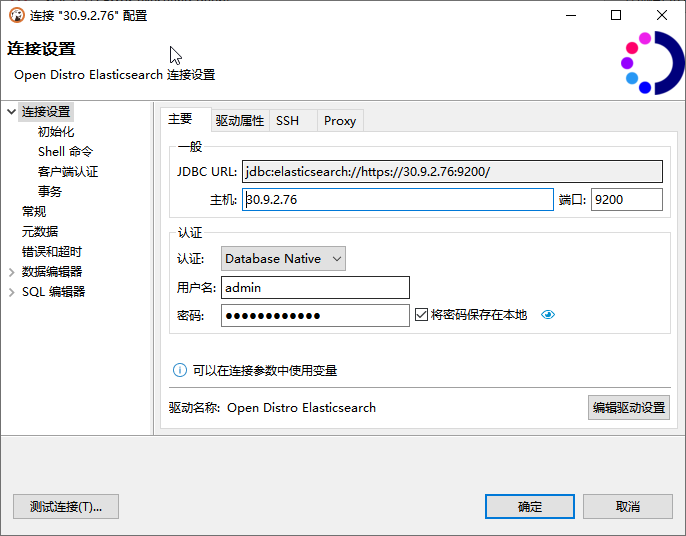
四、安装证书
-
将证书移动到 $JAVA_HOME/lib/security/cacerts 目录下
-
进入$JAVA_HOME/bin 目录
keytool -import -alias <别名> -keystore $JAVA_HOME/lib/security/cacerts -file 证书名.crt
列出证书:
keytool -list -keystore $JAVA_HOME/lib/security/cacerts
默认密码 “changeit”
原文链接:https://blog.csdn.net/hubxx/article/details/123405006
五、配置驱动属性
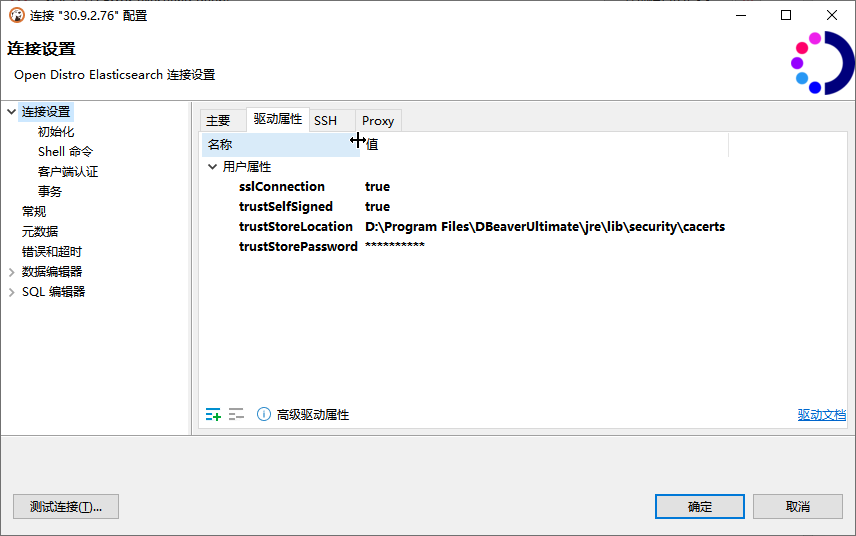
连接属性参数com.amazon.opendistroforelasticsearch.jdbc.config.ConnectionConfig类中的定义
public class ConnectionConfig {
  private String url;

  private String host;

  private int port;

  private String path;

  private boolean useSSL;

  private int loginTimeout;

  private String logOutput;

  private PrintWriter logWriter;

  private String user;

  private String password;

  private boolean requestCompression;

  private AuthenticationType authenticationType;

  private String region;

  private LogLevel logLevel;

  private String keyStoreLocation;

  private String keyStorePassword;

  private String keyStoreType;

  private String trustStoreLocation;

  private String trustStorePassword;

  private String trustStoreType;

  private boolean trustSelfSigned;

  private boolean hostnameVerification;

  private ConnectionConfig(Builder builder) {
    this.url = builder.getUrl();
    this.host = builder.getHostProperty().getValue();
    this.port = builder.getPortProperty().getValue().intValue();
    this.path = builder.getPathProperty().getValue();
    this.useSSL = builder.getUseSSLProperty().getValue().booleanValue();
    this.logOutput = builder.getLogOutputProperty().getValue();
    this.logLevel = builder.getLogLevelConnectionProperty().getValue();
    this.logWriter = builder.getLogWriter();
    this.loginTimeout = builder.getLoginTimeoutProperty().getValue().intValue();
    this.user = builder.getUserProperty().getValue();
    this.password = builder.getPasswordProperty().getValue();
    this.requestCompression = builder.getRequestCompressionProperty().getValue().booleanValue();
    this.authenticationType = builder.getAuthConnectionProperty().getValue();
    this.region = builder.getRegionConnectionProperty().getValue();
    this.keyStoreLocation = builder.getKeyStoreLocationConnectionProperty().getValue();
    this.keyStorePassword = builder.getKeyStorePasswordConnectionProperty().getValue();
    this.keyStoreType = builder.getKeyStoreTypeConnectionProperty().getValue();
    this.trustStoreLocation = builder.getTrustStoreLocationConnectionProperty().getValue();
    this.trustStorePassword = builder.getTrustStorePasswordConnectionProperty().getValue();
    this.trustStoreType = builder.getTrustStoreTypeConnectionProperty().getValue();
    this.trustSelfSigned = builder.getTrustSelfSignedConnectionProperty().getValue().booleanValue();
    this.hostnameVerification = builder.getHostnameVerificationConnectionProperty().getValue().booleanValue();
  }
「喜欢这篇文章,您的关注和赞赏是给作者最好的鼓励」
关注作者
【版权声明】本文为墨天轮用户原创内容,转载时必须标注文章的来源(墨天轮),文章链接,文章作者等基本信息,否则作者和墨天轮有权追究责任。如果您发现墨天轮中有涉嫌抄袭或者侵权的内容,欢迎发送邮件至:contact@modb.pro进行举报,并提供相关证据,一经查实,墨天轮将立刻删除相关内容。
