



学习目标
学习 openGauss 体系结构,了解实例(集簇或服务)和数据库的关系
前面每日一练链接
openGauss 每日一练第 1 天 | openGauss 数据库状态查看
openGauss 每日一练第 2 天 | 学习 gsql 命令行的使用
课程学习
在一个 openGauss DBMS 上,一个数据库集簇(Database Cluster)中,可以创建、管理多个数据库。
1.创建表空间,并在该表空间上创建多个数据库
–进入数据库omm,创建表空间、测试数据库

CREATE TABLESPACE music_tbs RELATIVE LOCATION 'tablespace/test_ts1';
CREATE DATABASE musicdb  WITH TABLESPACE = music_tbs;
CREATE DATABASE musicdb1 WITH TABLESPACE = music_tbs;
CREATE DATABASE musicdb2 WITH TABLESPACE = music_tbs;
CREATE DATABASE musicdb3 WITH TABLESPACE = music_tbs;

2.执行\db命令,查看openGauss数据库上有哪些表空间:
openGauss=# \db
           List of tablespaces
    Name    | Owner |      Location
------------+-------+---------------------
 music_tbs  | omm   | tablespace/test_ts1
 pg_default | omm   |
 pg_global  | omm   |
(3 rows)
3.执行 \l 命令,查看 openGauss 实例中有哪些数据库:
--\l命令,元命令\l的作用是显示openGauss数据库集簇中,目前有哪些数据库。

openGauss=# \l
                         List of databases
   Name    | Owner | Encoding | Collate | Ctype | Access privileges
-----------+-------+----------+---------+-------+-------------------
 musicdb   | omm   | UTF8     | C       | C     |
 musicdb1  | omm   | UTF8     | C       | C     |
 musicdb2  | omm   | UTF8     | C       | C     |
 musicdb3  | omm   | UTF8     | C       | C     |
 omm       | omm   | UTF8     | C       | C     |
 postgres  | omm   | UTF8     | C       | C     |
 template0 | omm   | UTF8     | C       | C     | =c/omm           +
           |       |          |         |       | omm=CTc/omm
 template1 | omm   | UTF8     | C       | C     | =c/omm           +
           |       |          |         |       | omm=CTc/omm
(8 rows)
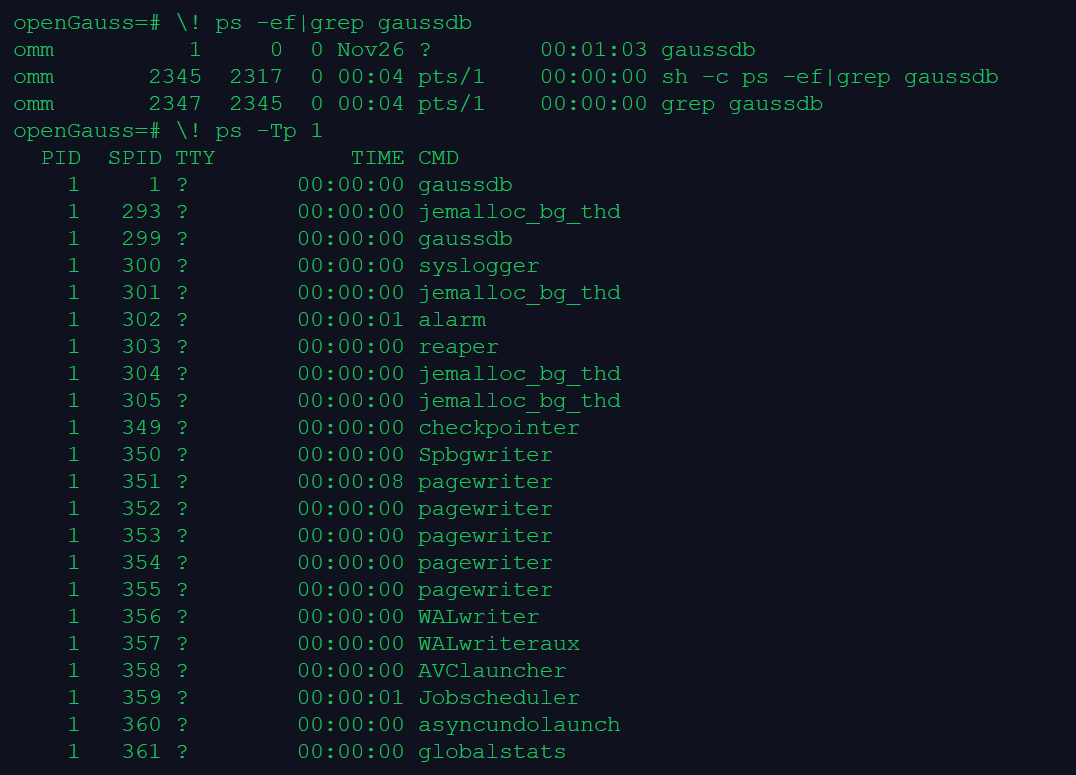
4.查看 openGauss 数据库上实例的进程、线程
--查看实例中的进程
\! ps -ef|grep gaussdb
--查看实例中的线程
\! ps -Tp 1

openGauss=# \! ps -ef|grep gaussdb
omm          1     0  0 Nov26 ?        00:01:03 gaussdb
omm       2345  2317  0 00:04 pts/1    00:00:00 sh -c ps -ef|grep gaussdb
omm       2347  2345  0 00:04 pts/1    00:00:00 grep gaussdb
openGauss=# \! ps -Tp 1
  PID  SPID TTY          TIME CMD
    1     1 ?        00:00:00 gaussdb
    1   293 ?        00:00:00 jemalloc_bg_thd
    1   299 ?        00:00:00 gaussdb
    1   300 ?        00:00:00 syslogger
    1   301 ?        00:00:00 jemalloc_bg_thd
    1   302 ?        00:00:01 alarm
    1   303 ?        00:00:00 reaper
    1   304 ?        00:00:00 jemalloc_bg_thd
    1   305 ?        00:00:00 jemalloc_bg_thd
    1   349 ?        00:00:00 checkpointer
    1   350 ?        00:00:00 Spbgwriter
    1   351 ?        00:00:08 pagewriter
    1   352 ?        00:00:00 pagewriter
    1   353 ?        00:00:00 pagewriter
    1   354 ?        00:00:00 pagewriter
    1   355 ?        00:00:00 pagewriter
    1   356 ?        00:00:00 WALwriter
    1   357 ?        00:00:00 WALwriteraux
    1   358 ?        00:00:00 AVClauncher
    1   359 ?        00:00:01 Jobscheduler
    1   360 ?        00:00:00 asyncundolaunch
    1   361 ?        00:00:00 globalstats
    1   362 ?        00:00:00 applylauncher
    1   363 ?        00:00:00 statscollector
    1   364 ?        00:00:06 percentworker
    1   365 ?        00:00:24 ashworker
    1   366 ?        00:00:05 TrackStmtWorker
    1   367 ?        00:00:00 auditor
    1   368 ?        00:00:00 2pccleaner
    1   369 ?        00:00:00 faultmonitor
    1   370 ?        00:00:00 WLMworker
    1   371 ?        00:00:02 WLMmonitor
    1   372 ?        00:00:00 WLMarbiter
    1   373 ?        00:00:00 undorecycler
    1  2318 ?        00:00:00 worker
课程作业
1.创建表空间 music_tbs1 和多个数据库 music_db、music_db1、music_db2
create tablespace music_tbs1 relative location 'tablespace/music_tbs1';
create database music_db  with tablespace = music_tbs1;
create database music_db1 with tablespace = music_tbs1;
create database music_db2 with tablespace = music_tbs1;
2.查看数据库上的表空间
openGauss=# \db
            List of tablespaces
    Name    | Owner |       Location
------------+-------+-----------------------
 music_tbs  | omm   | tablespace/test_ts1
 music_tbs1 | omm   | tablespace/music_tbs1
 pg_default | omm   |
 pg_global  | omm   |
(4 rows)
3.查看 openGauss 实例上有哪些数据库
openGauss=# \l
                         List of databases
   Name    | Owner | Encoding | Collate | Ctype | Access privileges
-----------+-------+----------+---------+-------+-------------------
 music_db  | omm   | UTF8     | C       | C     |
 music_db1 | omm   | UTF8     | C       | C     |
 music_db2 | omm   | UTF8     | C       | C     |
 musicdb   | omm   | UTF8     | C       | C     |
 musicdb1  | omm   | UTF8     | C       | C     |
 musicdb2  | omm   | UTF8     | C       | C     |
 musicdb3  | omm   | UTF8     | C       | C     |
 omm       | omm   | UTF8     | C       | C     |
 postgres  | omm   | UTF8     | C       | C     |
 template0 | omm   | UTF8     | C       | C     | =c/omm           +
           |       |          |         |       | omm=CTc/omm
 template1 | omm   | UTF8     | C       | C     | =c/omm           +
           |       |          |         |       | omm=CTc/omm
(11 rows)
4.使用操作系统命令,查看 openGauss 实例的进程、线程
--不退出数据库 直接在命令行运行操作系统命令,类似于 Oracle SQLPLUS 中运行 !top 或者 host top 之类的命令。
\! ps -ef | grep gauss
\! ps -Tp 1
欢迎关注我的公众号【JiekeXu DBA之路】,第一时间一起学习新知识!
————————————————————————————
公众号:JiekeXu DBA之路
CSDN :https://blog.csdn.net/JiekeXu
墨天轮:https://www.modb.pro/u/4347
腾讯云:https://cloud.tencent.com/developer/user/5645107
————————————————————————————

最后修改时间:2022-11-27 00:16:17
「喜欢这篇文章,您的关注和赞赏是给作者最好的鼓励」
关注作者
【版权声明】本文为墨天轮用户原创内容,转载时必须标注文章的来源(墨天轮),文章链接,文章作者等基本信息,否则作者和墨天轮有权追究责任。如果您发现墨天轮中有涉嫌抄袭或者侵权的内容,欢迎发送邮件至:contact@modb.pro进行举报,并提供相关证据,一经查实,墨天轮将立刻删除相关内容。
