



我们经常遇到某个挂接目录磁盘空间不足问题,这时需要扩容。
推荐的方式是:增加1个新磁盘加入到原vg当中即可。
而直接在原盘扩容大小(应该是可以直接resize的),所以这时需要通过fdisk增加新主分区,然后再创建成pv,加入到vg中。(如下操作就是模拟处理这种情况)
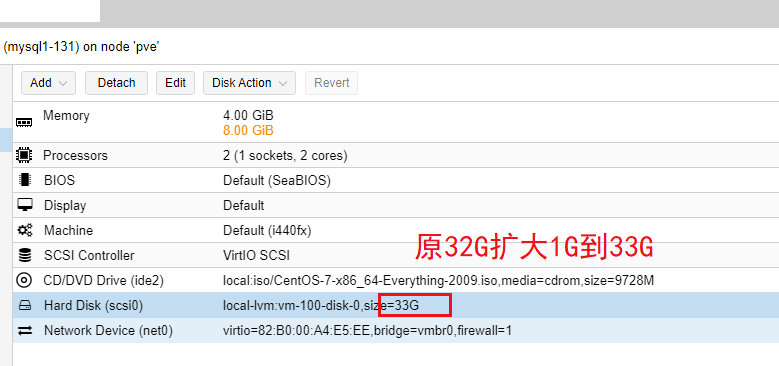
思路:1.增加磁盘主分区fdisk /dev/sda(不能做成扩展分区)
2.创建pv,extend vg,extend lv,扩文件系统(参考https://www.modb.pro/db/397198)
目标结果:
扩容前:

扩容后:

操作记录如下:
Last login: Wed Jan  4 10:18:59 2023 from 10.168.20.66
[root@mysql1 ~]# cat /etc/redhat-release
CentOS Linux release 7.9.2009 (Core)
[root@mysql1 ~]# fdisk -l

Disk /dev/sda: 34.4 GB, 34359738368 bytes, 67108864 sectors
Units = sectors of 1 * 512 = 512 bytes
Sector size (logical/physical): 512 bytes / 512 bytes
I/O size (minimum/optimal): 512 bytes / 512 bytes
Disk label type: dos
Disk identifier: 0x000c2fc4

   Device Boot      Start         End      Blocks   Id  System
/dev/sda1   *        2048     2099199     1048576   83  Linux
/dev/sda2         2099200    67108863    32504832   8e  Linux LVM

Disk /dev/mapper/centos-root: 29.8 GB, 29842472960 bytes, 58286080 sectors
Units = sectors of 1 * 512 = 512 bytes
Sector size (logical/physical): 512 bytes / 512 bytes
I/O size (minimum/optimal): 512 bytes / 512 bytes


Disk /dev/mapper/centos-swap: 3435 MB, 3435134976 bytes, 6709248 sectors
Units = sectors of 1 * 512 = 512 bytes
Sector size (logical/physical): 512 bytes / 512 bytes
I/O size (minimum/optimal): 512 bytes / 512 bytes

[root@mysql1 ~]# fdisk /dev/sda
Welcome to fdisk (util-linux 2.23.2).

Changes will remain in memory only, until you decide to write them.
Be careful before using the write command.


Command (m for help): p

Disk /dev/sda: 34.4 GB, 34359738368 bytes, 67108864 sectors
Units = sectors of 1 * 512 = 512 bytes
Sector size (logical/physical): 512 bytes / 512 bytes
I/O size (minimum/optimal): 512 bytes / 512 bytes
Disk label type: dos
Disk identifier: 0x000c2fc4

   Device Boot      Start         End      Blocks   Id  System
/dev/sda1   *        2048     2099199     1048576   83  Linux
/dev/sda2         2099200    67108863    32504832   8e  Linux LVM

Command (m for help): ^C
[root@mysql1 ~]# fdisk -l

Disk /dev/sda: 35.4 GB, 35433480192 bytes, 69206016 sectors
Units = sectors of 1 * 512 = 512 bytes
Sector size (logical/physical): 512 bytes / 512 bytes
I/O size (minimum/optimal): 512 bytes / 512 bytes
Disk label type: dos
Disk identifier: 0x000c2fc4

   Device Boot      Start         End      Blocks   Id  System
/dev/sda1   *        2048     2099199     1048576   83  Linux
/dev/sda2         2099200    67108863    32504832   8e  Linux LVM

Disk /dev/mapper/centos-root: 29.8 GB, 29842472960 bytes, 58286080 sectors
Units = sectors of 1 * 512 = 512 bytes
Sector size (logical/physical): 512 bytes / 512 bytes
I/O size (minimum/optimal): 512 bytes / 512 bytes


Disk /dev/mapper/centos-swap: 3435 MB, 3435134976 bytes, 6709248 sectors
Units = sectors of 1 * 512 = 512 bytes
Sector size (logical/physical): 512 bytes / 512 bytes
I/O size (minimum/optimal): 512 bytes / 512 bytes

[root@mysql1 ~]# fdisk /dev/sda
Welcome to fdisk (util-linux 2.23.2).

Changes will remain in memory only, until you decide to write them.
Be careful before using the write command.


Command (m for help): p

Disk /dev/sda: 35.4 GB, 35433480192 bytes, 69206016 sectors
Units = sectors of 1 * 512 = 512 bytes
Sector size (logical/physical): 512 bytes / 512 bytes
I/O size (minimum/optimal): 512 bytes / 512 bytes
Disk label type: dos
Disk identifier: 0x000c2fc4

   Device Boot      Start         End      Blocks   Id  System
/dev/sda1   *        2048     2099199     1048576   83  Linux
/dev/sda2         2099200    67108863    32504832   8e  Linux LVM

Command (m for help): m
Command action
   a   toggle a bootable flag
   b   edit bsd disklabel
   c   toggle the dos compatibility flag
   d   delete a partition
   g   create a new empty GPT partition table
   G   create an IRIX (SGI) partition table
   l   list known partition types
   m   print this menu
   n   add a new partition
   o   create a new empty DOS partition table
   p   print the partition table
   q   quit without saving changes
   s   create a new empty Sun disklabel
   t   change a partition's system id
   u   change display/entry units
   v   verify the partition table
   w   write table to disk and exit
   x   extra functionality (experts only)

Command (m for help): n
Partition type:
   p   primary (2 primary, 0 extended, 2 free)
   e   extended
Select (default p): e
Partition number (3,4, default 3):
First sector (67108864-69206015, default 67108864):
Using default value 67108864
Last sector, +sectors or +size{K,M,G} (67108864-69206015, default 69206015):
Using default value 69206015
Partition 3 of type Extended and of size 1 GiB is set

Command (m for help): p

Disk /dev/sda: 35.4 GB, 35433480192 bytes, 69206016 sectors
Units = sectors of 1 * 512 = 512 bytes
Sector size (logical/physical): 512 bytes / 512 bytes
I/O size (minimum/optimal): 512 bytes / 512 bytes
Disk label type: dos
Disk identifier: 0x000c2fc4

   Device Boot      Start         End      Blocks   Id  System
/dev/sda1   *        2048     2099199     1048576   83  Linux
/dev/sda2         2099200    67108863    32504832   8e  Linux LVM
/dev/sda3        67108864    69206015     1048576    5  Extended

Command (m for help): w
The partition table has been altered!

Calling ioctl() to re-read partition table.

WARNING: Re-reading the partition table failed with error 16: Device or resource busy.
The kernel still uses the old table. The new table will be used at
the next reboot or after you run partprobe(8) or kpartx(8)
Syncing disks.
[root@mysql1 ~]# fdisk /dev/sda
Welcome to fdisk (util-linux 2.23.2).

Changes will remain in memory only, until you decide to write them.
Be careful before using the write command.


Command (m for help): p

Disk /dev/sda: 35.4 GB, 35433480192 bytes, 69206016 sectors
Units = sectors of 1 * 512 = 512 bytes
Sector size (logical/physical): 512 bytes / 512 bytes
I/O size (minimum/optimal): 512 bytes / 512 bytes
Disk label type: dos
Disk identifier: 0x000c2fc4

   Device Boot      Start         End      Blocks   Id  System
/dev/sda1   *        2048     2099199     1048576   83  Linux
/dev/sda2         2099200    67108863    32504832   8e  Linux LVM
/dev/sda3        67108864    69206015     1048576    5  Extended

Command (m for help): ^C
[root@mysql1 ~]# df -h
Filesystem               Size  Used Avail Use% Mounted on
devtmpfs                 1.9G     0  1.9G   0% /dev
tmpfs                    1.9G     0  1.9G   0% /dev/shm
tmpfs                    1.9G  8.6M  1.9G   1% /run
tmpfs                    1.9G     0  1.9G   0% /sys/fs/cgroup
/dev/mapper/centos-root   28G  4.8G   24G  18% /
/dev/sda1               1014M  150M  865M  15% /boot
tmpfs                    379M     0  379M   0% /run/user/0
[root@mysql1 ~]# vgs
  VG     #PV #LV #SN Attr   VSize   VFree
  centos   1   2   0 wz--n- <31.00g 4.00m
[root@mysql1 ~]# lvs
  LV   VG     Attr       LSize  Pool Origin Data%  Meta%  Move Log Cpy%Sync Convert
  root centos -wi-ao---- 27.79g
  swap centos -wi-ao---- <3.20g
[root@mysql1 ~]# df -hT /
Filesystem              Type  Size  Used Avail Use% Mounted on
/dev/mapper/centos-root xfs    28G  4.8G   24G  18% /
[root@mysql1 ~]#
[root@mysql1 ~]# pvcreate /dev/sda3
  Device /dev/sda3 not found.
[root@mysql1 ~]# partprobe
Warning: Unable to open /dev/sr0 read-write (Read-only file system).  /dev/sr0 has been opened read-only.
[root@mysql1 ~]# pvcreate /dev/sda3
  Device /dev/sda3 excluded by a filter.
[root@mysql1 ~]# pvcreate /dev/sda3
  Device /dev/sda3 excluded by a filter.
[root@mysql1 ~]# parted /dev/sda3
GNU Parted 3.1
Using /dev/sda3
Welcome to GNU Parted! Type 'help' to view a list of commands.
(parted) help
  align-check TYPE N                        check partition N for TYPE(min|opt) alignment
  help [COMMAND]                           print general help, or help on COMMAND
  mklabel,mktable LABEL-TYPE               create a new disklabel (partition table)
  mkpart PART-TYPE [FS-TYPE] START END     make a partition
  name NUMBER NAME                         name partition NUMBER as NAME
  print [devices|free|list,all|NUMBER]     display the partition table, available devices, free space, all found partitions, or a particular partition
  quit                                     exit program
  rescue START END                         rescue a lost partition near START and END

  resizepart NUMBER END                    resize partition NUMBER
  rm NUMBER                                delete partition NUMBER
  select DEVICE                            choose the device to edit
  disk_set FLAG STATE                      change the FLAG on selected device
  disk_toggle [FLAG]                       toggle the state of FLAG on selected device
  set NUMBER FLAG STATE                    change the FLAG on partition NUMBER
  toggle [NUMBER [FLAG]]                   toggle the state of FLAG on partition NUMBER
  unit UNIT                                set the default unit to UNIT
  version                                  display the version number and copyright information of GNU Parted
(parted) mklabel
New disk label type?
New disk label type? y
parted: invalid token: y
New disk label type? sda3
parted: invalid token: sda3
New disk label type? yes
parted: invalid token: yes
New disk label type? help mktable
parted: invalid token: help
New disk label type? help
parted: invalid token: help
New disk label type? help mklable
parted: invalid token: help
New disk label type? help mklabel
parted: invalid token: help
New disk label type? msdos
Warning: The existing disk label on /dev/sda3 will be destroyed and all data on this disk will be lost. Do you want to continue?
Yes/No? yes
Error: Partition(s) 1, 2, 3, 4, 5, 6, 7, 8, 9, 10, 11, 12, 13, 14, 15, 16, 17, 18, 19, 20, 21, 22, 23, 24, 25, 26, 27, 28, 29, 30, 31, 32, 33, 34, 35, 36,
37, 38, 39, 40, 41, 42, 43, 44, 45, 46, 47, 48, 49, 50, 51, 52, 53, 54, 55, 56, 57, 58, 59, 60, 61, 62, 63, 64 on /dev/sda3 have been written, but we have
been unable to inform the kernel of the change, probably because it/they are in use.  As a result, the old partition(s) will remain in use.  You should
reboot now before making further changes.
Ignore/Cancel? Cancel
(parted) quit
[root@mysql1 ~]# reboot


重启并不好使,原因是需要创建主分区而不是扩展分区。

Last login: Thu Jan  5 16:17:35 2023 from 10.168.20.66
[root@mysql1 ~]# fdisk -l

Disk /dev/sda: 35.4 GB, 35433480192 bytes, 69206016 sectors
Units = sectors of 1 * 512 = 512 bytes
Sector size (logical/physical): 512 bytes / 512 bytes
I/O size (minimum/optimal): 512 bytes / 512 bytes
Disk label type: dos
Disk identifier: 0x000c2fc4

   Device Boot      Start         End      Blocks   Id  System
/dev/sda1   *        2048     2099199     1048576   83  Linux
/dev/sda2         2099200    67108863    32504832   8e  Linux LVM
/dev/sda3        67108864    69206015     1048576    5  Extended

Disk /dev/mapper/centos-root: 29.8 GB, 29842472960 bytes, 58286080 sectors
Units = sectors of 1 * 512 = 512 bytes
Sector size (logical/physical): 512 bytes / 512 bytes
I/O size (minimum/optimal): 512 bytes / 512 bytes


Disk /dev/mapper/centos-swap: 3435 MB, 3435134976 bytes, 6709248 sectors
Units = sectors of 1 * 512 = 512 bytes
Sector size (logical/physical): 512 bytes / 512 bytes
I/O size (minimum/optimal): 512 bytes / 512 bytes

[root@mysql1 ~]# pvcreate /dev/sda3
  Device /dev/sda3 excluded by a filter.
[root@mysql1 ~]# fdisk /dev/sda3
You must set cylinders.
You can do this from the extra functions menu.
Welcome to fdisk (util-linux 2.23.2).

Changes will remain in memory only, until you decide to write them.
Be careful before using the write command.


Command (m for help): p

Disk /dev/sda3: 0 MB, 1024 bytes, 2 sectors
Units = sectors of 1 * 512 = 512 bytes
Sector size (logical/physical): 512 bytes / 512 bytes
I/O size (minimum/optimal): 512 bytes / 512 bytes
Disk label type: dos
Disk identifier: 0x000967c6

     Device Boot      Start         End      Blocks   Id  System

Command (m for help): ^C
[root@mysql1 ~]# fdisk /dev/sda2
Welcome to fdisk (util-linux 2.23.2).

Changes will remain in memory only, until you decide to write them.
Be careful before using the write command.

Device does not contain a recognized partition table
Building a new DOS disklabel with disk identifier 0xe76720f1.

Command (m for help): p

Disk /dev/sda2: 33.3 GB, 33284947968 bytes, 65009664 sectors
Units = sectors of 1 * 512 = 512 bytes
Sector size (logical/physical): 512 bytes / 512 bytes
I/O size (minimum/optimal): 512 bytes / 512 bytes
Disk label type: dos
Disk identifier: 0xe76720f1

     Device Boot      Start         End      Blocks   Id  System

Command (m for help): ^C
[root@mysql1 ~]# fdisk /dev/sda1
Welcome to fdisk (util-linux 2.23.2).

Changes will remain in memory only, until you decide to write them.
Be careful before using the write command.

Device does not contain a recognized partition table
Building a new DOS disklabel with disk identifier 0xd8a8d25a.

Command (m for help): p

Disk /dev/sda1: 1073 MB, 1073741824 bytes, 2097152 sectors
Units = sectors of 1 * 512 = 512 bytes
Sector size (logical/physical): 512 bytes / 512 bytes
I/O size (minimum/optimal): 512 bytes / 512 bytes
Disk label type: dos
Disk identifier: 0xd8a8d25a

     Device Boot      Start         End      Blocks   Id  System

Command (m for help): ^C
[root@mysql1 ~]# fdisk /dev/sda3
You must set cylinders.
You can do this from the extra functions menu.
Welcome to fdisk (util-linux 2.23.2).

Changes will remain in memory only, until you decide to write them.
Be careful before using the write command.


Command (m for help): p

Disk /dev/sda3: 0 MB, 1024 bytes, 2 sectors
Units = sectors of 1 * 512 = 512 bytes
Sector size (logical/physical): 512 bytes / 512 bytes
I/O size (minimum/optimal): 512 bytes / 512 bytes
Disk label type: dos
Disk identifier: 0x000967c6

     Device Boot      Start         End      Blocks   Id  System

Command (m for help): ^C
[root@mysql1 ~]# fdisk /dev/sda
Welcome to fdisk (util-linux 2.23.2).

Changes will remain in memory only, until you decide to write them.
Be careful before using the write command.


Command (m for help): p

Disk /dev/sda: 35.4 GB, 35433480192 bytes, 69206016 sectors
Units = sectors of 1 * 512 = 512 bytes
Sector size (logical/physical): 512 bytes / 512 bytes
I/O size (minimum/optimal): 512 bytes / 512 bytes
Disk label type: dos
Disk identifier: 0x000c2fc4

   Device Boot      Start         End      Blocks   Id  System
/dev/sda1   *        2048     2099199     1048576   83  Linux
/dev/sda2         2099200    67108863    32504832   8e  Linux LVM
/dev/sda3        67108864    69206015     1048576    5  Extended

Command (m for help): ^C
[root@mysql1 ~]# pvcreate /dev/sda3
  Device /dev/sda3 excluded by a filter.
[root@mysql1 ~]# parted /dev/sda3
GNU Parted 3.1
Using /dev/sda3
Welcome to GNU Parted! Type 'help' to view a list of commands.
(parted) mklabel msdos
Warning: The existing disk label on /dev/sda3 will be destroyed and all data on this disk will be lost. Do you want to continue?
Yes/No? Yes
Error: Partition(s) 1, 2, 3, 4, 5, 6, 7, 8, 9, 10, 11, 12, 13, 14, 15, 16, 17, 18, 19, 20, 21, 22, 23, 24, 25, 26, 27, 28, 29, 30, 31, 32, 33, 34, 35, 36,
37, 38, 39, 40, 41, 42, 43, 44, 45, 46, 47, 48, 49, 50, 51, 52, 53, 54, 55, 56, 57, 58, 59, 60, 61, 62, 63, 64 on /dev/sda3 have been written, but we have
been unable to inform the kernel of the change, probably because it/they are in use.  As a result, the old partition(s) will remain in use.  You should
reboot now before making further changes.
Ignore/Cancel? Ignore
(parted) quit
Information: You may need to update /etc/fstab.

[root@mysql1 ~]# pvcreate /dev/sda3
  Device /dev/sda3 excluded by a filter.
[root@mysql1 ~]# pvs
  PV         VG     Fmt  Attr PSize   PFree
  /dev/sda2  centos lvm2 a--  <31.00g 4.00m
[root@mysql1 ~]# fdisk /dev/sda
Welcome to fdisk (util-linux 2.23.2).

Changes will remain in memory only, until you decide to write them.
Be careful before using the write command.


Command (m for help): m
Command action
   a   toggle a bootable flag
   b   edit bsd disklabel
   c   toggle the dos compatibility flag
   d   delete a partition
   g   create a new empty GPT partition table
   G   create an IRIX (SGI) partition table
   l   list known partition types
   m   print this menu
   n   add a new partition
   o   create a new empty DOS partition table
   p   print the partition table
   q   quit without saving changes
   s   create a new empty Sun disklabel
   t   change a partition's system id
   u   change display/entry units
   v   verify the partition table
   w   write table to disk and exit
   x   extra functionality (experts only)

Command (m for help): d
Partition number (1-3, default 3):
Partition 3 is deleted

Command (m for help): p

Disk /dev/sda: 35.4 GB, 35433480192 bytes, 69206016 sectors
Units = sectors of 1 * 512 = 512 bytes
Sector size (logical/physical): 512 bytes / 512 bytes
I/O size (minimum/optimal): 512 bytes / 512 bytes
Disk label type: dos
Disk identifier: 0x000c2fc4

   Device Boot      Start         End      Blocks   Id  System
/dev/sda1   *        2048     2099199     1048576   83  Linux
/dev/sda2         2099200    67108863    32504832   8e  Linux LVM

Command (m for help): n
Partition type:
   p   primary (2 primary, 0 extended, 2 free)
   e   extended
Select (default p): p
Partition number (3,4, default 3):
First sector (67108864-69206015, default 67108864):
Using default value 67108864
Last sector, +sectors or +size{K,M,G} (67108864-69206015, default 69206015):
Using default value 69206015
Partition 3 of type Linux and of size 1 GiB is set

Command (m for help): p

Disk /dev/sda: 35.4 GB, 35433480192 bytes, 69206016 sectors
Units = sectors of 1 * 512 = 512 bytes
Sector size (logical/physical): 512 bytes / 512 bytes
I/O size (minimum/optimal): 512 bytes / 512 bytes
Disk label type: dos
Disk identifier: 0x000c2fc4

   Device Boot      Start         End      Blocks   Id  System
/dev/sda1   *        2048     2099199     1048576   83  Linux
/dev/sda2         2099200    67108863    32504832   8e  Linux LVM
/dev/sda3        67108864    69206015     1048576   83  Linux

Command (m for help): w
The partition table has been altered!

Calling ioctl() to re-read partition table.

WARNING: Re-reading the partition table failed with error 16: Device or resource busy.
The kernel still uses the old table. The new table will be used at
the next reboot or after you run partprobe(8) or kpartx(8)
Syncing disks.
[root@mysql1 ~]# partprobe /dev/sda
[root@mysql1 ~]# pvs
  PV         VG     Fmt  Attr PSize   PFree
  /dev/sda2  centos lvm2 a--  <31.00g 4.00m
[root@mysql1 ~]# pvcreate /dev/sda3
WARNING: dos signature detected on /dev/sda3 at offset 510. Wipe it? [y/n]: y
  Wiping dos signature on /dev/sda3.
  Physical volume "/dev/sda3" successfully created.
[root@mysql1 ~]# pvs
  PV         VG     Fmt  Attr PSize   PFree
  /dev/sda2  centos lvm2 a--  <31.00g 4.00m
  /dev/sda3         lvm2 ---    1.00g 1.00g
[root@mysql1 ~]# vgs
  VG     #PV #LV #SN Attr   VSize   VFree
  centos   1   2   0 wz--n- <31.00g 4.00m
[root@mysql1 ~]# vgextend centos /dev/sda3
  Volume group "centos" successfully extended
[root@mysql1 ~]# pvs
  PV         VG     Fmt  Attr PSize    PFree
  /dev/sda2  centos lvm2 a--   <31.00g    4.00m
  /dev/sda3  centos lvm2 a--  1020.00m 1020.00m
[root@mysql1 ~]# lvs
  LV   VG     Attr       LSize  Pool Origin Data%  Meta%  Move Log Cpy%Sync Convert
  root centos -wi-ao---- 27.79g
  swap centos -wi-ao---- <3.20g
[root@mysql1 ~]# lvdisplay|grep centos
  LV Path                /dev/centos/root
  VG Name                centos
  LV Path                /dev/centos/swap
  VG Name                centos
[root@mysql1 ~]# lvcreate -n root -l 100%free centos
  Logical Volume "root" already exists in volume group "centos"
[root@mysql1 ~]# df -h
Filesystem               Size  Used Avail Use% Mounted on
devtmpfs                 1.9G     0  1.9G   0% /dev
tmpfs                    1.9G     0  1.9G   0% /dev/shm
tmpfs                    1.9G  8.5M  1.9G   1% /run
tmpfs                    1.9G     0  1.9G   0% /sys/fs/cgroup
/dev/mapper/centos-root   28G  4.8G   24G  17% /
/dev/sda1               1014M  150M  865M  15% /boot
tmpfs                    379M     0  379M   0% /run/user/0
[root@mysql1 ~]# xfs_growfs /dev/centos/root
meta-data=/dev/mapper/centos-root isize=512    agcount=4, agsize=1821440 blks
         =                       sectsz=512   attr=2, projid32bit=1
         =                       crc=1        finobt=0 spinodes=0
data     =                       bsize=4096   blocks=7285760, imaxpct=25
         =                       sunit=0      swidth=0 blks
naming   =version 2              bsize=4096   ascii-ci=0 ftype=1
log      =internal               bsize=4096   blocks=3557, version=2
         =                       sectsz=512   sunit=0 blks, lazy-count=1
realtime =none                   extsz=4096   blocks=0, rtextents=0
[root@mysql1 ~]# df -h
Filesystem               Size  Used Avail Use% Mounted on
devtmpfs                 1.9G     0  1.9G   0% /dev
tmpfs                    1.9G     0  1.9G   0% /dev/shm
tmpfs                    1.9G  8.5M  1.9G   1% /run
tmpfs                    1.9G     0  1.9G   0% /sys/fs/cgroup
/dev/mapper/centos-root   28G  4.8G   24G  17% /
/dev/sda1               1014M  150M  865M  15% /boot
tmpfs                    379M     0  379M   0% /run/user/0
[root@mysql1 ~]# lvs
  LV   VG     Attr       LSize  Pool Origin Data%  Meta%  Move Log Cpy%Sync Convert
  root centos -wi-ao---- 27.79g
  swap centos -wi-ao---- <3.20g
[root@mysql1 ~]# vgs
  VG     #PV #LV #SN Attr   VSize  VFree
  centos   2   2   0 wz--n- 31.99g 1.00g
[root@mysql1 ~]#
[root@mysql1 ~]# lvextend -l 100%FREE /dev/centos/root
  New size given (256 extents) not larger than existing size (7115 extents)
[root@mysql1 ~]# lvextend -l +100%FREE /dev/centos/root
  Size of logical volume centos/root changed from 27.79 GiB (7115 extents) to 28.79 GiB (7371 extents).
  Logical volume centos/root successfully resized.
[root@mysql1 ~]# xfs_growfs /dev/centos/root
meta-data=/dev/mapper/centos-root isize=512    agcount=4, agsize=1821440 blks
         =                       sectsz=512   attr=2, projid32bit=1
         =                       crc=1        finobt=0 spinodes=0
data     =                       bsize=4096   blocks=7285760, imaxpct=25
         =                       sunit=0      swidth=0 blks
naming   =version 2              bsize=4096   ascii-ci=0 ftype=1
log      =internal               bsize=4096   blocks=3557, version=2
         =                       sectsz=512   sunit=0 blks, lazy-count=1
realtime =none                   extsz=4096   blocks=0, rtextents=0
data blocks changed from 7285760 to 7547904
[root@mysql1 ~]# df -h /
Filesystem               Size  Used Avail Use% Mounted on
/dev/mapper/centos-root   29G  4.8G   25G  17% /
[root@mysql1 ~]#
最后修改时间:2024-02-29 13:21:15
「喜欢这篇文章,您的关注和赞赏是给作者最好的鼓励」
关注作者
【版权声明】本文为墨天轮用户原创内容,转载时必须标注文章的来源(墨天轮),文章链接,文章作者等基本信息,否则作者和墨天轮有权追究责任。如果您发现墨天轮中有涉嫌抄袭或者侵权的内容,欢迎发送邮件至:contact@modb.pro进行举报,并提供相关证据,一经查实,墨天轮将立刻删除相关内容。
