



关于ElasticSearch增删改查的方法有很多,使用curl操作命令总结如下,如有需要可以点击收藏。
1. ElasticSearch新增数据
如果进行一个类似于SQL的 insert的操作
insert into users(name,age,email) values('ctt',18,'ctt@abc.com')
具体示例如下:
curl -XPOST "http://127.0.0.1:9200/users/_doc" -H "Content-Type: application/json" -d '{"name": "ctt","age": 18,"email": "ctt@abc.com"}'

上面的命令使用HTTP POST方法向名为"users"的索引中添加一条文档,文档包含"name"、"age"和"email"三个字段。其中,-X选项指定HTTP请求的方法,-H选项指定HTTP请求的头部信息,-d选项指定HTTP请求的数据体。
写了多条记录,便于后面进行测试,结果如下:
{"took":1,"timed_out":false,"_shards":{"total":5,"successful":5,"skipped":0,"failed":0},"hits":{"total":5,"max_score":1.0,"hits":[{"_index":"users","_type":"_doc","_id":"Uxz2jYYBNjbWHoXGCfXa","_score":1.0,"_source":{"name": "jgt","age": 29,"email": "jgt@abc.com"}},{"_index":"users","_type":"_doc","_id":"UBz0jYYBNjbWHoXGufWJ","_score":1.0,"_source":{"name": "ttc","age": 20,"email": "ttc@abc.com"}},{"_index":"users","_type":"_doc","_id":"URz1jYYBNjbWHoXGOvU0","_score":1.0,"_source":{"name": "tt","age": 25,"email": "tt@abc.com"}},{"_index":"users","_type":"_doc","_id":"Uhz1jYYBNjbWHoXGhPWI","_score":1.0,"_source":{"name": "att","age": 27,"email": "att@abc.com"}},{"_index":"users","_type":"_doc","_id":"TxzvjYYBNjbWHoXG-fUx","_score":1.0,"_source":{"name": "ctt","age": 18,"email": "ctt@abc.com"}}]}}
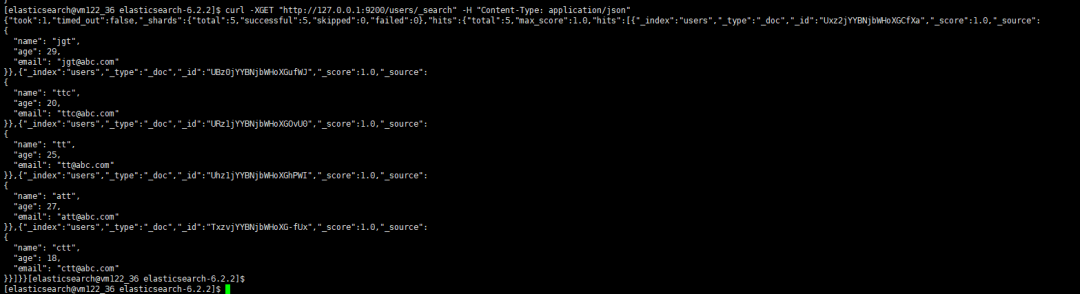
可以用pretty加以修饰,结果集显示如下
: {"name" : "ttc","age" : 20,"email" : "ttc@abc.com"}},{"_index" : "users","_type" : "_doc","_id" : "URz1jYYBNjbWHoXGOvU0","_score" : 1.0,"_source" : {"name" : "tt","age" : 25,"email" : "tt@abc.com"}},{"_index" : "users","_type" : "_doc","_id" : "Uhz1jYYBNjbWHoXGhPWI","_score" : 1.0,"_source" : {"name" : "att","age" : 27,"email" : "att@abc.com"}},{"_index" : "users","_type" : "_doc","_id" : "TxzvjYYBNjbWHoXG-fUx","_score" : 1.0,"_source" : {"name" : "ctt","age" : 18,"email" : "ctt@abc.com"}}]}}
如果新增的文档ID由Elasticsearch自动生成,可以将"_doc"替换为"_create",这样在新增数据时,Elasticsearch会在响应中返回文档ID,示例如下:
curl -XPOST "http://127.0.0.1:9200/users/_create" -H "Content-Type: application/json" -d '{"name": "ctty","age": 30,"email": "ctty@abc.com"}'
2. 更新记录
进行一次类似如下update的操作
update users set age=30 where name='jgt'
可以使用Elasticsearch的Update By Query API来根据条件更新数据。Update By Query API可以对符合特定条件的所有文档进行更新操作。以下是一个使用curl更新满足条件的文档的示例:
curl -XPOST "http://127.0.0.1:9200/users/_update_by_query" -H "Content-Type: application/json" -d '{"query": {"term": {"name": "jgt"}},"script": {"source": "ctx._source.age = params.new_age","params": {"new_age": 30}}}'
更新完成后查看结果如下:
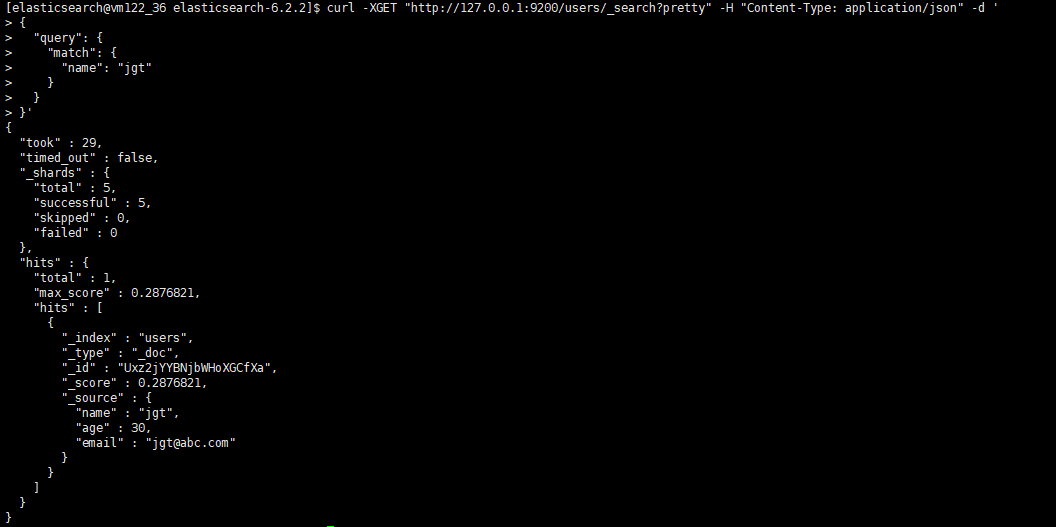
上面的命令使用HTTP POST方法向名为"users"的索引中name为“jgt”的所有文档的年龄为30。其中:
-X选项指定HTTP请求的方法-H选项指定HTTP请求的头部信息-d选项指定HTTP请求的数据体"query"字段表示查询条件:"term"表示匹配字段的值等于给定值,"name"字段表示要匹配的字段,"jgt"表示要匹配的值。"script"字段表示更新脚本:"source"表示要执行的脚本,"ctx._source.age"表示要更新的字段,"params"表示要传入的参数,"new_age"表示要更新成的新值。
curl -XPOST "http://127.0.0.1:9200/users/_bulk" -H "Content-Type: application/json" -d '{ "update": {"_id": "1", "_index": "users"} }{ "doc": {"age": 16} }{ "update": {"_id": "2", "_index": "users"} }{ "doc": {"age": 16} }'
curl -XPOST "http://127.0.0.1:9200/users/_doc/1/_update" -H "Content-Type: application/json" -d '{"doc": {"age": 16}}'
进行一次类似如下update的操作
delete from users where name='jgt
curl -XPOST "http://127.0.01:9200/users/_delete_by_query" -H "Content-Type: application/json" -d '{"query": {"term": {"name": "att"}}}'
curl -XDELETE "http://127.0.0.1:9200/users/_doc/1"
{ "query": { "match": { "my_field": "my_value" } } }
curl -XGET "http://127.0.0.1:9200/users/_search?pretty" -H "Content-Type: application/json" -d '{"query": {"match": {"name": "tt"}}}'
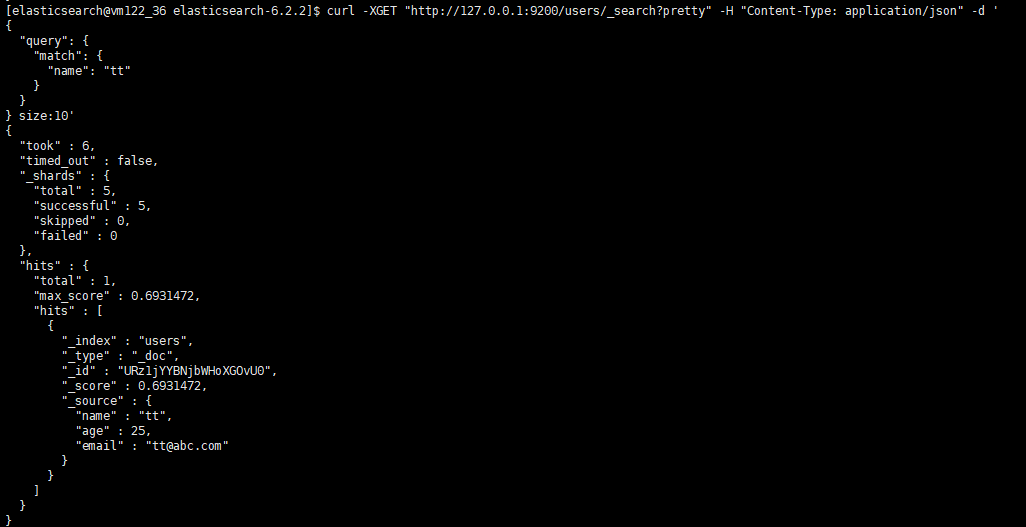
{ "query": { "term": { "my_field": "my_value" } } }
curl -XGET "http://127.0.0.1:9200/users/_search?pretty" -H "Content-Type: application/json" -d '{"query": {"term": {"name": "ctt"}}}'
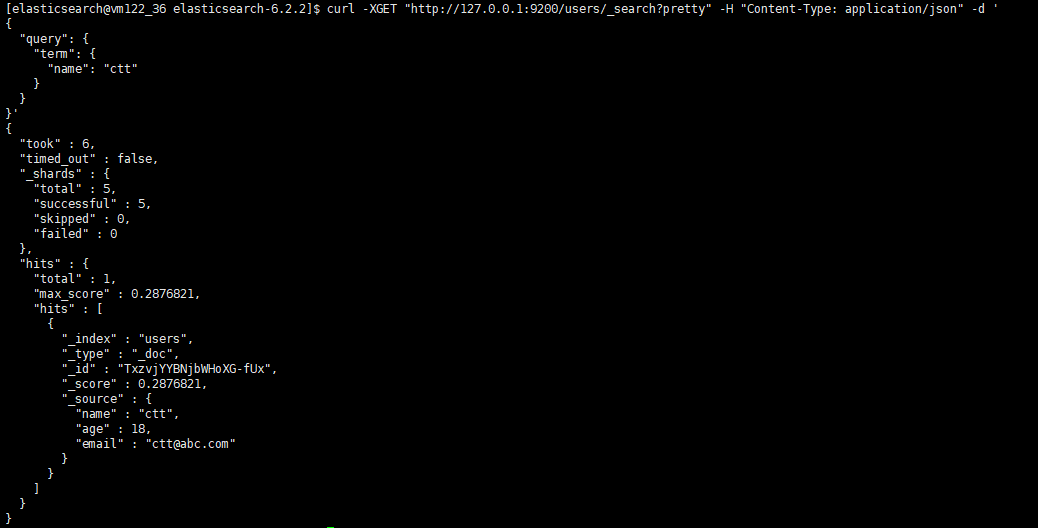
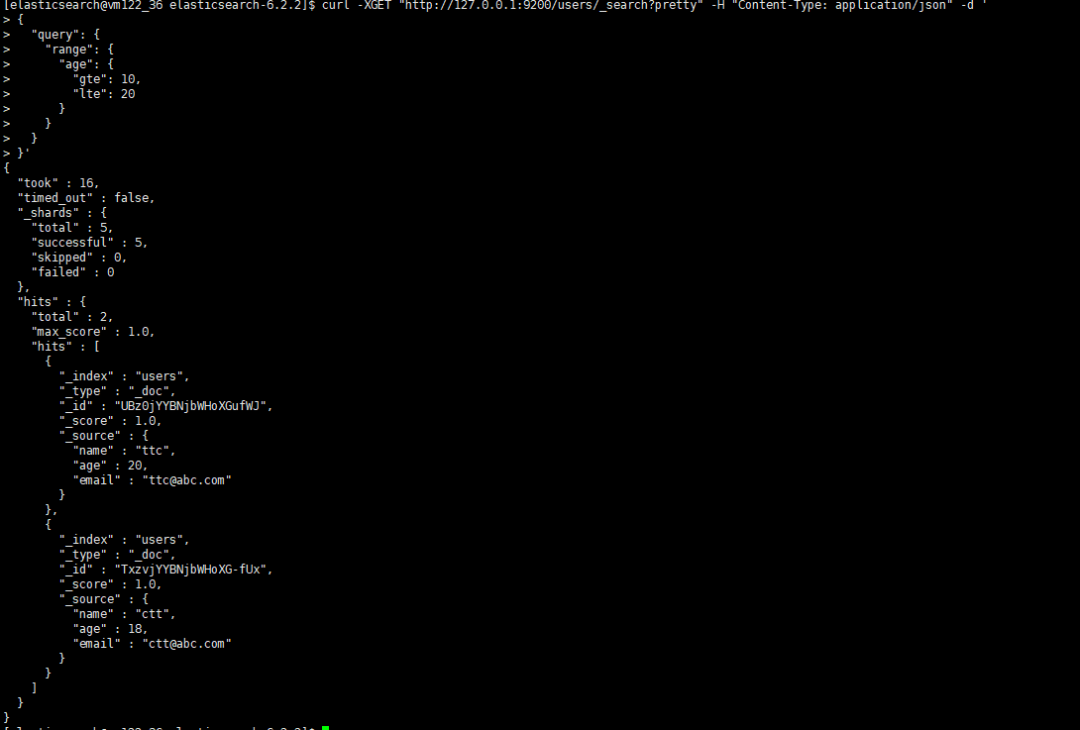
{ "query": { "range": { "my_field": { "gte": 10, "lte": 20 } } } }
curl -XGET "http://127.0.0.1:9200/users/_search?pretty" -H "Content-Type: application/json" -d '{"query": {"range": {"age": {"gte": 10,"lte": 20}}}}'
{ "query":{ "bool":{ "must": [ { "match": { "my_field1": "my_value1" } },{ "match": { "my_field2": "my_value2" } }]} } }
curl -XGET "http://127.0.0.1:9200/users/_search?pretty" -H "Content-Type: application/json" -d '{"query": {"bool": {"must": [{ "match": { "name": "ctt" } },{ "match": { "age": "18" } }]}}}'
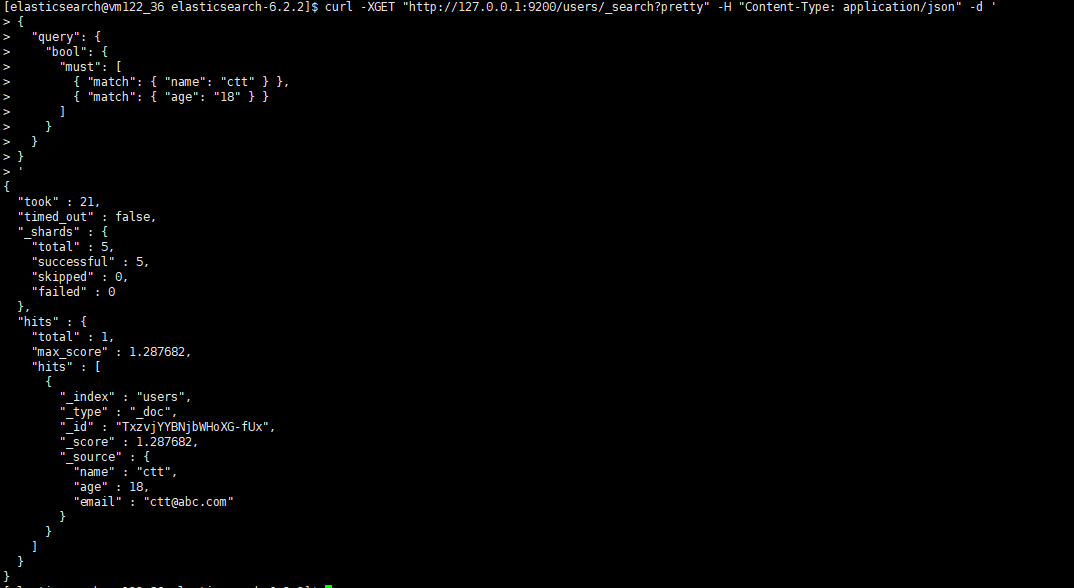
must查询:所有的查询条件都必须匹配才能返回文档。可以使用多个must子句来构建复杂的查询。should查询:至少有一个查询条件匹配时返回文档。可以使用多个should子句来构建复杂的查询。must_not查询:所有的查询条件都不能匹配才能返回文档。
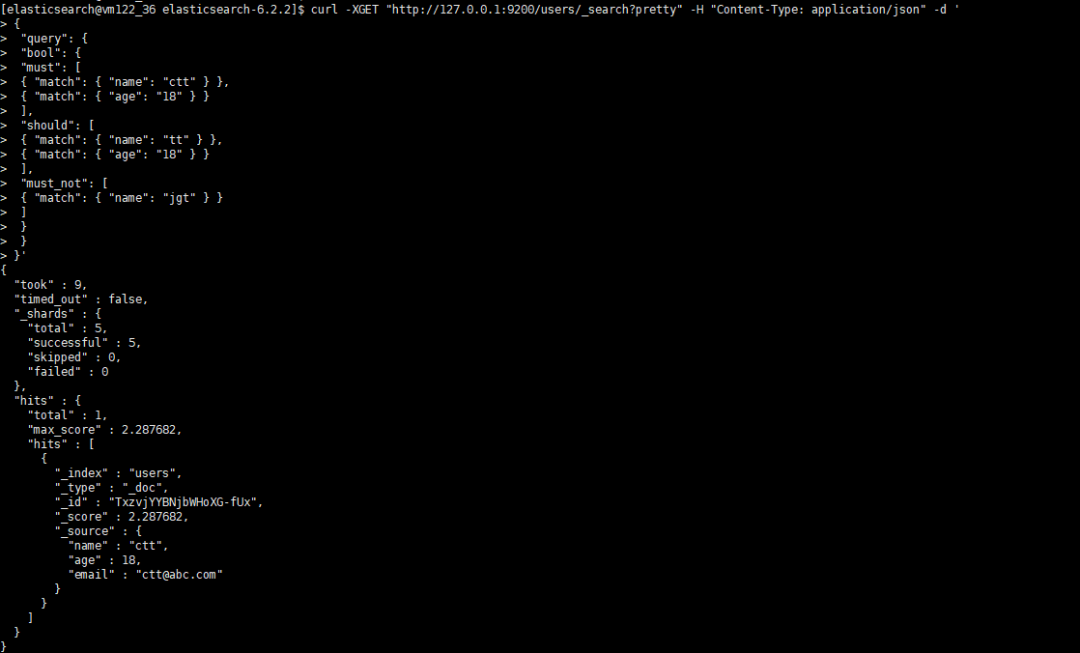
{"query": {"bool": {"must": [{ "match": { "field1": "value1" } },{ "match": { "field2": "value2" } }],"should": [{ "match": { "field3": "value3" } },{ "match": { "field4": "value4" } }],"must_not": [{ "match": { "field5": "value5" } }]}}}
必须匹配field1为value1的文档;必须匹配field2为value2的文档;至少匹配一个should子句,其中field3为value3或field4为value4;不匹配field5为value5的文档。
curl -XGET "http://127.0.0.1:9200/users/_search?pretty" -H "Content-Type: application/json" -d '{"query": {"bool": {"must": [{ "match": { "name": "ctt" } },{ "match": { "age": "18" } }],"should": [{ "match": { "name": "tt" } },{ "match": { "age": "18" } }],"must_not": [{ "match": { "name": "jgt" } }]}}}'
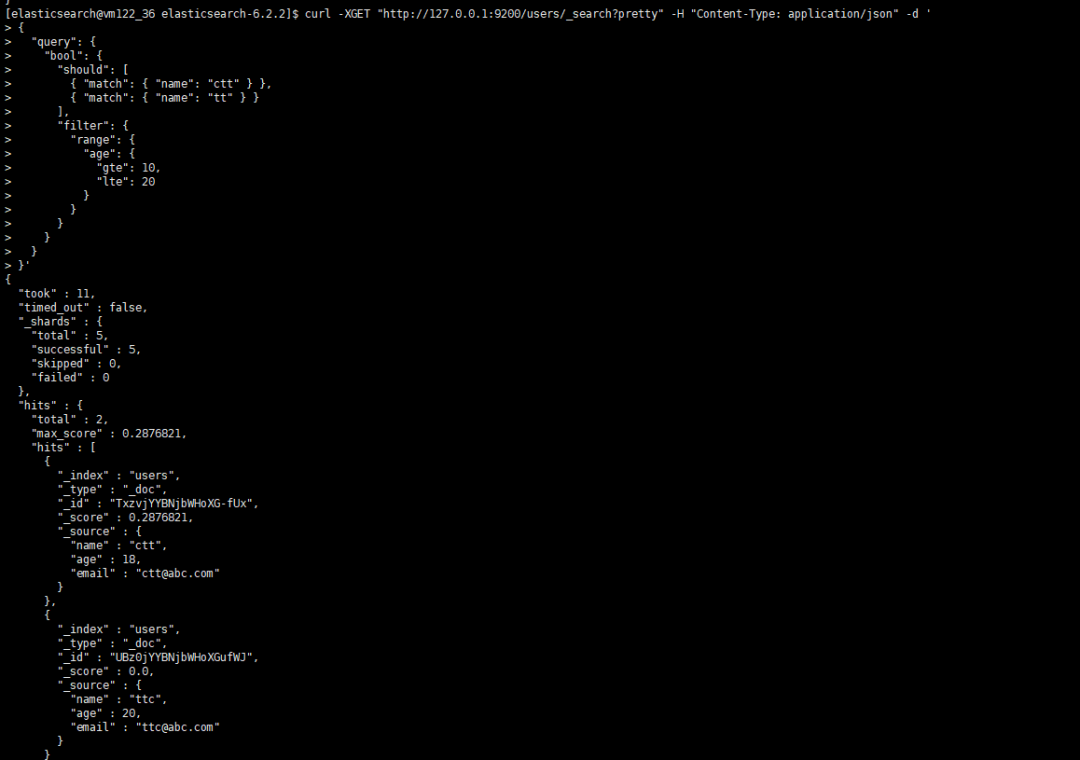
select * from users where (name like '%ctt%' or name like '%tt%') and age >=10 and age<=2
curl -XGET "http://127.0.0.1:9200/users/_search?pretty" -H "Content-Type: application/json" -d '{"query": {"bool": {"should": [{ "match": { "name": "ctt" } },{ "match": { "name": "tt" } }],"filter": {"range": {"age": {"gte": 10,"lte": 20}}}}}}'

2. mysql8.0新增用户及加密规则修改的那些事
3. 比hive快10倍的大数据查询利器-- presto
4. 监控利器出鞘:Prometheus+Grafana监控MySQL、Redis数据库
5. PostgreSQL主从复制--物理复制
6. MySQL传统点位复制在线转为GTID模式复制




文章转载自数据库干货铺,如果涉嫌侵权,请发送邮件至:contact@modb.pro进行举报,并提供相关证据,一经查实,墨天轮将立刻删除相关内容。
