



这一部分介绍一下 Elasticsearch 的使用以及部分原理。
CRUD
关于 Elasticsearch 的使用主要介绍对 Index 以及 Document 的 CRUD 操作。
先看关于 Index 的操作。
import timeimport ujsonfrom elasticsearch import Elasticsearches = Elasticsearch(['localhost:9200'])# indexclass Index(object):def __init__(self, index):self.index = indexdef indices(self):for i in es.indices.get("*"):print(i)def create(self):obj = es.indices.create(self.index)print(ujson.dumps(obj, indent=2))def delete(self):obj = es.indices.delete(self.index)print(ujson.dumps(obj, indent=2))def mapping(self):obj = es.indices.get_mapping(self.index)print(ujson.dumps(obj, indent=2))def settings(self):obj = es.indices.get_settings(self.index)print(ujson.dumps(obj, indent=2))def index_test():index = Index("index_test")index.indices()index.create()index.delete()index = Index("index_test")index.settings()index.mapping()
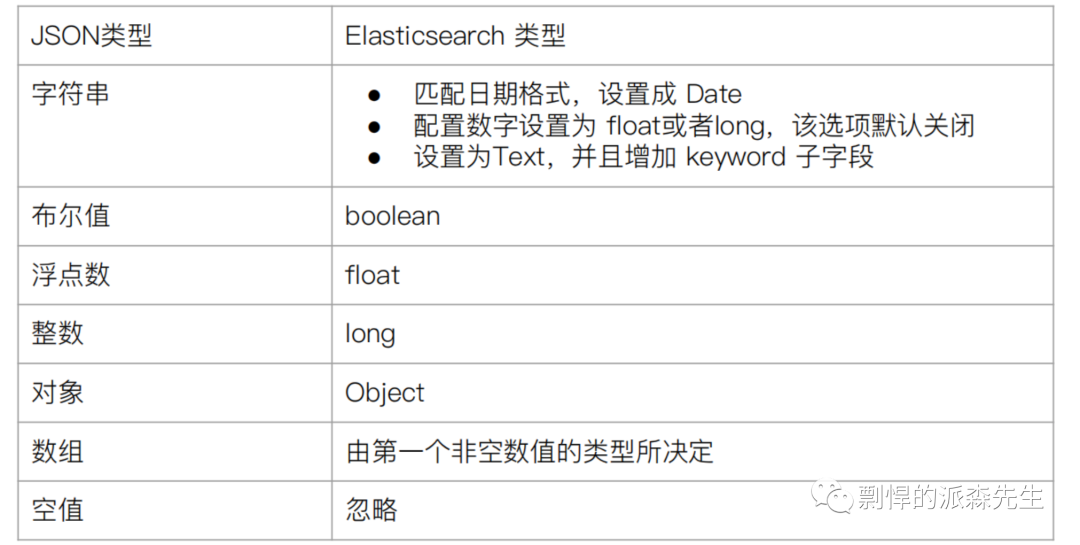
在创建 Index 的时候,我们可以不指定 schema,Elasticsearch 会根据插入的数据动态推断 Index 的 Mapping,我们称这个过程为 Dynamic mapping。输入数据与 Elasticsearch 数据类型的对应关系如下图。
再看下关于 Document 的操作。
import timeimport ujsonfrom elasticsearch import Elasticsearches = Elasticsearch(['localhost:9200'])# documentclass Document(object):def __init__(self, index):self.index = indexself._id = "00-0"def count(self):body = {"query": {"match_all": {}}}obj = es.count(index=self.index, body=body)print(ujson.dumps(obj, indent=2))def create(self):"""id 可选字段,id 存在会先删除,再创建"""body = {"status": 1,"user_id": 1,"deleted": 1,"created_at": 1601813059,"pid": 0,"app_id": 22,"updated_at": 1601813059,"content": "I like switch","title": "swimming","bid": 1,"id": 1,"rid": 0,}obj = es.index(index=self.index, body=body)print(ujson.dumps(obj, indent=2))return obj["_id"]def create2(self):"""id 必传字段, id 存在会失败"""now = int(time.time())body = {"status": 1,"user_id": 2,"deleted": 1,"created_at": now,"pid": 0,"app_id": 22,"updated_at": now,"content": "I like swimming and riding","title": "likes","bid": 2,"id": 2,"rid": 0,}obj = es.create(index=self.index, id=self._id, body=body)print(ujson.dumps(obj, indent=2))def delete(self, _id=None):obj = es.delete(index=self.index, id=_id or self._id)print(ujson.dumps(obj, indent=2))def update(self):"""update partial doc"""body = {"doc": {"tag_ids":[1]}}obj = es.update(self.index, self._id, body=body)print(ujson.dumps(obj, indent=2))def update2(self):"""update by scripthttps://www.elastic.co/guide/en/elasticsearch/reference/current/docs-update.htmlremove: "ctx._source.tag_ids.remove(ctx._source.tag_ids.indexOf(params.tag_id))"add: "ctx._source.tag_ids.add(params.tag_id)"append: `if(ctx._source.tag_ids != null) {ctx._source.tag_ids.add(params.tag_id)} else {ctx._source.tag_ids = [params.tag_id]}`"""body = {"script": {"source": "ctx._source.tag_ids.add(params.tag_id)","params": {"tag_id": 2},}}obj = es.update(self.index, self._id, body)print(ujson.dumps(obj, indent=2))def update3(self):"""整个 doc 替换"""body = {"old": {"status": 1,"user_id": 5874837928,"deleted": 1,"created_at": 1601813059,"pid": 0,"app_id": 22,"updated_at": 1601813059,"content": "This is a test","bid": 16550,"id": 10229,"rid": 0,}}obj = es.index(index=self.index, id=self._id, body=body)print(ujson.dumps(obj, indent=2))def sort(self):body = {"size": 2,"query": {"match_all": {}},"sort": [{"created_at": {"order": "desc"}}],}obj = es.search(index=self.index, body=body)print(ujson.dumps(obj, indent=2))def search(self, _id=None):"""搜索"""_id = _id or self._idbody = {"query": {"term": {"_id": _id}}}obj = es.search(index=self.index, body=body)print(ujson.dumps(obj, indent=2))# ====== search ======def search2(self):"""词条匹配查询"""body = {"query": {"match": {"content": {"query": "riding test",# "operator": "or","operator": "and",# "minimum_should_match": 1,}}}}obj = es.search(index=self.index, body=body)print(ujson.dumps(obj, indent=2))def search3(self):"""短语匹配查询"""body = {"query": {"match_phrase": {"content": {"query": "I like riding","slop": 2}}}}#obj = es.search(index=self.index, body=body)print(ujson.dumps(obj, indent=2))def search4(self):"""短语前缀查询"""body = {"query": {"match_phrase_prefix": {"content": {"query": "I like sw",},}}}obj = es.search(index=self.index, body=body)print(ujson.dumps(obj, indent=2))def search5(self):"""多字段匹配查询"""body = {"query": {"multi_match": {"query": "swimming","type": "best_fields","fields": ["title", "content"]}}}obj = es.search(index=self.index, body=body)print(ujson.dumps(obj, indent=2))def search6(self):"""复合查询"""body = {"query": {"bool": {"must": [{"multi_match": {"query": "swimming","type": "best_fields","fields": ["title", "content"]}},],"filter": [{"term": {"book_id": 2}}]}}}obj = es.search(index=self.index, body=body)print(ujson.dumps(obj, indent=2))def doc_test():doc = Document("doreader_chapter_comment_bid")doc.count()_id = doc.create()doc.search(_id)doc.create2()doc.search()doc.update()doc.search()doc.update2()doc.search()# searchdoc.search2()doc.search3()doc.search4()doc.search5()doc.search6()doc.delete(_id)doc.delete()
在通过 search 方法查询的时候,我们可以得到文档的元数据。所谓元数据就是指用于标注文档的相关信息,包括:
_index - 文档所属的索引名
_type - 文档所属的类型名
_id - 文档唯一 ID
_source - 文档的原始
JSON 数据
_version - 文档的版本信息
_sorce - 相关性打分
原理
写流程

客户端随机选择一个 node 发送请求,这个 node 就是 coordinating node(协调节点)
coordinating node 对 document 进行路由,将请求转发到该索引的 primary shard 的 node 上
primary shard 所在的 node 处理请求,存储数据,然后把数据同步到它的 replica shard 上
coordinating node 发现 primary shard 和 所有 replica shard 都同步了数据,就返回响应结果给客户端
搜索流程
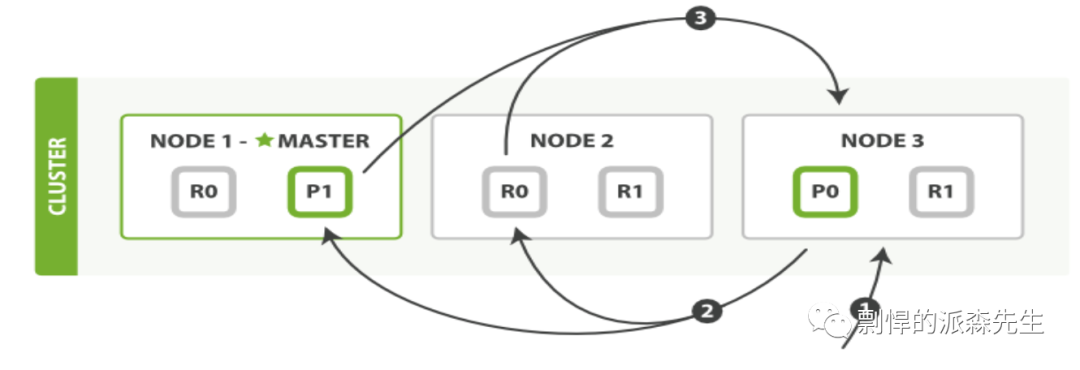
查询阶段
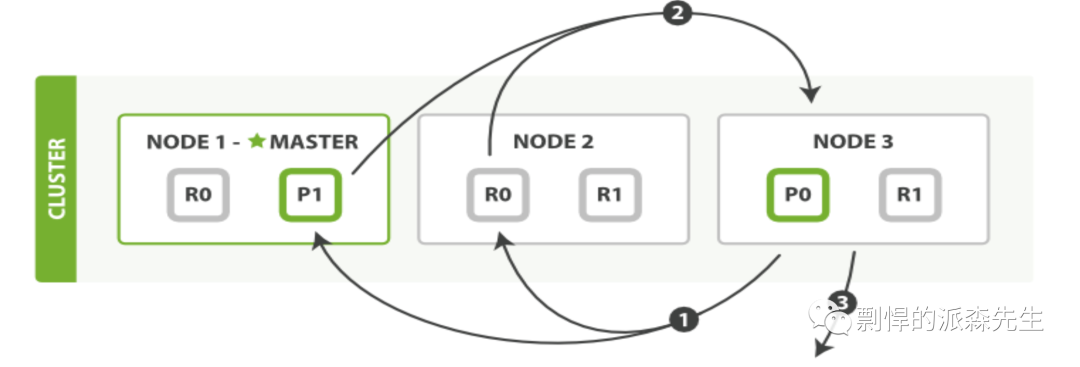
拉去数据阶段
客户端随机选择一个 node 发送请求,这个 node 就是 coordinating node(协调节点)
coordinating node 将搜索请求发送到所有 shard (从 primary shard 或 replica shard负载均衡搜索)
查询阶段:每个 shard 将结果(document的id)返回给协调节点,由协调节点进行合并、排序和分页等操作,产生最终结果
拉取数据阶段:协调节点根据id去各个节点拉取实际的 document 数据,最终返回给客户端
3. 倒排索引
参考链接:
http://www.nosqlnotes.com/technotes/searchengine/lucene-invertedindex/
