



openGauss 每日一练第 21 天学习打卡,学习 openGauss 存储模型-行存和列存基本操作!
学习目标
学习 openGauss 存储模型-行存和列存!
前面每日一练链接:
openGauss每日一练第 1 天 | 数据库和表的基本操作(一)
openGauss每日一练第 2 天 | 数据库和表的基本操作(二)
openGauss每日一练第 3 天 | 前三课作业实操练习
openGauss每日一练第 4 天 | 角色管理及课后作业
openGauss每日一练第 5 天 | 用户管理及课后作业
openGauss每日一练第 6 天 | 模式管理及课后作业
openGauss每日一练第 7 天 | 表空间管理及课后作业
openGauss每日一练第 8 天 | 分区表管理及课后作业
openGauss每日一练第 9 天 | 普通表索引管理及课后作业
openGauss每日一练第 10 天 | 分区表索引管理及课后作业
openGauss每日一练第 11 天 | 视图管理及课后作业
openGauss每日一练第 12 天 | 自定义数据类型管理及课后作业
openGauss每日一练第 13 天 | 数据导入操作及课后作业
openGauss每日一练第 14 天 | 数据导出操作及课后作业
openGauss每日一练第 15 天 | 定义存储过程和函数及课后作业
openGauss每日一练第 16 天 | 事务控制及课后作业
openGauss每日一练第 17 天 | 定义游标及课后作业
openGauss每日一练第 18 天 | 触发器及课后作业
openGauss每日一练第 19 天 | openGauss收集统计信息、打印执行计划、垃圾收集和 checkpoint 及课后作业
openGauss每日一练第 20 天 | openGauss 全文索引及课后作业
openGauss每日一练第 21 天 | openGauss 存储模型-行存和列存简单介绍及课后作业
课程学习
学习 openGauss 存储模型-行存和列存!
行存储是指将表按行存储到硬盘分区上,列存储是指将表按列存储到硬盘分区上。默认情况下,创建的表为行存储。
行、列存储模型各有优劣,通常用于TP场景的数据库,默认使用行存储,仅对执行复杂查询且数据量大的AP场景时,才使用列存储
连接数据库
#第一次进入等待15秒
su - omm
gsql -r
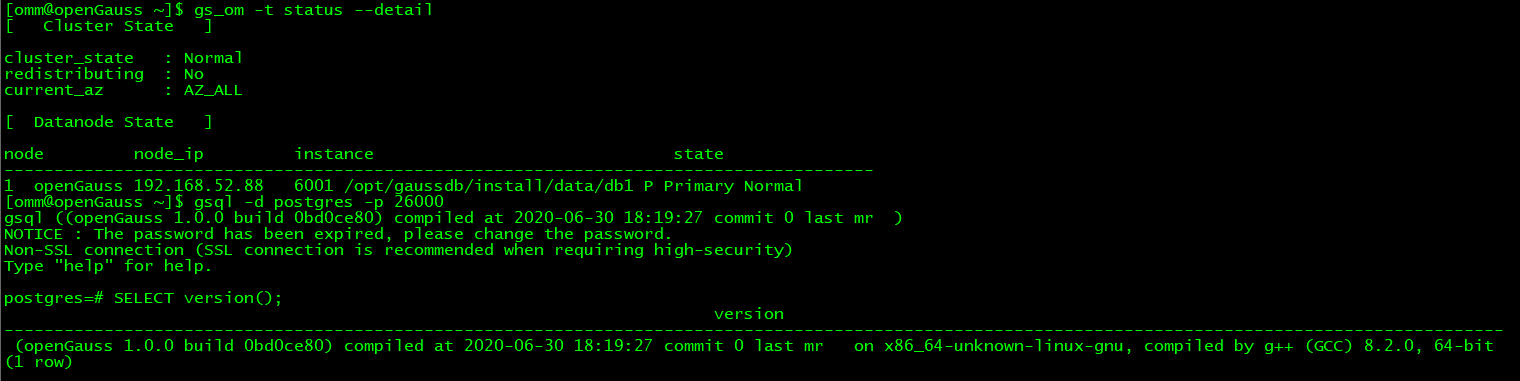
昨日由于墨天轮云平台登录人数过多,造成无法登录的局面,课后作业写完也没有得到验证。今天试试我本地的这个环境.
[omm@openGauss ~]$ gs_ctl start -D /opt/gaussdb/install/data/db1
[2021-12-22 09:54:06.583][20877][][gs_ctl]: gs_ctl started,datadir is -D "/opt/gaussdb/install/data/db1"
[2021-12-22 09:54:06.879][20877][][gs_ctl]: waiting for server to start...
.0 LOG:  The core dump path in core_pattern is an invalid directory.
0 [BACKEND] LOG:  Begin to start openGauss Database.
2021-12-22 09:54:07.029 61c2853e.1 [unknown] 139851954466560 [unknown] 0 dn_6001 DB001 0 [REDO] LOG:  Recovery parallelism, cpu count = 4, max = 4, actual = 4
2021-12-22 09:54:07.029 61c2853e.1 [unknown] 139851954466560 [unknown] 0 dn_6001 DB001 0 [REDO] LOG:  ConfigRecoveryParallelism, true_max_recovery_parallelism:4, max_recovery_parallelism:4
2021-12-22 09:54:07.031 61c2853e.1 [unknown] 139851954466560 [unknown] 0 dn_6001 00000 0 [BACKEND] LOG:  Transparent encryption disabled.
2021-12-22 09:54:07.049 61c2853e.1 [unknown] 139851954466560 [unknown] 0 dn_6001 01000 0 [BACKEND] WARNING:  could not create any HA TCP/IP sockets
2021-12-22 09:54:07.052 61c2853e.1 [unknown] 139851954466560 [unknown] 0 dn_6001 00000 0 [BACKEND] LOG:  InitNuma numaNodeNum: 1 numa_distribute_mode: none inheritThreadPool: 0.
2021-12-22 09:54:07.052 61c2853e.1 [unknown] 139851954466560 [unknown] 0 dn_6001 01000 0 [BACKEND] WARNING:  Failed to initialize the memory protect for g_instance.attr.attr_storage.cstore_buffers (1024 Mbytes) or shared memory (1876 Mbytes) is larger.
2021-12-22 09:54:07.095 61c2853e.1 [unknown] 139851954466560 [unknown] 0 dn_6001 00000 0 [CACHE] LOG:  set data cache  size(805306368)
2021-12-22 09:54:07.121 61c2853e.1 [unknown] 139851954466560 [unknown] 0 dn_6001 00000 0 [CACHE] LOG:  set metadata cache  size(268435456)
2021-12-22 09:54:11.312 61c2853e.1 [unknown] 139851954466560 [unknown] 0 dn_6001 00000 0 [BACKEND] LOG:  gaussdb: fsync file "/opt/gaussdb/install/data/db1/gaussdb.state.temp" success
2021-12-22 09:54:11.312 61c2853e.1 [unknown] 139851954466560 [unknown] 0 dn_6001 00000 0 [BACKEND] LOG:  create gaussdb state file success: db state(STARTING_STATE), server mode(Normal)
2021-12-22 09:54:11.335 61c2853e.1 [unknown] 139851954466560 [unknown] 0 dn_6001 00000 0 [BACKEND] LOG:  max_safe_fds = 978, usable_fds = 1000, already_open = 12
2021-12-22 09:54:11.336 61c2853e.1 [unknown] 139851954466560 [unknown] 0 dn_6001 00000 0 [BACKEND] LOG:  The core dump path in core_pattern is an invalid directory.
2021-12-22 09:54:11.365 61c2853e.1 [unknown] 139851954466560 [unknown] 0 dn_6001 00000 0 [BACKEND] LOG:  Success to start openGauss Database, please press any key to exit...
.
[2021-12-22 09:54:12.470][20877][][gs_ctl]:  done
[2021-12-22 09:54:12.470][20877][][gs_ctl]: server started (/opt/gaussdb/install/data/db1)
[omm@openGauss ~]$ ps -ef | grep gauss | egrep -v "grep"
omm       20887      1  8 09:54 pts/1    00:00:09 /opt/gaussdb/install/app/bin/gaussdb -D /opt/gaussdb/install/data/db1
[omm@openGauss ~]$  gsql -d postgres -p 26000
gsql ((openGauss 1.0.0 build 0bd0ce80) compiled at 2020-06-30 18:19:27 commit 0 last mr  )
NOTICE : The password has been expired, please change the password.
Non-SSL connection (SSL connection is recommended when requiring high-security)
Type "help" for help.

postgres=#
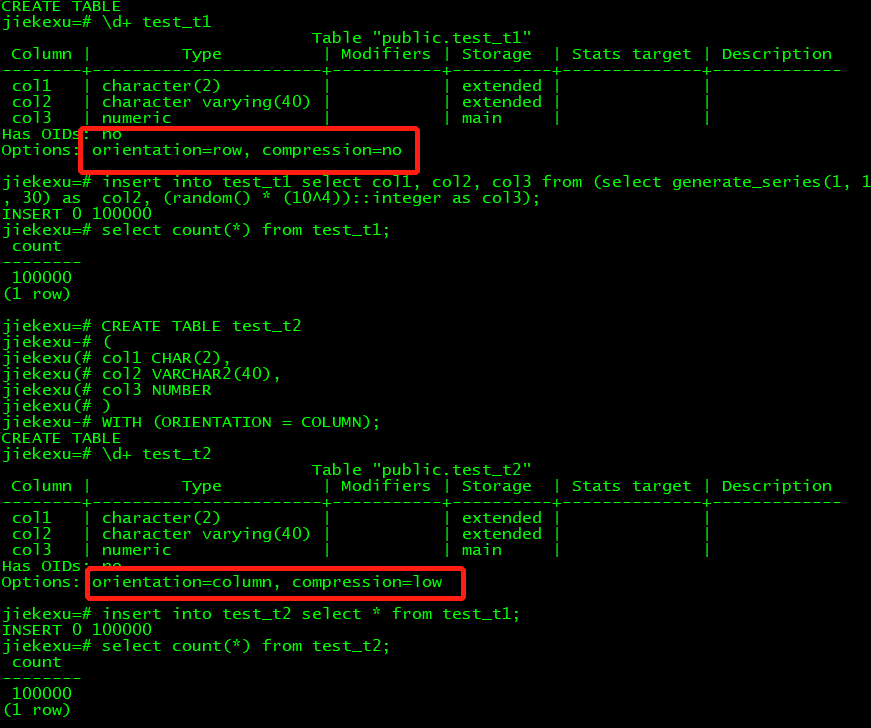
1.创建行存表
CREATE TABLE test_t1
(
col1 CHAR(2),
col2 VARCHAR2(40),
col3 NUMBER
);
–压缩属性为no
\d+ test_t1

insert into test_t1 select col1, col2, col3 from (select generate_series(1, 100000) as key, repeat(chr(int4(random() * 26) + 65), 2) as  col1, repeat(chr(int4(random() * 26) + 65), 30) as  col2, (random() * (10^4))::integer as col3);


jiekexu=# CREATE TABLE test_t1
jiekexu-# (
jiekexu(# col1 CHAR(2),
jiekexu(# col2 VARCHAR2(40),
jiekexu(# col3 NUMBER
jiekexu(# );
CREATE TABLE
jiekexu=# \d+ test_t1
                               Table "public.test_t1"
 Column |         Type          | Modifiers | Storage  | Stats target | Description
--------+-----------------------+-----------+----------+--------------+-------------
 col1   | character(2)          |           | extended |              |
 col2   | character varying(40) |           | extended |              |
 col3   | numeric               |           | main     |              |
Has OIDs: no
Options: orientation=row, compression=no

jiekexu=# insert into test_t1 select col1, col2, col3 from (select generate_series(1, 100000) as key, repeat(chr(int4(random() * 26) + 65), 2) as  col1, repeat(chr(int4(random() * 26) + 65), 30) as  col2, (random() * (10^4))::integer as col3);
INSERT 0 100000
jiekexu=# select count(*) from test_t1;
 count
--------
 100000
(1 row)
2.创建列存表
CREATE TABLE test_t2
(
col1 CHAR(2),
col2 VARCHAR2(40),
col3 NUMBER
)
WITH (ORIENTATION = COLUMN);
–压缩属性为low
\d+ test_t2;
–插入和行存表相同的数据
insert into test_t2 select * from test_t1;

jiekexu=# CREATE TABLE test_t2
jiekexu-# (
jiekexu(# col1 CHAR(2),
jiekexu(# col2 VARCHAR2(40),
jiekexu(# col3 NUMBER
jiekexu(# )
jiekexu-# WITH (ORIENTATION = COLUMN);
CREATE TABLE
jiekexu=# \d+ test_t2
                               Table "public.test_t2"
 Column |         Type          | Modifiers | Storage  | Stats target | Description
--------+-----------------------+-----------+----------+--------------+-------------
 col1   | character(2)          |           | extended |              |
 col2   | character varying(40) |           | extended |              |
 col3   | numeric               |           | main     |              |
Has OIDs: no
Options: orientation=column, compression=low

jiekexu=# insert into test_t2 select * from test_t1;
INSERT 0 100000
jiekexu=# select count(*) from test_t2;
 count
--------
 100000
(1 row)
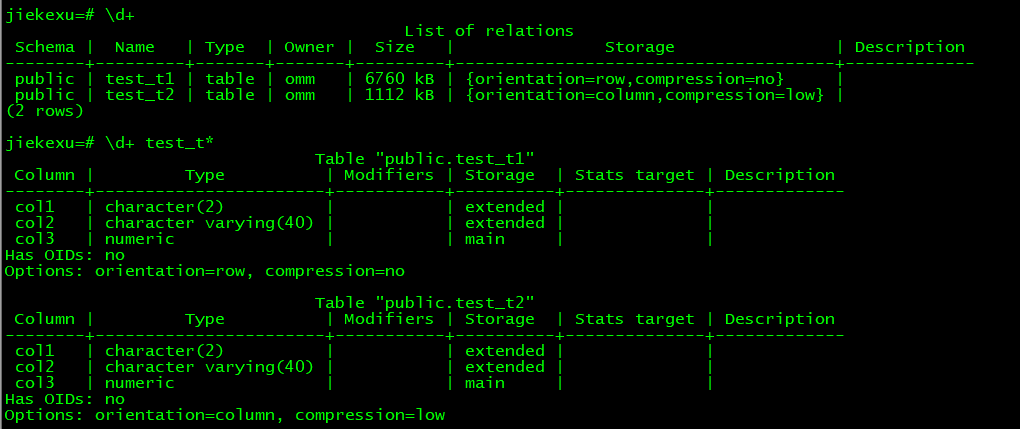
3.占用空间对比
\d+

jiekexu=# \d+
                                        List of relations
 Schema |  Name   | Type  | Owner |  Size   |               Storage                | Description
--------+---------+-------+-------+---------+--------------------------------------+-------------
 public | test_t1 | table | omm   | 6760 kB | {orientation=row,compression=no}     |
 public | test_t2 | table | omm   | 1112 kB | {orientation=column,compression=low} |
(2 rows)
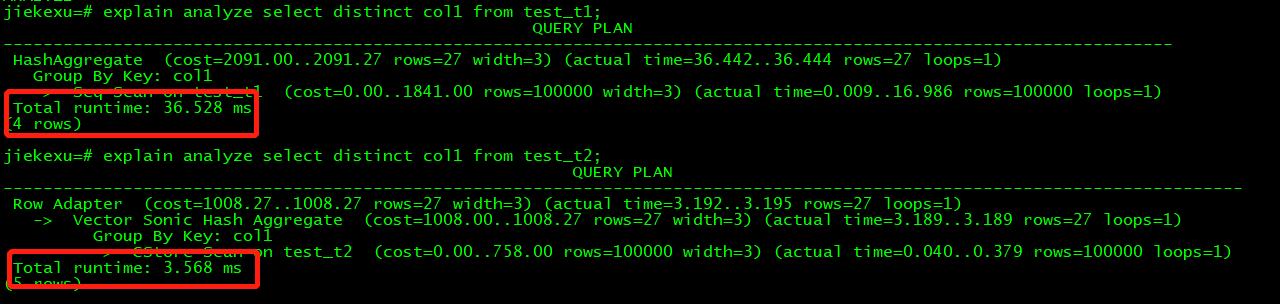
4.对比读取一列的速度
analyze VERBOSE test_t1;
analyze VERBOSE test_t2;

jiekexu=# analyze VERBOSE test_t1;
INFO:  analyzing "public.test_t1"(dn_6001 pid=20887)
analyze VERBOSE test_t2;INFO:  ANALYZE INFO : "test_t1": scanned 841 of 841 pages, containing 100000 live rows and 0 dead rows; 30000 rows in sample, 100000 estimated total rows(dn_6001 pid=20887)
ANALYZE
jiekexu=#
INFO:  analyzing "public.test_t2"(dn_6001 pid=20887)
INFO:  ANALYZE INFO : estimate total rows of "pg_delta_32845": scanned 0 pages of total 0 pages with 1 retry times, containing 0 live rows and 0 dead rows,  estimated 0 total rows(dn_6001 pid=20887)
INFO:  ANALYZE INFO : "test_t2": scanned 2 of 2 cus, sample 30000 rows, estimated total 100000 rows(dn_6001 pid=20887)
ANALYZE
–列存表时间少于行存表
explain analyze select distinct col1 from test_t1;
explain analyze select distinct col1 from test_t2;
5.对比插入一行的速度
–行存表时间少于列存表
explain analyze insert into test_t1 values('x', 'xxxx', '123');
explain analyze insert into test_t2 values('x', 'xxxx', '123');

jiekexu=# explain analyze insert into test_t1 values('x', 'xxxx', '123');
                                          QUERY PLAN
-----------------------------------------------------------------------------------------------
 Insert on test_t1  (cost=0.00..0.01 rows=1 width=0) (actual time=0.041..0.042 rows=1 loops=1)
   ->  Result  (cost=0.00..0.01 rows=1 width=0) (actual time=0.001..0.002 rows=1 loops=1)
 Total runtime: 0.114 ms
(3 rows)

jiekexu=# explain analyze insert into test_t2 values('x', 'xxxx', '123');
                                          QUERY PLAN
-----------------------------------------------------------------------------------------------
 Insert on test_t2  (cost=0.00..0.01 rows=1 width=0) (actual time=0.798..0.800 rows=1 loops=1)
   ->  Result  (cost=0.00..0.01 rows=1 width=0) (actual time=0.000..0.001 rows=1 loops=1)
 Total runtime: 0.906 ms
(3 rows)

6.清理数据
drop table test_t1;
drop table test_t2;
课程作业
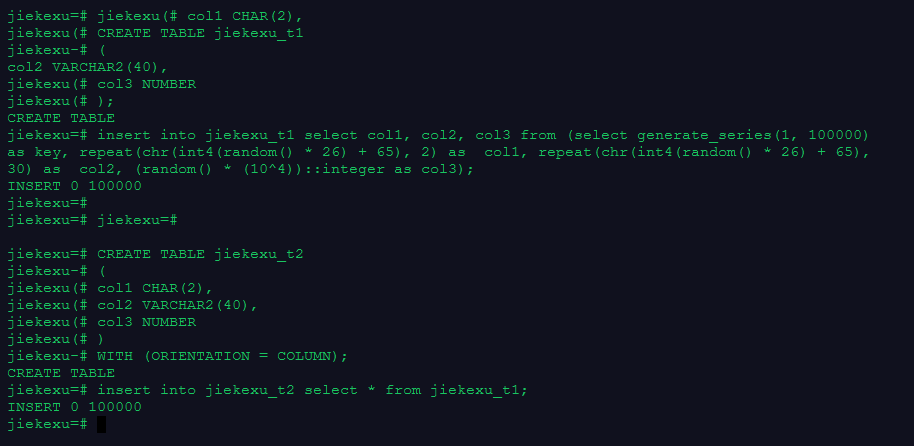
1.创建行存表和列存表,并批量插入10万条数据(行存表和列存表数据相同)
create database jiekexu;
\c jiekexu
--行存
CREATE TABLE jiekexu_t1
(
col1 CHAR(2),
col2 VARCHAR2(40),
col3 NUMBER
);

insert into jiekexu_t1 select col1, col2, col3 from (select generate_series(1, 100000) as key, repeat(chr(int4(random() * 26) + 65), 2) as  col1, repeat(chr(int4(random() * 26) + 65), 30) as  col2, (random() * (10^4))::integer as col3);

--列存
CREATE TABLE jiekexu_t2
(
col1 CHAR(2),
col2 VARCHAR2(40),
col3 NUMBER
)
WITH (ORIENTATION = COLUMN);

insert into jiekexu_t2 select * from jiekexu_t1;
2.对比行存表和列存表空间大小
\d+

3.对比查询一列和插入一行的速度
analyze VERBOSE jiekexu_t1;
analyze VERBOSE jiekexu_t2;

explain analyze select distinct col1 from jiekexu_t1;
explain analyze select distinct col1 from jiekexu_t2;

explain analyze insert into jiekexu_t1 values('a', 'na', '123');
explain analyze insert into jiekexu_t2 values('a', 'na', '123');
jiekexu=# analyze VERBOSE jiekexu_t1;
INFO:  analyzing "public.jiekexu_t1"(gaussdb pid=1)
INFO:  ANALYZE INFO : "jiekexu_t1": scanned 841 of 841 pages, containing 100000 live rows and 0 dead rows; 30000 rows in sample, 100000 estimated total rows(gaussdb pid=1)
ANALYZE
jiekexu=# analyze VERBOSE jiekexu_t2;
INFO:  analyzing "public.jiekexu_t2"(gaussdb pid=1)
INFO:  ANALYZE INFO : estimate total rows of "pg_delta_16396": scanned 0 pages of total 0 pages with 1 retry times, containing 0 live rows and 0 dead rows,  estimated 0 total rows(gaussdb pid=1)
INFO:  ANALYZE INFO : "jiekexu_t2": scanned 2 of 2 cus, sample 30000 rows, estimated total 100000 rows(gaussdb pid=1)
ANALYZE
jiekexu=# explain analyze select distinct col1 from jiekexu_t1;
                                                       QUERY PLAN

-------------------------------------------------------------------------------------------------
-----------------------
 HashAggregate  (cost=2091.00..2091.27 rows=27 width=3) (actual time=52.031..52.034 rows=27 loops
=1)
   Group By Key: col1
   ->  Seq Scan on jiekexu_t1  (cost=0.00..1841.00 rows=100000 width=3) (actual time=0.012..25.15
9 rows=100000 loops=1)
 Total runtime: 52.094 ms
(4 rows)

jiekexu=# explain analyze select distinct col1 from jiekexu_t2;
                                                          QUERY PLAN

-------------------------------------------------------------------------------------------------
------------------------------
 Row Adapter  (cost=1008.27..1008.27 rows=27 width=3) (actual time=4.185..4.187 rows=27 loops=1)
   ->  Vector Sonic Hash Aggregate  (cost=1008.00..1008.27 rows=27 width=3) (actual time=4.182..4
.182 rows=27 loops=1)
         Group By Key: col1
         ->  CStore Scan on jiekexu_t2  (cost=0.00..758.00 rows=100000 width=3) (actual time=0.03
7..0.291 rows=100000 loops=1)
 Total runtime: 4.298 ms
(5 rows)
jiekexu=# explain analyze insert into jiekexu_t1 values('a', 'na', '123');
                                            QUERY PLAN

-------------------------------------------------------------------------------------------------
-
 [Bypass]
 Insert on jiekexu_t1  (cost=0.00..0.01 rows=1 width=0) (actual time=0.060..0.061 rows=1 loops=1)
   ->  Result  (cost=0.00..0.01 rows=1 width=0) (actual time=0.001..0.001 rows=1 loops=1)
 Total runtime: 0.142 ms
(4 rows)

jiekexu=# explain analyze insert into jiekexu_t2 values('a', 'na', '123');
                                            QUERY PLAN

-------------------------------------------------------------------------------------------------
-
 Insert on jiekexu_t2  (cost=0.00..0.01 rows=1 width=0) (actual time=3.751..3.752 rows=1 loops=1)
   ->  Result  (cost=0.00..0.01 rows=1 width=0) (actual time=0.001..0.001 rows=1 loops=1)
 Total runtime: 3.840 ms
(3 rows)
4.清理数据
drop table jiekexu_t1,jiekexu_t2;
欧耶,第二十一天课行存和列存及课后作业练习题完成啦!最后一课终于完成了!!!
