学习目标
掌握 openGauss 数据库的逻辑备份和恢复技术。
前面每日一练链接
openGauss 每日一练第 1 天 | openGauss 数据库状态查看
openGauss 每日一练第 2 天 | 学习 gsql 命令行的使用
openGauss 每日一练第 3 天 | openGauss 数据库状态查看
openGauss 每日一练第 4 天 | openGauss 中一个数据库可以被多个用户访问
openGauss 每日一练第 5 天 | openGauss 中一个用户可以访问多个数据库
openGauss 每日一练第 6 天 | openGauss 中用户一次只能连接到一个数据库
openGauss 每日一练第 7 天 | openGauss 中一个数据库中可以创建多个模式
openGauss 每日一练第 8 天 | openGauss 中一个数据库可以存储在多个表空间中
openGauss 每日一练第 9 天 | openGauss 中一个表空间可以存储多个数据库
openGauss 每日一练第 10 天 | openGauss 逻辑结构:表空间管理
openGauss 每日一练第 11 天 | openGauss 逻辑结构:数据库管理
openGauss 每日一练第 12 天 | openGauss 逻辑结构:模式管理
openGauss 每日一练第 13 天 |openGauss 逻辑结构:表管理 1
openGauss 每日一练第 14 天 |openGauss 逻辑结构:表管理 2
openGauss 每日一练第 15 天 |openGauss 逻辑结构:表管理 3
openGauss 每日一练第 16 天 |openGauss 逻辑结构:表管理 4
openGauss 每日一练第 17 天 |openGauss 逻辑结构:索引管理
openGauss 每日一练第 18 天 |openGauss 逻辑结构:视图管理
openGauss 每日一练第 19 天 |openGauss 用户和角色管理
课程学习
1.为逻辑备份准备环境
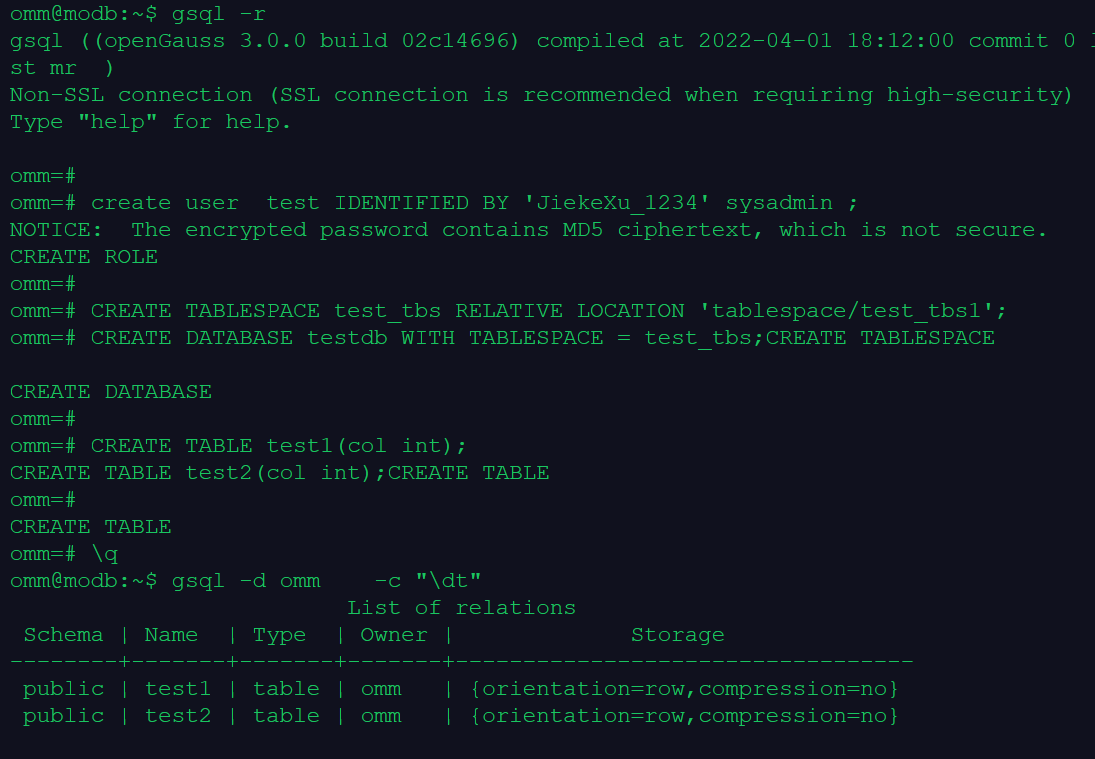
--创建逻辑备份的存储目录:
su - omm
mkdir /var/lib/opengauss/backup

--创建备份恢复用户,需要具有 super 或者 sysadmin 权限
gsql -r
create user  test IDENTIFIED BY 'JiekeXu_1234' sysadmin ;
--创建恢复测试数据库 testdb
CREATE TABLESPACE test_tbs RELATIVE LOCATION 'tablespace/test_tbs1';
CREATE DATABASE testdb WITH TABLESPACE = test_tbs;

--在 omm 数据库上,创建测试表 test1、test2:

CREATE TABLE test1(col int);
CREATE TABLE test2(col int);
\q
--查看数据
gsql -d omm    -c "\dt"
2.逻辑备份和恢复案例 1(sql 格式)
逻辑备份,使用 gs_dump 备份数据库,生成 sql 文件:
--使用 test 用户,备份数据库 omm:

gs_dump -U test -W JiekeXu_1234  omm -F p -f /var/lib/opengauss/backup/backup.sql

omm@modb:~$ gs_dump -U test -W JiekeXu_1234  omm -F p -f /var/lib/opengauss/backup/backup.sql
gs_dump[port='5432'][omm][2022-12-13 22:10:35]: The total objects number is 413.
gs_dump[port='5432'][omm][2022-12-13 22:10:35]: [100.00%] 413 objects have been dumped.
gs_dump[port='5432'][omm][2022-12-13 22:10:35]: dump database omm successfully
gs_dump[port='5432'][omm][2022-12-13 22:10:35]: total time: 1589  ms

逻辑恢复:

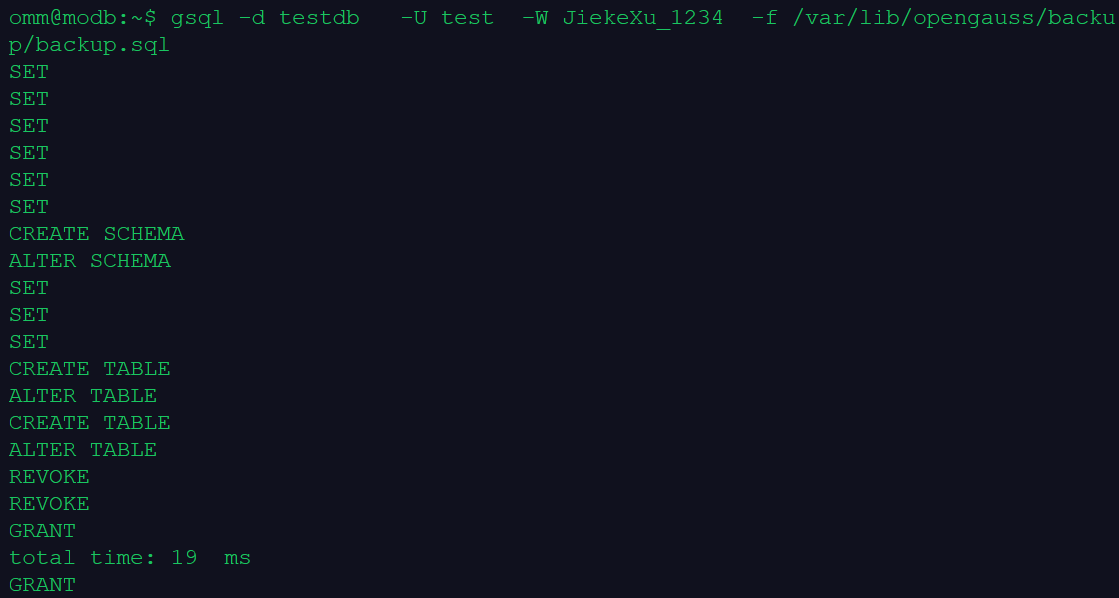
--使用用户 test,执行用 gs_dump 生成的 sql 脚本,将数据恢复到 testdb 数据库中:
gsql -d testdb   -U test  -W JiekeXu_1234  -f /var/lib/opengauss/backup/backup.sql


恢复验证:

--验证数据库 omm 的备份已经被恢复到数据库 testdb:
--源库(备份的数据库):
omm@modb:~$ gsql -d omm    -c "\dt"

                         List of relations
 Schema | Name  | Type  | Owner |             Storage
--------+-------+-------+-------+----------------------------------
 public | test1 | table | omm   | {orientation=row,compression=no}
 public | test2 | table | omm   | {orientation=row,compression=no}
(2 rows)

--新库(恢复的数据库):
omm@modb:~$ gsql -d testdb   -U test   -W JiekeXu_1234 -c "\dt"
                         List of relations
 Schema | Name  | Type  | Owner |             Storage
--------+-------+-------+-------+----------------------------------
 public | test1 | table | omm   | {orientation=row,compression=no}
 public | test2 | table | omm   | {orientation=row,compression=no}
(2 rows)
3.openGauss 数据库逻辑备份和恢复案例 2(dump格式)
逻辑备份:使用 gs_dump 备份数据库,生成归档格式的备份文件
--创建测试数据
gsql -r
CREATE TABLE test3(col int);
CREATE TABLE test4(col int);
\q

--使用 tes t用户,备份 omm 数据库,生成归档格式的备份文件:

omm@modb:~$ gs_dump -U test -W JiekeXu_1234  omm -F p -f /var/lib/opengauss/backup/backup.dump

gs_dump[port='5432'][omm][2022-12-13 22:16:43]: The total objects number is 417.
gs_dump[port='5432'][omm][2022-12-13 22:16:43]: [100.00%] 417 objects have been dumped.
gs_dump[port='5432'][omm][2022-12-13 22:16:43]: dump database omm successfully
gs_dump[port='5432'][omm][2022-12-13 22:16:43]: total time: 1511  ms

逻辑恢复:

--使用 gs_dump 生成的归档文件恢复数据库

 gsql -d testdb   -U test  -W JiekeXu_1234  -f /var/lib/opengauss/backup/backup.dump

恢复验证:

--源库(备份的数据库):
gsql -d omm    -c "\dt"
--新库(恢复的数据库):
omm@modb:~$ gsql -d testdb   -U test   -W JiekeXu_1234 -c "\dt"
                         List of relations
 Schema | Name  | Type  | Owner |             Storage
--------+-------+-------+-------+----------------------------------
 public | test1 | table | omm   | {orientation=row,compression=no}
 public | test2 | table | omm   | {orientation=row,compression=no}
 public | test3 | table | omm   | {orientation=row,compression=no}
 public | test4 | table | omm   | {orientation=row,compression=no}
(4 rows)
课程作业
1.逻辑备份和恢复案例1:使用 sql 格式进行备份和恢复 omm 数据库
--准备数据和用户
create user backup IDENTIFIED BY 'JiekeXu_1234' sysadmin ;
CREATE TABLESPACE backup_tbs RELATIVE LOCATION 'tablespace/backup_tbs';
CREATE DATABASE backupdb WITH TABLESPACE = backup_tbs;

CREATE TABLE t1(col int);
CREATE TABLE t2(col int);
insert into t1 values(1);
insert into t2 values(2);
\q

--备份数据库 omm
gs_dump -U backup -W JiekeXu_1234  omm -F p -f /var/lib/opengauss/backup/backup_omm.sql

gs_dump[port='5432'][omm][2022-12-13 22:27:46]: The total objects number is 422.
gs_dump[port='5432'][omm][2022-12-13 22:27:46]: [100.00%] 422 objects have been dumped.
gs_dump[port='5432'][omm][2022-12-13 22:27:46]: dump database omm successfully
gs_dump[port='5432'][omm][2022-12-13 22:27:46]: total time: 1690  ms

--逻辑恢复

--使用用户 backup,执行用 gs_dump 生成的 sql 脚本,将数据恢复到 backupdb 数据库中:
gsql -d backupdb   -U backup  -W JiekeXu_1234  -f /var/lib/opengauss/backup/backup_omm.sql

--检查恢复情况
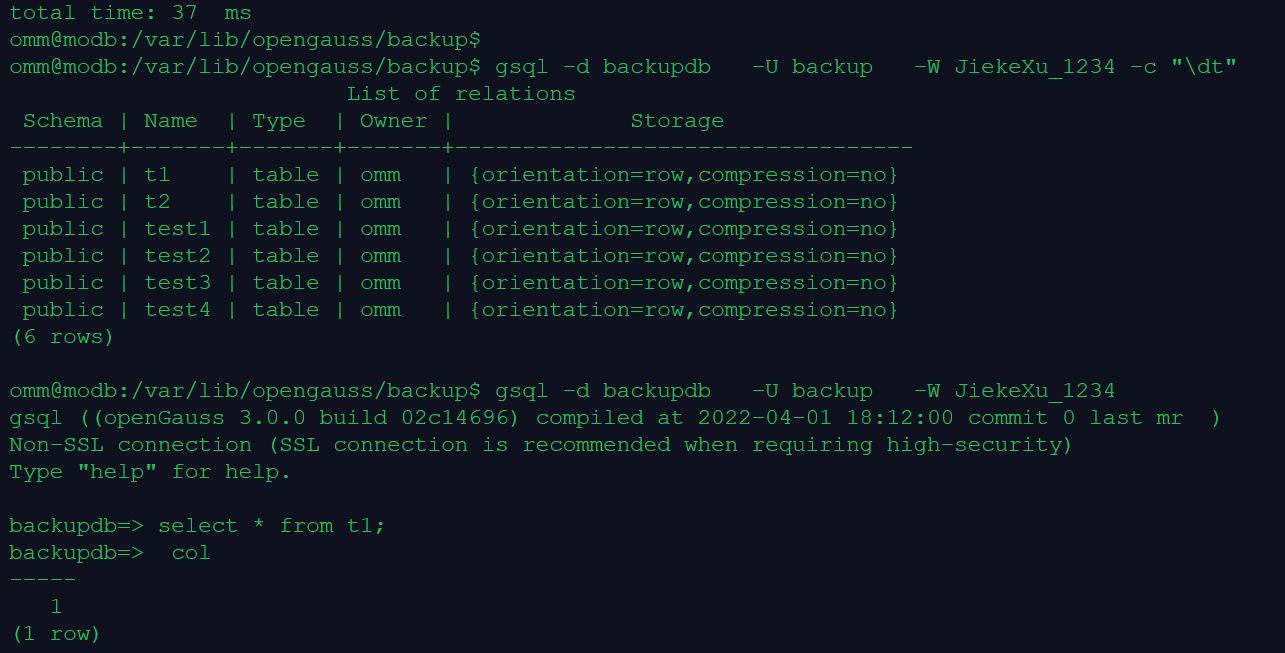
gsql -d backupdb   -U backup   -W JiekeXu_1234 -c "\dt"
                        List of relations
 Schema | Name  | Type  | Owner |             Storage
--------+-------+-------+-------+----------------------------------
 public | t1    | table | omm   | {orientation=row,compression=no}
 public | t2    | table | omm   | {orientation=row,compression=no}
 public | test1 | table | omm   | {orientation=row,compression=no}
 public | test2 | table | omm   | {orientation=row,compression=no}
 public | test3 | table | omm   | {orientation=row,compression=no}
 public | test4 | table | omm   | {orientation=row,compression=no}
(6 rows)
2.逻辑备份和恢复案例2:使用 dump 格式进行备份和恢复 omm 数据库
--创建测试数据
gsql -r
CREATE TABLE t3(col int);
CREATE TABLE t4(col int);
insert into t3 values(3);
insert into t4 values(4);
\q

--使用 backup 用户,备份 omm 数据库,生成归档格式的备份文件:

omm@modb:~$ gs_dump -U backup -W JiekeXu_1234  omm -F p -f /var/lib/opengauss/backup/backup_omm.dump

gs_dump[port='5432'][omm][2022-12-13 22:35:05]: The total objects number is 426.
gs_dump[port='5432'][omm][2022-12-13 22:35:05]: [100.00%] 426 objects have been dumped.
gs_dump[port='5432'][omm][2022-12-13 22:35:05]: dump database omm successfully
gs_dump[port='5432'][omm][2022-12-13 22:35:05]: total time: 1629  ms

逻辑恢复

--使用 gs_dump 生成的归档文件恢复数据库

 gsql -d backupdb -U backup  -W JiekeXu_1234  -f /var/lib/opengauss/backup/backup_omm.dump

恢复验证:

--源库(备份的数据库):
gsql -d omm    -c "\dt"
                        List of relations
 Schema | Name  | Type  | Owner |             Storage
--------+-------+-------+-------+----------------------------------
 public | t1    | table | omm   | {orientation=row,compression=no}
 public | t2    | table | omm   | {orientation=row,compression=no}
 public | t3    | table | omm   | {orientation=row,compression=no}
 public | t4    | table | omm   | {orientation=row,compression=no}
 public | test1 | table | omm   | {orientation=row,compression=no}
 public | test2 | table | omm   | {orientation=row,compression=no}
 public | test3 | table | omm   | {orientation=row,compression=no}
 public | test4 | table | omm   | {orientation=row,compression=no}
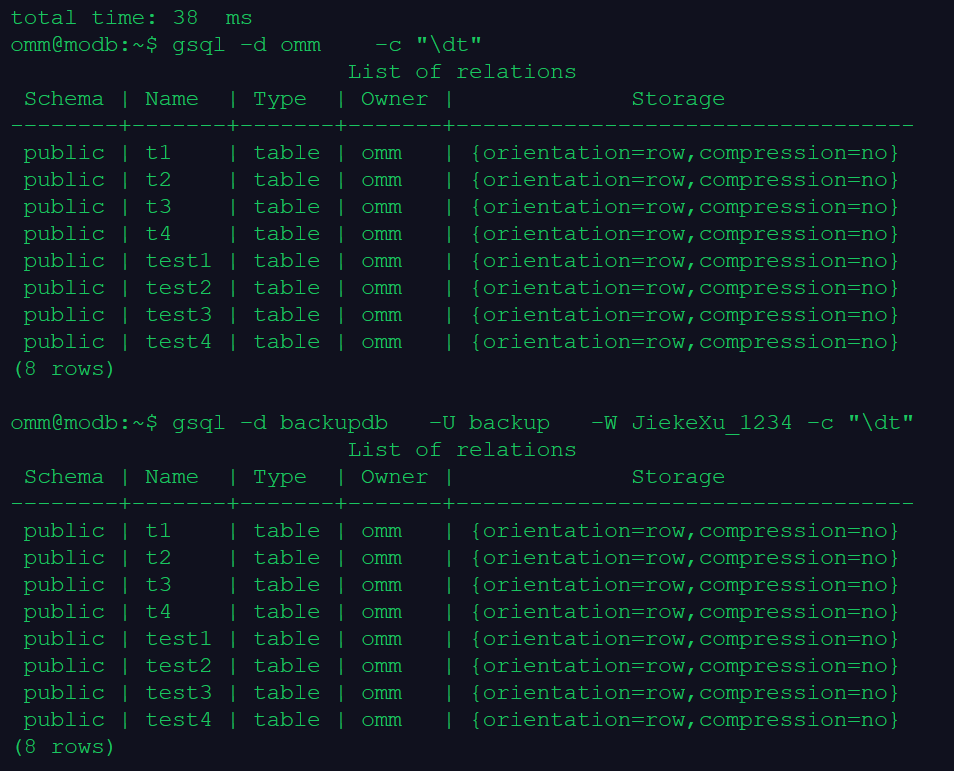
(8 rows)

--新库 backupdb(恢复的数据库):
omm@modb:~$ gsql -d backupdb   -U backup   -W JiekeXu_1234 -c "\dt"
                         List of relations
 Schema | Name  | Type  | Owner |             Storage
--------+-------+-------+-------+----------------------------------
 public | t1    | table | omm   | {orientation=row,compression=no}
 public | t2    | table | omm   | {orientation=row,compression=no}
 public | t3    | table | omm   | {orientation=row,compression=no}
 public | t4    | table | omm   | {orientation=row,compression=no}
 public | test1 | table | omm   | {orientation=row,compression=no}
 public | test2 | table | omm   | {orientation=row,compression=no}
 public | test3 | table | omm   | {orientation=row,compression=no}
 public | test4 | table | omm   | {orientation=row,compression=no}
(8 rows)

omm@modb:~$ gsql -d backupdb   -U backup   -W JiekeXu_1234
gsql ((openGauss 3.0.0 build 02c14696) compiled at 2022-04-01 18:12:00 commit 0 last mr  )
Non-SSL connection (SSL connection is recommended when requiring high-security)
Type "help" for help.

backupdb=>
backupdb=> select * from t3;
 col
-----
   3
(1 row)